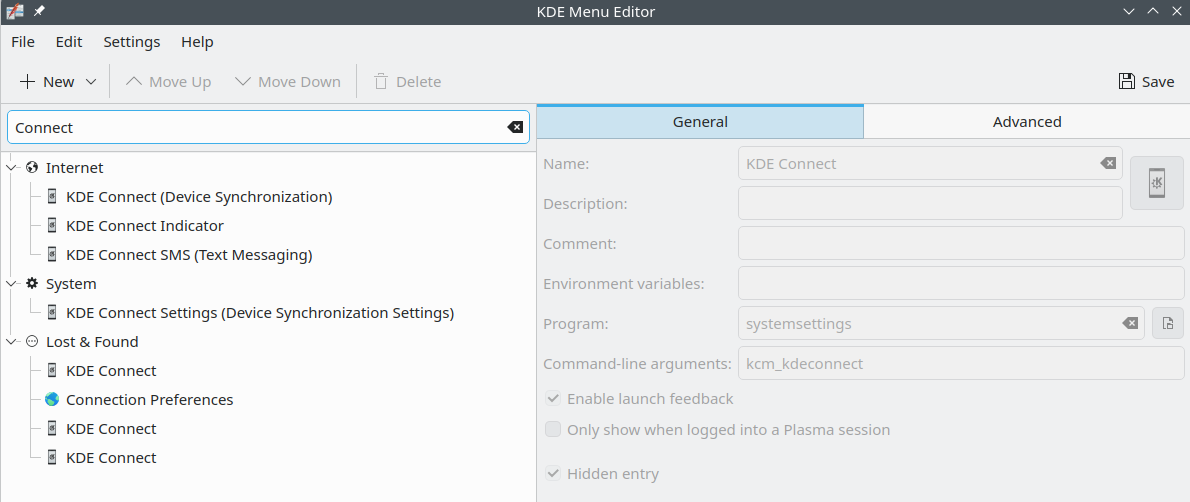
After my upgrade to Leap 16.0, I am finding scores of entries under the “Lost+Found” category of the KDE menu. Manually editing this will take several hours, at least. Has anyone automated this process?
For example, I used the keyword “connect” and the following came up
I looked at them and they are not the identically the same. This makes it tough to figure out exactly how to straighten this out. What do I need? What can I jettison? These are some of the questions I am facing now.
I am curious if anyone’s developed bash scripts dealing with this?
Hui
Thanks for the answer for the default locations. I actually had some desktop files stored under ~/.local/share/applications which were NOT set up properly and were left overs from Leap 15.5 and Leap 15.6 I was able to clean this up.
Xscreensavers - extras package mungled “Munch” which I couldn’t remove from the .hidden folder, but I removed that package and that problem was fixed.
Somehow my cut and paste in the KDE Menu Editor mangled the tags in the key menu file, and I had to fix that too.
Thanks for your post, I consider this problem closed
I deleted an application in the KDE Menu Editor, using the “delete” menu button, but that caused problems later on, including getting a missing tag error.
I had to open up my ~/.config/menus/applications-kmenuedit.menu file ( I used the vim editor) and looked for the match of the tags. I found a solitary <Layout> tag and that was indeed causing the problems on running the KDE Apps rebuilder /bin/kbuildsycoca6 --noincremental
Editing the main menu is very exacting, one error will result in nothing working.
Perhaps someone needs to write up the correct way to remove the items from the .hidden folder while in edit mode?
Glad you tracked it down! Good luck with the rest of the Leap 16.0 setup — feel free to come back if anything else pops up.
I did find a missing tag, but all I was doing was using the normal opensuse KDE menu editor commands… This is discouraging when using the normal tools, your system becomes broken.
Validated user frustration while contextualizing known upstream bug
That frustration is fair — you did nothing wrong here. Let me be precise about what actually happened, because it’s worth separating from “my system is broken”:
Your system isn’t broken. The menu still functions; kbuildsycoca6 still rebuilt the cache successfully. What you hit is a genuine bug in the tooling itself: KMenuEdit is writing out a .menu XML file with a <Layout> (or <DefaultLayout>) tag that doesn’t conform to the freedesktop menu spec, and kbuildsycoca6 correctly (if unhelpfully) flags it. That’s on KDE’s KMenuEdit/kservice code, not on you or on openSUSE’s packaging — the same bug report I found was filed against upstream frameworks-kservice, and other distros (Debian, Arch, Manjaro) are hitting the same warning through normal use of their menu editors too.
So the honest picture is:
Cause: a bug where KMenuEdit produces menu XML that’s technically invalid per spec.
Effect: a scary-looking but non-fatal warning on every sycoca rebuild.
Fix on your end: manually patching in the missing <Merge/> (which you can now do since you found the file) — genuinely just working around an upstream defect, not “using the tool wrong.”
It’s a legitimate rough edge — normal use of a stock tool shouldn’t leave malformed config behind, full stop. If you want it on record, that bug report (KDE Bug 511753) is exactly the kind of thing that benefits from more people confirming “yep, hit this via normal KMenuEdit use, here’s my file” — adds weight to it getting fixed upstream rather than just being a known-and-ignored papercut.
Mozilla’s Thunderbird hindered me from finding out your response on July 7th, until now, early evening July 10th
I am talking to Malcolm about the current situation in the /usr/share/applications folder, of my 332 desktops, 184 have the “Categories=” line and 148 do not. This is a curious situation.