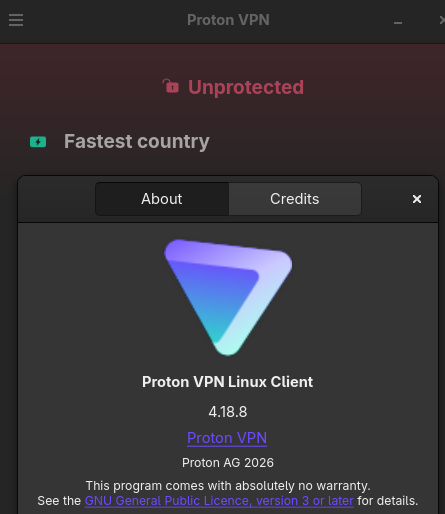
Proton-vpn 4.15.0-2.2 end of Proton support since 11-11-2026

The proton-vpn package in official openSuse repo has end of Proton support. (since a day a red banner show this when using the app)

So now, their is NO proton VPN GUI app in openSuse Repo that is upto date.

Please OpenSuse developers.
Is it so hard, to use the Official Fedora RPM at protonVPN, and fork it to openSuse repo? So we finally have a uptodate Proton VPN gui. (gui is easy in switching countries, compared to cli).

Here is Fedora ProtonVPN:

This because flatpak and snap versions have limitations :

  • No support Proton Protocols (and therefore Smart Protocol and Stealth. Currently available on the GUI app only)
  • No support for split tunneling (currently available on the GUI app only)
  • No support for ARM devices

I used to use ProtonVPN and switched to Windscribe. Windscribe provides installers for all the main distros, including openSUSE, one of the big reasons why I choose to use it.

The openSUSE maintainers (to whom I’m very grateful), are all volunteers whose focus aught to be on maintaining the core system.

I think the only way you will see updated ProtonVPN packages in the repo is if a developer has a mutual interest in it being there and you benefit in turn. I don’t see how you can expect otherwise, considering the amount of software out there… including VPN’s.

Have you asked Proton to provide an openSUSE installer? They already have for Debian/Ubuntu and Fedora.

1 Like

Maybe use the gui in debian or fedora in a distrobox?

I always wondered if a vpn app would work out of a distrobox container. But if it did, it would be a great option. I was once running the Proton Bridge GUI app out of my ubuntu distrobox container.

It should work - meaning launch. The question is: will it would provide the same protection for apps not in the container?

Best way to find out is to test it.

I created my own solution.
It was the same way like adding the app cameractrls to my OpenSuse Tumbleweed. (but cameractrls from git was way more easy)

I asked Proton Lumo.:
I wrote ā€œhow can i add the uptodate protonVPN application for fedoraā€ from proton webpage to my opensuse tumbleweed installation.
And then the copy past between Lumo and the terminal begin.
I did this (this is 90% of the work) :

wget https://repo.protonvpn.com/fedora-45-stable/protonvpn-stable-release/protonvpn-stable-release-1.0.5-1.noarch.rpm

mkdir pvpn && cd pvpn
rpm2cpio …/protonvpn-stable-release-1.0.5-1.noarch.rpm | cpio -idmv
find . -type f # shows you where the .repo file and key ended up

sudo rpm --import ./etc/pki/rpm-gpg/RPM-GPG-KEY-protonvpn-stable # adjust to the actual path find showed
sudo cp ./etc/yum.repos.d/protonvpn-stable.repo /etc/zypp/repos.d/
sudo zypper ref

cd ~/pvpn
curl -O https://repo.protonvpn.com/fedora-45-stable/public_key.asc
sudo rpm --import public_key.asc

sudo sed ā€˜s/$releasever/45/’ ~/pvpn/etc/yum.repos.d/protonvpn-stable.repo | sudo tee /etc/zypp/repos.d/protonvpn-stable.repo

sudo zypper in python313-pip # only if pip isn’t there yet
sudo python3 -m pip install dbus-fast
python3 -c ā€œimport dbus_fast; print(dbus_fast.version)ā€

sudo python3 -m pip install --break-system-packages dbus-fast
python3 -c ā€œimport dbus_fast; print(dbus_fast.version)ā€

sudo python3 -m pip install dbus-fast

sudo zypper ref

sudo zypper in proton-vpn-gnome-desktop

(select solution 2, break proton- xxxxx-.noarch by ignoring some of its dependencies) They already installed on uptodate opensuse tumbleweed.
You get this 2 times. both select 2.

sudo zypper mr -r protonvpn-fedora-stable

sudo zypper mr -p 80 protonvpn-fedora-stable

echo ā€œ/usr/lib/python3.13/site-packagesā€ | sudo tee /usr/lib64/python3.13/site-packages/proton-fedora-path.pth

python3 -c ā€œimport proton.vpn.appā€
protonvpn-app

This was not all, but after this i was busy with lumo to solve some python version conflicts, so busy busy busy (forgot to copy terminal commandsto text file) but it is amazing to see how good Lumo (AI) helped me.

Now i have the newest ProtonVPN gnome gui on OpenSuse Tumbleweed, with the proton protocols (smart and stealth) and netshield, the whole proton functions, and…it updates too from proton repo.

I just don’t get it why opensuse don’t do this, and add it to their opensuse repo.
i mean, ProtonVPN, many people use it.
Proton (migrated from Swiss to Germany, and OpenSuse, also from Germany)


Seeing my typo and not being able to edit it… :roll_eyes:


proton-vpn devel for opensuse is network:vpn

Those of you who actually use this app should go ahead and branch the packages, update them and submit the new packages back to the devel repo.

That will lead to updated packages - this does not happen automagically, somebody needs to do the work.

proton-vpn, proton-vpn-cli, python-proton-client, python-proton-core, python-proton-keyring-linux, python-proton-vpn-api-core, python-proton-vpn-daemon, python-proton-vpn-local-agent - so there is a package for everyone to update - have fun!

2 Likes

The devel opensuse is older/behind the stable fedora rpm from proton.

So, branch, update, submit as @iznogood suggested.

I use Fedora packages from proton repo. (the work i did with Proton Lumo AI was, that opensuse and fedora use different names in systems for same functions (so created some symlinks), result is fedora ProtonVPN uptodate from proton repo working on opensuse (proton beta functions are buggy on opensuse, so off, using just WireGuard, killswitch, netshield), but the protonvpn apps are for opensuse like broken dependencies, because the dependencies have not fedora names, but opensue names, but it works.
So what i used is found here: https://repo.protonvpn.com/fedora-45-stable/
Cool thing is, it is automatically updated by zypper when their is newer version on proton repo.

I’m just a few weeks back to opensuse, no idea how to use devel network:vpn. (last time i used opensuse was version 8). I think you don’t want my -i’m not a programmer but i can fix it with AI- work in opensuse development.

I already mention it to Proton in a chat, but today i did a official ā€œProton VPN support requestā€ with this text, hope someone wakes up at ProtonVPn Linux team:


With your Proton Lumo i make it possible to use Proton VPN gnome gui for fedora on a OpenSuse Tumbleweed machine.
The original proton-vpn (gui) app in OpenSuse repo report since a few days a red banner saying thatt he support of proton is ended for this version.
So now, since 3 days, openSuse has no ProtonVPN gui.
I think you know that OpenSuse is a serious good Linux distribution from Germany.
My question, can you please give it high priority that you also make a (OpenSuse) Tumbleweed repo.
As i wrote in the beginning, you can use the fedora rpm’s, the programs just need some name changes in dependencies (depenencies are same, but some have different name in OpenSuse Tumbleweed, compared to Fedora 45 stable).
This is very important for all OpenSuse users (a German Distribution) using ProtonVPN (also German, or is only Lumo migrated from Swiss to Germany?)

OpenSuse is a enterprice distribution, so i think pretty important to give it it’s tumbleweed repo.
So we not only have
https://repo.protonvpn.com/fedora-45-stable/
but also
https://repo.protonvpn.com/opensuse-tumbleweed/

Thank you so much.
Jeroen from The Hague.

How is this an acceptable solution? break-system-packages means you’re going to have problems later. Please don’t run this AI slop on your machine.

Using the Flatpak seems a lot easier & is a lot more up to date than the one on the Opensuse Repo you are talking about.

Does net shield & ad blocking etc, kill switch & secure core, not sure about stealth mode.

I know not everyone likes Flatpaks & this is an unofficial, albeit more up to date version.

Strangely (the maybe even more hated?) Snap version is apparently from Proton & officially supported if you are prepared to set that up on your machine.

1 Like

After a few days their are no more unneeded files in my system.
So that is clean.
The two breaking dependencies are related to two files from Proton Fedora repo.
They not missing, but have a different name in opensuse, so system think it is broken, but their is nothing broken, just different name for same kind of file.
I fixed that with Proton Lumo, by making a few symlinks.

About Flatpack protonVPN version, do you have:
-split tunneling?
-Proton Beta protocols?
-Proton securecore?
-Proton Netshield?
-Proton Smart connection?

Why people don’t want a vpn app in a container like Flatpak is, it is more limited to network possibilities, because of the container it runs in. This was already mention in some postings above.

The beta protocols with fedora package on opensuse are kinda buggy, but those are only useful if you live in a country that block internet services. In European country wireguard is enough, beta proton protocols not necessary.

There are different perspectives and philosophies in life. For example, when faced with an electronic device with a different plug type than the available electrical outlet, someone may consider sticking bare wires into the outlet and connecting the other ends to the device to be a solution because the output/input voltages happen to match and it doesn’t fry the device and it ā€œworksā€. And some with a different philosophy may consider it to be lunacy.

Anyway, I’m also affected by this issue. Is this something someone like me who has zero experience with OpenSuse’s package management can help to fix this on the repos?

As I said in my previous reply

As for the Snap I’m not sure about stealth mode, beta protocols or smart connection & apparently users will have to wait a bit longer for split tunnelling & stealth mode.

https://snapcraft.io/proton-vpn#tab-security

https://www.techradar.com/vpn/vpn-services/proton-vpn-brings-official-one-click-installs-to-the-linux-snap-store-but-some-features-are-still-missing

This not necessarily the case just because it happens to be containerized. You can give a Flatpak as much system/network access as it needs using tools like Flatseal.

The greater issue would be whether those said tools are included or not with the Flatpak package. If they are, there is a high chance you can get them working with the right amount of fiddling.

[quote=ā€œAndroid_Gynous, post:18, topic:197217ā€]

…whether those said tools are included or not with the Flatpak package.

They are not.