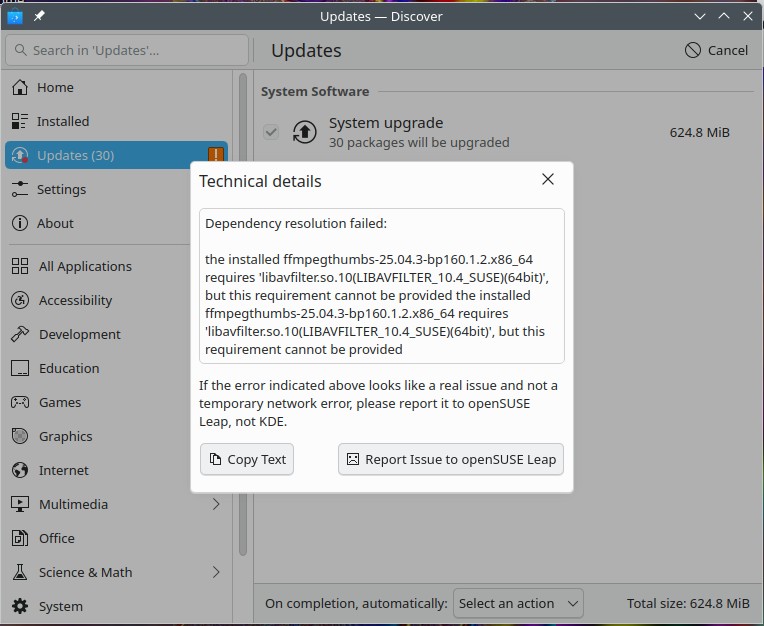
sudo zypper dup --allow-vendor-change
Refreshing service ‘NVIDIA’.
Refreshing service ‘openSUSE’.
Loading repository data…
Reading installed packages…
Warning: You are about to do a distribution upgrade with all enabled repositories. Make sure these repositories are compatible before you continue. See ‘man zypper’ for more information about this command.
Computing distribution upgrade…
The following 30 packages are going to be upgraded:
blog chromium curl dracut gstreamer-plugins-good gstreamer-plugins-good-gtk gstreamer-plugins-good-lang javapackages-filesystem
javapackages-tools kf6-kwallet kpipewire6-imports krb5 kwalletd6 libblogger2 libcurl4 libKF6Wallet6 libKF6WalletBackend6 libKPipeWire6
libKPipeWireDmaBuf6 libsystemd0 libudev1 python313-msgpack strace systemd systemd-doc systemd-lang udev xorg-x11-server
xorg-x11-server-extra xorg-x11-server-Xvfb
The following package is going to be REMOVED:
glibc-gconv-modules-extra-32bit
30 packages to upgrade, 1 to remove.
Package download size: 163.0 MiB
Package install size change:
| 547.1 MiB required by packages that will be installed
7.5 MiB | - 539.6 MiB released by packages that will be removed
Backend: classic_rpmtrans
Continue? [y/n/v/…? shows all options] (y):
Preloading: curl-8.14.1-160000.8.1.x86_64.rpm [Error: “The requested URL returned error: 404”, trying next mirror.]
Preloading: xorg-x11-server-21.1.15-160000.6.1.x86_64.rpm [Error: “The requested URL returned error: 404”, trying next mirror.]
Preloading: kwalletd6-6.16.0-bp160.2.1.x86_64.rpm [Error: “The requested URL returned error: 404”, trying next mirror.]
Preloading: kpipewire6-imports-6.4.2-bp160.1.3.x86_64.rpm [done]
Preloading: xorg-x11-server-21.1.15-160000.6.1.x86_64.rpm [Error: “The requested URL returned error: 404”, trying next mirror.]
Preloading: kwalletd6-6.16.0-bp160.2.1.x86_64.rpm [Error: “The requested URL returned error: 404”, trying next mirror.]
Preloading: gstreamer-plugins-good-lang-1.26.7-160000.2.1.noarch.rpm [done]
Preloading: xorg-x11-server-21.1.15-160000.6.1.x86_64.rpm [Error: “The requested URL returned error: 404”, trying next mirror.]
Preloading: dracut-059+suse.724.gaa87d1594-160000.1.1.x86_64.rpm [done]
Preloading: chromium-150.0.7871.100-bp160.1.1.x86_64.rpm [Error: “The requested URL returned error: 404”, trying next mirror.]
Preloading: xorg-x11-server-21.1.15-160000.6.1.x86_64.rpm [Error: “The requested URL returned error: 404”, trying next mirror.]
Preloading: chromium-150.0.7871.100-bp160.1.1.x86_64.rpm [Error: “The requested URL returned error: 404”, trying next mirror.]
Preloading: kwalletd6-6.16.0-bp160.2.1.x86_64.rpm [done]
Preloading: curl-8.14.1-160000.8.1.x86_64.rpm [done]
Preloading: chromium-150.0.7871.100-bp160.1.1.x86_64.rpm [Error: “The requested URL returned error: 404”, trying next mirror.]
Preloading: chromium-150.0.7871.100-bp160.1.1.x86_64.rpm [Error: “The requested URL returned error: 404”, trying next mirror.]
Preloading: systemd-lang-257.13-160000.3.1.noarch.rpm [done]
Preloading: xorg-x11-server-21.1.15-160000.6.1.x86_64.rpm [done]
Preloading: blog-2.45-160000.1.1.x86_64.rpm [done]
Preloading: xorg-x11-server-extra-21.1.15-160000.6.1.x86_64.rpm [done]
Preloading: xorg-x11-server-Xvfb-21.1.15-160000.6.1.x86_64.rpm [done]
Preloading: libKPipeWireDmaBuf6-6.4.2-bp160.1.3.x86_64.rpm [done]
Preloading: javapackages-tools-6.5.1-160000.2.1.x86_64.rpm [done]
Preloading: libKF6Wallet6-6.16.0-bp160.2.1.x86_64.rpm [done]
Preloading: gstreamer-plugins-good-1.26.7-160000.2.1.x86_64.rpm [done]
Preloading: libcurl4-8.14.1-160000.8.1.x86_64.rpm [done]
Preloading: systemd-doc-257.13-160000.3.1.noarch.rpm [done]
Preloading: python313-msgpack-1.1.0-160000.3.1.x86_64.rpm [done]
Preloading: udev-257.13-160000.3.1.x86_64.rpm [done]
Preloading: systemd-257.13-160000.3.1.x86_64.rpm [done]
Preloading: libblogger2-2.45-160000.1.1.x86_64.rpm [done]
Preloading: libKPipeWire6-6.4.2-bp160.1.3.x86_64.rpm [done]
Preloading: libKF6WalletBackend6-6.16.0-bp160.2.1.x86_64.rpm [done]
Preloading: krb5-1.21.3-160000.4.1.x86_64.rpm [done]
Preloading: strace-7.1-160000.1.1.x86_64.rpm [done]
Preloading: kf6-kwallet-6.16.0-bp160.2.1.x86_64.rpm [done]
Preloading: javapackages-filesystem-6.5.1-160000.2.1.x86_64.rpm [done]
Preloading: gstreamer-plugins-good-gtk-1.26.7-160000.2.1.x86_64.rpm [done]
Preloading: libudev1-257.13-160000.3.1.x86_64.rpm [done]
Preloading: libsystemd0-257.13-160000.3.1.x86_64.rpm [done]
Preloading: chromium-150.0.7871.100-bp160.1.1.x86_64.rpm [done]
Preload finished. [success (580.7 KiB/s) ] …[done]
Retrieving: gstreamer-plugins-good-1.26.7-160000.2.1.x86_64 (repo-oss-16) (1/30), 2.4 MiB
Retrieving: gstreamer-plugins-good-gtk-1.26.7-160000.2.1.x86_64 (repo-oss-16) (2/30), 170.5 KiB
Retrieving: javapackages-filesystem-6.5.1-160000.2.1.x86_64 (repo-oss-16) (3/30), 28.5 KiB
Retrieving: kf6-kwallet-6.16.0-bp160.2.1.x86_64 (repo-oss-16) (4/30), 14.9 KiB
Retrieving: krb5-1.21.3-160000.4.1.x86_64 (repo-oss-16) (5/30), 749.8 KiB
Retrieving: libKF6WalletBackend6-6.16.0-bp160.2.1.x86_64 (repo-oss-16) (6/30), 66.2 KiB
Retrieving: libKPipeWire6-6.4.2-bp160.1.3.x86_64 (repo-oss-16) (7/30), 103.3 KiB
Retrieving: libblogger2-2.45-160000.1.1.x86_64 (repo-oss-16) (8/30), 23.5 KiB
Retrieving: libsystemd0-257.13-160000.3.1.x86_64 (repo-oss-16) (9/30), 899.6 KiB
Retrieving: libudev1-257.13-160000.3.1.x86_64 (repo-oss-16) (10/30), 586.3 KiB
Retrieving: python313-msgpack-1.1.0-160000.3.1.x86_64 (repo-oss-16) (11/30), 111.6 KiB
Retrieving: strace-7.1-160000.1.1.x86_64 (repo-oss-16) (12/30), 730.4 KiB
Retrieving: systemd-257.13-160000.3.1.x86_64 (repo-oss-16) (13/30), 4.7 MiB
Retrieving: udev-257.13-160000.3.1.x86_64 (repo-oss-16) (14/30), 2.4 MiB
Retrieving: systemd-doc-257.13-160000.3.1.noarch (repo-oss-16) (15/30), 2.3 MiB
Retrieving: gstreamer-plugins-good-lang-1.26.7-160000.2.1.noarch (repo-oss-16) (16/30), 231.8 KiB
Retrieving: javapackages-tools-6.5.1-160000.2.1.x86_64 (repo-oss-16) (17/30), 50.1 KiB
Retrieving: libKF6Wallet6-6.16.0-bp160.2.1.x86_64 (repo-oss-16) (18/30), 77.5 KiB
Retrieving: libcurl4-8.14.1-160000.8.1.x86_64 (repo-oss-16) (19/30), 651.3 KiB
Retrieving: libKPipeWireDmaBuf6-6.4.2-bp160.1.3.x86_64 (repo-oss-16) (20/30), 27.8 KiB
Retrieving: blog-2.45-160000.1.1.x86_64 (repo-oss-16) (21/30), 70.3 KiB
Retrieving: xorg-x11-server-Xvfb-21.1.15-160000.6.1.x86_64 (repo-oss-16) (22/30), 1011.3 KiB
Retrieving: xorg-x11-server-extra-21.1.15-160000.6.1.x86_64 (repo-oss-16) (23/30), 1.3 MiB
Retrieving: chromium-150.0.7871.100-bp160.1.1.x86_64 (repo-oss-16) (24/30), 140.3 MiB
Retrieving: systemd-lang-257.13-160000.3.1.noarch (repo-oss-16) (25/30), 667.4 KiB
Retrieving: dracut-059+suse.724.gaa87d1594-160000.1.1.x86_64 (repo-oss-16) (26/30), 804.4 KiB
Retrieving: kwalletd6-6.16.0-bp160.2.1.x86_64 (repo-oss-16) (27/30), 269.7 KiB
Retrieving: curl-8.14.1-160000.8.1.x86_64 (repo-oss-16) (28/30), 587.9 KiB
Retrieving: kpipewire6-imports-6.4.2-bp160.1.3.x86_64 (repo-oss-16) (29/30), 47.4 KiB
Retrieving: xorg-x11-server-21.1.15-160000.6.1.x86_64 (repo-oss-16) (30/30), 1.6 MiB
Checking for file conflicts: …[done]
/var/tmp/rpm-tmp.Ch4WV4: line 1: /usr/sbin/iconvconfig-32: cannot execute binary file: Exec format error
error: %preun(glibc-gconv-modules-extra-32bit-2.40-160000.5.1.x86_64) scriptlet failed, exit status 126
error: glibc-gconv-modules-extra-32bit-2.40-160000.5.1.x86_64: erase failed
( 1/31) Removing: glibc-gconv-modules-extra-32bit-2.40-160000.5.1.x86_64 …[error]
Removal of (117902)glibc-gconv-modules-extra-32bit-2.40-160000.5.1.x86_64(@System) failed:
Error: Subprocess failed. Error: RPM failed: Command exited with status 1.
Abort, retry, ignore? [a/r/i] (a):