A (recent) update removed my printer configuration. Under Yast I’m no longer able to configure my printer. My printer is attached to my server, and that is running Slowroll. Cups is configured on the server and the printer is running correct when running the test-page print-out.
Under KDE 6.7.3 I’m not able to get my printer configured. KDE wants to configure a local CUPS server, while I provide the direct URL where to send the print command to. KDE also wants me to provide a PPD selection, which I downloaded as my HP printer is not showing up in the list. However the local CUPS printer is not sending the job to the remote server.
If the printer is already shared by your Slowroll CUPS server, the Tumbleweed client shouldn’t need to create a local queue or use a PPD. If printer discovery is working, KDE should simply present the shared printer.
Show what is reported on the TW host from lpstat -eand ippfind.
The client is trying to use the hpcups filter locally, which means it is not simply forwarding the print job to the remote CUPS queue. A true remote CUPS queue should not require the client to have the HPLIP filter installed.
If the printer is being advertised, it should appear (as a remote CUPS printer) automatically. If not, check that your firewall allows “mdns” and “ipp” perhaps. I’d remove the existing config and start over.
Something like the following manual config should work…
FWIW, I have the same model, it’s connected to the wireless network…
lpstat -t
scheduler is running
no system default destination
device for HP_LaserJet_P1102w: hp:/net/HP_LaserJet_Professional_P_1102w?hostname=xxxx-laser
HP_LaserJet_P1102w accepting requests since Tue 21 Jul 2026 11:40:19 AM CDT
printer HP_LaserJet_P1102w is idle.  enabled since Tue 21 Jul 2026 11:40:19 AM CDT
@malcolmlewis The OP indicated that they are not accessing the printer directly? Instead via a common CUPS server for some reason. Having said that, it would be easier to access if it was connected to the LAN.
Yes, that is the usual approach, but the OP hasn’t shared why they are using a CUPS server in their environment, and sharing the printer that way. I was just helping with making a distinction between a remote CUPS queue and a locally configured HP queue. Let’s see what they come back with.
Huh? I don’t follow. My CUPS server is up-to-date with hp-setup and drivers are aligned. The printer itself can print a test-page just fine, when I go to the server address cups page.
I have a CUPS server for years (as that was the only way to have the printer available on all machines in the network) and that worked as expected when I configured the printer through Yast. KDE wants to create a localhost CUPS instance. When I provide the server address to the printer it asks for me to pick the model etc. That is totally unexpected as the printer is correctly configured on my server. And I should not create a local CUPS.
I provide the full address and click search. KDE shows the remote printer. Then I select the printer and KDE asks me to provide the printer details. I provide the PPD file and it is not working as expected.
The point Malcolm was making is that if the printer is directly accessible on the network, then each client can print to it without going through a CUPS server.
If you prefer to continue using the CUPS server approach, I wouldn’t expect the client to need a PPD, since the printer is already configured on the server. The client should simply use the remote queue. Try the lpadmin command I gave. You can also do the following to remove the existing config, and add using ipps…
I think I may have added to the confusion here. As your printer is an older model, the CUPS server has the HPLIP/hpcups driver and should do the filtering. In this case the client queue needs to be a forwarding/raw queue pointing at the remote CUPS queue, rather than a locally configured HP printer.
So like the following…
Client → raw queue → CUPS server → hpcups/HPLIP → HP printer
The client queue can be set up like this…
sudo lpadmin -p HP_LaserJet_Professional_P_1102w -E -v ipp://homeserver:631/printers/HP_LaserJet_Professional_P_1102w -m raw
Although, if your firewall is configured properly, then the local CUPS client should discover it and enumerate automatically without any explicit configuration.
Ok, so you’ve added it as an IPP Everywhere printer. Good to know it’s working for you. I would have expected the remote shared printer to have been discovered and added by CUPS without any explicit configuration though.
Based upon what you gave me and how it is configured now. I now understand how the KDE developers made their design/ development decisions. And I can now also do it through the KDE interface.
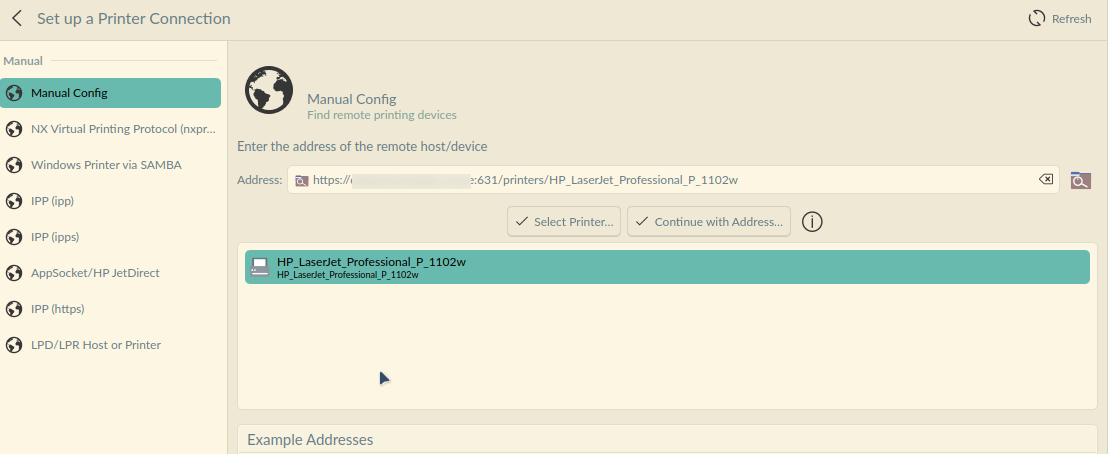
 And I can now also do it through the KDE interface.