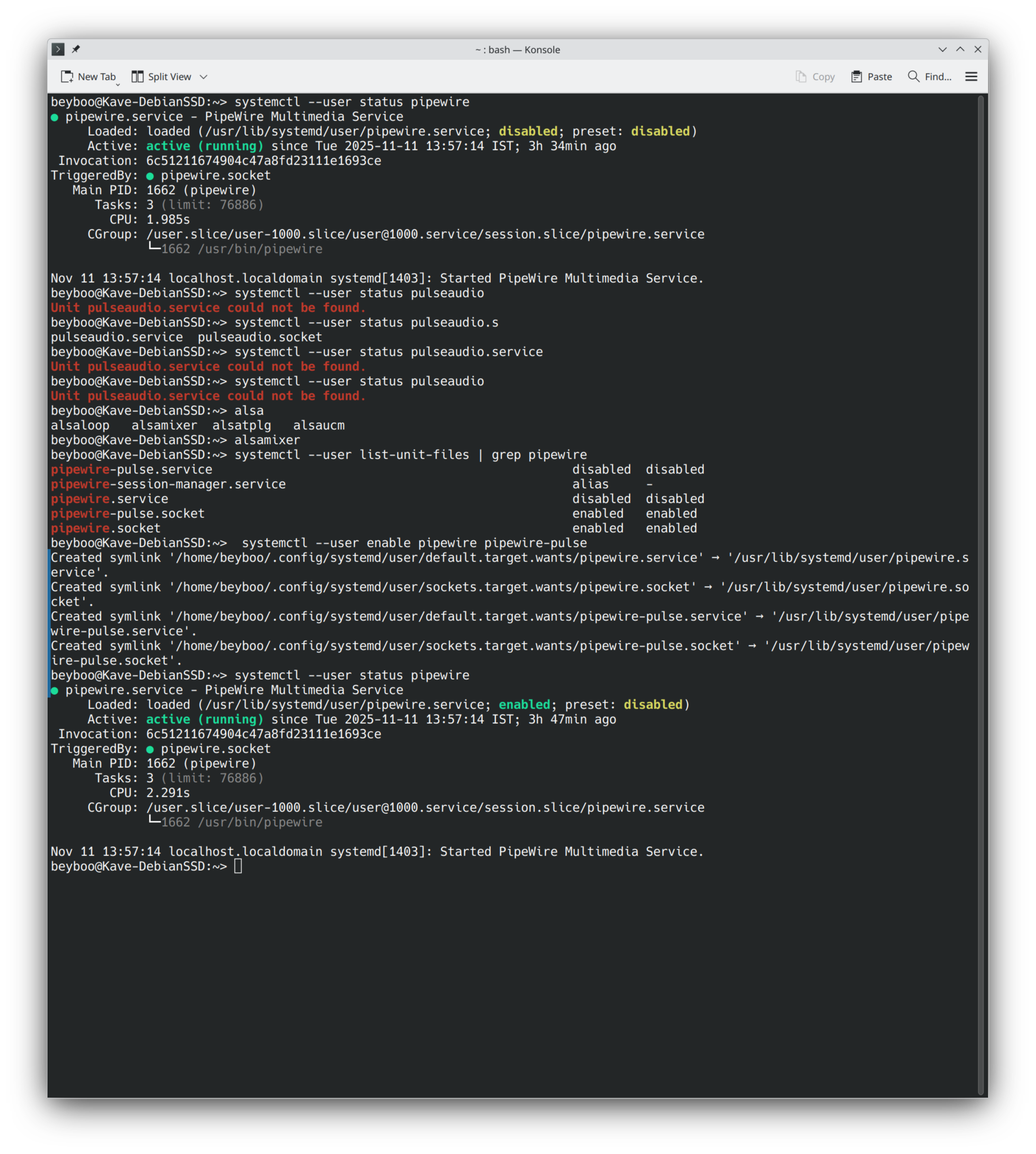
I am a new openSuse TW user / KDE Plasma 6.5 with all AMD hardware. System has all the latest patches via zypper dup command.
I initially came looking for a solution to my VLC acting weird, where volume of voices was very low and that of the music was loud. I found a solution by change the setting to ALSA from automatic.
Meanwhile, when reading all the trouble shooting steps, and running some myself - I figured out that my install of TW doesnt have pipewire enabled nor was pulse-audio available. From my understanding of these stacks, either one server must be running to enable my desktop to have sound, however as pe the screenshot both were disabled. However I had sound on my system, except the errant VLC audio issue.
I also did a sysmctl command to enable pipewire, which created the symlinks and the pipewire service was enabled.
Question 1 :
Was both the services not being enabled a quirk or by design on TW. If by design, any reasons for the same and should I have not enabled / started it ?
Question2 :
Without either server services running, how was my system having good audio out on my stereo speaker output.
First of all, welcome to the openSUSE Forums!
Apparently you do not understand how pipewire works.
The first few lines of your photo show clearly that pipewire.service is active (running), so there is no mystery about how you get sound on your desktop.
There is no pulseaudio.service when pipewire is running, but pipewire has an interface acting like a pulseaudio compatible server to interfaces requesting such access; that is provided by a pipewire-pulse.service.
So a default Tumbleweed install looks like:
bruno@LT-B:~> systemctl --user status pipewire
● pipewire.service - PipeWire Multimedia Service
     Loaded: loaded (/usr/lib/systemd/user/pipewire.service; disabled; preset: disabled)
     Active: active (running) since Tue 2025-11-11 18:50:26 CET; 5min ago
 Invocation: 64aaba0dc0c8432382f76ab73f42a75c
TriggeredBy: ● pipewire.socket
   Main PID: 3688 (pipewire)
      Tasks: 2 (limit: 18878)
        CPU: 80ms
     CGroup: /user.slice/user-1000.slice/user@1000.service/session.slice/pipewire.service
             └─3688 /usr/bin/pipewire

nov 11 18:50:26 LT-B systemd[3262]: Started PipeWire Multimedia Service.
bruno@LT-B:~> systemctl --user status pipewire-pulse
● pipewire-pulse.service - PipeWire PulseAudio
     Loaded: loaded (/usr/lib/systemd/user/pipewire-pulse.service; disabled; preset: disabled)
     Active: active (running) since Tue 2025-11-11 18:50:26 CET; 7min ago
 Invocation: d2f6ec2d59f8459a9ba799fac7879874
TriggeredBy: ● pipewire-pulse.socket
   Main PID: 3691 (pipewire-pulse)
      Tasks: 2 (limit: 18878)
        CPU: 34ms
     CGroup: /user.slice/user-1000.slice/user@1000.service/session.slice/pipewire-pulse.service
             └─3691 /usr/bin/pipewire-pulse

nov 11 18:50:26 LT-B systemd[3262]: Started PipeWire PulseAudio.
bruno@LT-B:~>
Both services are disabled as default at system level, so that a multi-user login on the command line has no sound service by default, but both services are started on a user basis for each user logging in to a graphical session; so you should not have enabled or started them on your own.
(And, BTW, please don’t paste computer output as images, use the pre-formatted text tags using the </> button above the editing area)
This is very helpful. Now that I have enabled the service, should I now reverse it and disable it ?
Noted :- not pasting images, and using quotes to type text.