My neighbor gave me an older laptop that she replaced. It has Windows 10 installed and it was giving her problems. I installed Tumbleweed but must have made a partitioning error. It boots and works fine in TW but Windows won’t boot and repair fails. It appears there is not enough room to make a repair using a Windows 10 install usb drive.
What I think I did was make the stupid error of giving Windows 143 MB instead of 143GB!!! I have no idea how to safely shrink a TW partition in yast. I have a Gparted disk, but once again, I don’t know the right way move some space to Windows. I have low risk of messing this up since Windows doesn’t work now and I don’t care about any of the files there. Likewise, Tumbleweed has no important files to save since I didn’t add anything since the install.
I was thinking I could remove the TW partitions altogether, expand the Windows partition and , if I can get it working, re-install TW properly. My last option is to re-install TW, taking the whole disk and forget about Windows.
I know anyone that wishes to help me out will need to see some cli output. Which commands shall I run?
I suggest use that gparted disk to delete all partitions, then create partitions that you wish the two OSes to use. Make sure only the partition(s) you wish Windows to use are types it recognizes, and it should leave the rest alone for you to put TW on afterward. If the laptop supports UEFI, before starting, go into its BIOS and disable CSM support, to ensure both Windows and TW will only boot in UEFI mode. Make your new partitions in GPT mode.
I give Windows 3 on my PCS: 1: small, to boot from, e.g. 320MB for a FAT32 ESP; 2: Windows system type 7; 3: Windows-only type7 and/or shared data type 7 or FAT32 or ExFAT. With GPT/UEFI, TW will use the same little FAT32 for booting, mounting it to /boot/efi/. Use the TW installer’s expert mode to select which partitions you created to use for what mount points, and format them accordingly. TW’s default is to put /home/ on the same BTRFS filesystems as the OS, so if you wish /home/ to be separate, expert mode after pre-partitioning for everything is the best way I know to get there, and the only method I use.
So, you’re using 100 G for Windows? That’s even less than the 143 G I THOUGHT I was giving it. But, as I said, I have very little use for Windows since Tumbleweed has gotten so useful.
How are you labeling these partitions? karlmistelberger used about 100 G total for Windows. Can I tell Gparted to make one 100 G partition and let Windows sort out the 3 partitions you mention? If I get Windows running, I’ll install TW and let it figure out the rest of the partitioning. Will that work?
I have less use for Windows. Biggest partition I gave 10 was 48G. 11 I haven’t even considered - no PCs with a Windows license and hardware that would qualify.
Typically I boot into Windows when I need to recover an appliance such as the Garmin Forerunner 735XT-GPS-Watch from disaster, which happens every second year or so.
I’ve had mixed results. I deleted the partitions with TW on them. I then expanded the Windows partition. I tried to add space to get 100 G on that partition. Gparted corrected that to 97.95 G.
I then installed TW. It selected the now unallocated space and installed with some hiccups, related to signing of the repos. Each OS works as expected, or I should say, as I hoped. But it is not a complete success.
If I allow an unattended boot, it boots to Windows 10. This is an HP laptop. If I interrupt the boot process by pressing ESC, I get the option to select F9 to get to the bios. I have to select boot from uefi. That gives me 4 options, the last of which is to boot to opensuse. Selecting that option brings me to the grub menu. Windows does NOT appear on the grub menu. I can boot only opensuse from that menu. So, I can get to either OS but it is not easy to get to TW.
I am not on the laptop at the moment, so I cannot post any output. But sda1 is the NTFS Windows partition. sda2, 3 and 4 are the btrfs partitions for opensuse. Can anyone figure out how to get a normal grub boot to select either OS when I power up?
Thanks for all the info you have given me. I would not have attempted this without you!
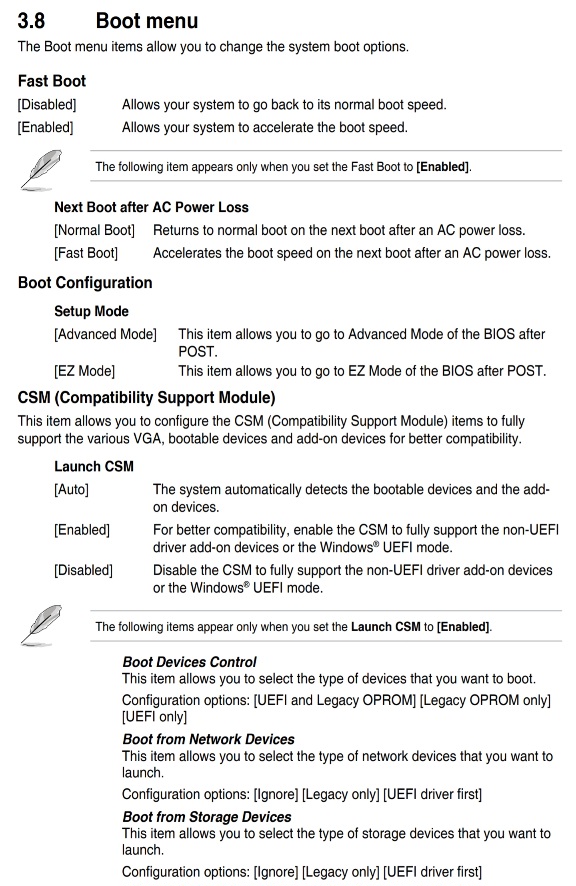
It’s always been my experience that the boot setup is done within the BIOS settings (of the motherboard). Some offer “auto” mode or to manually pick which device (avail boot partition) to use.
For example, the image below is an excerpt from my ASUS manual. There’s a whole 1 1/2 pages of explanation (that’s how easy it is). This is just an example, and not related to your hardware/BIOS
To further my example, that one machine has two m2(mvne) drives and an older SATA drive.
Each one of those drives has its own boot partition, with GRUB boot selection.
And each GRUB config can boot the other systems on each individual (3) drives
This is for redundancy /backup. If a drive fails (say, my primary boot up drive), I can revert to another drive’s boot partition and be on my way (and take my time repairing the failed drive).
In my BIOS setup, I can select multiple bootable partitions and set a priority for them.
Assuming you have both Windows and TW installed in UEFI mode, either via UEFI BIOS priority configuration, or during openSUSE boot, using efibootmgr to set the boot priority to your liking. If Windows isn’t in your Grub menu, check in /etc/default/grub what GRUB_DISABLE_OS_PROBER= is set to. If true, change it to false, and when next grub.cfg is regenerated, Windows should be in Grub’s menu. If using YaST instead, simply check the probe other OS box appropriately, and YaST will both change /etc/default/grub and regenerate grub.cfg. Either method might not work if you are allowing Windows to fastboot as per its default, which blocks Linux access to it. It needs to be disabled, or you need to be in the habit of not normally shutting Windows down, instead selecting reboot, then shutting down via power switch or by having booted to Linux after running Windows rebooted.
Great. Installed systems are indeed working when booted from UEFI. You will want to have a nice grub screen:
 thinkbook:~ # grep 'menuentry ' /boot/grub2/grub.cfg |cut -d \' -f2
...
openSUSE Tumbleweed
openSUSE Tumbleweed, with Linux 6.3.9-1-default
openSUSE Tumbleweed, with Linux 6.3.9-1-default (recovery mode)
openSUSE Tumbleweed, with Linux 6.3.7-1-default
openSUSE Tumbleweed, with Linux 6.3.7-1-default (recovery mode)
Windows Boot Manager (on /dev/nvme0n1p1)
UEFI Firmware Settings
thinkbook:~ #
Boot into Tumbleweed and fix grub configuration using yast2 bootloader.
I have followed the instructions here but still do not see Windows in my boot screen. @mrmazda I followed the steps and shut off fast boot. @karlmistelberger I followed your example for menuentry. I get only the first 3 lines. I tried to find a way to edit to add Windows Boot Manager but failed.
I apologize for this long entry, but perhaps you will see something I’m doing wrong. These are the steps I take to boot TW. When I reboot, a box appears saying ESC to get to boot. Here is the sequence of steps:
ESC
F9 Boot Device options
Optical Disk Drive (UEFI)
OS Boot Manager
Boot from EFI File
Optical Disk Drive
Notebook Hard drive
Notebook Ethernet
Selecting Notebook Hard Drive boots Windows. I select Boot From EFI File and get this box:
Select File System (with a long descriptor that I can’t interpret) My only choice is
Enter
This brings up this menu
Exit
EFI
System Volume info
$Recycle Bin
I select EFI to bring up this menu
Exit
.
…
boot
opensuse
I select opensuse and get this menu
Exit
.
…
Mokmanager.efi
grub.efi
shim.efi
grubx64.efi
I select either grub.efi or grubx64.efi and it boots to TW grub screen but no Windows option there.
Most of the options I did not select merely return me to the power-up screen where I press ESC. (Selecting Optical Drives does work). If I do nothing on that power-up screen, after a time it goes to the first menu I listed above where I start the sequence.
Can you access the window partition from within Linux? Dolphin should show you windows as - other locations- OS - If not you might have accidentally deleted the windows partition.
windows needs a 100MB EFI partition.
If you have a win ISO, you can put it on a VENTOY multi boot USB drive and dry the fix-boot option within the Windows installer.
there are a couple of differences in my bootloader. You do not have “Secure Boot Support” checked. I do. I have no option available for “Trusted Boot Support.” My “Optional Kernel Command Line Parameter” stops at “apparmor.”
As mentioned, it looks like the Windows boot partition was deleted when I ran Gparted. I thought I deleted only TW specific partitions. Guess I deleted Windows boot. I left the only NTFS partition and thought that was all I needed to worry about.
 Biggest partition I gave 10 was 48G. 11 I haven’t even considered - no PCs with a Windows license and hardware that would qualify.