openSUSE Leap 16 partition configuration query

I’m the “BTRFS for / and XFS for /home” person too, for many years. Previous TW installs, current Leap 15.6 installs, and current Leap 16.

For fun, and to waste some time before I go grocery shopping, I decided to create your hope for installation (hopefully, I’m not confused). The new Leap 16 is currently in the install process, into a VBox virtual machine.

I configured / as BTRFS, /home as XFS (it’s the default in Agama when defining a separate /home), and ALL encrypted.

A couple of screenshots to complete this Reply:


.
And this one to show the overall partition config, showing all is encrypted.


.
About 200 files to install until it’s completed :+1:

@Abigail_Donovan

Installation complete, with KDE Plasma … screenshot showing partition config on the new running system, and logged in

All right, but if I’m not all that confused I read your post as if you’re made the / partition use BTRFS and the remaining partitions XFS. That’s not exactly what I would prefer, but rather to have all partitions, including root, on XFS. So the question still remains. Or did I misunderstood something?

How?

I would like to use an installation procedure with a graphical interface like the one I’ve been used to up to version 15.6, and have worked well for me, but now has been substituted with Agama.

https://en.opensuse.org/openSUSE:Expert_Installation

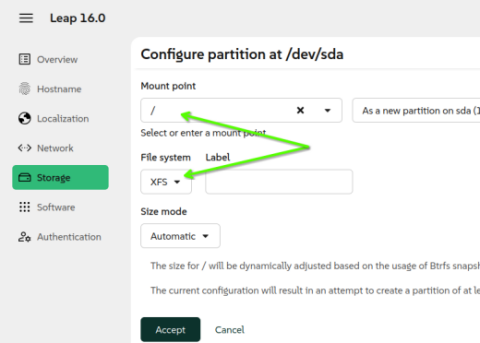
No problem. Okay, I started all over again, and installed a new instance of Leap 16, with ALL partitions types as XFS and encrypted.

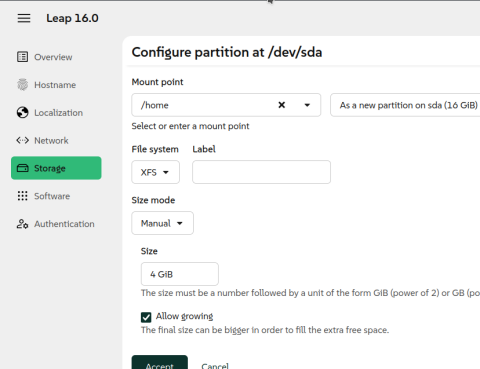
I did take it one step further, and created a separate /home (as XFS), because that’s a habit of mine - always install a separate /home. Anyway, the / partition is also configured as XFS. So, everything is XFS.

If your habit is to not create a separate /home, then that’s one step less - simply change | create a lone / partition (which includes a /home) as XFS.

So, here’s the screenshots showing the configuration steps in Agama installer, then the last screenshot is me logged into the new system, showing the filesystem layout.

The / partition configured as XFS

The /home partition configured as XFS

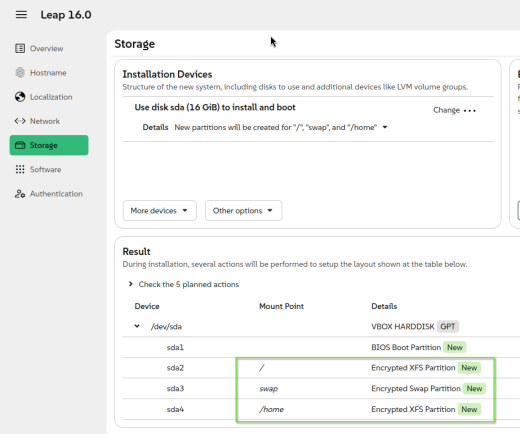
The overall view of the partition configuration (XFS and all encrypted) , then I clicked “Install”

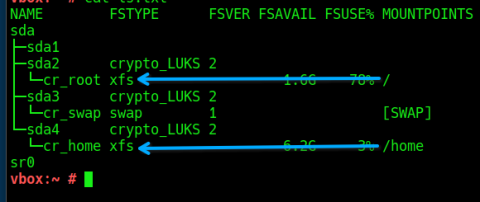
And now, after install is complete and logged into new system, showing partition layout.

Excellent!

Ahead lies the challenge for me to put your instructions into practice and manage to succeed. It shouldn’t be all too hard, right? :slight_smile:

As for the question on partitions: I prefer to have (at least) separate partitions for /, /home, /tmp, /var and swap. With the exception of swap, each one of them using XFS. And every partition encrypted.

@Abigail_Donovan Hi, well /tmp is tmpfs now, so shouldn’t be needed? Likewise if you use zram for swap this is encrypted?

 fwupdmgr security | grep swap
✔ Linux swap:                    Encrypted
  2025-11-01 14:57:50:  ✔ Linux swap changed: Disabled → Encrypted

OK. I can consider such a method, but if I can reach my goal with Agama instead (all partitions on XFS (except swap), all encrypted), and it seems possible, I will use Agama. But thanks anyway!

I’m not sure what you mean…

/dev/mapper/cr_tmp xfs 6,0G 153M 5,8G 3% /tmp

My setup on a computer running Leap 15.6, and preferably even with Leap 16.

@Abigail_Donovan The default install… (no encryption here)

mount | grep tmpfs

devtmpfs on /dev type devtmpfs (rw,nosuid,seclabel,size=4096k,nr_inodes=2000066,mode=755,inode64)
tmpfs on /dev/shm type tmpfs (rw,nosuid,nodev,seclabel,inode64)
tmpfs on /run type tmpfs (rw,nosuid,nodev,seclabel,size=3206856k,nr_inodes=819200,mode=755,inode64)
tmpfs on /run/credentials/systemd-journald.service type tmpfs (ro,nosuid,nodev,noexec,relatime,nosymfollow,seclabel,size=1024k,nr_inodes=1024,mode=700,inode64,noswap)
tmpfs on /tmp type tmpfs (rw,nosuid,nodev,seclabel,nr_inodes=1048576,inode64)
tmpfs on /run/user/1000 type tmpfs (rw,nosuid,nodev,relatime,seclabel,size=1603424k,nr_inodes=400856,mode=700,uid=1000,gid=1000,inode64)
tmpfs on /run/credentials/getty@tty1.service type tmpfs (ro,nosuid,nodev,noexec,relatime,nosymfollow,seclabel,size=1024k,nr_inodes=1024,mode=700,inode64,noswap)
tmpfs on /run/user/0 type tmpfs (rw,nosuid,nodev,relatime,seclabel,size=1603424k,nr_inodes=400856,mode=700,inode64)

@Abigail_Donovan what I’m indicating is that you should be fine without creating a separate/tmp partition since it’s on tmpfs.

A few days ago, I tried installing Leap 16 in VirtualBox.
For years, I have been using partitions / and /home under ext4 and swap. That’s all.
It took me a long time to figure out how partition settings actually work in the new installer. The only thing worse than this partition setup is, I think, the Fedora installer. Or maybe it’s worse in openSUSE.

Sure. If I don’t need a separate partition for /tmp, I can refrain from creating it.

@Abigail_Donovan and the same with swap, don’t create and after install, install zram-generator and configure as required (there are a few posts on this in the forum). So when system is shutdown, nothing is there to worry about…

Well, Galko, I didn’t understand Agama either. That’s why I became stuck with a setup of Leap 16 that I do not like: a combination of BTRFS and XFS, and even worse - none of the partitions are encrypted. It felt like Agama was and maybe still is a bit immature. But it was not Agamas fault, as far as I can understand.

1 Like

All right. I’ll consider that. Thanks for the suggestion!

Did you ever try to follow these instructions and if so did you end up with a working system?

Hmmmm. It’s unfortunate the options did not show up for you. I showed (screenshots in my previous Replys) how I configured the partitions in Agama to your preferences (separate and encrypted). Took about five minutes (my first Reply, then my second).

Maybe this link is helpful (I never read this until I just now found the link):

… oops, never-mind about the link … @shundhammer already posted the link (the chapter for Agama Interactive guide) in their Reply.