Only single screen and low resolution after zypper dup

After I ran zypper dup I ended up on a single screen with low resolution. I’ve found this topic which sounds similar but I’m not sure if it’s really the solution for me.

I have an RTX 5070Ti (changed recently from a 1080Ti)

sudo zypper se -si nvidia
Repository-Daten werden geladen...
Installierte Pakete werden gelesen...

S  | Name                                           | Type  | Version                  | Arch   | Repository
---+------------------------------------------------+-------+--------------------------+--------+---------------
i  | kernel-firmware-nvidia                         | Paket | 20251018-1.1             | noarch | Adfinis OSS
i  | kernel-firmware-nvidia                         | Paket | 20251018-1.1             | noarch | repo-oss
i+ | libnvidia-cfg                                  | Paket | 580.126.09-1             | x86_64 | cuda
i+ | libnvidia-egl-gbm1                             | Paket | 1.1.2.1-150700.12.1      | x86_64 | cuda
i+ | libnvidia-egl-gbm1-32bit                       | Paket | 1.1.2.1-150700.12.1      | x86_64 | cuda
i+ | libnvidia-egl-wayland1                         | Paket | 1.1.21-150700.1.1        | x86_64 | cuda
i+ | libnvidia-egl-wayland1-32bit                   | Paket | 1.1.21-150700.1.1        | x86_64 | cuda
i+ | libnvidia-egl-x111                             | Paket | 1.0.5-1.1                | x86_64 | (Systempakete)
i+ | libnvidia-egl-x111-32bit                       | Paket | 1.0.5-22.1               | x86_64 | repo-non-free
i+ | libnvidia-gpucomp                              | Paket | 580.126.09-1             | x86_64 | cuda
i+ | libnvidia-gpucomp-32bit                        | Paket | 580.126.09-44.1          | x86_64 | repo-non-free
i+ | libnvidia-ml                                   | Paket | 580.126.09-1             | x86_64 | cuda
i+ | nvidia-common-G06                              | Paket | 580.126.09-1             | x86_64 | cuda
i+ | nvidia-compute-G06                             | Paket | 580.126.09-1             | x86_64 | cuda
i+ | nvidia-compute-G06-32bit                       | Paket | 580.126.09-44.1          | x86_64 | repo-non-free
i+ | nvidia-compute-utils-G06                       | Paket | 580.126.09-1             | x86_64 | cuda
i+ | nvidia-gl-G06                                  | Paket | 580.126.09-1             | x86_64 | cuda
i+ | nvidia-gl-G06-32bit                            | Paket | 580.126.09-44.1          | x86_64 | repo-non-free
i+ | nvidia-modprobe                                | Paket | 580.126.09-1             | x86_64 | cuda
i+ | nvidia-open-driver-G06                         | Paket | 580.126.09-1             | noarch | cuda
i+ | nvidia-open-driver-G06-signed-cuda-kmp-default | Paket | 580.105.08_k6.18.5_1-1.4 | x86_64 | (Systempakete)
i+ | nvidia-open-driver-G06-signed-kmp-meta         | Paket | 580.119.02-31.1          | x86_64 | repo-non-free
i+ | nvidia-persistenced                            | Paket | 580.126.09-1             | x86_64 | cuda
i+ | nvidia-video-G06                               | Paket | 580.126.09-1             | x86_64 | cuda
i+ | nvidia-video-G06-32bit                         | Paket | 580.126.09-44.1          | x86_64 | repo-non-free
i+ | openSUSE-repos-MicroOS-NVIDIA                  | Paket | 20250728.9adc675-1.1     | x86_64 | Adfinis OSS
i+ | openSUSE-repos-MicroOS-NVIDIA                  | Paket | 20250728.9adc675-1.1     | x86_64 | repo-oss
sudo inxi -GSaz
System:
  Kernel: 6.18.5-1-default arch: x86_64 bits: 64 compiler: gcc v: 15.2.1 clocksource: tsc
    avail: hpet,acpi_pm parameters: BOOT_IMAGE=/boot/vmlinuz-6.18.5-1-default
    root=UUID=cbf85e28-de1d-4aa8-ae64-598189b525dd rootflags=subvol=/@/.snapshots/165/snapshot
    splash=silent video=2516x1440 quiet security=selinux selinux=1 rd.driver.blacklist=nouveau
    mitigations=auto
  Console: pty pts/3 DM: SDDM Distro: openSUSE Tumbleweed 20260113
Graphics:
  Device-1: NVIDIA GB203 [GeForce RTX 5070 Ti] vendor: ASUSTeK driver: nvidia v: 580.126.09
    alternate: nouveau,nvidia_drm non-free: 550-580.xx+ status: current (as of 2025-11)
    arch: Lovelace code: AD1xx process: TSMC n4 (5nm) built: 2022+ pcie: gen: 1 speed: 2.5 GT/s
    lanes: 16 link-max: gen: 5 speed: 32 GT/s ports: active: DP-2,DP-3
    empty: DP-1,HDMI-A-1,HDMI-A-2 bus-ID: 0d:00.0 chip-ID: 10de:2c05 class-ID: 0300
  Device-2: Razer USA Kiyo Pro driver: snd-usb-audio,uvcvideo type: USB rev: 2.1 speed: 480 Mb/s
    lanes: 1 mode: 2.0 bus-ID: 3-4:2 chip-ID: 1532:0e05 class-ID: 0102
  Display: unspecified server: X.org v: 1.21.1.21 with: Xwayland v: 24.1.8
    compositor: kwin_wayland driver: X: loaded: nvidia unloaded: modesetting,vesa
    alternate: fbdev,nouveau,nv gpu: nv_platform,nvidia,nvidia-nvswitch tty: 252x49
  Monitor-1: DP-2 model: HP LA2405 serial: <filter> built: 2011 res: 1920x1200 dpi: 94
    gamma: 1.2 size: 518x324mm (20.39x12.76") diag: 611mm (24.1") ratio: 16:10 modes: max: 1920x1200
    min: 640x480
  Monitor-2: DP-3 model: LG (GoldStar) ULTRAGEAR serial: <filter> built: 2020 res: 2560x1440
    dpi: 109 gamma: 1.2 size: 597x336mm (23.5x13.23") diag: 685mm (27") ratio: 16:9 modes:
    max: 2560x1440 min: 640x480
  API: EGL v: 1.5 hw: drv: nvidia platforms: device: 0 drv: nvidia device: 2 drv: swrast gbm:
    drv: nvidia surfaceless: drv: nvidia inactive: wayland,x11,device-1
  API: OpenGL v: 4.6.0 compat-v: 4.5 vendor: mesa v: 25.3.3 note: console (EGL sourced)
    renderer: NVIDIA GeForce RTX 5070 Ti/PCIe/SSE2, llvmpipe (LLVM 21.1.7 256 bits)
  API: Vulkan v: 1.4.335 layers: 3 device: 0 type: discrete-gpu name: NVIDIA GeForce RTX 5070 Ti
    driver: nvidia v: 580.126.09 device-ID: 10de:2c05 surfaces: N/A device: 1 type: cpu
    name: llvmpipe (LLVM 21.1.7 256 bits) driver: mesa llvmpipe v: 25.3.3 (LLVM 21.1.7)
    device-ID: 10005:0000 surfaces: N/A
  Info: Tools: api: clinfo, eglinfo, glxinfo, vulkaninfo de: kscreen-console,kscreen-doctor
    gpu: nvidia-smi wl: wayland-info x11: xdpyinfo, xprop, xrandr

Why these two are not at the 580.126.09 version? Something went wrong during the zypper dup?

This is your problem. Everything else about your NVidia setup has version 580.126, but not this most essential one: The NVidia kernel module. But for TW there should be a 580.126 NVidia kernel module.

Is it possible that you locked your kernel or this module, so your kernel is so old that there is no NVidia module available in that version?

I guess I posted wrong information I’m sorry. I rebooted into a snapshot. So this is the output of the latest system state:

S  | Name                                           | Type  | Version                  | Arch   | Repository
---+------------------------------------------------+-------+--------------------------+--------+--------------
i  | kernel-firmware-nvidia                         | Paket | 20251018-1.1             | noarch | Adfinis OSS
i  | kernel-firmware-nvidia                         | Paket | 20251018-1.1             | noarch | repo-oss
i+ | libnvidia-cfg                                  | Paket | 580.105.08-1             | x86_64 | cuda
i+ | libnvidia-egl-gbm1                             | Paket | 1.1.2.1-150700.12.1      | x86_64 | cuda
i+ | libnvidia-egl-gbm1-32bit                       | Paket | 1.1.2.1-150700.12.1      | x86_64 | cuda
i+ | libnvidia-egl-wayland1                         | Paket | 1.1.21-150700.1.1        | x86_64 | cuda
i+ | libnvidia-egl-wayland1-32bit                   | Paket | 1.1.21-150700.1.1        | x86_64 | cuda
i+ | libnvidia-egl-x111                             | Paket | 1.0.5-2.1                | x86_64 | Adfinis OSS
i+ | libnvidia-egl-x111                             | Paket | 1.0.5-2.1                | x86_64 | repo-oss
i+ | libnvidia-egl-x111-32bit                       | Paket | 1.0.5-22.1               | x86_64 | repo-non-free
i+ | libnvidia-gpucomp                              | Paket | 580.105.08-1             | x86_64 | cuda
i+ | libnvidia-gpucomp-32bit                        | Paket | 580.105.08-44.1          | x86_64 | repo-non-free
i+ | libnvidia-ml                                   | Paket | 580.105.08-1             | x86_64 | cuda
i+ | nvidia-common-G06                              | Paket | 580.105.08-1             | x86_64 | cuda
i+ | nvidia-compute-G06                             | Paket | 580.105.08-1             | x86_64 | cuda
i+ | nvidia-compute-G06-32bit                       | Paket | 580.105.08-44.1          | x86_64 | repo-non-free
i+ | nvidia-compute-utils-G06                       | Paket | 580.105.08-1             | x86_64 | cuda
i+ | nvidia-gl-G06                                  | Paket | 580.105.08-1             | x86_64 | cuda
i+ | nvidia-gl-G06-32bit                            | Paket | 580.105.08-44.1          | x86_64 | repo-non-free
i+ | nvidia-modprobe                                | Paket | 580.105.08-1             | x86_64 | cuda
i+ | nvidia-open-driver-G06                         | Paket | 580.105.08-1             | noarch | cuda
i+ | nvidia-open-driver-G06-signed-cuda-kmp-default | Paket | 580.126.09_k6.18.7_1-2.1 | x86_64 | Adfinis OSS
i+ | nvidia-open-driver-G06-signed-cuda-kmp-default | Paket | 580.126.09_k6.18.7_1-2.1 | x86_64 | repo-oss
i+ | nvidia-open-driver-G06-signed-kmp-meta         | Paket | 580.126.09-32.1          | x86_64 | repo-non-free
i+ | nvidia-persistenced                            | Paket | 580.105.08-1             | x86_64 | cuda
i+ | nvidia-video-G06                               | Paket | 580.105.08-1             | x86_64 | cuda
i+ | nvidia-video-G06-32bit                         | Paket | 580.105.08-44.1          | x86_64 | repo-non-free
i+ | openSUSE-repos-MicroOS-NVIDIA                  | Paket | 20250728.9adc675-1.1     | x86_64 | Adfinis OSS
i+ | openSUSE-repos-MicroOS-NVIDIA                  | Paket | 20250728.9adc675-1.1     | x86_64 | repo-oss
sudo inxi -GSaz
System:
  Kernel: 6.18.8-1-default arch: x86_64 bits: 64 compiler: gcc v: 15.2.1 clocksource: tsc
    avail: hpet,acpi_pm parameters: BOOT_IMAGE=/boot/vmlinuz-6.18.8-1-default
    root=UUID=cbf85e28-de1d-4aa8-ae64-598189b525dd splash=silent video=2516x1440 quiet
    security=selinux selinux=1 rd.driver.blacklist=nouveau mitigations=auto
  Console: pty pts/1 DM: SDDM Distro: openSUSE Tumbleweed 20260204
Graphics:
  Device-1: NVIDIA GB203 [GeForce RTX 5070 Ti] vendor: ASUSTeK driver: nvidia v: 580.126.09
    alternate: nouveau,nvidia_drm non-free: 550-580.xx+ status: current (as of 2025-11)
    arch: Lovelace code: AD1xx process: TSMC n4 (5nm) built: 2022+ pcie: gen: 4 speed: 16 GT/s
    lanes: 16 link-max: gen: 5 speed: 32 GT/s bus-ID: 0d:00.0 chip-ID: 10de:2c05 class-ID: 0300
  Device-2: Razer USA Kiyo Pro driver: snd-usb-audio,uvcvideo type: USB rev: 2.1 speed: 480 Mb/s
    lanes: 1 mode: 2.0 bus-ID: 3-4:2 chip-ID: 1532:0e05 class-ID: 0102
  Display: unspecified server: X.org v: 1.21.1.21 with: Xwayland v: 24.1.9
    compositor: kwin_wayland driver: X: loaded: modesetting unloaded: vesa failed: nvidia
    alternate: fbdev,nouveau,nv gpu: nvidia tty: 188x36
  Monitor-1: Unknown-1 size-res: N/A in console modes: 1920x1080
  API: EGL v: 1.5 platforms: device: 0 drv: swrast surfaceless: drv: swrast
    inactive: gbm,wayland,x11
  API: OpenGL v: 4.5 vendor: mesa v: 25.3.4 note: console (EGL sourced) renderer: llvmpipe
    (LLVM 21.1.8 256 bits)
  API: Vulkan v: 1.4.341 layers: 3 device: 0 type: cpu name: llvmpipe (LLVM 21.1.8 256 bits)
    driver: mesa llvmpipe v: 25.3.4 (LLVM 21.1.8) device-ID: 10005:0000 surfaces: N/A
  Info: Tools: api: clinfo, eglinfo, glxinfo, vulkaninfo de: kscreen-console,kscreen-doctor
    gpu: nvidia-smi wl: wayland-info x11: xdpyinfo, xprop, xrandr

This is the opposite problem: The kernel modules on V 580.126, everything else on V 580.105.

Start Myrlyn, switch to the “Repos” view, select the NVidia repo.

Temporarily uncheck “Dependencies” → “ Autocheck”, then go through the packages that you have installed from this repo, switch to the “Versions” tab on the bottom right, and select 580.126 for each of them.

Then go to the “Search” tab and enter *nvidia*kmp* in the search box and hit the “Search” button. Select 580.126 for those that you want (…G06…) as well.

Then re-enable “Dependencies” → “ Autocheck” and hit “Check Now”. You shouldn’t get any dependency problems now, but if you do, try your best to solve them with a solution that includes all 580.126 packages (NOT 550.x or any similar old versions!).

Switch to the “Installation Summary” tab and double-check the versions carefully.

When you are satisfied with the results, hit “Accept”. If you messed everything up completely (which does happen), hit “Cancel” and start over.

HTH + good luck

I don’t see a NVidia repo. Do you mean the cuda repo?

Whatever you named it; that thing where your NVidia packages are.

You appear to have two repos for Nvidia stuff, named repo-non-free(which is possibly the one managed by a service) and cuda that likely you added manually.
Maybe time for a clean-up?

I tried my best to follow your instructions. I’ve deleted the cuda repo. I honestly have no idea how it got there. As you can see on the screenshot, the versions are selected:

Yet if I go to “Installation summary” the list is empty.

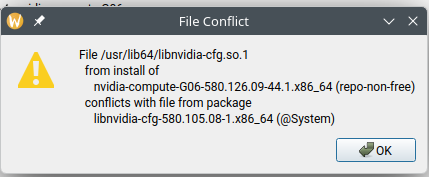
So I tried it with the 16 Updates that are pending. There I got a couple of conflicts, I choose to replace the package, even though they are the same version. When starting the installation. I got this error

No Idea how to clean this up.

So I uninstalled that libnvidia-cfg by ignoring dependencies, then installed the updates, resolving conflicts like so:

Problem mit dem installierten dkms-3.3.0-1.noarch

    [x] dkms-3.3.0-1.1.noarch von Hersteller openSUSE installieren
und dkms-3.3.0-1.noarch von Hersteller NVIDIA ersetzen

    [ ] veraltetes dkms-3.3.0-1.noarch beibehalten


Problem mit dem installierten dkms-bash-completion-3.3.0-1.noarch

    [x] dkms-bash-completion-3.3.0-1.1.noarch von Hersteller openSUSE installieren
und dkms-bash-completion-3.3.0-1.noarch von Hersteller NVIDIA ersetzen

    [ ] veraltetes dkms-bash-completion-3.3.0-1.noarch beibehalten


Problem mit dem installierten libnvidia-egl-gbm1-1.1.2.1-150700.12.1.x86_64

    [x] libnvidia-egl-gbm1-1.1.3-1.1.x86_64 von Hersteller openSUSE installieren
und libnvidia-egl-gbm1-1.1.2.1-150700.12.1.x86_64 von Hersteller obs://build.opensuse.org/home:scaronni ersetzen

    [ ] veraltetes libnvidia-egl-gbm1-1.1.2.1-150700.12.1.x86_64 beibehalten


Problem mit dem installierten libnvidia-egl-gbm1-32bit-1.1.2.1-150700.12.1.x86_64

    [ ] veraltetes libnvidia-egl-gbm1-32bit-1.1.2.1-150700.12.1.x86_64 beibehalten

    [x] libnvidia-egl-gbm1-32bit-1.1.3-1.1.x86_64 von Hersteller openSUSE installieren
und libnvidia-egl-gbm1-32bit-1.1.2.1-150700.12.1.x86_64 von Hersteller obs://build.opensuse.org/home:scaronni ersetzen


Problem mit dem installierten libnvidia-egl-wayland1-1.1.21-150700.1.1.x86_64

    [x] libnvidia-egl-wayland1-1.1.21-54.1.x86_64 von Hersteller obs://build.suse.de/Proprietary:X11:Drivers installieren
und libnvidia-egl-wayland1-1.1.21-150700.1.1.x86_64 von Hersteller obs://build.opensuse.org/home:scaronni ersetzen

    [ ] veraltetes libnvidia-egl-wayland1-1.1.21-150700.1.1.x86_64 beibehalten


Problem mit dem installierten libnvidia-egl-wayland1-32bit-1.1.21-150700.1.1.x86_64

    [x] libnvidia-egl-wayland1-32bit-1.1.21-54.1.x86_64 von Hersteller obs://build.suse.de/Proprietary:X11:Drivers installieren
und libnvidia-egl-wayland1-32bit-1.1.21-150700.1.1.x86_64 von Hersteller obs://build.opensuse.org/home:scaronni ersetzen

    [ ] veraltetes libnvidia-egl-wayland1-32bit-1.1.21-150700.1.1.x86_64 beibehalten


Problem mit dem installierten libnvidia-gpucomp-580.105.08-1.x86_64

    [x] libnvidia-gpucomp-580.126.09-44.1.x86_64 von Hersteller obs://build.suse.de/Proprietary:X11:Drivers installieren
und libnvidia-gpucomp-580.105.08-1.x86_64 von Hersteller NVIDIA ersetzen

    [ ] veraltetes libnvidia-gpucomp-580.105.08-1.x86_64 beibehalten


Problem mit dem installierten libnvidia-ml-580.105.08-1.x86_64

    [x] nvidia-compute-G06-580.126.09-44.1.x86_64 von Hersteller obs://build.suse.de/Proprietary:X11:Drivers installieren
und libnvidia-ml-580.105.08-1.x86_64 von Hersteller NVIDIA ersetzen

    [ ] veraltetes libnvidia-ml-580.105.08-1.x86_64 beibehalten


Problem mit dem installierten libvdpau1-32bit-1.5-150700.41.1.x86_64

    [x] libvdpau1-32bit-1.5-5.1.x86_64 von Hersteller openSUSE installieren
und libvdpau1-32bit-1.5-150700.41.1.x86_64 von Hersteller obs://build.opensuse.org/home:scaronni ersetzen

    [ ] veraltetes libvdpau1-32bit-1.5-150700.41.1.x86_64 beibehalten


Problem mit dem installierten nvidia-common-G06-580.105.08-1.x86_64

    [x] nvidia-common-G06-580.126.09-44.1.x86_64 von Hersteller obs://build.suse.de/Proprietary:X11:Drivers installieren
und nvidia-common-G06-580.105.08-1.x86_64 von Hersteller NVIDIA ersetzen

    [ ] veraltetes nvidia-common-G06-580.105.08-1.x86_64 beibehalten


Problem mit dem installierten nvidia-compute-G06-580.105.08-1.x86_64

    [x] nvidia-compute-G06-580.126.09-44.1.x86_64 von Hersteller obs://build.suse.de/Proprietary:X11:Drivers installieren
und nvidia-compute-G06-580.105.08-1.x86_64 von Hersteller NVIDIA ersetzen

    [ ] veraltetes nvidia-compute-G06-580.105.08-1.x86_64 beibehalten


Problem mit dem installierten nvidia-compute-utils-G06-580.105.08-1.x86_64

    [x] nvidia-compute-utils-G06-580.126.09-44.1.x86_64 von Hersteller obs://build.suse.de/Proprietary:X11:Drivers installieren
und nvidia-compute-utils-G06-580.105.08-1.x86_64 von Hersteller NVIDIA ersetzen

    [ ] veraltetes nvidia-compute-utils-G06-580.105.08-1.x86_64 beibehalten


Problem mit dem installierten nvidia-gl-G06-580.105.08-1.x86_64

    [x] nvidia-gl-G06-580.126.09-44.1.x86_64 von Hersteller obs://build.suse.de/Proprietary:X11:Drivers installieren
und nvidia-gl-G06-580.105.08-1.x86_64 von Hersteller NVIDIA ersetzen

    [ ] veraltetes nvidia-gl-G06-580.105.08-1.x86_64 beibehalten


Problem mit dem installierten nvidia-modprobe-580.105.08-1.x86_64

    [x] nvidia-modprobe-580.126.09-22.1.x86_64 von Hersteller obs://build.suse.de/Proprietary:X11:Drivers installieren
und nvidia-modprobe-580.105.08-1.x86_64 von Hersteller NVIDIA ersetzen

    [ ] veraltetes nvidia-modprobe-580.105.08-1.x86_64 beibehalten


Problem mit dem installierten nvidia-persistenced-580.105.08-1.x86_64

    [x] nvidia-persistenced-580.126.09-2.1.x86_64 von Hersteller obs://build.suse.de/Proprietary:X11:Drivers installieren
und nvidia-persistenced-580.105.08-1.x86_64 von Hersteller NVIDIA ersetzen

    [ ] veraltetes nvidia-persistenced-580.105.08-1.x86_64 beibehalten


Problem mit dem installierten nvidia-video-G06-580.105.08-1.x86_64

    [ ] veraltetes nvidia-video-G06-580.105.08-1.x86_64 beibehalten

    [x] nvidia-video-G06-580.126.09-44.1.x86_64 von Hersteller obs://build.suse.de/Proprietary:X11:Drivers installieren
und nvidia-video-G06-580.105.08-1.x86_64 von Hersteller NVIDIA ersetzen

Now this seems to have worked.

This screenshot shows that a newer candidate version for those blue packages is available, but not selected for installation / update. To mark the candidate version for update, just click on the icon on the left of the package name. If you select any other alternative version from the list at the bottom, this will happen automatically.

A package version in red means that the candidate package would be a downgrade in this context: You already have a version installed that is newer than any alternate version, and the version that you have installed is not or no longer available in that list on the bottom.

The file list conflict in the other screenshot is more difficult to fix. In this case, I would hope that updating all nvidia packages to 580.126 should resolve it.

This topic was automatically closed 7 days after the last reply. New replies are no longer allowed.