In my system both GPUs are showing up as llvmpipe and not as their respective Intel integrated and NVidia RTX4090. The Intel is in use and I cannot switch to the NVidia despite having the opensource or proprietary drivers (570.xx) installed. When I use the widget in KDE Plasma to switch GPU it won’t switch (even though I installed “suse-prime”). Also to note, “nomodeset” is in my grub config. How do I fix this without disabling the integrated GPU? How do I get the system to recognize these GPUs for what they are and not the generic “llvmpipe”. Thank you.

@JimmyTexas don’t use suse-prime that is for older optimus hardware. So you need to get rid of that, anything bbswitch/bumblebee related and also removed from initrd.
The modern way is Prime Render Offload with the likes of switcherooctl.
This also needs to be removed.
That had to be added to even get the installer to load opensuse on the system. Remove it at this point is okay?
It is only needed to get the system booted when no video driver is installed.
1 Like
It appears switcher00ctl is already on my system. Prime Render offload is not showing up in Yast or Discover even though I’ve got both OSS and non-free repositories enabled. Where should that be obtained from?
@JimmyTexas it’s the suse-prime stuff you need to ensure is gone. The switcherooctl service is for Prime Render offload to the nvidia gpu when needed.
Many applications (well they do in GNOME) use the Nvidia GPU automatically these days. You can see this activity running the likes of nvtop.
You can also force the use of aspects via a /etc/environment file.
A quick way to confirm all is working is with for example switcherooctl list and switcherooctl inxi -Gxxz
Oh, you likely need to add nvidia_drm.modeset=1 to the kernel boot options.
Likewise the iGPU has features for hardware encode/decode OTB with guc/huc. Then the pending switch from i915 to xe driver.
Again, it’s a matter of figuring out what works for you with your setup and workflow.
I’ll look into this. Big thing for me is to be able to use multiple 4Kx60FPS screens along with the integral 165FPS screen. This is something the KDE Plasma desktop is just not doing right now and I figured GPU is the place to look (before I get into turning up my OBS Studio stuff). Right now if I connect just one of my two usual external screens I cannot mirror or extend the desktop. I get some graphics and mouse movement but nothing on the second display is usable. This is one thing Linux Mint actually did really well on its own after the NVidia drivers were loaded. LM just didn’t support all the newer hardware well and I figured it’d be two major releases before they even got near kernel 6.15.
So I added that parameter to the boot options and everything was working good for the Nvidia yesterday. Today after updates I now have two issues. One is that the NVidia card doesn’t even show up and my BIOS boot screen just hangs a very long time before the computer boots. No seeing any errors on bios boot though (or logs in the bios). Received about 200 system updates today that I just let go through. Any thoughts?
So I added that parameter to the boot options and everything was working good for the Nvidia yesterday. Today after updates I now have two issues. One is that the NVidia card doesn’t even show up in system information or “mission center”.
Updated this post after disabling the integrated GPU to include errors with boot into OpenSuse for “Failed to star NVIDIA Persistence Daemon”. This will not allow me into the desktop as I just get stuck at localhost login on the cli (troubleshooting mode). Bios hang resolved.
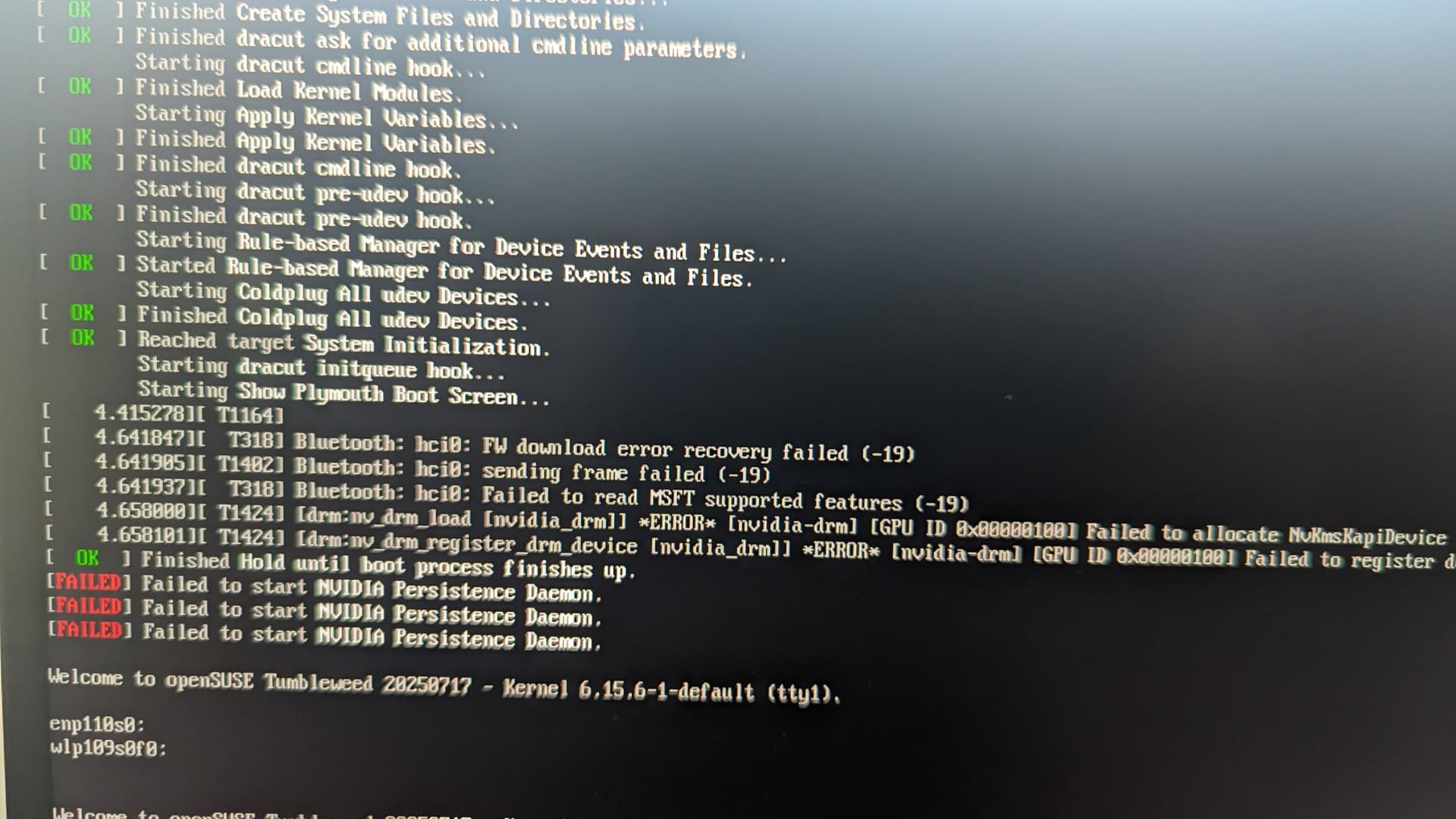
Okay, kernel issue I suspect, booted to 6.15.5 under advanced options and see both GPUs now.
@JimmyTexas force the re-install on the nvidia kmp.
This topic was automatically closed 7 days after the last reply. New replies are no longer allowed.