Hello
Trying to install NVidia 580 driver with Myrlyn.
Receiving an error:
Impossible de fournir le paquet nvidia-common-G06-580.105.08-lp160.44.1.x86_64 (NVIDIA). Souhaitez-vous essayer à nouveau de le récupérer ?

[NVIDIA|https://download.nvidia.com/opensuse/leap/16.0] Impossible de fournir './x86_64/nvidia-common-G06-580.105.08-lp160.44.1.x86_64.rpm' à partir du dépôt 'NVIDIA'
Historique :
 - Erreur de téléchargement (curl) pour 'https://download.nvidia.com/opensuse/leap/16.0/x86_64/nvidia-common-G06-580.105.08-lp160.44.1.x86_64.rpm' :
   Code d'erreur : Server returned an error for the given request. Curl error (56)
   Message d'erreur : Recv failure: Connexion ré-initialisée par le correspondant
 - Can't provide ./x86_64/nvidia-common-G06-580.105.08-lp160.44.1.x86_64.rpm
I am on Leap 16, have a quadro M1200 graphic card (with optimus system)
I can translate from French to English if needed
Thanks for your help.
Looks like a transient problem, all normal here as of this writing: please try again (or maybe you already did so meanwhile).
For translations, prepending LANG=Cas in:
LANG=C zypper in nvidia-common-G06
should do the trick.
Hello.
After two days, Myrlyn was finally able to install the drivers.
Anyway the MOK enrollment prompt didn’t appear at startup.
So the driver is not working.
Should I try a manual installation?
Try the one of the wiki - In case the import fails:
Mok Example
What happens when you run zypper install-new-recommends?
Hello Sauerland.
I try to do “mokutil --import /usr/share/nvidia-pubkeys/MOK-nvidia-gfxG0-<driver_version>-<kernel_flavor>.der --root-pw” but am not completely sure of the parameters for the driver version and kernel_flavor.
The driver is nvidia-gl-G06-580.105.08-lp160.44.1.x86_64
Should the .der be already in /usr/share folder, which is not the case?
Hello @kmullins0295
if I enter this command, do I get only the Nvidia driver or also differents softwares?
I tried " zypper install-new-recommends" but there is one error:
nvidia-driver-G06-kmp-default-580.105.08_k6.12.0_160000.5-lp160.44.1.x86_64.rpm [Recv failure: Connexion ré-initialisée par le correspondant]
Seems teh connection cannot be finished when downloading
Probably a firewall or a SEL error?
Use the bash-completion:
Type in or copy:
now use the TAB key once and maybe you get something like:
stephan@linux64:~> mokutil --import /usr/share/nvidia-pubkeys/MOK-nvidia-driver-G06-580.
Or it will expand to something like:
mokutil --import /usr/share/nvidia-pubkeys/MOK-nvidia-driver-G06-580.105.08-lp160.44.1-default.der
Maybe you get another Version of the key…
Thanks
I shutted downn the firewall and made zypper install-new-recommends and it installed the drivers.
Then during the MOK enrollment, it refused my root password.
So I had to do the method of Sauerland to ask for signing again and it asked me the password to enter. Then reboot and MOK succesfull enrollment.
Thanks a lot to you
A last question:
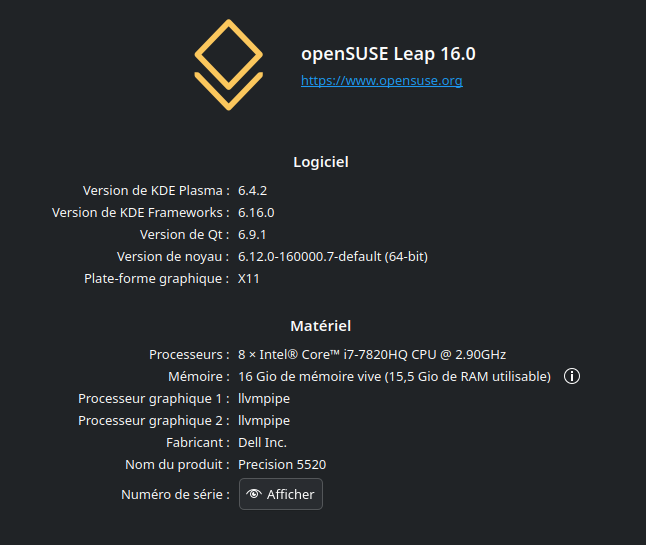
Amazingly when looking in KDE system information, I have two GPU but they are labelled llvmpipe.
I also tryed switcherootctl
switcherooctl list Device: 0 Name: NVIDIA Corporation GM107GLM [Quadro M1200 Mobile] Default: yes Environment: __GLX_VENDOR_LIBRARY_NAME=nvidia __NV_PRIME_RENDER_OFFLOAD=1 __VK_LAYER_NV_optimus=NVIDIA_only
but I only see one card.
So I do not know which card is being used currently
Hi
Any supplementary help for this llvm problem. So far I can read that mean that the system do not really use graphic cards
Post:
LANG=C inxi -Gaz
LANG=C zypper se -si nvidia
Here are the logs.
ba@localhost:~> LANG=C inxi -Gaz
Graphics:
  Device-1: Intel HD Graphics 630 vendor: Dell driver: N/A alternate: i915
    arch: Gen-9.5 process: Intel 14nm built: 2016-20 bus-ID: 00:02.0
    chip-ID: 8086:591b class-ID: 0300
  Device-2: NVIDIA GM107GLM [Quadro M1200 Mobile] vendor: Dell
    driver: nvidia v: 580.105.08 alternate: nouveau,nvidia_drm non-free: 550.xx+
    status: current (as of 2024-09; EOL~2026-12-xx) arch: Maxwell code: GMxxx
    process: TSMC 28nm built: 2014-2019 pcie: gen: 1 speed: 2.5 GT/s lanes: 16
    link-max: gen: 3 speed: 8 GT/s bus-ID: 01:00.0 chip-ID: 10de:13b6
    class-ID: 0302
  Device-3: Sunplus Innovation Integrated_Webcam_HD driver: uvcvideo
    type: USB rev: 2.0 speed: 480 Mb/s lanes: 1 mode: 2.0 bus-ID: 1-12:3
    chip-ID: 1bcf:2b95 class-ID: 0e02
  Display: x11 server: X.Org v: 21.1.15 with: Xwayland v: 24.1.6
    compositor: kwin_x11 driver: X: loaded: modesetting,nvidia unloaded: vesa
    alternate: fbdev,intel,nouveau,nv gpu: nvidia display-ID: :0 screens: 1
  Screen-1: 0 s-res: 1920x1080 s-dpi: 96 s-size: 508x285mm (20.00x11.22")
    s-diag: 582mm (22.93")
  Monitor-1: Unknown-1 mapped: None-1 res: 1920x1080 hz: 60 size: N/A
    modes: 1920x1080
  API: EGL v: 1.5 hw: drv: nvidia platforms: device: 0 drv: nvidia
    surfaceless: drv: nvidia x11: drv: swrast inactive: gbm,wayland
  API: OpenGL v: 4.6.0 compat-v: 4.5 vendor: mesa v: 24.3.3 glx-v: 1.4
    direct-render: yes renderer: llvmpipe (LLVM 19.1.7 256 bits)
    device-ID: ffffffff:ffffffff memory: 15.11 GiB unified: yes
  API: Vulkan v: 1.4.309 layers: 3 device: 0 type: discrete-gpu
    name: Quadro M1200 driver: N/A device-ID: 10de:13b6 surfaces: xcb,xlib
LANG=C zypper se -si nvidia
Loading repository data...
Reading installed packages...

S  | Name                          | Type    | Version                                | Arch   | Repository
---+-------------------------------+---------+----------------------------------------+--------+---------------------------------------------------------------------
i  | kernel-firmware-nvidia        | package | 20250516-160000.2.2                    | noarch | https://download.opensuse.org/distribution/leap/16.0/repo/oss/x86_64
i  | kernel-firmware-nvidia        | package | 20250516-160000.2.2                    | noarch | repo-oss (16.0)
i  | libnvidia-egl-gbm1            | package | 1.1.2-160000.3.2                       | x86_64 | https://download.opensuse.org/distribution/leap/16.0/repo/oss/x86_64
i  | libnvidia-egl-gbm1            | package | 1.1.2-160000.3.2                       | x86_64 | repo-oss (16.0)
i  | libnvidia-egl-wayland1        | package | 1.1.20-lp160.51.1                      | x86_64 | repo-non-free (16.0)
i  | libnvidia-egl-x111            | package | 1.0.3-lp160.21.1                       | x86_64 | repo-non-free (16.0)
i  | libnvidia-gpucomp             | package | 580.105.08-lp160.44.1                  | x86_64 | repo-non-free (16.0)
i+ | nvidia-common-G06             | package | 580.105.08-lp160.44.1                  | x86_64 | repo-non-free (16.0)
i  | nvidia-compute-G06            | package | 580.105.08-lp160.44.1                  | x86_64 | repo-non-free (16.0)
i  | nvidia-compute-utils-G06      | package | 580.105.08-lp160.44.1                  | x86_64 | repo-non-free (16.0)
i  | nvidia-driver-G06-kmp-default | package | 580.105.08_k6.12.0_160000.5-lp160.44.1 | x86_64 | repo-non-free (16.0)
i  | nvidia-driver-G06-kmp-meta    | package | 580.105.08-lp160.24.1                  | x86_64 | repo-non-free (16.0)
i  | nvidia-gl-G06                 | package | 580.105.08-lp160.44.1                  | x86_64 | repo-non-free (16.0)
i  | nvidia-modprobe               | package | 580.105.08-lp160.20.1                  | x86_64 | repo-non-free (16.0)
i  | nvidia-persistenced           | package | 580.105.08-lp160.2.1                   | x86_64 | repo-non-free (16.0)
i  | nvidia-userspace-meta-G06     | package | 580.105.08-lp160.24.1                  | x86_64 | repo-non-free (16.0)
i+ | nvidia-video-G06              | package | 580.105.08-lp160.44.1                  | x86_64 | repo-non-free (16.0)
i  | openSUSE-repos-Leap-NVIDIA    | package | 20250714.a450212-lp160.3.1             | x86_64 | https://download.opensuse.org/distribution/leap/16.0/repo/oss/x86_64
i  | openSUSE-repos-Leap-NVIDIA    | package | 20250714.a450212-lp160.3.1             | x86_64 | repo-oss (16.0)

    Note: For an extended search including not yet activated remote resources please use 'zypper
    search-packages'.
discrete-gpu
you need switcheroo or something else to switch between both graphic cards?
Post also:
cat /proc/cmdline
Hi
I found the solution: I had “nomodeset” in grub settings since it was necessary for the Agama installer.
I removed it and it work !!!
I already have switchrootctl.
Thanks for your Help

Thats why I ask:
But fine it is now running.