No free space in /boot/efi for new kernel error during update

Hello during the zypper dup update today to install 20240725 i got the following error:

“Error: No free space in /boot /efi for new kernel
ERROR: can’t find uuid ‘xxxxxxxx-xxxx-xxxx-xxxx-xxxxxxxxxxxx’ on ‘/.snapshot/679/snapshot’
snapshot check failed.not adding snapshot 279
snapshot check failed. not adding snapshot 280

etc.”

After reboot PC failed to boot into GUI so i had to rollback to previous snapshot. After rollback i ran a df -h command and it shows dev/sdc1 /boot/efi used 9% (Size 94MB, available 86MB).
How can I solve this issue?

1 Like

Hey,
maybe is this solution for you:

sudo zypper purge-kernels

Are you using systemd-boot?

Hi,

Nothing changed after running purge-kernels. Output:

Configuration: latest, latest-1,6.4.11-1, running
Running kernel release: 6.9.6-1-default
Running kernel arch: x86_64

Resolving package dependencies…
Nothing to do.

Yes. Now that you mentioned /sys/firmware/efi/efivars is used 100% (Size:128K Used:125K). Maybe this has to do anything with the problem?

Self inflicted wound then. 94MB is barely enough for two kernels and there are kernels from the previous snapshots that must be kept as well. I wonder how you managed to consume just 8MB on ESP when the kernel-default alone is 14MB.

Ok. How big the /boot/efi partition should be, is 500MB enough? Is it possible to extend the existing partition /boot/efi or reinstall the whole OS?

How should we know? If you are using systemd-boot, all kernels and initrds are kept there. So, you need enough space to keep them across all snapshots.

systemd-boot is not default, any reason you use it? Did you read the big red warning about it being work in progress?

It is possible if there is enough free space adjacent to this partition. ESP need not be at the beginning so it is also possible to create new partition and use it as ESP.

How to make sure I really use the systemd-boot? Yast shows it as installed.
Tree /boot/efi/ output does’t show any systemd systemd-bootx64.efi entry.
I’ve been using and updating OpenSuse for a year and never had such issue. I also have a Windows 8.1 installed on a second HDD.

@Wtrfull Is this kernel still needed: 6.4.11-1 if so remove and purge kernels again and see if it helps…

May be you should have asked this question before replying “yes”?

grep '^LOADER_TYPE' /etc/sysconfig/bootloader
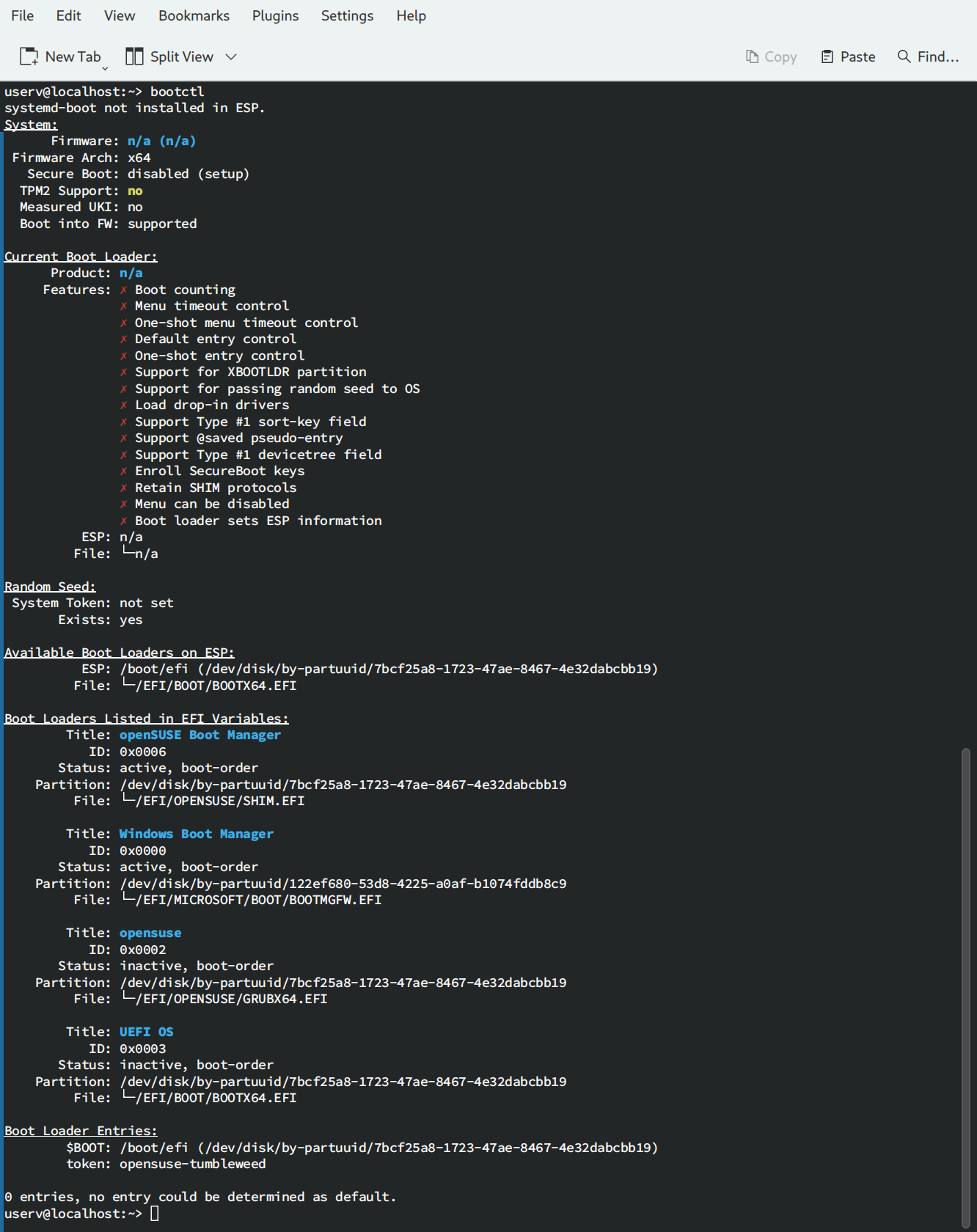
bootctl

Sorry, I should have asked.

LOADER_TYPE=“grub2-efi”

bootctl output:

So, you are using grub2.

I cannot read anything on this tiny image. It is still a mystery to me why would anyone make a screenshot of text instead of simply pasting this text in the message.

Anyway, show the complete command you use to update and its full output with all error messages. As preformatted text, not as image. Copy and paste, not type in manually. As well as the output of

findmnt --real -u  +o partuuid,size,used

Removed the 6.4.11-1 and purged kernels, same error.

findmnt --real -u +o partuuid,size,used

There is no output for this command, however:

findmnt --real -u

returns

TARGET                   SOURCE                              FSTYPE      OPTIONS
/                        /dev/sdc2[/@/.snapshots/739/snapshot]
│                                                            btrfs       rw,relatime,ssd,discard=async,space_cache=v2,subvolid=1036,subvol=/@/.snapshots/739/snapshot
├─/run/user/1000/doc     portal                              fuse.portal rw,nosuid,nodev,relatime,user_id=1000,group_id=1000
├─/opt                   /dev/sdc2[/@/opt]                   btrfs       rw,relatime,ssd,discard=async,space_cache=v2,subvolid=261,subvol=/@/opt
├─/.snapshots            /dev/sdc2[/@/.snapshots]            btrfs       rw,relatime,ssd,discard=async,space_cache=v2,subvolid=264,subvol=/@/.snapshots
├─/boot/grub2/i386-pc    /dev/sdc2[/@/boot/grub2/i386-pc]    btrfs       rw,relatime,ssd,discard=async,space_cache=v2,subvolid=263,subvol=/@/boot/grub2/i386-pc
├─/boot/grub2/x86_64-efi /dev/sdc2[/@/boot/grub2/x86_64-efi] btrfs       rw,relatime,ssd,discard=async,space_cache=v2,subvolid=262,subvol=/@/boot/grub2/x86_64-efi
├─/root                  /dev/sdc2[/@/root]                  btrfs       rw,relatime,ssd,discard=async,space_cache=v2,subvolid=260,subvol=/@/root
├─/srv                   /dev/sdc2[/@/srv]                   btrfs       rw,relatime,ssd,discard=async,space_cache=v2,subvolid=259,subvol=/@/srv
├─/usr/local             /dev/sdc2[/@/usr/local]             btrfs       rw,relatime,ssd,discard=async,space_cache=v2,subvolid=258,subvol=/@/usr/local
├─/var                   /dev/sdc2[/@/var]                   btrfs       rw,relatime,ssd,discard=async,space_cache=v2,subvolid=257,subvol=/@/var
├─/boot/efi              /dev/sdc1                           vfat        rw,relatime,fmask=0022,dmask=0022,codepage=437,iocharset=iso8859-1,shortname=mixed,utf8,errors=remount-ro
└─/home                  /dev/sdc3                           ext4        rw,relatime,data=ordered

update process:

userv@localhost:~> sudo zypper dup
[sudo] password for root: 
Refreshing service 'NVIDIA'.
Refreshing service 'openSUSE'.
Loading repository data...
Reading installed packages...
Warning: You are about to do a distribution upgrade with all enabled repositories. Make sure these repositories are compatible before you continue. See 'man zypper' for more information about this command.
Computing distribution upgrade...

Problem: 1: problem with the installed bleachbit-4.6.0-1.1.noarch
 Solution 1: install bleachbit-4.6.0-1.3.noarch from vendor openSUSE
  replacing bleachbit-4.6.0-1.1.noarch from vendor obs://build.opensuse.org/home:andrew_z
 Solution 2: keep obsolete bleachbit-4.6.0-1.1.noarch

Choose from above solutions by number or cancel [1/2/c/d/?] (c): 2

Resolving dependencies...
Computing distribution upgrade...

The following 4 items are locked and will not be changed by any action:
 Available:
  tigervnc tigervnc-x11vnc xorg-x11-Xvnc
 Installed:
  bleachbit

The following 1477 packages are going to be upgraded:
  
The following product is going to be upgraded:
  openSUSE Tumbleweed  20240628-0 -> 20240726-0

The following 2 packages are going to be downgraded:
  python-rpm-generators python-rpm-macros

The following 12 NEW packages are going to be installed:
  kernel-default-6.9.9-1.1 kernel-default-devel-6.9.9-1.1 kernel-devel-6.9.9-1.1 libplacebo349 libpoppler139 libpoppler-cpp1 libreoffice-qt5 libSPIRV-Tools-2024_3 libvapoursynth-69 pinentry-qt6 qt6-sensors
  xdg-utils-screensaver

The following 11 packages are going to be REMOVED:
  libopencv409 libplacebo338 libpoppler135 libpoppler-cpp0 libSPIRV-Tools-2024_1 libvapoursynth-68 pinentry-qt5 translation-update translation-update-en_GB translation-update-lt translation-update-ru

The following package requires a system reboot:
  kernel-default-6.9.9-1.1

1477 packages to upgrade, 2 to downgrade, 12 new, 11 to remove.
Overall download size: 2,59 GiB. Already cached: 0 B. After the operation, additional 306,0 MiB will be used.

    Note: System reboot required.

Backend:  classic_rpmtrans
Continue? [y/n/v/...? shows all options] (y):  y

(Use arrows or pgUp/pgDown keys to scroll the text by lines or pages.)

In order to install 'nvidia-compute-G06-32bit', you must agree to terms of the following license agreement:
In order to install 'nvidia-compute-G06', you must agree to terms of the following license agreement:
In order to install 'nvidia-compute-utils-G06', you must agree to terms of the following license agreement:
In order to install 'nvidia-driver-G06-kmp-default', you must agree to terms of the following license agreement:
In order to install 'nvidia-gl-G06-32bit', you must agree to terms of the following license agreement:
In order to install 'nvidia-gl-G06', you must agree to terms of the following license agreement:
In order to install 'nvidia-utils-G06', you must agree to terms of the following license agreement:
In order to install 'nvidia-video-G06-32bit', you must agree to terms of the following license agreement:
In order to install 'nvidia-video-G06', you must agree to terms of the following license agreement:

           License For Customer Use of NVIDIA Software

( 808/1501) Installing: kernel-firmware-all-20240712-1.1.noarch ............................................................................................................[done]
snapshot check failed. not adding snapshot 279
snapshot check failed. not adding snapshot 280
snapshot check failed. not adding snapshot 349
snapshot check failed. not adding snapshot 350
snapshot check failed. not adding snapshot 351
snapshot check failed. not adding snapshot 352
snapshot check failed. not adding snapshot 353
snapshot check failed. not adding snapshot 354
snapshot check failed. not adding snapshot 357
snapshot check failed. not adding snapshot 358
snapshot check failed. not adding snapshot 361
snapshot check failed. not adding snapshot 362
snapshot check failed. not adding snapshot 367
snapshot check failed. not adding snapshot 368
snapshot check failed. not adding snapshot 369
snapshot check failed. not adding snapshot 370
snapshot check failed. not adding snapshot 371
snapshot check failed. not adding snapshot 372
snapshot check failed. not adding snapshot 373
snapshot check failed. not adding snapshot 374
snapshot check failed. not adding snapshot 375
snapshot check failed. not adding snapshot 376
snapshot check failed. not adding snapshot 377
snapshot check failed. not adding snapshot 378
Error: No free space in /boot/efi for new kernel
CA enrolled. Skip /etc/uefi/certs/1F673297.crt
warning: %post(kernel-default-6.9.9-1.1.x86_64) scriptlet failed, exit status 1
( 809/1501) Installing: kernel-default-6.9.9-1.1.x86_64 ....................................................................................................................[done]
( 810/1501) Installing: libdvdcss2-1.4.3+3-10.9.x86_64 .....................................................................................................................[done]

(1501/1501) Installing: phonon-vlc-qt5-0.12.0-2.3.x86_64 ...................................................................................................................[done]
%posttrans(coreutils-9.5-2.1.x86_64) script output:
snapshot check failed. not adding snapshot 279
snapshot check failed. not adding snapshot 280
snapshot check failed. not adding snapshot 349
snapshot check failed. not adding snapshot 350
snapshot check failed. not adding snapshot 351
snapshot check failed. not adding snapshot 352
snapshot check failed. not adding snapshot 353
snapshot check failed. not adding snapshot 354
snapshot check failed. not adding snapshot 357
snapshot check failed. not adding snapshot 358
snapshot check failed. not adding snapshot 361
snapshot check failed. not adding snapshot 362
snapshot check failed. not adding snapshot 367
snapshot check failed. not adding snapshot 368
snapshot check failed. not adding snapshot 369
snapshot check failed. not adding snapshot 370
snapshot check failed. not adding snapshot 371
snapshot check failed. not adding snapshot 372
snapshot check failed. not adding snapshot 373
snapshot check failed. not adding snapshot 374
snapshot check failed. not adding snapshot 375
snapshot check failed. not adding snapshot 376
snapshot check failed. not adding snapshot 377
snapshot check failed. not adding snapshot 378
Error: No free space in /boot/efi for new kernel
%posttrans(java-11-openjdk-headless-11.0.24.0-1.1.x86_64) script output:
++ /usr/bin/file --mime-type -b /var/lib/ca-certificates/java-cacerts
++ stat -c %s /usr/lib64/jvm/java-11-openjdk-11/lib/security/cacerts
++ /usr/bin/file --mime-type -b -L /usr/lib64/jvm/java-11-openjdk-11/lib/security/cacerts
%posttrans(grub2-x86_64-efi-2.12-22.1.noarch) script output:
++ cat /run/fde-tpm-helper/update
++ uniq
Running post-transaction scripts ...........................................................................................................................................[done]
There are running programs which still use files and libraries deleted or updated by recent upgrades. They should be restarted to benefit from the latest updates. Run 'zypper ps -s' to list these programs.

Since the last system boot core libraries or services have been updated.
Reboot is suggested to ensure that your system benefits from these updates.

My apologies, it should have been

findmnt --real -u -o +partuuid,size,used

These come from the snapper. Most likely you have orphaned metadata without subvoluumes. Show

snapper list
btrfs subvolume list /

Is sdbootutil package installed?

Hi,

userv@localhost:~> findmnt --real -u -o +partuuid,size,used
TARGET SOURCE FSTYPE      OPTIONS                                                                                                   PARTUUID                               SIZE   USED
/      /dev/sdc2[/@/.snapshots/743/snapshot]
│             btrfs       rw,relatime,ssd,discard=async,space_cache=v2,subvolid=1040,subvol=/@/.snapshots/743/snapshot              ddc51651-1502-4371-bbb5-0e440cccf649  74,5G    31G
├─/run/user/1000/doc
│      portal fuse.portal rw,nosuid,nodev,relatime,user_id=1000,group_id=1000                                                                                                   
├─/root
│      /dev/sdc2[/@/root]
│             btrfs       rw,relatime,ssd,discard=async,space_cache=v2,subvolid=260,subvol=/@/root                                  ddc51651-1502-4371-bbb5-0e440cccf649  74,5G    31G
├─/srv /dev/sdc2[/@/srv]
│             btrfs       rw,relatime,ssd,discard=async,space_cache=v2,subvolid=259,subvol=/@/srv                                   ddc51651-1502-4371-bbb5-0e440cccf649  74,5G    31G
├─/var /dev/sdc2[/@/var]
│             btrfs       rw,relatime,ssd,discard=async,space_cache=v2,subvolid=257,subvol=/@/var                                   ddc51651-1502-4371-bbb5-0e440cccf649  74,5G    31G
├─/opt /dev/sdc2[/@/opt]
│             btrfs       rw,relatime,ssd,discard=async,space_cache=v2,subvolid=261,subvol=/@/opt                                   ddc51651-1502-4371-bbb5-0e440cccf649  74,5G    31G
├─/.snapshots
│      /dev/sdc2[/@/.snapshots]
│             btrfs       rw,relatime,ssd,discard=async,space_cache=v2,subvolid=264,subvol=/@/.snapshots                            ddc51651-1502-4371-bbb5-0e440cccf649  74,5G    31G
├─/boot/grub2/x86_64-efi
│      /dev/sdc2[/@/boot/grub2/x86_64-efi]
│             btrfs       rw,relatime,ssd,discard=async,space_cache=v2,subvolid=262,subvol=/@/boot/grub2/x86_64-efi                 ddc51651-1502-4371-bbb5-0e440cccf649  74,5G    31G
├─/usr/local
│      /dev/sdc2[/@/usr/local]
│             btrfs       rw,relatime,ssd,discard=async,space_cache=v2,subvolid=258,subvol=/@/usr/local                             ddc51651-1502-4371-bbb5-0e440cccf649  74,5G    31G
├─/boot/grub2/i386-pc
│      /dev/sdc2[/@/boot/grub2/i386-pc]
│             btrfs       rw,relatime,ssd,discard=async,space_cache=v2,subvolid=263,subvol=/@/boot/grub2/i386-pc                    ddc51651-1502-4371-bbb5-0e440cccf649  74,5G    31G
├─/boot/efi
│      /dev/sdc1
│             vfat        rw,relatime,fmask=0022,dmask=0022,codepage=437,iocharset=iso8859-1,shortname=mixed,utf8,errors=remount-ro 7bcf25a8-1723-47ae-8467-4e32dabcbb19  93,8M   7,8M
└─/home
       /dev/sdc3
              ext4        rw,relatime,data=ordered                                                                                  cd70f322-ec6c-4451-b3af-fb44d89daea0 373,9G 220,4G

userv@localhost:~> sudo snapper list
[sudo] password for root: 
   # │ Type   │ Pre # │ Date                          │ User │ Used Space │ Cleanup │ Description             │ Userdata
─────┼────────┼───────┼───────────────────────────────┼──────┼────────────┼─────────┼─────────────────────────┼──────────────
  0  │ single │       │                               │ root │            │         │ current                 │
736  │ pre    │       │ 2024 m. liepos 27 d. 17:51:21 │ root │   9,56 MiB │ number  │ zypp(zypper)            │ important=yes
737  │ post   │   736 │ 2024 m. liepos 27 d. 17:51:33 │ root │ 128,00 KiB │ number  │                         │ important=yes
738  │ single │       │ 2024 m. liepos 27 d. 17:55:31 │ root │ 400,00 KiB │ number  │ rollback backup of #721 │ important=yes
740  │ pre    │       │ 2024 m. liepos 27 d. 18:30:53 │ root │  12,00 MiB │ number  │ zypp(zypper)            │ important=yes
741  │ post   │   740 │ 2024 m. liepos 27 d. 19:17:23 │ root │   9,44 MiB │ number  │                         │ important=yes
742  │ single │       │ 2024 m. liepos 27 d. 20:42:05 │ root │   9,77 MiB │ number  │ rollback backup of #739 │ important=yes
743* │ single │       │ 2024 m. liepos 27 d. 20:42:16 │ root │   1,69 MiB │         │ writable copy of #740   │
744  │ pre    │       │ 2024 m. liepos 28 d. 09:33:00 │ root │ 848,00 KiB │ number  │ yast sw_single          │

userv@localhost:~> sudo btrfs subvolume list /
ID 256 gen 30 top level 5 path @
ID 257 gen 480108 top level 256 path @/var
ID 258 gen 480108 top level 256 path @/usr/local
ID 259 gen 476191 top level 256 path @/srv
ID 260 gen 480098 top level 256 path @/root
ID 261 gen 479649 top level 256 path @/opt
ID 262 gen 479524 top level 256 path @/boot/grub2/x86_64-efi
ID 263 gen 465416 top level 256 path @/boot/grub2/i386-pc
ID 264 gen 480097 top level 256 path @/.snapshots
ID 1033 gen 477863 top level 264 path @/.snapshots/736/snapshot
ID 1034 gen 477867 top level 264 path @/.snapshots/737/snapshot
ID 1035 gen 477878 top level 264 path @/.snapshots/738/snapshot
ID 1037 gen 479627 top level 264 path @/.snapshots/740/snapshot
ID 1038 gen 479527 top level 264 path @/.snapshots/741/snapshot
ID 1039 gen 479626 top level 264 path @/.snapshots/742/snapshot
ID 1040 gen 480100 top level 264 path @/.snapshots/743/snapshot
ID 1041 gen 480096 top level 264 path @/.snapshots/744/snapshot

Yast shows that sdbootutil and sdbootutil-snapper are installed.
A few months ago my SSD malfunctioned and went into warranty. I have got a new one recently and restored backup image from the old one. Maybe that’s where this got messed up.

Show

ls -lR /boot/efi

It is possible that snapper skips invalid snapshots. Show

ls /.snapshots
userv@localhost:~> ls -lR /boot/efi
/boot/efi:
total 6
drwxr-xr-x 4 root root 2048 spal.  30  2022 EFI
drwxr-xr-x 3 root root 2048 liep.  27 12:01 loader
drwxr-xr-x 6 root root 2048 liep.  27 16:42 opensuse-tumbleweed

/boot/efi/EFI:
total 4
drwxr-xr-x 2 root root 2048 liep.  27 12:01 boot
drwxr-xr-x 3 root root 2048 liep.  27 12:01 opensuse

/boot/efi/EFI/boot:
total 3880
-rwxr-xr-x 1 root root  934024 liep.  27 19:16 BOOTX64.EFI
-rwxr-xr-x 1 root root   86208 kov.   14 07:58 fallback.efi
-rwxr-xr-x 1 root root     155 liep.  27 19:16 grub.cfg
-rwxr-xr-x 1 root root 2099056 liep.  27 19:16 grub.efi
-rwxr-xr-x 1 root root  846096 liep.  27 19:16 MokManager.efi

/boot/efi/EFI/opensuse:
total 4124
-rwxr-xr-x 1 root root      64 liep.  27 12:01 boot.csv
-rwxr-xr-x 1 root root     155 liep.  30  2023 grub.cfg
-rwxr-xr-x 1 root root 2099056 liep.  19 12:59 grub.efi
-rwxr-xr-x 1 root root  331776 liep.  27 19:16 grubx64.efi
-rwxr-xr-x 1 root root      20 liep.  27 12:01 installed_by_sdbootutil
-rwxr-xr-x 1 root root  846096 kov.   14 07:58 MokManager.efi
-rwxr-xr-x 1 root root  934024 kov.   14 07:58 shim.efi
drwxr-xr-x 2 root root    2048 kov.   30 16:58 x86_64-efi

/boot/efi/EFI/opensuse/x86_64-efi:
total 4
-rwxr-xr-x 1 root root 3904 liep.  19 12:59 bli.mod

/boot/efi/loader:
total 4
drwxr-xr-x 2 root root 2048 kov.   30 16:58 entries
-rwxr-xr-x 1 root root   32 liep.  27 12:01 random-seed

/boot/efi/loader/entries:
total 0

/boot/efi/opensuse-tumbleweed:
total 8
drwxr-xr-x 2 root root 2048 liep.  30  2023 6.0.5-1-default
drwxr-xr-x 2 root root 2048 liep.  27 16:41 6.4.11-1-default
drwxr-xr-x 2 root root 2048 liep.  28 09:43 6.9.6-1-default
drwxr-xr-x 2 root root 2048 liep.  27 11:54 6.9.9-1-default

/boot/efi/opensuse-tumbleweed/6.0.5-1-default:
total 0

/boot/efi/opensuse-tumbleweed/6.4.11-1-default:
total 0

/boot/efi/opensuse-tumbleweed/6.9.6-1-default:
total 0

/boot/efi/opensuse-tumbleweed/6.9.9-1-default:
total 0
userv@localhost:~> sudo ls /.snapshots
[sudo] password for root: 
279  280  349  350  351  352  353  354  357  358  361  362  367  368  369  370  371  372  373  374  375  376  377  378  736  737  738  740  741  742  743  grub-snapshot.cfg