My experience of using firewall and scanning with HP network scanner without YaST

This is NOT a help request, which is why I am posting this here.

It is about setting up and using an HP scanner (in HP printer/scanner) on openSUSE LEAP-16.0 RC without YaST, where for the past ~20 years, I have always successfully used YaST to configure the scanner, without issues. In the process of doing this, I had to tune the LEAP-16.0 RC firewall a bit.

I thought to post this in a separate post, rather than push it into either my YaST alternatives thread or my “experience in installing a Printer thread without YaST” thread, both of which I started prior.

With regard to scanning …

I wanted to use the app xsane to scan , as that was how i scanned images in the past (after 1st configuring with YaST).

xsane

Of course, per Murphy’s law, xsane is NOT in the nominally LEAP-16.0 RC repositories.

However there is a version of xsane in the OBS repositories, and so I installed that version. I won’t spam the forum with how I did that, … I think most openSUSE users are very familiar with doing that.

Note this activity on my computer was done AFTER setting up my printer for network printing with my HP printer/scanner for printing. So I had previously installed hplip and previously run su -c hp-setup

Now before running xsane, I decided to see if the scanner could be detected so I ran scanimage -L :

oldcpu@desktop16rc:~> scanimage -L
device `hpaio:/net/DeskJet_2600_series?ip=192.168.31.46' is a Hewlett-Packard DeskJet_2600_series all-in-one
oldcpu@desktop16rc:~>

So that was good. The scanner can be seen.

So I typed xsane and obtained error: Failed to open device 'hapio/net/DeskJet_2600_series?ip=192.168.31.46': Error during device I/O

I suspected a firewall issue. My recollection is YaST used to open this for me automatically when I configured my HP network scanner.

Firewall

So i decided to check the firewall, only to find out firewall-config was not installed by default. So I installed it (using zypper).

Then I tried to run it. THAT took me a few tries.

The first try: sudo firewall-config failed with errors.

The second try: su -c firewall-config failed with errors.

The third try I first tired “su” by itself (changing to root). Then with root permissions (ie user root) I tried firewall-config , and that worked.

This brings up a GUI for the firewall. :+1: :slightly_smiling_face:

I then in the GUI, under services, selected to open the firewall for ‘sane’ (which I read elsewhere is port 6566/tcp ) .

I found it interesting I previously had to do nothing to the firewall, for my HP printer to work. My assumption is printing worked (without tuning the firewall for printing) as printing may have used port 9100/tcp (JetDirect) or port 631/tcp (IPP).

But I wanted to check that assumption:

I sent this concatinated command:

oldcpu@desktop16rc:~> sudo firewall-cmd --list-all --permanent 2>/dev/null && echo "---" && sudo ss -tulpn
public (default)
  target: default
  ingress-priority: 0
  egress-priority: 0
  icmp-block-inversion: no
  interfaces: 
  sources: 
  services: dhcpv6-client sane ssh
  ports: 
  protocols: 
  forward: yes
  masquerade: no
  forward-ports: 
  source-ports: 
  icmp-blocks: 
  rich rules: 
---
Netid       State        Recv-Q       Send-Q              Local Address:Port                Peer Address:Port       Process                                       
udp         UNCONN       0            0                         0.0.0.0:51962                    0.0.0.0:*           users:(("avahi-daemon",pid=987,fd=13))       
udp         UNCONN       0            0                     224.0.0.251:5353                     0.0.0.0:*           users:(("chrome",pid=2099,fd=164))           
udp         UNCONN       0            0                     224.0.0.251:5353                     0.0.0.0:*           users:(("chrome",pid=2099,fd=152))           
udp         UNCONN       0            0                         0.0.0.0:5353                     0.0.0.0:*           users:(("avahi-daemon",pid=987,fd=11))       
udp         UNCONN       0            0                       127.0.0.1:323                      0.0.0.0:*           users:(("chronyd",pid=1230,fd=5))            
udp         UNCONN       0            0                            [::]:5353                        [::]:*           users:(("avahi-daemon",pid=987,fd=12))       
udp         UNCONN       0            0                            [::]:55617                       [::]:*           users:(("avahi-daemon",pid=987,fd=14))       
udp         UNCONN       0            0                           [::1]:323                         [::]:*           users:(("chronyd",pid=1230,fd=6))            
tcp         LISTEN       0            4096                    127.0.0.1:631                      0.0.0.0:*           users:(("cupsd",pid=1175,fd=8))              
tcp         LISTEN       0            4096                        [::1]:631                         [::]:*           users:(("cupsd",pid=1175,fd=7))              
oldcpu@desktop16rc:~>

That shows ports status for sane and and configured for cupsd (I assume for printing) to listen. and avahi (I assume to allow printer/scanner detection).

Creating that concatenated command was a PIA to create. But I could not find another way to get what I wanted in a single one line command.

Network scanning now works !!

I should note - scanning from my desktop PC, to the HP scanner upstairs, via a mesh router network, worked fine.

So clearly, there are functional alternatives to YaST for both scanning and the firewall turning.

Summary:

Six words: " It works !!! and I miss YaST".

VERY VERY clearly, there are ways to do everything without YaST.

But having to learn (and in cases re-learn) exactly what way to launch a command ( sudo, or su -c or simply su ) is not as convenient as YaST. Then messing around with different commands to get a succinct firewall output that told me status of both ports open for scanning and printing, was also a bit tiresome.

Fortunately it did not take long , but again I wonder, was this relatively quick setup (despite my being outdated and old/rusty) for me because I have been a GNU/Linux user for > 1/4 century?

As noted in a previous thread, with YaST I was spoiled, and now I am super fussy. I can not deny that.

But also, even more important, is that THERE ARE ALTERNATIVES TO YAST - they simply may not be so intuitively obvious (for a former YaST user).

Silver Lining

They say, “every cloud has its silver lining”.

In this case, I learned a bunch. That is good. And further printing, scanning, and further playing with the firewall worked.

It took me about 10x as long to type this post, than it did to configure and do a network scan.

Still this, for me, is a useful record.

Perhaps an even BIGGER silver lining, is I think I am liking LEAP-16.0 RC - possibly better than LEAP-15.6 (albeit I have yet to try to setup multi-media on LEAP-16.0 (I won’t try that until December, after I come back from a travel half way around the world).

So I have not yet put my finger on the reason why I like LEAP-16.0 RC , but maybe it is because of the fun/investigating/learning with no YaST, is the reason.

You just launch with firewall-config (or via the menu). When launched from a normal user session, PolicyKit (Polkit) takes care of privilege escalation. That’s why it pops up the authentication dialog asking for the root (or admin) password.

If you scan using a scanner front-end then no firewall adjustment should be required. SANE over the network uses the saned daemon, which listens on TCP port 6566. That port is only relevant if your machine is sharing its scanner with other clients.

If your computer is just a client connecting to a network scanner (for example, an HP multifunction device with its own scanner service), you usually don’t need port 6566 open at all. The scanner speaks its own protocol (often via hpaio, escl, or even airscan), and the firewall doesn’t need to expose anything inbound. It’s all solicited traffic.

Where a firewall port might need opening is when “Scan to PC” functionality that some scanners offer is available (usually initiated by a button pressed on the scanner), but not for a scanning application interacting with the scanner.

With respect to this error you reported, that usually means SANE/HPLIP tried to talk to the device but something failed in the protocol exchange. It’s not a connection block, otherwise the error would be more like “no such device” or “could not connect.”

Its puzzling thou, because the error was repeatable, and when I changed the firewall setting, to allow the ‘sane’ service, xsane then worked.

I don’t know if my multi-function HP printer has that functionality.

As I noted, its puzzling thou, because the error was repeatable, and when I changed the firewall setting, to allow the ‘sane’ service, xsane then worked.

I’m bad here. … I didn’t even think to check the menu. :thinking: I simply mistakenly assumed it needed to be started via bash shell. :astonished:

Looks like its me who has the ‘1998’ mentality and not the distro. :joy:

Well, it’s easy enough to remove the sane port. You could try another GUI eg the HPLIP utility hp-scan.

I’ve seen I/O errors from the legacy xsane app before, where other scanning utilities such simple-scan just worked.

I make use of our HP multifunction laser printer/scanners at work. I allow mdns (because I use Avahi). No explicit scanner configuration required.

As you have the printer defined using a fixed IP address (and not by Avahi hostname), and as the correct CUPS hp backend is in use, the hpaio scanning backend should just work. No further configuration required.

@oldcpu don’t forget SELinux is in play as well, so worth a check with Cockpit after ensuring the setroubleshoot-server package is installed and check. Since your using packages external to the current oss repositories there may be a policy issue that has not been added.

Tip: Don’t. It implies introducing a repo with untested packages. We see the results of such almost daily.

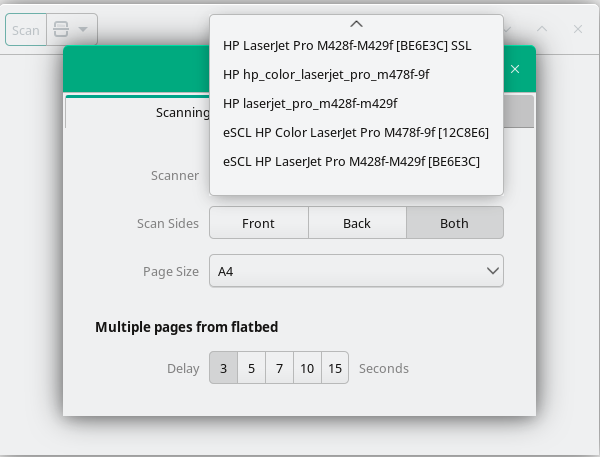
@oldcpu Here’s what I get (at work)

~> scanimage -L
device `escl:https://192.168.30.150:443' is a HP LaserJet Pro M428f-M429f [BE6E3C] SSL platen,adf scanner
device `escl:https://192.168.30.151:443' is a HP Color LaserJet Pro M478f-9f [12C8E6] SSL platen,adf scanner
device `airscan:e0:HP Color LaserJet Pro M478f-9f [12C8E6]' is a eSCL HP Color LaserJet Pro M478f-9f [12C8E6] ip=192.168.30.151
device `airscan:e3:HP LaserJet Pro M428f-M429f [BE6E3C]' is a eSCL HP LaserJet Pro M428f-M429f [BE6E3C] ip=192.168.30.150
device `hpaio:/net/hp_color_laserjet_pro_m478f-9f?ip=192.168.30.151&queue=false' is a Hewlett-Packard hp_color_laserjet_pro_m478f-9f all-in-one
device `hpaio:/net/laserjet_pro_m428f-m429f?ip=192.168.30.150&queue=false' is a Hewlett-Packard laserjet_pro_m428f-m429f all-in-one

My firewall (when active) is currently configured like this

~> firewall-cmd --list-all
public (default, active)
  target: default
  ingress-priority: 0
  egress-priority: 0
  icmp-block-inversion: no
  interfaces: eth0 eth1
  sources: 
  services: cockpit dhcpv6-client mdns rdp vnc-server ws-discovery-client
  ports: 3702/udp 3702/tcp 445/tcp
  protocols: 
  forward: no
  masquerade: no
  forward-ports: 
  source-ports: 
  icmp-blocks: 
  rich rules: 

No firewall changes required for client side scanning.

If I fire up simple-scan, it will default to the last used scanner, but under preferences I see

I believe I know the issue where initially xsane gave me an error, and as you pointed out, it likely was not a firewall issue.

Details:

Turns out, my HP network printer/scanner was likely asleep. I have my desktop computer (located in a downstairs room - and LEAP-16.0 is on this desktop PC) while my HP network printer/scanner is located in an upstairs “study” room.

I believe the first time I tried xsane, the printer/scanner upstairs was asleep.

So I then proceeded to open the firewall service for sane. That took me some time as it was my first time configuring a firewall with LEAP-16.0 and as I noted, I messed around with permissions in starting the firewall app ( with my badly ignoring it being in the KDE menu).

Unknown to me, while I was configuring the firewall, upstairs my wife was using the printer taking it out of sleep mode. That room is sufficiently far away that I would not hear it printing.

So then, with firewall configured, and I launched xsane, and the reason that it worked, may not have been due to the firewall configuration, but rather due to the printer/scanner being awake (being waken by my wife).

Test-1:

Today, I went to use xsane and I obtained an error “Failed to open device 'ppaio:/net/Deskjet_2600_series?ip=192.168.31.46':Error during device I/O

I also tried simple-scan and I obtained the error, “Failed to scan - unable to connect to scanner”.

So I went upstairs, pressed a physical button on the printer to take it out of sleep mode, went down stairs ,and from LEAP-16.0 tried both xsane and simple-scan, and both worked.

Test-2:

I have not yet done this test, but likely I will (eventually) remove sane as a firewall service, and try both xsane and simple-scan again (after first ensuring the printer/scanner is awake).

Nominally I don’t have a problem (with printer being asleep) when I scan with xsane from LEAP-15.6 with my laptop PC running LEAP-15.6 … but I note usually I scan sitting right next to the scanner (in the upstairs study) using my main PC which is my Lenovo laptop. When in the study, my laptop is on same direct (mesh) network as the printer but when downstairs, my desktop is going through a (mesh) repeater to the main router to the laptop. Also, its possible I have had (and can’t recall) having obtained such errors when using the laptop, but sitting right next to the printer (when using the laptop) I simply press a button on the printer/scanner to take it out of sleep and I don’t think twice about doing such a button press. …

One would hope after 71 years one would pay more attention to what they are doing … but … < sigh > sometimes despite learning, we get forgetful.

Thanks for the update. I thought this might be the case, (especially during your initial test), and nearly suggested as much.

Anyway, as you can now see for yourself, no “scanner” configuration needed in general. :wink: