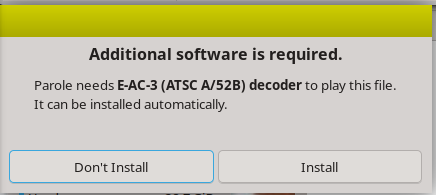
on my laptop with slowroll running KDE .mkv files doesn’t play sound
I tried the same film on leap 16.0 and it play sound
I opened it with smplayer and parole media player and this said me
Check zypper se -si ffmpeg libavcodec and report back.
Edit: Just noitced your mention of SMPlayer…it is a front-end for mpv, and that uses FFmpeg’s decoding libraries, including libavcodec, for formats such as E-AC3. So gstreamer not actually relevant here.
Since you’re currently using the openSUSE FFmpeg 9 packages, I’d suggest installing FFmpeg from the VLC repository instead. That’s the FFmpeg 8 stack I’m using, and it provides the E-AC3 decoder.
the repo was also in myrlyn>community-repos and ffmpeg-8 offered as package
installed via myrlyn the repo
the name of the repo was VideoLAN so I changed in the command
I did this selecting solution 1
and now smplayer play sound
maanythanks!!
pla@plaST-slowroll:~> sudo zypper in --from VideoLAN --oldpackage ffmpeg-8
Refreshing service 'openSUSE'.
Loading repository data...
Reading installed packages...
Resolving package dependencies...

Problem: 1: the installed ffmpeg-9.0.1-1.0.2.1.sr20260802.x86_64 conflicts with 'ffmpeg-tools' provided by the to be installed ffmpeg-8-8.1.2-4.3.x86_64
 Solution 1: Following actions will be done:
  deinstallation of ffmpeg-9.0.1-1.0.2.1.sr20260802.x86_64
  install libavcodec62-8.1.2-4.3.x86_64 from vendor VideoLAN Project (http://www.videolan.org)
    replacing libavcodec62-8.1.2-2.2.x86_64 from vendor openSUSE
  install libavdevice62-8.1.2-4.3.x86_64 from vendor VideoLAN Project (http://www.videolan.org)
    replacing libavdevice62-8.1.2-2.2.x86_64 from vendor openSUSE
  install libavfilter11-8.1.2-4.3.x86_64 from vendor VideoLAN Project (http://www.videolan.org)
    replacing libavfilter11-8.1.2-2.2.x86_64 from vendor openSUSE
  install libavformat62-8.1.2-4.3.x86_64 from vendor VideoLAN Project (http://www.videolan.org)
    replacing libavformat62-8.1.2-2.2.x86_64 from vendor openSUSE
  install libavutil60-8.1.2-4.3.x86_64 from vendor VideoLAN Project (http://www.videolan.org)
    replacing libavutil60-8.1.2-2.2.x86_64 from vendor openSUSE
  install libswresample6-8.1.2-4.3.x86_64 from vendor VideoLAN Project (http://www.videolan.org)
    replacing libswresample6-8.1.2-2.2.x86_64 from vendor openSUSE
  install libswscale9-8.1.2-4.3.x86_64 from vendor VideoLAN Project (http://www.videolan.org)
    replacing libswscale9-8.1.2-2.2.x86_64 from vendor openSUSE
 Solution 2: do not install ffmpeg-8-8.1.2-4.3.x86_64

Choose from above solutions by number or cancel [1/2/c/d/?] (c): 1

Resolving dependencies...
Resolving package dependencies...

The following 7 packages are going to be upgraded:
  libavcodec62 libavdevice62 libavfilter11 libavformat62 libavutil60 libswresample6 libswscale9

The following 7 packages are going to change vendor:
  libavcodec62    openSUSE -> VideoLAN Project (http://www.videolan.org)
  libavdevice62   openSUSE -> VideoLAN Project (http://www.videolan.org)
  libavfilter11   openSUSE -> VideoLAN Project (http://www.videolan.org)
  libavformat62   openSUSE -> VideoLAN Project (http://www.videolan.org)
  libavutil60     openSUSE -> VideoLAN Project (http://www.videolan.org)
  libswresample6  openSUSE -> VideoLAN Project (http://www.videolan.org)
  libswscale9     openSUSE -> VideoLAN Project (http://www.videolan.org)

The following 3 NEW packages are going to be installed:
  ffmpeg-8 libjxl0_12 libjxl0_12-x86-64-v3

The following package is going to be REMOVED:
  ffmpeg

7 packages to upgrade, 3 new, 1 to remove, 7  to change vendor.

Package download size:    13.9 MiB

Package install size change:
              |      33.9 MiB  required by packages that will be installed
    10.1 MiB  |  -   23.8 MiB  released by packages that will be removed

Backend:  classic_rpmtrans
Continue? [y/n/v/...? shows all options] (y): y
Preloading: libswresample6-8.1.2-4.3.x86_64.rpm [done]
Preloading: libjxl0_12-x86-64-v3-0.12.0-1.1.x86_64.rpm [done]
Preloading: libswscale9-8.1.2-4.3.x86_64.rpm [done]
Preloading: libavutil60-8.1.2-4.3.x86_64.rpm [done]
Preloading: libavfilter11-8.1.2-4.3.x86_64.rpm [done]
Preloading: libavdevice62-8.1.2-4.3.x86_64.rpm [done]
Preloading: ffmpeg-8-8.1.2-4.3.x86_64.rpm [done]
Preloading: libjxl0_12-0.12.0-1.1.x86_64.rpm [done]
Preloading: libavcodec62-8.1.2-4.3.x86_64.rpm [done]
Preloading: libavformat62-8.1.2-4.3.x86_64.rpm [done]
Preload finished. [success (11.5 MiB/s) ] .................................................................[done]
Retrieving: libjxl0_12-0.12.0-1.1.x86_64 (update-slowroll)                                  (1/10),   1.0 MiB
Retrieving: libjxl0_12-x86-64-v3-0.12.0-1.1.x86_64 (update-slowroll)                        (2/10),   1.0 MiB
Retrieving: libavutil60-8.1.2-4.3.x86_64 (VideoLAN)                                         (3/10), 372.6 KiB
Retrieving: libswscale9-8.1.2-4.3.x86_64 (VideoLAN)                                         (4/10), 312.7 KiB
Retrieving: libswresample6-8.1.2-4.3.x86_64 (VideoLAN)                                      (5/10),  65.4 KiB
Retrieving: libavcodec62-8.1.2-4.3.x86_64 (VideoLAN)                                        (6/10),   6.2 MiB
Retrieving: libavformat62-8.1.2-4.3.x86_64 (VideoLAN)                                       (7/10),   1.2 MiB
Retrieving: libavfilter11-8.1.2-4.3.x86_64 (VideoLAN)                                       (8/10),   1.6 MiB
Retrieving: libavdevice62-8.1.2-4.3.x86_64 (VideoLAN)                                       (9/10),  70.9 KiB
Retrieving: ffmpeg-8-8.1.2-4.3.x86_64 (VideoLAN)                                           (10/10),   2.1 MiB

Checking for file conflicts: ..............................................................................[done]
( 1/11) Removing: ffmpeg-9.0.1-1.0.2.1.sr20260802.x86_64 ..................................................[done]
( 2/11) Installing: libjxl0_12-0.12.0-1.1.x86_64 ..........................................................[done]
( 3/11) Installing: libjxl0_12-x86-64-v3-0.12.0-1.1.x86_64 ................................................[done]
( 4/11) Installing: libavutil60-8.1.2-4.3.x86_64 ..........................................................[done]
( 5/11) Installing: libswscale9-8.1.2-4.3.x86_64 ..........................................................[done]
( 6/11) Installing: libswresample6-8.1.2-4.3.x86_64 .......................................................[done]
( 7/11) Installing: libavcodec62-8.1.2-4.3.x86_64 .........................................................[done]
( 8/11) Installing: libavformat62-8.1.2-4.3.x86_64 ........................................................[done]
( 9/11) Installing: libavfilter11-8.1.2-4.3.x86_64 ........................................................[done]
(10/11) Installing: libavdevice62-8.1.2-4.3.x86_64 ........................................................[done]
(11/11) Installing: ffmpeg-8-8.1.2-4.3.x86_64 .............................................................[done]
Running post-transaction scripts ..........................................................................[done]
There are running programs which still use files and libraries deleted or updated by recent upgrades. They should be restarted to benefit from the latest updates. Run 'zypper ps -s' to list these programs.

pla@plaST-slowroll:~>