So far there is no good tooling to move the flatpaks installed with the defaults from system to user. I did not want to go through them manually, so wrote a bash script flatpak_system_to_user.sh ( code below )
This from my real system where I aleady ran the script, so the rest of the flatpaks are already there, just not KDEnlive and its deps.
The script
#!/usr/bin/env bash

# Name      : flatpak_system_to_user.sh
# Purpose   : Migrating system flatpaks from system to user
#
# Usage:
# - create the file in some folder, do `chmod +x flatpak_system_to_user.sh
# - run ./flatpak_system_to_user.sh as your user from that folder.

set -euo pipefail

# Set some vars
USER_NAME=$(whoami)
FLATPAK_REMOTE_NAME="flathub"
FLATPAK_REMOTE_URL="https://flathub.org/repo/flathub.flatpakrepo"
FLATPAK_REMOTE_USER=$(flatpak remote-list --user | awk '{print $1}' | grep -qx "$FLATPAK_REMOTE_NAME")


# Install flathub to the user if needed
echo "Checking for user remote"
if [[ "$(id -un)" != "$USER_NAME" ]]; then
  echo "Run this as $USER_NAME" >&2
  exit 1
fi

if [[ $FLATPAK_REMOTE_USER ]]; then
  echo "Adding flathub remote for user" >&2
  flatpak --user remote-add --if-not-exists "$FLATPAK_REMOTE_NAME" "$FLATPAK_REMOTE_URL"
else echo "User remote already setup"
fi


# Create lists from both system and user installed flatpaks
echo "Create lists from both system and user installed flatpaks" >&2
mapfile -t system_fp < <(flatpak --system list --columns=ref | awk 'NF {print $1}')
mapfile -t user_fp < <(flatpak --user list --columns=ref | awk 'NF {print $1}')

# Build a set of user‑installed flatpak refs
declare -A user_set
for ref in "${user_fp[@]}"; do
  user_set["$ref"]=1
done

# For each system flatpak, install in user if missing, then remove from system

for ref in "${system_fp[@]}"; do
echo "Migrating flatpaks to user install: $ref" >&2
  if [[ -n "${user_set[$ref]+x}" ]]; then
    echo "Already in user install: $ref" >&2
    echo "Uninstall flatpak from system: $ref" >&2
    sudo flatpak uninstall -y --system  --force-remove --noninteractive "$ref"
  else
    echo "- Installing flatpak to user: $ref" >&2
    flatpak install -y --user --noninteractive flathub "$ref"
    echo "Uninstall flatpak from system: $ref" >&2
    sudo flatpak uninstall -y --system --force-remove --noninteractive "$ref"
  continue
  fi

done
echo "Migration finished"
The script spits out some output on the way.
The result
Migration finished?
Let’s check
knurpht@Lenovo-P16:~/bin> flatpak --system list
knurpht@Lenovo-P16:~/bin> flatpak --system list
knurpht@Lenovo-P16:~/bin> flatpak --user list | grep -i kdenlive
Kdenlive        org.kde.kdenlive        25.12.2 stable
knurpht@Lenovo-P16:~/bin>
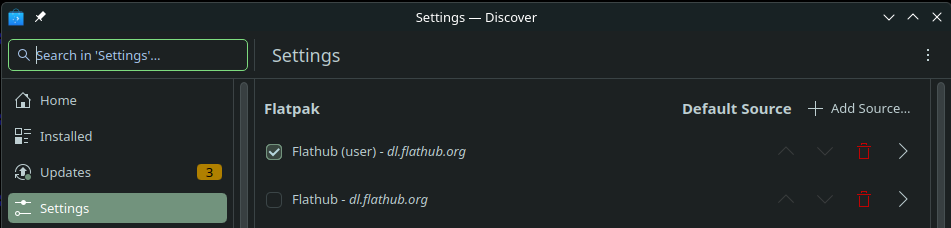
And, here’s how to go about in Discover. If your user had only the default system entry, you will now see the user’s one. Enable it, disable or remove the stock one, and you will never need the script again.
And with this setting it will install as system again. Mind, if you decide to do both system and user flatpaks for whatever reason, do not use the script gain.
  #!/usr/bin/env bash

# Name      : flatpak_system_to_user.sh
# Purpose   : Migrating system flatpaks from system to user
#
# Usage:
# - create the file in some folder, do `chmod +x flatpak_system_to_user.sh
# - run ./flatpak_system_to_user.sh as your user from that folder.


# Set some vars
FLATPAK_REMOTE_NAME="flathub"
FLATPAK_REMOTE_URL="https://flathub.org/repo/flathub.flatpakrepo"
FLATPAK_REMOTE_DISABLED="disabled"
FLATPAK_REMOTE_USER=$(flatpak --user remote-list --show-disabled| awk '{print $1}')
FLATPAK_REMOTE_USER_DISABLED=$(flatpak --user remote-list --show-disabled | awk '{print $2}')
FLATPAK_SYSTEM_COUNT=0
FLATPAK_USER_COUNT=0

# Check whether user is not "root"
echo "Checking for permissions" >&2
if [[ ! $EUID > 0 ]]; then
  echo "Run this as your user, exiting" >&2
  exit 1
fi

# Install flathub remote to the user if needed
if [[ ! $FLATPAK_REMOTE_USER ]]; then
  echo "User flathub remote not installed" >&2
  echo "Adding flathub remote for user" >&2
  flatpak --user remote-add --if-not-exists "$FLATPAK_REMOTE_NAME" "$FLATPAK_REMOTE_URL"
  sleep 5
  flatpak --user remote-modify --enable "$FLATPAK_REMOTE_NAME" >/dev/null 2>&1
  echo "User flathub remote now enabled" >&2
else
  echo "User flathub remote already installed" >&2
  echo "Checking user flathub remote status" >&2
  if [[ $FLATPAK_REMOTE_USER_DISABLED ]]; then
    echo "User flathub remote disabled" >&2
    flatpak --user remote-modify --enable "$FLATPAK_REMOTE_NAME" >/dev/null 2>&1
    echo "User flathub remote now enabled" >&2
  fi
  echo "User flatpak remote setup complete !" >&2
fi


# Create lists from both system and huser installed flatpaks
echo "Create lists from system and user installed flatpaks" >&2
mapfile -t system_fp < <(flatpak --system list --columns=ref | awk 'NF {print $1}')
mapfile -t user_fp < <(flatpak --user list --columns=ref | awk 'NF {print $1}')

# Build a set of user‑installed flatpak refs
declare -A user_set
for ref in "${user_fp[@]}"; do
  user_set["$ref"]=1
  ((FLATPAK_USER_COUNT++))
done
declare -A system_set
for ref in "${system_fp[@]}"; do
  system_set["$ref"]=1
  ((FLATPAK_SYSTEM_COUNT++))
done

OLD=$FLATPAK_SYSTEM_COUNT
FP=""
if [[ $OLD == 1 ]]; then
  FP="flatpak"
else
  FP="flatpaks"
fi

# For each system flatpak, install in user if missing, then remove from system
echo "Totals: To do: $OLD >> User: $FLATPAK_USER_COUNT" >&2
if [[ ! $OLD == 0 ]]; then
  for ref in "${system_fp[@]}"; do
    echo "Migrating $FLATPAK_SYSTEM_COUNT flatpaks to user install: $ref" >&2
    if [[ -n "${user_set[$ref]+x}" ]]; then
      echo "- Already in user install: $ref" >&2
      echo "- Uninstalling flatpak from system: $ref" >&2
      sudo flatpak uninstall -y --system  --force-remove --noninteractive "$ref" >/dev/null 2>&1
      echo "- Uninstalled from system: $ref" >&2
      ((FLATPAK_SYSTEM_COUNT--))
      echo "Totals: To do: $FLATPAK_SYSTEM_COUNT | User: $FLATPAK_USER_COUNT" >&2
    else
      echo "- Installing flatpak to user: $ref" >&2
      flatpak install -y --user --noninteractive flathub "$ref" >/dev/null 2>&1
      echo "- Installed to user: $ref" >&2
      ((FLATPAK_USER_COUNT++))
      echo "- Totals: To do: $FLATPAK_SYSTEM_COUNT | User: $FLATPAK_USER_COUNT" >&2
      echo "- Uninstalling flatpak from system: $ref" >&2
      sudo flatpak uninstall -y --system --force-remove --noninteractive "$ref" >/dev/null 2>&1
      echo "- Uninstalled from system: $ref" >&2
      ((FLATPAK_SYSTEM_COUNT--))
      echo "- Totals: To do: $FLATPAK_SYSTEM_COUNT | User: $FLATPAK_USER_COUNT" >&2
    continue
    fi
  done
  echo "Migration of $OLD $FP to user flathub remote completed" >&2
else
  echo "Migration of $FLATPAK_SYSTEM_COUNT $FP to user is useless, exiting" >&2
  exit 1
fi
Prove that I have a good test case:
knurpht@Lenovo-P16:~/bin> LANG=C flatpak --system list --columns=name,application
Name                                     Application ID
Mesa                                     org.freedesktop.Platform.GL.default
Mesa (Extra)                             org.freedesktop.Platform.GL.default
Codecs Extra Extension                   org.freedesktop.Platform.codecs-extra
Adwaita theme                            org.kde.KStyle.Adwaita
KDE Application Platform                 org.kde.Platform
Amarok                                   org.kde.amarok
knurpht@Lenovo-P16:~/bin>
knurpht@Lenovo-P16:~/bin> LANG=C flatpak --user list --columns=name,application | grep amarok
knurpht@Lenovo-P16:~/bin>
Now run the script:
knurpht@Lenovo-P16:~/bin> ./flatpak_system_to_user.sh
Checking for permissions
User flathub remote not installed
Adding flathub remote for user
User flathub remote now enabled
Create lists from system and user installed flatpaks
Totals: To do: 6 >> User: 51
Migrating 6 flatpaks to user install: org.freedesktop.Platform.GL.default/x86_64/25.08
- Already in user install: org.freedesktop.Platform.GL.default/x86_64/25.08
- Uninstalling flatpak from system: org.freedesktop.Platform.GL.default/x86_64/25.08
- Uninstalled from system: org.freedesktop.Platform.GL.default/x86_64/25.08
Totals: To do: 5 | User: 51
Migrating 5 flatpaks to user install: org.freedesktop.Platform.GL.default/x86_64/25.08-extra
- Already in user install: org.freedesktop.Platform.GL.default/x86_64/25.08-extra
- Uninstalling flatpak from system: org.freedesktop.Platform.GL.default/x86_64/25.08-extra
- Uninstalled from system: org.freedesktop.Platform.GL.default/x86_64/25.08-extra
Totals: To do: 4 | User: 51
Migrating 4 flatpaks to user install: org.freedesktop.Platform.codecs-extra/x86_64/25.08-extra
- Already in user install: org.freedesktop.Platform.codecs-extra/x86_64/25.08-extra
- Uninstalling flatpak from system: org.freedesktop.Platform.codecs-extra/x86_64/25.08-extra
- Uninstalled from system: org.freedesktop.Platform.codecs-extra/x86_64/25.08-extra
Totals: To do: 3 | User: 51
Migrating 3 flatpaks to user install: org.kde.KStyle.Adwaita/x86_64/6.10
- Already in user install: org.kde.KStyle.Adwaita/x86_64/6.10
- Uninstalling flatpak from system: org.kde.KStyle.Adwaita/x86_64/6.10
- Uninstalled from system: org.kde.KStyle.Adwaita/x86_64/6.10
Totals: To do: 2 | User: 51
Migrating 2 flatpaks to user install: org.kde.Platform/x86_64/6.10
- Already in user install: org.kde.Platform/x86_64/6.10
- Uninstalling flatpak from system: org.kde.Platform/x86_64/6.10
- Uninstalled from system: org.kde.Platform/x86_64/6.10
Totals: To do: 1 | User: 51
Migrating 1 flatpaks to user install: org.kde.amarok/x86_64/stable
- Installing flatpak to user: org.kde.amarok/x86_64/stable
- Installed to user: org.kde.amarok/x86_64/stable
- Totals: To do: 1 | User: 52
- Uninstalling flatpak from system: org.kde.amarok/x86_64/stable
- Uninstalled from system: org.kde.amarok/x86_64/stable
- Totals: To do: 0 | User: 52
Migration of 6 flatpaks to user flathub remote completed
knurpht@Lenovo-P16:~/bin>
Run it again:
knurpht@Lenovo-P16:~/bin> ./flatpak_system_to_user.sh
Checking for permissions
User flathub remote already installed
Checking user flathub remote status
User flatpak remote setup complete !
Create lists from system and user installed flatpaks
Totals: To do: 0 >> User: 52
Migration of 0 flatpaks to user is useless, exiting
knurpht@Lenovo-P16:~/bin>
Out of curiosity, why do you do so (i.e. converting from “system” to “user”)? I know that both is possible and many people use “user” and it is often told to do so. But why? When I use software by repository management (RPM) it is also “system”, isn’t it. What are actual advantages of “user” — what are actual disadvantages of “system”?
There is a big difference between running apps entirely as your user, and running system apps. Despite the sandboxing of flatpaks.
My personal reasons were basically that some people had already pointed out that moving all from system installed to user installed was possible via Discover / Gnome Software, but not a fun job when one has 80 flatpaks installed, and that there are no tools that can do that for you in one go. I have those days that I think “OK, let’s make this a little bash script” and added the challenge of not using AI agents or copy-paste-edit from elsewhere on the web, but only own bash knowledge, notes and my own script library.
The fun for me is writing something that does the job, then see how it can be expanded and more elegant codewise and verbositywise. Things I’m currently considering:
Adding user interaction
Adding selective sysem → user migration
Making it work both ways
Packaging the script
Ultimately make it a GUI tool for manipulating flatpak installs.
When yes, then why are they installed by the system manager on the system?
And now the system manager wants users who want to use them to copy them to their own space for security? within a given time space because after that the system manager will remove them from the system?
When installed from a user remote, there is no system manager involved, unless you insist that flatpak itself was installed by the system manager. You can see from the script that I don’t
run the script as root
that I install the remote for the user as the user
that I only do need root permissions to interact with the system uninstalls
Now, we both know
that bad things can happen in software, backdoors, malicious instructions etc.
the difference between an app running with such as system app and the same app running entirely as userin such cases.
Then there is another thing: You and some of my “local customers” have their homedir on a separate partition, that they reuse on a reinstall. With their entire flatpak environment living in their homedir, there is no need to reinstall their flatpaks, A matter of conveniance.
Like said, I personally don’t care that much, it was started as and still is a fun project. If you, or anyone else, see potential improvements or issues, I would appreciate your contributions. Fork the repo, improve the script, send a merge/pull request and after reviewing with good outcome I’ll gladly merge the MR/ PR into the main branch.
AFAIK, when Flatpaks installed by system context (instead of user context), I still use them as a user with user rights (not as some system or root). But they are available for all my users on my system (not only the current one — in that case each user would have to manage the Flatpaks on their own, each).
Do sandboxing really differ between managed by system context and managed by user context? I mean, the Flatpaks are managed by system context… but they are actually run (normally) by user context. At least, I do so.
@C7NhtpnK they should all run at a user level, less chance of having system related issues, better to balk a user on the system rather than the system for multiple users…
Thank you so much! I have been putting this off for the longest time precisely because of how long it would take me manually. Doing god’s work here, brother, cheers
Thank you @knurpht for the script. In run the scrip fine but it removed the installed (system) applications but did not re-install them as user. Not a major inconvenience because I didn’t have too many flatpak apps and I was able to install manually as user.
If it helps others - it appears to me that the the issue is in the command line “flatpak --user remote-add …” It should read … NAME LOCATION and not the otherway round as is in the script of 29-Mar (Note: I haven’t tested this)
Mmm, you’re the 1st person reporting that issue. I tried to replicate that on TW, Leap 16.0 and 16.1 and Slowroll, but cannot, it just works as described.
Thank you @knurpht for looking into my comment. I have a fairly basic and updated Leap 16.0 running KDE. The script run apparently without any problem so I only read the messages briefly, and may have missed some warning message there. Thanks again,