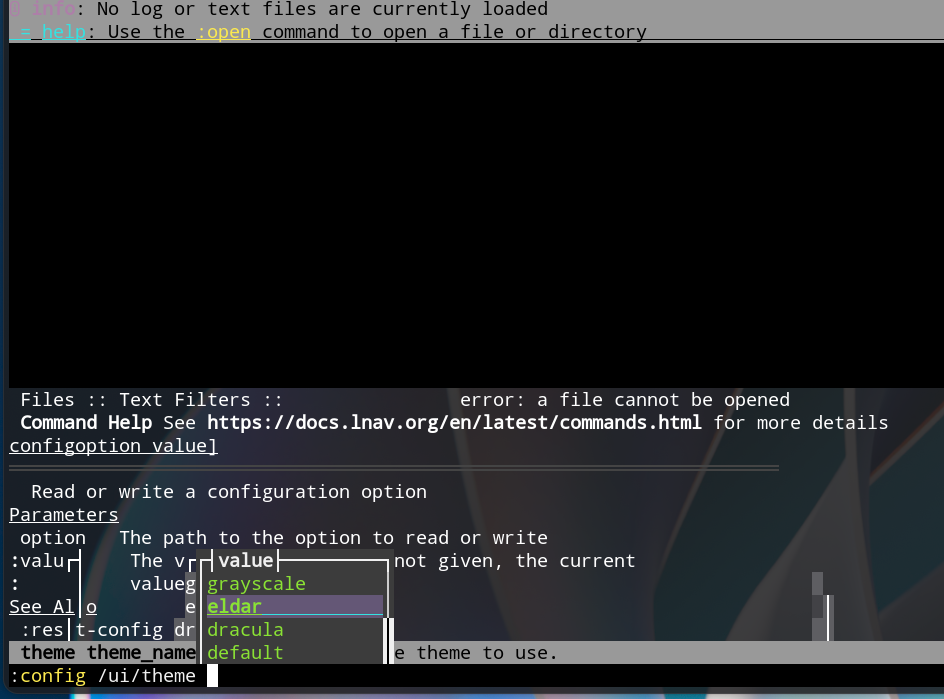
Yesterday lnav (log file summary viewer) was working as it had for months. It had colorful and well formatted text layout. Today lnav has lost all colors (only white text) and has different layout.
One suggestion is to analyze log files to see if there is a clue as to the issue … might try the tool “Logfile Navigator”.
Just kidding
What I’d do is create a new user account that has never been created before … then log into that user account, and launch “lnav” and see if the problem exists for that user.
I sent my system back to 6/3 using timeshift snapshot and lnav started working as before with the same colored formatting.
lnav is working right but there are 400 updates that are needed to get system back to date and i need to select which one might be the culprit.
The only real problem related choice to make is with libgdm-devel as below. This is related to mesa graphics and I wonder if this might be the key. Anyone with any insights as to a selection that might not affect lnav formatting?
thanks, tom kosvic
om@mydesktop: ~ $ szd
Refreshing service 'NVIDIA'.
Refreshing service 'openSUSE'.
Loading repository data...
Reading installed packages...
Warning: You are about to do a distribution upgrade with all enabled repositories. Make sure these repositories are compatible before you continue. See 'man zypper' for more information about this command.
Computing distribution upgrade...

Problem: 1: the to be installed libgbm-devel-26.1.2-1699.2.pm.1.x86_64 requires 'libgbm1 = 26.1.2', but this requirement cannot be provided
not installable providers: libgbm1-26.1.2-1699.2.pm.1.i586[ftp.gwdg.de-openSUSE_Tumbleweed]
                   libgbm1-26.1.2-1699.2.pm.1.x86_64[ftp.gwdg.de-openSUSE_Tumbleweed]

 Solution 1: install libgbm-devel-26.1.1-1.1.x86_64 from vendor openSUSE
  replacing libgbm-devel-26.1.1-1699.2.pm.1.x86_64 from vendor http://packman.links2linux.de
 Solution 2: install libgbm1-26.1.2-1699.2.pm.1.x86_64 from vendor http://packman.links2linux.de
  replacing libgbm1-26.1.1-1.1.x86_64 from vendor openSUSE
 Solution 3: keep obsolete libgbm-devel-26.1.1-1699.2.pm.1.x86_64
 Solution 4: break libgbm-devel-26.1.2-1699.2.pm.1.x86_64 by ignoring some of its dependencies

Choose from above solutions by number or cancel [1/2/3/4/c/d/?] (c): c
I reinstalled approx 400 packages using sudo zypper dup and lnav again lost the formatting and is basically unreadable. This is two times the loss of lnav formatting was seen to be associated with recent updates.
I reverted back to timeshift snapshot ahead of these updates and lnav went back to full functioning. I will not do these updates as I wish to keep lnav functioning as I am monitoring an error.
If anyone sees this same problem, I would like a confirmation. if anyone has an idea as to what update is affecting lnav formatting, let me know.
It is tedious, but a possible way. But you should start fast with the following steps or more and more packages (not only 400) will accumulate.
Use Myrlyn. On the “Updates” tab mark 10-20 packages manually for update (rightclick->update). As example office stuff or kernel. Reboot. Test Lnav. Everything ok → proceed with the next manually updated set of packages…and so on. In this way you will decrease the set of packages to update. When only a handful of packages are left it is way, way easier to spot a possible culprit.
But this change was implemented in July 2025 for Tumbleweed (upstream already in March 2025) with version 0.13.0. Tumbleweed ships 0.14.0. That does not explain how the behaviour changed from yesterday to today for the TO. Something is completelöy off then…
And if i have a look at the screenshots from Lnav, there seems something complety broken on TW. I installed Lnav in a VM for testing and everyting is only black and white.
Setting the /ui/default-colors did not change anything. Using a theme via /ui/themes loaded some colored text, but there a massive graphical artifacts which renders the use nearly impossible. Don’t know if it is due to the test in a VM or smth else.
But @tckosvic should be more fluid in using and testing this app. First time user here and only tried to reproduce the TOs issue.
When lnav was in black and white I restored ~/.config/lnav from a “backintime” backup for a time last week when lnav colors were good and there was no change.