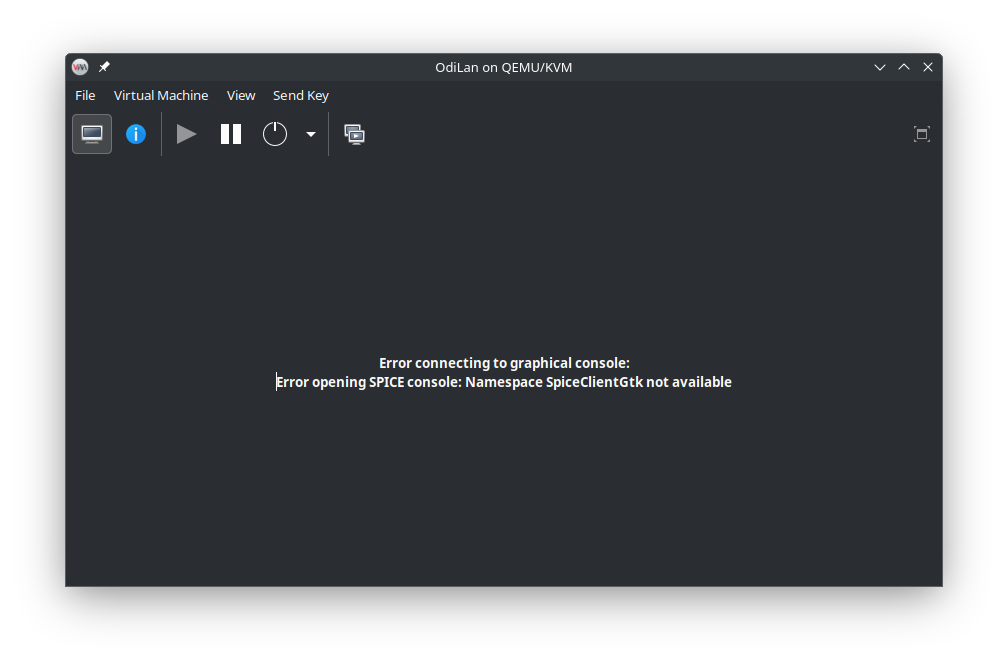
I also have the issue that I can’t get SPICE to work on Leap 16.
I get the following error:
Error connecting to graphical console:
Error opening SPICE console: Namespace SpiceClientGtk not available
Regarding the libspice-server1 it is correct, that this package is automatically installed with virt-manager. Here is an overview of the installed packages:
$ zypper se spice
Loading repository data...
Reading installed packages...

S  | Name                            | Summary                                                                 | Type
---+---------------------------------+-------------------------------------------------------------------------+--------
   | libngspice-devel                | Development files for ngspice                                           | package
   | libngspice0                     | Shared libraries for ngspice                                            | package
   | libspice-client-glib-2_0-8      | Gtk client and libraries for SPICE remote desktop servers               | package
   | libspice-client-glib-helper     | Gtk client and libraries for SPICE remote desktop servers               | package
   | libspice-client-gtk-3_0-5       | Gtk client and libraries for SPICE remote desktop servers               | package
   | libspice-server-devel           | Development files for building SPICE-server                             | package
i  | libspice-server1                | Library for SPICE-server                                                | package
   | ngspice                         | Mixed-level, Mixed-signal Circuit Simulator Based on spice3f5           | package
   | ngspice-doc                     | Documentation for the ngspice Mixed-signal simulator                    | package
   | ngspice-scripts                 | Ngspice init scripts                                                    | package
   | ngspice-xspice-cm               | Xspice code model Plugins                                               | package
i  | qemu-audio-spice                | Spice based audio support for QEMU                                      | package
i  | qemu-chardev-spice              | Spice vmc and port chardev support for QEMU                             | package
   | qemu-spice                      | Modules and packages for SPICE                                          | package
i  | qemu-ui-spice-app               | Spice UI support for QEMU                                               | package
i  | qemu-ui-spice-core              | Core Spice support for QEMU                                             | package
   | remmina-plugin-spice            | SPICE Protocol Plugin for Remmina                                       | package
   | spice-gtk                       | Gtk client and libraries for SPICE remote desktop servers               | package
   | spice-gtk-devel                 | Devel                                                                   | package
   | spice-gtk-lang                  | Translations for package spice-gtk                                      | package
   | spice-html5                     | Pure Javascript SPICE client                                            | package
   | spice-protocol-devel            | SPICE-protocol definitions                                              | package
   | spice-vdagent                   | Agent for Spice guests                                                  | package
   | spice-webdavd                   | Spice daemon for the DAV channel                                        | package
   | spicetify-cli                   | Command-line tool to customize Spotify client                           | package
   | typelib-1_0-SpiceClientGlib-2_0 | Gtk client and libraries for SPICE remote desktop servers - gi-bindings | package
   | typelib-1_0-SpiceClientGtk-3_0  | Gtk client and libraries for SPICE remote desktop servers - gi-bindings | package
   | xorg-x11-server-Xspice          | XSpice is an X server that can be accessed by a Spice client            | package
When searching the web for this litteral error, there is basically one search result pointing to this debian bug report: #1067836 - Error opening SPICE console: Namespace SpiceClientGtk not available - Debian Bug report logs
Which is resolved by installing the debian package gir1.2-spiceclientgtk-3.0
I don’t know what the girl1.2 exactly stands for, but I tried installing the spice-gtk package which also installs the libspice-client-gtk-3_0-5 package:
$ sudo zypper in spice-gtk
Refreshing service 'openSUSE'.
Loading repository data...
Reading installed packages...
Resolving package dependencies...

The following 7 NEW packages are going to be installed:
  libphodav-3_0-0 libspice-client-glib-2_0-8 libspice-client-glib-helper libspice-client-gtk-3_0-5 libusbredirhost1 spice-gtk spice-gtk-lang

7 new packages to install.

Package download size:   661.3 KiB

Package install size change:
              |       1.7 MiB  required by packages that will be installed
     1.7 MiB  |  -      0 B    released by packages that will be removed
After rebooting, I still have the same issue as above.
When adding a VNC display, I can use the VM from “Virtual Machine Manager”.
But as using SPICE has a much better user experience, I would prefere getting it to work on my leap 16 machine again.
Any thoughts or ideas, how to get SPICE working again?
Does someone know whether the prefix “girl1.2” of the debian package is a different one compared to the openSUSE one?
Cheers
Simon