In 15.6, Yast > User Management > Advanced (or technical) Options button, I could set automatic login for a user, bypassing the login screen after boot.
I couldn’t find a similar option in Cockpit. How can I do this in 16.0?
Thanks!
OBS: KDE desktop, if it makes a difference.
With Plasma this can be done via systemsettings.
In systemsettings, type SDDM in the search field. Click on “Login Screen (SDDM)”. And at the top of the window you will have a button “Behavior” where you can setup auto login.
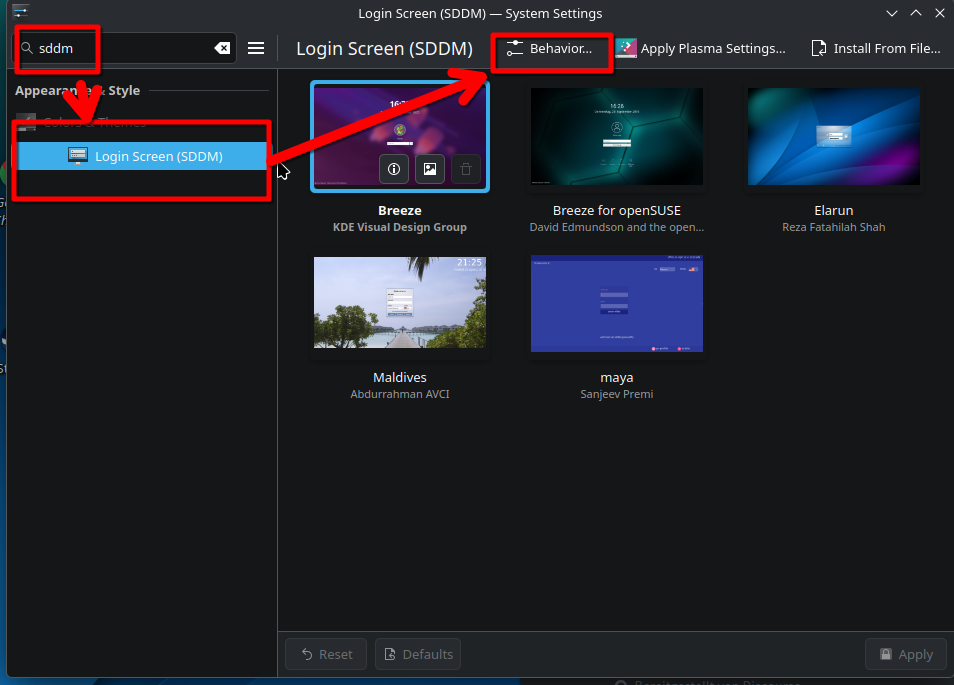
Found it, thanks!
Although it’s a bit weird having in under the “Color and Themes” main section… 
You edit /etc/sysconfig/displaymanager and set DISPLAYMANAGER_AUTOLOGIN to your user name. Exactly what YaST did.
1 Like
This topic was automatically closed 7 days after the last reply. New replies are no longer allowed.