I’m upgrading my system hard drive capacity, so perhaps it’s a good time to go from Leap 15.6 to 16.0. In reading about 16.0, Wayland will be replacing X11. Currently, I have a file, 10-nvidia.conf, in /etc/X11/xorg.conf.d/ to deal with my setup:
Contents:
# nvidia-settings: X configuration file generated by nvidia-settings
# nvidia-settings:  version 570.133.07

Section "ServerLayout"
    Identifier     "Layout0"
    Screen      0  "Screen0" 0 0
    InputDevice    "Keyboard0" "CoreKeyboard"
    InputDevice    "Mouse0" "CorePointer"
    Option         "Xinerama" "0"
EndSection

Section "Files"
EndSection

Section "InputDevice"
    # generated from data in "/etc/sysconfig/mouse"
    Identifier     "Mouse0"
    Driver         "mouse"
    Option         "Protocol" "IMPS/2"
    Option         "Device" "/dev/input/mice"
    Option         "Emulate3Buttons" "yes"
    Option         "ZAxisMapping" "4 5"
EndSection

Section "InputDevice"
    # generated from default
    Identifier     "Keyboard0"
    Driver         "kbd"
EndSection

Section "Monitor"
    # HorizSync source: edid, VertRefresh source: edid
    Identifier     "Monitor0"
    VendorName     "Unknown"
    ModelName      "DELL U2415"
    HorizSync       30.0 - 83.0
    VertRefresh     49.0 - 61.0
    Option         "DPMS"
EndSection

Section "Device"
    Identifier     "Device0"
    Driver         "nvidia"
    VendorName     "NVIDIA Corporation"
    BoardName      "NVIDIA T600"
EndSection

Section "Screen"
    Identifier     "Screen0"
    Device         "Device0"
    Monitor        "Monitor0"
    DefaultDepth    24
    Option         "CustomEDID" "GPU-0.DFP-0:/etc/X11/eizoCG277_edid.txt"
    Option         "ConnectedMonitor" "DFP-0, DFP-2"
    #no checks
    Option         "ModeValidation" "NoDFPNativeResolutionCheck,NoVirtualSizeChe
ck,NoMaxPClkCheck,NoHorizSyncCheck,NoVertRefreshCheck,NoWidthAlignmentCheck"
    Option         "Stereo" "0"
    Option         "nvidiaXineramaInfoOrder" "DP-2"
    #two displays
    Option         "metamodes" "DP-2: 1920x1200 +2560+0, DP-0: 2560x1440 +0+0"
    #Option         "metamodes" "nvidia-auto-select +0+0"
    Option         "SLI" "Off"
    Option         "MultiGPU" "Off"
    Option         "BaseMosaic" "off"
    SubSection     "Display"
        Depth       24
    EndSubSection
EndSection
The reason for the file is to tell X11 my exact monitor configuration, which can’t be automatically detected, due to using a KVM.
How would I communicate similar info to Wayland?
In Wayland this is done by the compositor so you need to look at what the compositor (which is usually also window manager) of your desktop environment supports.
when i installed leap 16, by default i found x11 (plasma environment)
I use KDE, so still KWin in Leap 16.0?
Are you saying that X11 is still available, if I’m not ready to move to Wayland yet? i.e. to keep my existing config file?
yes, i’m trying leap 16 on an old notebook and in beta rc and now, i always had x11 by default
1 Like
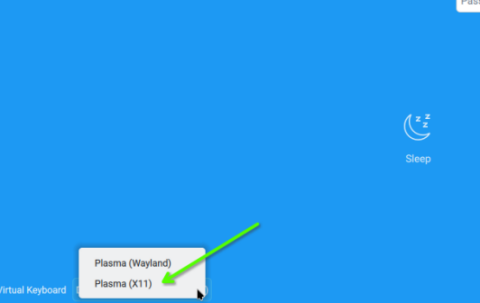
Yes, X11 choice is there. See screenshot - it’s available after the fresh install … and no, I did not have to install it manually post-installation. I can choose either at login, but I always use X11 / Plasma as the default. (BTW, I don’t have nvidia card in any machine here).
The SDDM login screen, showing X11 and wayland choices
1 Like
@linuxvinh Hi, you should not need anything to be configured for Wayland and Nvidia? I’ve been on Wayland for almost a year with Nvidia and Intel…
The desktop environment should take care of everything with monitors etc, it does on GNOME.
This is a Dell OptiPlex XE3, primary graphics is a T400, the iGPU switches to a Display Controller for Prime Render Offload;
inxi -GSaz

System:
  Kernel: 6.12.0-160000.6-default arch: x86_64 bits: 64 compiler: gcc
    v: 13.4.0 clocksource: tsc avail: acpi_pm
    parameters: BOOT_IMAGE=/boot/vmlinuz-6.12.0-160000.6-default
    root=UUID=e2911003-8a7b-490a-89b4-de68d08f1200 intel_iommu=on
    mitigations=auto quiet security=selinux selinux=1 fbdev=1
    nvidia_drm.modeset=1 rd.driver.blacklist=nouveau ia32_emulation=1
  Desktop: GNOME v: 48.4 tk: GTK v: 3.24.50 wm: gnome-shell
    tools: gsd-screensaver-proxy dm: GDM v: 48.0 Distro: openSUSE Leap 16.0
Graphics:
  Device-1: Intel CoffeeLake-S GT2 [UHD Graphics 630] vendor: Dell
    driver: i915 v: kernel arch: Gen-9.5 process: Intel 14nm built: 2016-20
    ports: active: none empty: DP-1, DP-2, DP-3, HDMI-A-1, HDMI-A-2, HDMI-A-3
    bus-ID: 00:02.0 chip-ID: 8086:3e92 class-ID: 0380
  Device-2: NVIDIA TU117GLM [Quadro T400 Mobile] driver: nvidia
    v: 580.105.08 alternate: nouveau,nvidia_drm non-free: 550.xx+ status: current
    (as of 2024-09; EOL~2026-12-xx) arch: Turing code: TUxxx
    process: TSMC 12nm FF built: 2018-2022 pcie: gen: 1 speed: 2.5 GT/s
    lanes: 16 link-max: gen: 3 speed: 8 GT/s ports: active: DP-4
    empty: DP-5,DP-6 bus-ID: 01:00.0 chip-ID: 10de:1fb2 class-ID: 0300
  Display: wayland server: Xwayland v: 24.1.6 compositor: gnome-shell
    driver: N/A display-ID: 0
  Monitor-1: DP-4 res: 1920x1080 size: N/A modes: N/A
  API: EGL v: 1.5 hw: drv: intel iris drv: nvidia platforms: device: 0
    drv: nvidia device: 1 drv: iris gbm: drv: iris surfaceless: drv: nvidia
    wayland: drv: nvidia x11: drv: nvidia
  API: OpenGL v: 4.6.0 compat-v: 4.6 vendor: nvidia mesa v: 580.105.08
    glx-v: 1.4 direct-render: yes renderer: NVIDIA T400/PCIe/SSE2
    memory: 1.95 GiB display-ID: :0.0
  API: Vulkan v: 1.4.309 layers: 3 device: 0 type: discrete-gpu
    name: NVIDIA T400 driver: N/A device-ID: 10de:1fb2
    surfaces: xcb,xlib,wayland device: 1 type: integrated-gpu name: Intel UHD
    Graphics 630 (CFL GT2) driver: N/A device-ID: 8086:3e92
    surfaces: xcb,xlib,wayland
1 Like
malcolmlewis:
@linuxvinh Hi, you should not need anything to be configured for Wayland and Nvidia? I’ve been on Wayland for almost a year with Nvidia and Intel…
The desktop environment should take care of everything with monitors etc, it does on GNOME.
This is a Dell OptiPlex XE3, primary graphics is a T400, the iGPU switches to a Display Controller for Prime Render Offload;
The problem I usually run into is the second monitor, that’s connected through a KVM, has issues. The EDID of the monitor isn’t recognized on boot, and if the machine goes to sleep, sometimes it wakes up without the second monitor, due the system reconfiguring the monitor setup on the fly. I discovered that I needed to explicitly define the monitor setup and turn off services like KScreen2, which was designed to make it easy for the system to adapt to changing monitors.
Just to close this out…
I went about downloading the Leap 16.0 ISO but the USB stick I was going to burn it to failed to mount on two GNU/Linux boxen and one MacBook. fdisk had problems with it too. Since I already had a 15.6 ready to go, I ended up installing 15.6.
Thanks everyone for their input and help!
system
December 31, 2025, 11:01pm
13
This topic was automatically closed 30 days after the last reply. New replies are no longer allowed.