Latest Update Borks Calibre

Yesterday and today I tried to do the usual “sudo zypper dup” and I get this:


Problem: 1: the installed calibre-8.7.0-1.1.x86_64 requires 'libQt6Gui.so.6(Qt_6.9.1_PRIVATE_API)(64bit)', but this requirement cannot be provided
deleted providers: libQt6Gui6-6.9.1-2.1.x86_64

 Solution 1: Following actions will be done:
  keep obsolete libQt6Gui6-6.9.1-2.1.x86_64
  keep obsolete libQt6Core6-6.9.1-2.1.x86_64
  keep obsolete libQt6DBus6-6.9.1-2.1.x86_64
  keep obsolete libQt6OpenGL6-6.9.1-2.1.x86_64
  keep obsolete libQt6Widgets6-6.9.1-2.1.x86_64
 Solution 2: deinstallation of calibre-8.7.0-1.1.x86_64
 Solution 3: break calibre-8.7.0-1.1.x86_64 by ignoring some of its dependencies

Doing option 1 gets me a whole slew of other issues, which basically end up removing most of KDE or whatever.

I asked Kimi K2 AI what was the problem, it said it’s a mismatch between the Qt library and the version of the library Calibre is compiled against. It recommended waiting until the maintainer recompiles Calibre against the latest QT. The other option is to remove Calibre, do the update, and reinstall Calibre if an when it is recompiled.

Is that correct and how long should I expect to wait for the Calibre maintainer to fix this?

You might report the issue so the developer is aware of it, or at least check to see if there’s already a bug reported.

But yes, you could either take solution 1 and keep the obsolete libraries (if that doesn’t break anything else, that’s a viable option), or you could take solution 2 and remove calibre and get the updated libraries and wait for calibre to be built against the new versions of those libraries.

https://bugzilla.opensuse.org/show_bug.cgi?id=1249031

And following that one leads to this one https://bugzilla.opensuse.org/show_bug.cgi?id=1227140 and following that one leads to this one: Show Documentation:Tools / calibre - openSUSE Build Service - which is two months go and still apparently “unresolvable.”

Time to look for a Flatpak…

UPDATE: Turns out they have a binary with all dependencies that installs via a script, including desktop integration. Problem solved.

As indicated here:

please do not use the Calibre package provided by your distribution, as these are often buggy/outdated. Instead, use the binary installation described below.

The command to install the binaries is:

sudo -v && wget -nv -O- https://download.calibre-ebook.com/linux-installer.sh | sudo sh /dev/stdin

Personally, I use flatpak, which avoids (m)any problems.

flatpak install flathub com.calibre_ebook.calibre
flatpak run com.calibre_ebook.calibre

As @Wolfheri suggested, install the Flatpak version.

And for those who prefer the easy way, and running KDE … fire up Discover, search for “calibre”, then tap the Install button.

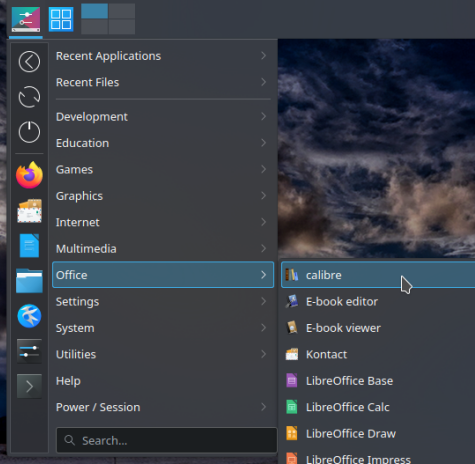
And then to run Calibre, simply tap on the KDE app menu and select Office, and tap Calibre … no command-line required (for either step) :+1:
.

The one ‘issue’ I have with the flatpak version is it takes about 1GB of file space (at least it does if one wishes to install it in user space on LEAP-15.6 … and I assume the same would be true for Tumbleweed). That is a lot of space.

I note:

oldcpu@lenovo:~> flatpak install --user flathub com.calibre_ebook.calibre
Looking for matches…

com.calibre_ebook.calibre permissions:
    ipc        network        fallback-x11           pulseaudio             wayland
    x11        devices        file access [1]        dbus access [2]        system dbus access [3]

    [1] host, xdg-config/kdeglobals:ro, xdg-data/Trash, xdg-run/speech-dispatcher:ro
    [2] com.canonical.AppMenu.Registrar, org.kde.StatusNotifierWatcher
    [3] org.freedesktop.UDisks2


        ID                                              Branch                Op            Remote             Download
 1.     org.freedesktop.Platform.GL.default             24.08                 u             flathub            < 145.0 MB
 2.     org.freedesktop.Platform.GL.default             24.08extra            u             flathub            < 145.0 MB
 3.     org.freedesktop.Platform.Locale                 24.08                 u             flathub            < 387.7 MB (partial)
 4.     org.freedesktop.Platform.VAAPI.Intel            24.08                 u             flathub             < 15.0 MB
 5.     org.freedesktop.Platform                        24.08                 u             flathub            < 264.7 MB
 6.     com.calibre_ebook.calibre                       stable                i             flathub            < 254.4 MB

Proceed with these changes to the user installation? [Y/n]: n
oldcpu@lenovo:~> 

That adds up to over 1 GB !! So in my case I typed “n” for no install.

While normally I would prefer a zypper (if available) and then next a flatpak version, in this particular case, I decided I would go for the installer provided by calibre for GNU/Linux.

oldcpu@lenovo:~> wget -O- https://download.calibre-ebook.com/linux-installer.sh | sh /dev/stdin install_dir=~/calibre-bin isolated=y
--2025-09-03 20:31:26--  https://download.calibre-ebook.com/linux-installer.sh
Resolving download.calibre-ebook.com (download.calibre-ebook.com)... 51.89.235.100, 2001:41d0:800:2764::
Connecting to download.calibre-ebook.com (download.calibre-ebook.com)|51.89.235.100|:443... connected.
HTTP request sent, awaiting response... 200 OK
Length: 35050 (34K) [application/x-sh]
Saving to: ‘STDOUT’

-                                   100%[===================================================================>]  34.23K  --.-KB/s    in 0s      

2025-09-03 20:31:37 (499 MB/s) - written to stdout [35050/35050]

Using python executable: /usr/bin/python3
Installing to /home/oldcpu/calibre-bin/calibre
Downloading tarball signature securely...
Will download and install calibre-8.9.0-x86_64.txz 
                                                      Downloading calibre-8.9.0-x86_64.txz                                                      
100% [======================================================================================================================================]
                                                                                                                                                Downloaded 181199520 bytes 
Checking downloaded file integrity... 
Extracting files to /home/oldcpu/calibre-bin/calibre ...
Extracting application files... 
Run "/home/oldcpu/calibre-bin/calibre/calibre" to start calibre 
oldcpu@lenovo:~> 

and to check on the amount of file space consumed:

oldcpu@lenovo:~> du -sh ~/calibre-bin
587M    /home/oldcpu/calibre-bin
oldcpu@lenovo:~> 

where while 587MB is big, it is not as big as > 1 GB.

Granted, not everyone wishes to install an application in user space. Nor install an app if it can not be managed nicely with zypper or discover / flatpak. But I am the only user of my laptop and so for me this use of the calibre installer (to install in user space) is an acceptable approach.

I adopt this user space approach for now, as my " / " (system) partition is pretty full and it only has about 5.9 GB free space while i have over 300 GB free space in my /home.

… having typed that … I do like/appreciate being able to install apps via flatpak.
.

@oldcpu It will as you have not included any of the supporting rpms that are installed to support the Calibre rpm that are installed via flatpak, all the org.freedesktop items. So say you install another flatpak that needs those, well it won’t download and use the ones provided.

They are not RPMs. Please do not add to confusion.

1 Like

@arvidjaar So all the supporting packages installed via rpm to support the desktop environment in use by the distribution to provide the likes of GL, Locale and VAPPI…

@oldcpu So I use flatpak here, all I see is;

latpak install --user com.calibre_ebook.calibre
Looking for matches…

com.calibre_ebook.calibre permissions:
    ipc            network                fallback-x11           pulseaudio                   wayland       x11
    devices        file access [1]        dbus access [2]        system dbus access [3]

    [1] host, xdg-config/kdeglobals:ro, xdg-data/Trash, xdg-run/speech-dispatcher:ro
    [2] com.canonical.AppMenu.Registrar, org.kde.StatusNotifierWatcher
    [3] org.freedesktop.UDisks2


        ID                                  Branch          Op          Remote           Download
 1.     com.calibre_ebook.calibre           stable          i           flathub          < 254.4 MB

Because all the others needed are installed already and shared by the other flatpaks…

I have a lot to learn here. I note I sent :
flatpak install --user flathub com.calibre_ebook.calibre
which is a bit different as I specified flathub.

I assume that makes no difference (as likely I did not need to specify flathub)?

@oldcpu only if you have multiple repos added, in my case only flathub, so no need to specify…

flatpak remotes
Name    Options
flathub system
flathub user

I’ve been pondering that. … I think I am beginning to like flatpak.

So if I understand flatpak, if the necessary version of a dependency has already been installed on one’s PC via flatpak, then flatpak won’t download that dependency again. BUT, if the version of dependency that is already on one’s PC (in the flatpak ‘area’) unfortunately is not an appropriate version for the new app, then flatpak will simply install a new version of the dependency (avoiding dependency ‘hell’ ) while still keeping the older version of the dependency . . Possibly the downside being one has 2 versions of the same dependency on one’s PC, taking up a small amount more space.

Do I have that correct ?

Interesting ! Thanks for sharing that tidbit (if I understand correctly).

@oldcpu Yes, that is correct.

1 Like

What about this way:

You can also do an "isolated" install that only touches files inside the installation folder and does not need to be run as root, like this: 
wget -nv -O- https://download.calibre-ebook.com/linux-installer.sh | sh /dev/stdin install_dir=~/calibre-bin isolated=y

I did it and it works. Only i just tested convert book feature but not any other one.

@sidler_bot that is in essence what I noted in my post except I used the command:

wget -O- https://download.calibre-ebook.com/linux-installer.sh | sh /dev/stdin install_dir=~/calibre-bin isolated=y

The difference being you specified the " -nv " option, that suppresses the detailed progress meter, and instead prints only essential messages like errors or success notices.

I confess I was curious to watch the download progress in more detail.

1 Like

My bad. i just had a quick look to the responses and didn’t bother to move the horizontal scrollbar slider. (where are smileys when you need them?). And i agree with you, much more interesting the verbose version.
BTW, i just tried to install calibre and it seems the problem with that libraries is gone, so I’ll uninstall the isolated version (seems just deleting the folder will do the trick) and install the program from the repo because the context menu capabilities.
Thanks a lot.
Thank you for your

This topic was automatically closed 30 days after the last reply. New replies are no longer allowed.