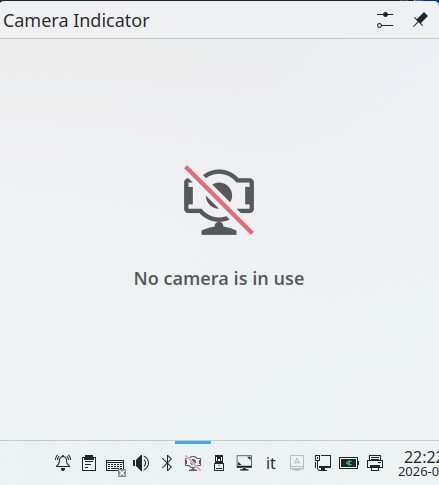
on my laptop 1=ASUS vivobook pro N552VW-FY204T (2016) with freshly installed leap 16.0
the laptop camera doesn’t works (in 15.6 worked)
now if I click on systm tray show this
no camera is in use
how can I have my camera working again?
the laptop camera doesn’t works (in 15.6 worked)
now if I click on systm tray show this
no camera is in use
how can I have my camera working again?
Any camera device detected?
lsusb
Device node present?
ls /dev/video*
No function key (or similar) to disable it?
eros@localhost:~> lsusb
Bus 004 Device 001: ID 1d6b:0003 Linux Foundation 3.0 root hub
Bus 003 Device 001: ID 1d6b:0002 Linux Foundation 2.0 root hub
Bus 002 Device 001: ID 1d6b:0003 Linux Foundation 3.0 root hub
Bus 001 Device 005: ID 8087:0a2a Intel Corp. Bluetooth wireless interface
Bus 001 Device 004: ID 2537:1068 Norelsys NS1068/NS1068X SATA Bridge Controller
Bus 001 Device 003: ID 13d3:5666 IMC Networks USB2.0 HD UVC WebCam
Bus 001 Device 002: ID 3153:1023 YICHIP 2.4G Receiver
Bus 001 Device 001: ID 1d6b:0002 Linux Foundation 2.0 root hub
eros@localhost:~>
eros@localhost:~> ls /dev/video*
/dev/video0 /dev/video1
eros@localhost:~> it seems not, nor hardware switch too
The widget is also for me not working, but the Camera does.
guvcview and jitsi are working.
I installed guvcview and it works
So your webcam is working (as the output) and application shows.
The Camera Indicator widget does not check /dev/video*, but rather pipewire for activity, hence the message “No camera is in use”.
Refer:
https://bugs.kde.org/show_bug.cgi?id=482614
From Nate Graham…
It detects apps using it via PipeWire. It can’t detect camera use for apps that open it in a lower-level way at the moment. Making this bug a wishlist requesting that it do so.
Thankfully, I have a camera LED that I use for camera status - I don’t use the widget for that.
I think the issue is that the widget was built for Plasma5.
This topic was automatically closed 30 days after the last reply. New replies are no longer allowed.