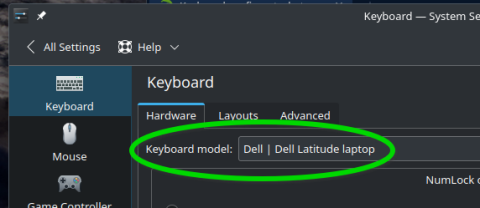
Keyboard config :
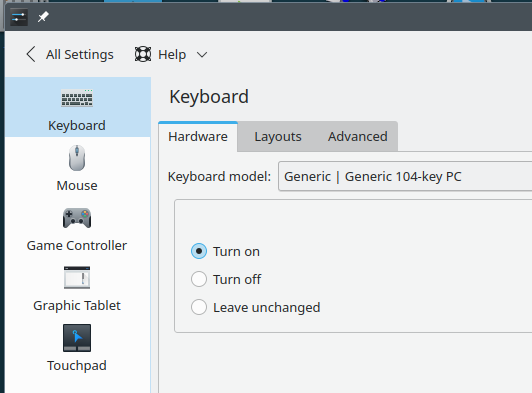
On boot, login first as user root, numlock is not turn on.
Any help is welcome.
I am a rather dump person without any clairvoyance capabilities. Do you mind to explain what program this part of a window comes from?
If you mean root login on a vtty rather than in your GUI DE, then you should investigate the NumLock on? content of /etc/sysconfig/keyboard.
system settings

it is not a root login from a vtty.
It is a login as user (other) root in GUI DE ( x11 )
This file is not on the computer.
All user can log with numlock on except user root and the seems not necessary…
I do not know what “(other)” means here. But when you are saying that you log in in a GUI/Desktop with user root, then I am out.
## Type:        list(bios,yes,no)
## Default:     bios
#
# NumLock on? ("yes" or "no" or "bios" for BIOS setting)
# This setting may interfere with GNOME /org/gnome/settings-daemon/peripherals/keyboard/remember-numlock-state DConf key.
KBD_NUMLOCK="yes"
That’s your religion.
It’s up to you
Your post is quite confusing. You want to have numlock enabled in a tty session for root, but try to configure it via the DE as user (screenshot from first post)? Or do you login graphically as root?
See
it is not a root login from a vtty.
It is a login as user (other) root in GUI DE ( x11 )
Numlock is already set :
## Type:        list(bios,yes,no)
## Default:     bios
#
# NumLock on? ("yes" or "no" or "bios" for BIOS setting)
# This setting may interfere with GNOME /org/gnome/settings-daemon/peripherals/keyboard/remember-numlock-state DConf key.
KBD_NUMLOCK="yes"
I cannot grok “user (other) root”. It’s incoherent. Either it’s user root, or it’s some other user.
When you do “sudo nano /etc/sddm.conf” you create the file in question. And then you just have to add what I wrote in my previous message, save it and close the file. After this you log out and it should work.
On the login screen, under the password input field, at the rightmost place there an icon whose named is other. You click on it then, give the user you want to log in ( root in my case ) then type the password ( root password in my case )
I don’t want to do that as it is not necessary.
I’ve always known that it’s important to specify the exact keyboard, if possible | listed. Choosing “Generic Keyboard” does not apply proper settings for very specific keyboard configurations.
For example, our desktop has a Matias Ergo Pro split keyboard.
Much different than this Dell laptop I’m using, which has keys that do not exist on the Ergo Pro
.
This topic was automatically closed 30 days after the last reply. New replies are no longer allowed.