Kernel panic during Leap 16.0 installation

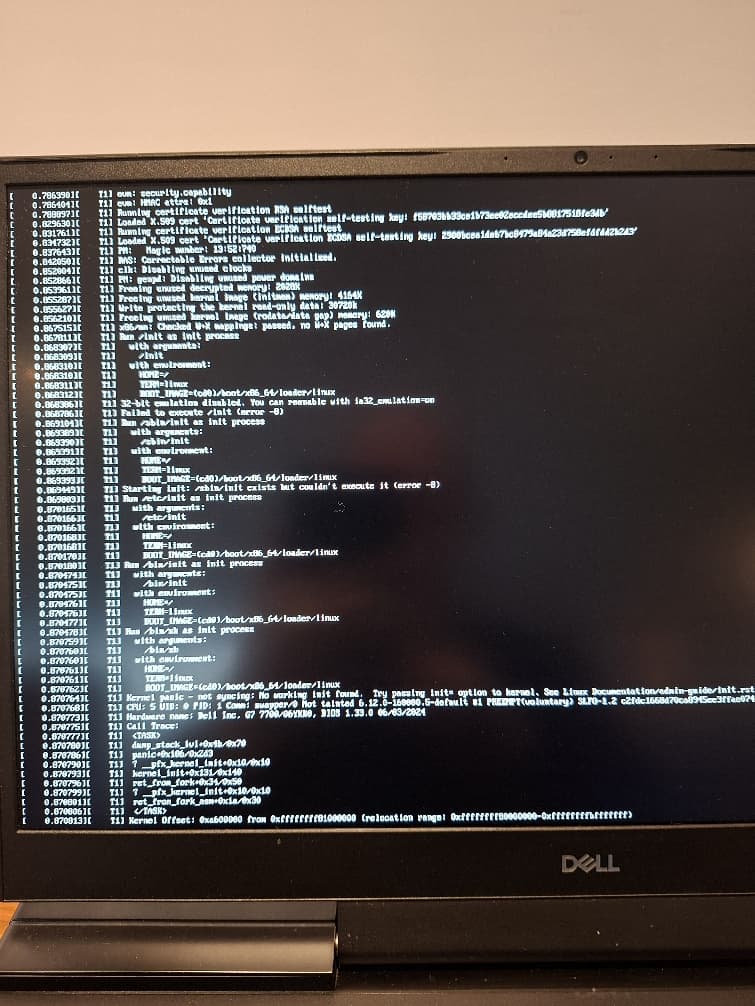
I tried installing Leap 16.0 on a Dell G7 7700 laptop but the installer gets a kernel panic (see image)

I verified that the iso Leap-16.0-offline-installer-x86_64.install.iso has the correct checksum.

I’ve seen this panic mentioned in relation to the system not supporting Leap 16, but I tried the commands on the wiki and they seem to indicate that the system should work:

inxi -Cx | grep sse4_2
Flags-basic: avx avx2 ht lm nx pae sse sse2 sse3 sse4_1 sse4_2 ssse3 vmx

inxi -aCz | grep level
gen: core 10 level: v3 note: check built: 2020 process: Intel 14nm family: 6

ld.so --help
Subdirectories of glibc-hwcaps directories, in priority order:
x86-64-v4
x86-64-v3 (supported, searched)
x86-64-v2 (supported, searched)

lscpu | grep sse4_2
Flags: fpu vme de pse tsc msr pae mce cx8 apic sep mtrr pge mca cmov pat pse36 clflush dts acpi mmx fxsr sse sse2 ss ht tm pbe syscall nx pdpe1gb rdtscp lm constant_tsc art arch_perfmon pebs bts rep_good nopl xtopology nonstop_tsc cpuid aperfmperf pni pclmulqdq dtes64 monitor ds_cpl vmx est tm2 ssse3 sdbg fma cx16 xtpr pdcm pcid sse4_1 sse4_2 x2apic movbe popcnt tsc_deadline_timer aes xsave avx f16c rdrand lahf_lm abm 3dnowprefetch cpuid_fault epb ssbd ibrs ibpb stibp ibrs_enhanced tpr_shadow flexpriority ept vpid ept_ad fsgsbase tsc_adjust bmi1 avx2 smep bmi2 erms invpcid mpx rdseed adx smap clflushopt intel_pt xsaveopt xsavec xgetbv1 xsaves dtherm ida arat pln pts hwp hwp_notify hwp_act_window hwp_epp vnmi pku ospke md_clear flush_l1d arch_capabilities

any suggestions? I have slowroll installed on the system but I wanted to try Leap 16 also. thanks.

aha, I was trying to install it with ventoy and that somehow messed something up.
using a regular usb drive gets it booting.

It’s well-known, and it’s documented, that ventoy does not work with openSUSE isos:

https://en.opensuse.org/Create_installation_USB_stick#Ventoy

got it. I actually had no problems using ventoy for slowroll.

1 Like

That’s incorrect. Ventoy did work with openSUSE ISOs before Leap 16.0 (and even Tumbleweed).

Lucky it worked that time !

Sometimes the docs are not easily found. The ventoy issue has been around for quite a while. As some of us would say, “just do a search in the forums” … there is a plethora of “can’t install using ventoy” postings (and it’s not just a Leap 16 issue) :+1:

If someone is using an openSUSE OS, Studio Imagewriter is available. And as in the openSUSE url I posted earlier, there are other tools available.

Some of us old-folks use the ‘dd’ command on a CLI. (very trustworthy tool).

Unfortunately, imagewriter is only available for Tumbleweed.

Impression will write openSUSE install media just fine, I believe it’s available in both the Leap and Tumbleweed repositories, as well as via Flatpak, if that’s your preference.

linux64:/home/stephan # LANG=C zypper se -s imagewriter
Loading repository data...
Reading installed packages...


S  | Name        | Type       | Version                           | Arch   | Repository
---+-------------+------------+-----------------------------------+--------+-----------------
i+ | imagewriter | package    | 1.10.1432200249.1d253d9-bp156.4.7 | x86_64 | OSS
   | imagewriter | srcpackage | 1.10.1432200249.1d253d9-bp156.4.7 | noarch | Quell-Repository
linux64:/home/stephan # lsb-release -id
Distributor ID: openSUSE
Description:    openSUSE Leap 15.6

You are right, thank you! But Leap 16.0 still does not have it.

But you want to write a Leap 16.0 image to a stick…

No not there but in OBS

The dd command works everywhere (Including Windows…) :person_shrugging:

1 Like

For ostensibly improved reliability, and automatic feedback during processing, in Linux I use gnu_ddrescue, an “I/O error aware data recovery and copying utility”.

isoimagewriter works on leap 16 !!

Mod edit: The reference to opi removed. We don’t encourage the use of opi. It can add repositories that aren’t part of the official openSUSE distribution, and introduce unsupported packages, and at worst lead to broken systems.
I have not saying others…

Only to this one:

This topic was automatically closed 30 days after the last reply. New replies are no longer allowed.