Kernel panic after update

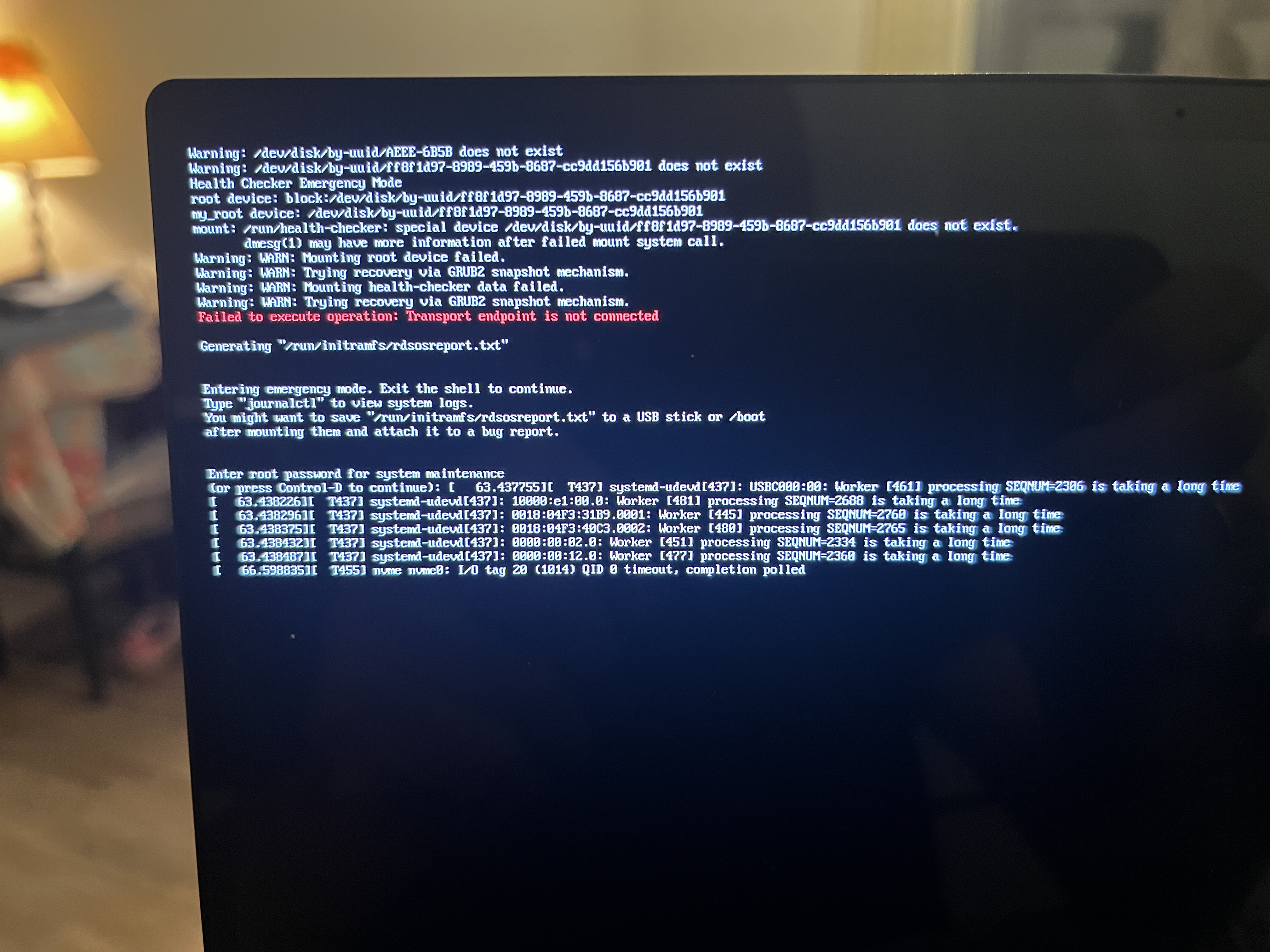
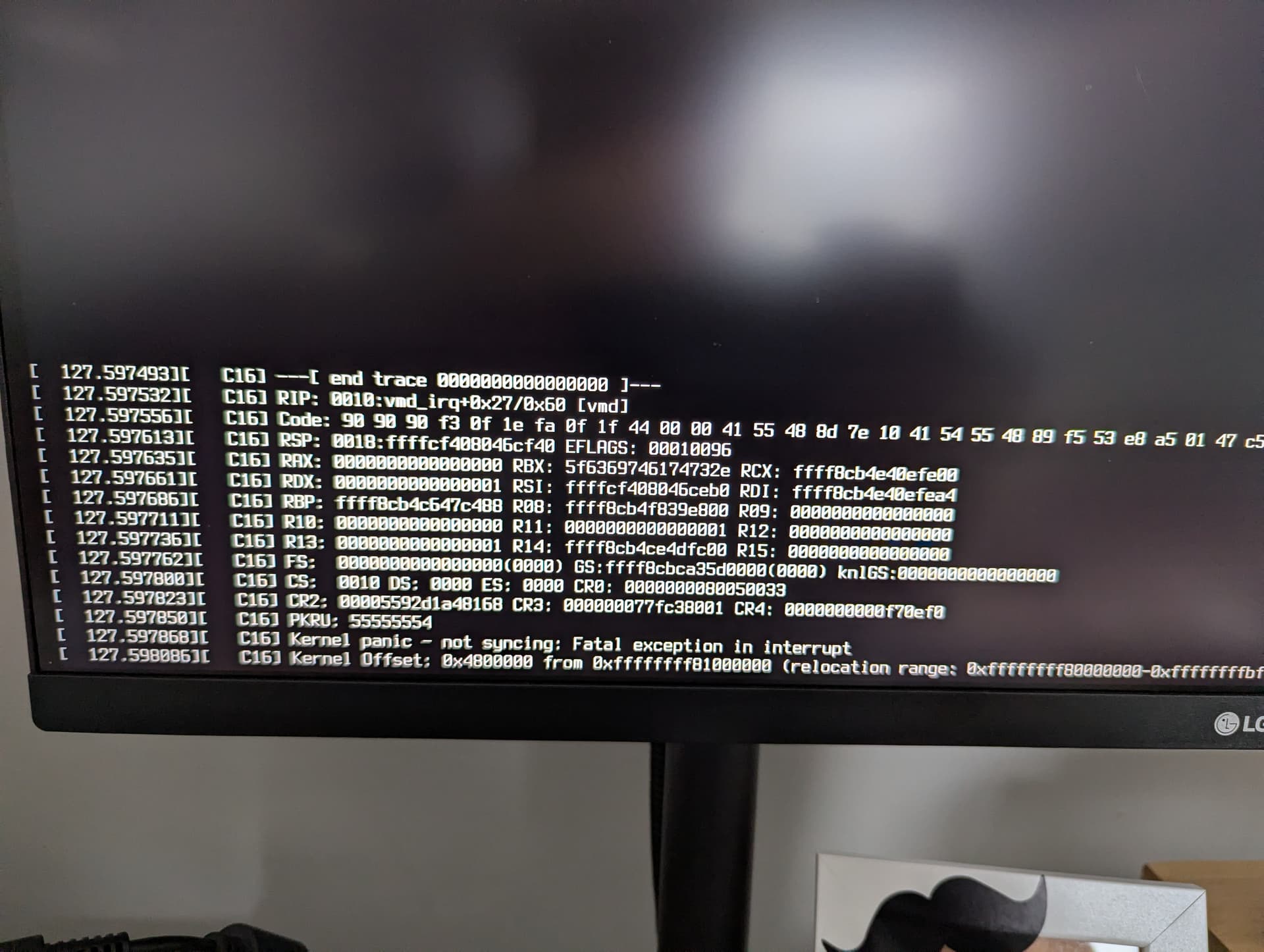
Today, I decided to update my computer and restarted it after the update. Upon restarting, I saw three square dots that I had previously seen on Debian-based distributions (normally, my laptop manufacturer logo and the Tumbleweed logo would appear), and I thought something was wrong. I continued with the boot process, but after a while, my computer completely froze. Then I turned it off using the power button and started it again, this time removing quiet and splash=silent from the GRUB configuration. This time, after a while, I saw a kernel panic, and it froze in the same way. What steps should I take?

Upgraded to kernel version 6.17.3-1.1. Kernel 6.17.0-2.1 was working without issues.
CPU: 11th Gen Intel(R) Core™ i7-11800H
Discrete GPU: NVIDIA GeForce RTX 3050 Mobile
Laptop: ASUS TUF Gaming F15 FX506HC (2021)

2 Likes

@herrwinfried

I have the exact same problem. The new kernel crashed my system the same way. I’m using 6.17.2 right now. I think the new kernel is buggy.

@herrwinfried Hi and welcome to the Forum :smile:
If you edit the boot options and add plymouth.enable=0 does that help? The three dots are plymouth related…

I don’t use Plymouth (and install nvidia the hard way) and all good here?

          ,...,                                 
     .,:lloooooc;.                              ---------------
   ,ool'     oo,;oo:                            OS: openSUSE Tumbleweed x86_64
 .lo'        oo.   oo:                          Host: HP Z440 Workstation
.oo.         oo.    oo:                         Kernel: Linux 6.17.3-1-default
:ol          oo.    'oo                         Uptime: 26 mins
:oo         .oo.    .oo.                        Packages: 3016 (rpm), 37 (flatpak-user)
.oooooooooooooo.    .oo.                        Shell: bash 5.3.3
 ;oo.               .oo.                        Display (Sceptre F24): 1920x1080 in 24", 100 Hz [External]
  'oo,              .oo.                        Display (Sceptre F24): 1920x1080 in 24", 100 Hz [External]
    "ooc,',,,,,,,,,,:ooc,,,,,,,,,,,             Display (Sceptre F24): 1920x1080 in 24", 100 Hz [External] *
       ':cooooooooooooooooooooooooool;.         DE: GNOME 49.0
                    .oo.             .oo;       WM: Mutter (Wayland)
                    .oo.               .oo.     WM Theme: Adwaita
                    .oo.    'oooooooooo:ooo.    Theme: Adwaita [GTK2/3/4]
                    .oo.    'oo.         col    Icons: Adwaita [GTK2/3/4]
                    .oo'    'oo          col    Font: Adwaita Sans 12 @wght=600 (SemiBold) [GTK2/3/4]
                     coo    'oo          oo'    Cursor: Adwaita (40px)
                      coc   'oo        .lo,     Terminal: Ptyxis 49.1
                       `oo, 'oo      .:oo       Terminal Font: Adwaita Mono (14pt)
                         'ooooc,, ,:lol         CPU: Intel(R) Xeon(R) E5-2695 v4 (36) @ 3.30 GHz
                            `''"clc"'           GPU 1: NVIDIA Quadro RTX 4000 [Discrete]
                                                GPU 2: Intel Arc A380 @ 2.45 GHz [Discrete]
                                                Memory: 3.87 GiB / 125.69 GiB (3%)
                                                Swap: 0 B / 3.14 GiB (0%)
                                                Disk (/): 266.86 GiB / 933.89 GiB (29%) - ext4
                                                Disk (/build): 59.13 GiB / 111.57 GiB (53%) - xfs
                                                Disk (/data): 265.99 GiB / 452.87 GiB (59%) - xfs
                                                Local IP (eno1): 
                                                Locale: en_US.UTF-8


inxi -GSaz

System:
  Kernel: 6.17.3-1-default arch: x86_64 bits: 64 compiler: gcc v: 15.2.1
    clocksource: tsc avail: hpet,acpi_pm
    parameters: BOOT_IMAGE=/boot/vmlinuz-6.17.3-1-default
    root=UUID=1ab675ed-aba2-4593-9ebc-1c893015b607 splash=silent quiet
    security=apparmor intel_iommu=on iommu=pt fbdev=1
    nvidia_drm.modeset=1 mitigations=auto
  Desktop: GNOME v: 49.0 tk: GTK v: 3.24.51 wm: gnome-shell
    tools: gsd-screensaver-proxy avail: xscreensaver dm: GDM v: 49.1
    Distro: openSUSE Tumbleweed 20251017
Graphics:
  Device-1: Intel DG2 [Arc A380] vendor: ASRock driver: i915 v: kernel
    alternate: xe arch: Xe-HPG code: Alchemist process: TSMC n6 (7nm)
    built: 2022+ pcie: gen: 1 speed: 2.5 GT/s lanes: 1 ports:
    active: DP-1,DP-2,DP-3 empty: HDMI-A-1, HDMI-A-2, HDMI-A-3, HDMI-A-4
    bus-ID: 04:00.0 chip-ID: 8086:56a5 class-ID: 0300
  Device-2: NVIDIA TU104GL [Quadro RTX 4000] vendor: Hewlett-Packard
    driver: nvidia v: 580.95.05 alternate: nouveau,nvidia_drm
    non-free: 550-580.xx+ status: current (as of 2025-08; EOL~2026-12-xx)
    arch: Turing code: TUxxx process: TSMC 12nm FF built: 2018-2022 pcie:
    gen: 1 speed: 2.5 GT/s lanes: 16 link-max: gen: 3 speed: 8 GT/s ports:
    active: none empty: DP-4, DP-5, DP-6, Unknown-1 bus-ID: 07:00.0
    chip-ID: 10de:1eb1 class-ID: 0300
  Device-3: Realtek RTL2838 DVB-T driver: dvb_usb_rtl28xxu,rtl2832_sdr
    type: USB rev: 2.0 speed: 480 Mb/s lanes: 1 mode: 2.0 bus-ID: 3-4:2
    chip-ID: 0bda:2838 class-ID: 0000 serial: <filter>
  Display: wayland server: X.org v: 1.21.1.15 with: Xwayland v: 24.1.8
    compositor: gnome-shell driver: X: loaded: modesetting,nvidia unloaded: vesa
    alternate: fbdev,intel,nouveau,nv dri: iris gpu: i915 d-rect: 5760x2160
    display-ID: 0
  Monitor-1: DP-1 pos: bottom-c model: Sceptre F24 built: 2023 res:
    mode: 1920x1080 hz: 100 scale: 100% (1) dpi: 93 gamma: 1.2
    size: 530x300mm (20.71x11.65") diag: 604mm (23.8") ratio: 16:9 modes:
    max: 1920x1080 min: 640x480
  Monitor-2: DP-2 pos: primary,top-left model: Sceptre F24 built: 2023 res:
    mode: 1920x1080 hz: 100 scale: 100% (1) dpi: 93 gamma: 1.2
    size: 530x300mm (20.71x11.65") diag: 604mm (23.8") ratio: 16:9 modes:
    max: 1920x1080 min: 640x480
  Monitor-3: DP-3 pos: top-right model: Sceptre F24 built: 2023 res:
    mode: 1920x1080 hz: 100 scale: 100% (1) dpi: 93 gamma: 1.2
    size: 530x300mm (20.71x11.65") diag: 604mm (23.8") ratio: 16:9 modes:
    max: 1920x1080 min: 640x480
  API: EGL v: 1.5 hw: drv: intel iris drv: nvidia platforms: device: 0
    drv: nvidia device: 2 drv: iris device: 3 drv: swrast gbm: drv: nvidia
    surfaceless: drv: nvidia wayland: drv: iris x11: drv: iris
    inactive: device-1
  API: OpenGL v: 4.6.0 compat-v: 4.5 vendor: intel mesa v: 25.2.4 glx-v: 1.4
    direct-render: yes renderer: Mesa Intel Arc A380 Graphics (DG2)
    device-ID: 8086:56a5 memory: 5.81 GiB unified: no display-ID: :0.0
  API: Vulkan v: 1.4.328 layers: 4 device: 0 type: discrete-gpu name: Intel
    Arc A380 Graphics (DG2) driver: mesa intel v: 25.2.4 device-ID: 8086:56a5
    surfaces: N/A device: 1 type: discrete-gpu name: Quadro RTX 4000
    driver: nvidia v: 580.95.05 device-ID: 10de:1eb1 surfaces: N/A device: 2
    type: cpu name: llvmpipe (LLVM 21.1.2 256 bits) driver: mesa llvmpipe
    v: 25.2.4 (LLVM 21.1.2) device-ID: 10005:0000 surfaces: N/A
  Info: Tools: api: clinfo, eglinfo, glxinfo, vulkaninfo gpu: gputop,
    intel_gpu_top, lsgpu, nvidia-settings, nvidia-smi wl: wayland-info
    x11: xdpyinfo, xprop, xrandr

@malcolmlewis

I’m having the same problem but I don’t use Nvidia. I use Intel Iris XE Graphics. Could plymouth.enable=0 work on this system too?

@alexsec it may very well help, as you can see I have Intel as primary GPU here with i915 driver, are you running Xe, if so I can switch and test? Show output from inxi -GSaz from the running kernel.

This sounds like regression and needs to be reported in bugzilla.

Same problem here, but after waiting for a few minutes it ended by displaying the login screen. To see what happens, one may use the ESC key, while stuck on the 3 dots gray screen.

https://bugzilla.opensuse.org/show_bug.cgi?id=1252291

Unfortunately, nothing has changed.

@herrwinfried Sounds like a hardware specific issue… Can you post the output from inxi -GSaz as in the Fedora bug mentioned in the openSUSE bug, that user has the Nvidia GPU running the laptop display…

@malcolmlewis

Yes, the system has only one adapter, the onboard Iris XE Graphics.

I entered plymouth.enable=0 manually at the end of the linux line by pressing edit while booting. The only thing that happened was the gray background with the three dots didn’t appear. Everything else was the same. The system froze for about a minute, displayed some characters on the screen and then it rebooted by itself.

I even tried regenerating everything by issuing a dracut -f --regenerate-all while the system was running on the 6.17.2 kernel but it didn’t help.

Unfortunately I’m on the phone right now and I cannot post the results you requested.

https://paste.opensuse.org/d633ad5f3069

So your using the longterm kernel…

The same thing happened to me tonight.

Yes, so should I switch to 6.17.0-2.1 before sending it?

@herrwinfried 6.17.2 and see how that goes…

I encountered the same issue on kernel-default-6.17.3-1.1

rolling back to 6.17.2-1 has resolved the hard lock / long boot time on boot.

inxi -GSaz output:

System:
  Kernel: 6.17.2-1-default arch: x86_64 bits: 64 compiler: gcc v: 15.2.1
    clocksource: tsc avail: acpi_pm
    parameters: BOOT_IMAGE=/boot/vmlinuz-6.17.2-1-default
    root=UUID=bf859535-7566-4989-b7a0-8f886b10ca81 splash=silent
    resume=/dev/disk/by-uuid/949f90c6-a4c2-4981-95fc-2db090c1c436 quiet
    security=apparmor pcie_aspm=force nvidia-drm.modeset=1 nvidia_drm.fbdev=1
    intel_iommu=on iommu=pt mitigations=auto
  Desktop: GNOME v: 49.0 tk: GTK v: 3.24.51 wm: gnome-shell
    tools: gsd-screensaver-proxy avail: i3lock,xautolock,xscreensaver dm: 1: GDM
    v: 49.1 2: SDDM note: stopped Distro: openSUSE Tumbleweed 20251015
Graphics:
  Device-1: Intel Raptor Lake-P [Iris Xe Graphics] vendor: Micro-Star MSI
    driver: i915 v: kernel alternate: xe arch: Xe process: Intel 7 (10nm)
    built: 2022+ ports: active: DP-1,eDP-1 empty: DP-2,DP-3,DP-4
    bus-ID: 0000:00:02.0 chip-ID: 8086:a7a0 class-ID: 0300
  Device-2: NVIDIA AD106M [GeForce RTX 4070 Max-Q / Mobile]
    vendor: Micro-Star MSI driver: nvidia v: 580.95.05
    alternate: nouveau,nvidia_drm non-free: 550-580.xx+
    status: current (as of 2025-08) arch: Lovelace code: AD1xx
    process: TSMC n4 (5nm) built: 2022+ ports: active: none
    empty: DP-5,HDMI-A-1,eDP-2 bus-ID: 0000:01:00.0 chip-ID: 10de:2820
    class-ID: 0300
  Device-3: Bison FHD Camera driver: uvcvideo type: USB rev: 2.0
    speed: 480 Mb/s lanes: 1 mode: 2.0 bus-ID: 3-1:2 chip-ID: 5986:213a
    class-ID: 0e02 serial: <filter>
  Device-4: Logitech Webcam C270 driver: snd-usb-audio,uvcvideo type: USB
    rev: 2.0 speed: 480 Mb/s lanes: 1 mode: 2.0 bus-ID: 3-5.1.3:11
    chip-ID: 046d:0825 class-ID: 0102 serial: <filter>
  Display: wayland server: X.org v: 1.21.1.15 with: Xwayland v: 24.1.8
    compositor: gnome-shell driver: X: loaded: modesetting dri: iris,nouveau
    gpu: i915 d-rect: 6400x3760 display-ID: 0
  Monitor-1: DP-1 pos: top-right model: LG (GoldStar) ULTRAFINE
    serial: <filter> built: 2025 res: mode: 3840x2160 hz: 144 scale: 100% (1)
    dpi: 140 gamma: 1.2 size: 700x390mm (27.44x15.43") diag: 800mm (31.5")
    ratio: 16:9 modes: max: 3840x2160 min: 640x480
  Monitor-2: eDP-1 pos: bottom-l model: ChiMei InnoLux 0x162f built: 2022
    res: mode: 2560x1600 hz: 240 scale: 100% (1) dpi: 189 gamma: 1.2
    size: 340x220mm (13.54x8.46") diag: 406mm (16") ratio: 16:10
    modes: 2560x1600
  API: EGL v: 1.5 hw: drv: intel iris drv: nvidia platforms: device: 0
    drv: nvidia device: 2 drv: iris device: 3 drv: swrast gbm: drv: nvidia
    surfaceless: drv: nvidia wayland: drv: iris x11: drv: iris
    inactive: device-1
  API: OpenGL v: 4.6.0 compat-v: 4.5 vendor: intel mesa v: 25.2.4 glx-v: 1.4
    direct-render: yes renderer: Mesa Intel Iris Xe Graphics (RPL-P)
    device-ID: 8086:a7a0 memory: 30.31 GiB unified: yes display-ID: :0.0
  API: Vulkan v: 1.4.328 layers: 8 device: 0 type: integrated-gpu name: Intel
    Iris Xe Graphics (RPL-P) driver: mesa intel v: 25.2.4 device-ID: 8086:a7a0
    surfaces: N/A device: 1 type: discrete-gpu name: NVIDIA GeForce RTX 4070
    Laptop GPU driver: nvidia v: 580.95.05 device-ID: 10de:2820 surfaces: N/A
    device: 2 type: cpu name: llvmpipe (LLVM 21.1.3 256 bits)
    driver: mesa llvmpipe v: 25.2.4 (LLVM 21.1.3) device-ID: 10005:0000
    surfaces: N/A
  Info: Tools: api: clinfo, eglinfo, glxinfo, vulkaninfo de: kscreen-doctor
    gpu: gputop, intel_gpu_top, lsgpu, lact, nvidia-settings, nvidia-smi
    wl: wayland-info x11: xdpyinfo, xprop, xrandr

fastfetch output:

          ,...,
     .,:lloooooc;.
   ,ool'     oo,;oo:
 .lo'        oo.   oo:
.oo.         oo.    oo:
:ol          oo.    'oo                         dannyr@localhost
:oo         .oo.    .oo.                        ----------------
.oooooooooooooo.    .oo.                        OS: openSUSE Tumbleweed x86_64
 ;oo.               .oo.                        Host: Stealth 16Studio A13VG (REV:1.0)
  'oo,              .oo.                        Kernel: Linux 6.17.2-1-default
    "ooc,',,,,,,,,,,:ooc,,,,,,,,,,,             Uptime: 10 mins
       ':cooooooooooooooooooooooooool;.         Packages: 6301 (rpm), 36 (flatpak)
                    .oo.             .oo;       Shell: zsh 5.9
                    .oo.               .oo.     Display (LG ULTRAFINE): 3840x2160 in 32", 144 Hz [External]
                    .oo.    'oooooooooo:ooo.    Display (CMN162F): 2560x1600 in 16", 240 Hz [Built-in]
                    .oo.    'oo.         col    DE: GNOME 49.0
                    .oo'    'oo          col    WM: Mutter (Wayland)
                     coo    'oo          oo'    WM Theme: Adwaita-dark
                      coc   'oo        .lo,     Theme: Adwaita-dark [GTK2/3/4]
                       `oo, 'oo      .:oo       Icons: Adwaita [GTK2/3/4]
                         'ooooc,, ,:lol         Font: Inter (10pt) [GTK2/3/4]
                            `''"clc"'           Cursor: Adwaita (24px)
                                                Terminal: ghostty 1.1.3
                                                Terminal Font: JetBrainsMono Nerd Font (13pt)
                                                CPU: 13th Gen Intel(R) Core(TM) i7-13700H (20) @ 5.00 GHz
                                                GPU 1: NVIDIA GeForce RTX 4070 Max-Q / Mobile [Discrete]
                                                GPU 2: Intel Iris Xe Graphics @ 1.50 GHz [Integrated]
                                                Memory: 6.63 GiB / 31.04 GiB (21%)
                                                Swap: 0 B / 31.05 GiB (0%)
                                                Disk (/): 847.17 GiB / 1.83 TiB (45%) - btrfs
                                                Local IP (wlo1): 192.168.1.235/24
                                                Battery (BIF0_9): 79% [AC Connected]
                                                Locale: en_US.UTF-8

Happy to run any tests / commands if it can help?
@dannyr87 Have you enabled kms-modifiers for GNOME?
gsettings set org.gnome.mutter experimental-features [\"kms-modifiers\"]

So, can you get to GNOME or Login?

was not enabled, testing upgrade again now after setting.

i’ll let you know how it goes :slight_smile:

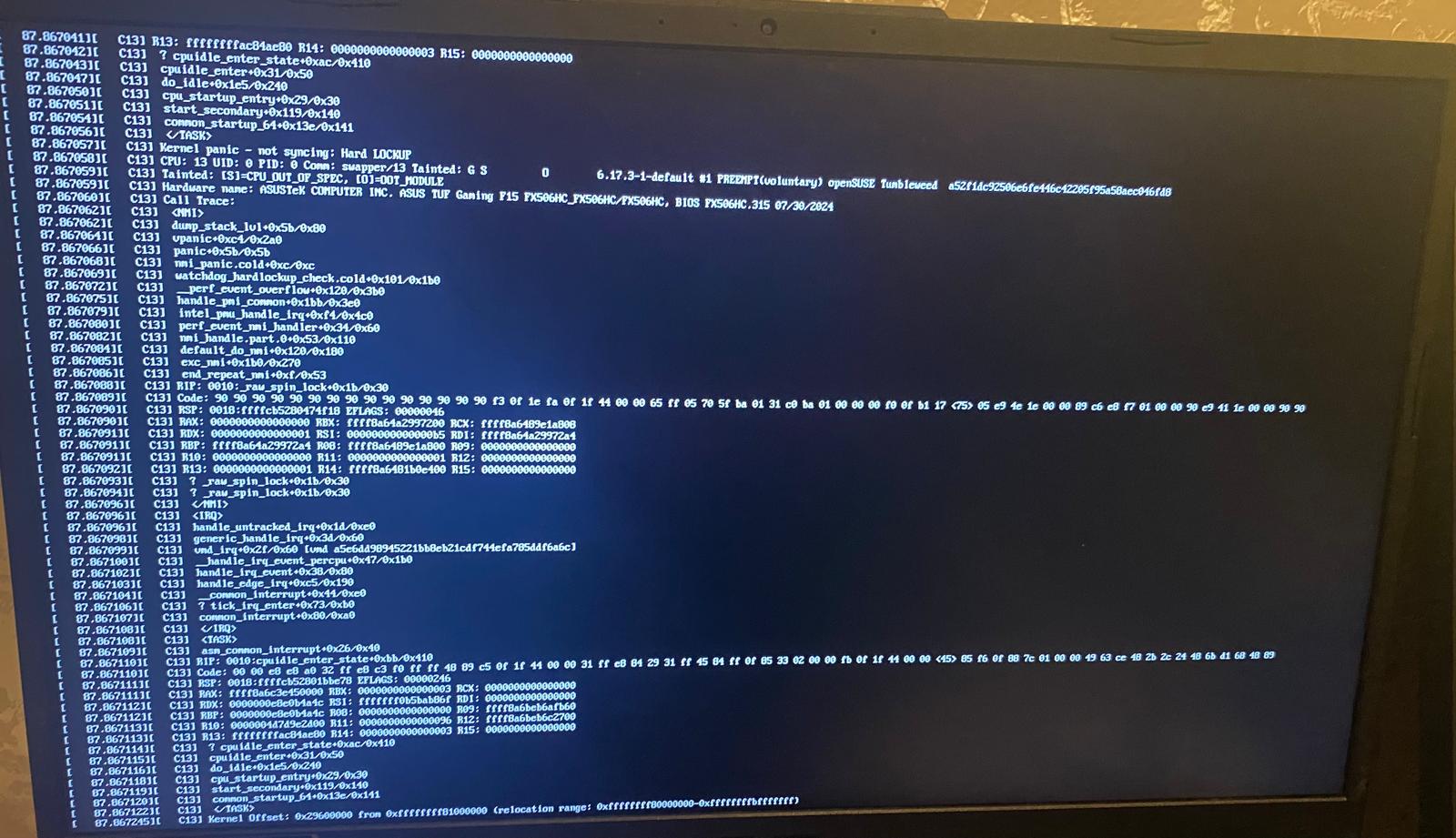
@malcolmlewis , no luck - still crashes on boot. Some pics attached from phone, currently booted using 6.17.2 again.