KDE Plasma external DP monitors not working with newer kernels

Hi,

I have the following situation: a laptop connected to a DELL WD22TB4 Thunderbolt dock, with two external screens connected to it.

~>  inxi -e
System:
  Host: C22URNQ Kernel: 6.17.0-rc2-4.g5e7fd49-vanilla arch: x86_64 bits: 64
  Desktop: KDE Plasma v: 6.4.4 Distro: openSUSE Tumbleweed 20250905
Machine:
  Type: Laptop System: Dell product: Latitude 5530 v: N/A
    serial: <superuser required>
  Mobo: Dell model: 0C6CYC v: A00 serial: <superuser required> UEFI: Dell
    v: 1.31.1 date: 07/04/2025
Battery:
  ID-1: BAT0 charge: 38.8 Wh (80.9%) condition: 48/58 Wh (82.7%)
CPU:
  Info: 10-core (2-mt/8-st) model: 12th Gen Intel Core i7-1265U bits: 64
    type: MST AMCP cache: L2: 6.5 MiB
  Speed (MHz): avg: 400 min/max: 400/4800:3600 cores: 1: 400 2: 400 3: 400
    4: 400 5: 400 6: 400 7: 400 8: 400 9: 400 10: 400 11: 400 12: 400
Graphics:
  Device-1: Intel Alder Lake-UP3 GT2 [Iris Xe Graphics] driver: i915 v: kernel
  Device-2: NVIDIA TU117M [GeForce MX550] driver: nouveau v: kernel
  Device-3: Microdia Integrated_Webcam_HD driver: uvcvideo type: USB
  Display: wayland server: X.org v: 1.21.1.15 with: Xwayland v: 24.1.8
    compositor: kwin_wayland driver: X: loaded: intel unloaded: modesetting,vesa
    dri: iris gpu: i915 resolution: 1: 2560x1440~60Hz 2: 1920x1080~60Hz
    3: 1920x1080~60Hz
  API: EGL v: 1.5 drivers: iris,swrast
    platforms: gbm,wayland,x11,surfaceless,device
  API: OpenGL v: 4.6 compat-v: 4.5 vendor: intel mesa v: 25.2.2
    renderer: Mesa Intel Iris Xe Graphics (ADL GT2)
  API: Vulkan v: 1.4.321 drivers: intel,llvmpipe surfaces: N/A
  Info: Tools: api: eglinfo, glxinfo, vulkaninfo
    de: kscreen-console,kscreen-doctor gpu: gputop, intel_gpu_top, lsgpu
    wl: wayland-info x11: xdpyinfo, xprop, xrandr
Audio:
  Device-1: Intel Alder Lake PCH-P High Definition Audio driver: snd_hda_intel
  API: ALSA v: k6.17.0-rc2-4.g5e7fd49-vanilla status: kernel-api
  Server-1: PipeWire v: 1.4.7 status: active
Network:
  Device-1: Intel Alder Lake-P PCH CNVi WiFi driver: iwlwifi
  IF: wlp0s20f3 state: up mac: 28:6b:35:15:ad:3d
  Device-2: Intel Ethernet I219-LM driver: e1000e
  IF: enp0s31f6 state: down mac: c8:4b:d6:60:90:cf
  Device-3: Realtek RTL8153 Gigabit Ethernet Adapter driver: r8152 type: USB
  IF: enp0s13f0u1u4u4 state: up speed: 1000 Mbps duplex: full
    mac: c8:4b:d6:60:90:d0
Drives:
  Local Storage: total: 953.87 GiB used: 381.95 GiB (40.0%)
  ID-1: /dev/nvme0n1 vendor: Samsung model: PM9A1 NVMe 1024GB
    size: 953.87 GiB
Partition:
[...]
Info:
  Memory: total: 32 GiB note: est. available: 31.04 GiB used: 6.36 GiB (20.5%)
  Processes: 371 Uptime: 0h 13m Shell: Bash inxi: 3.3.39

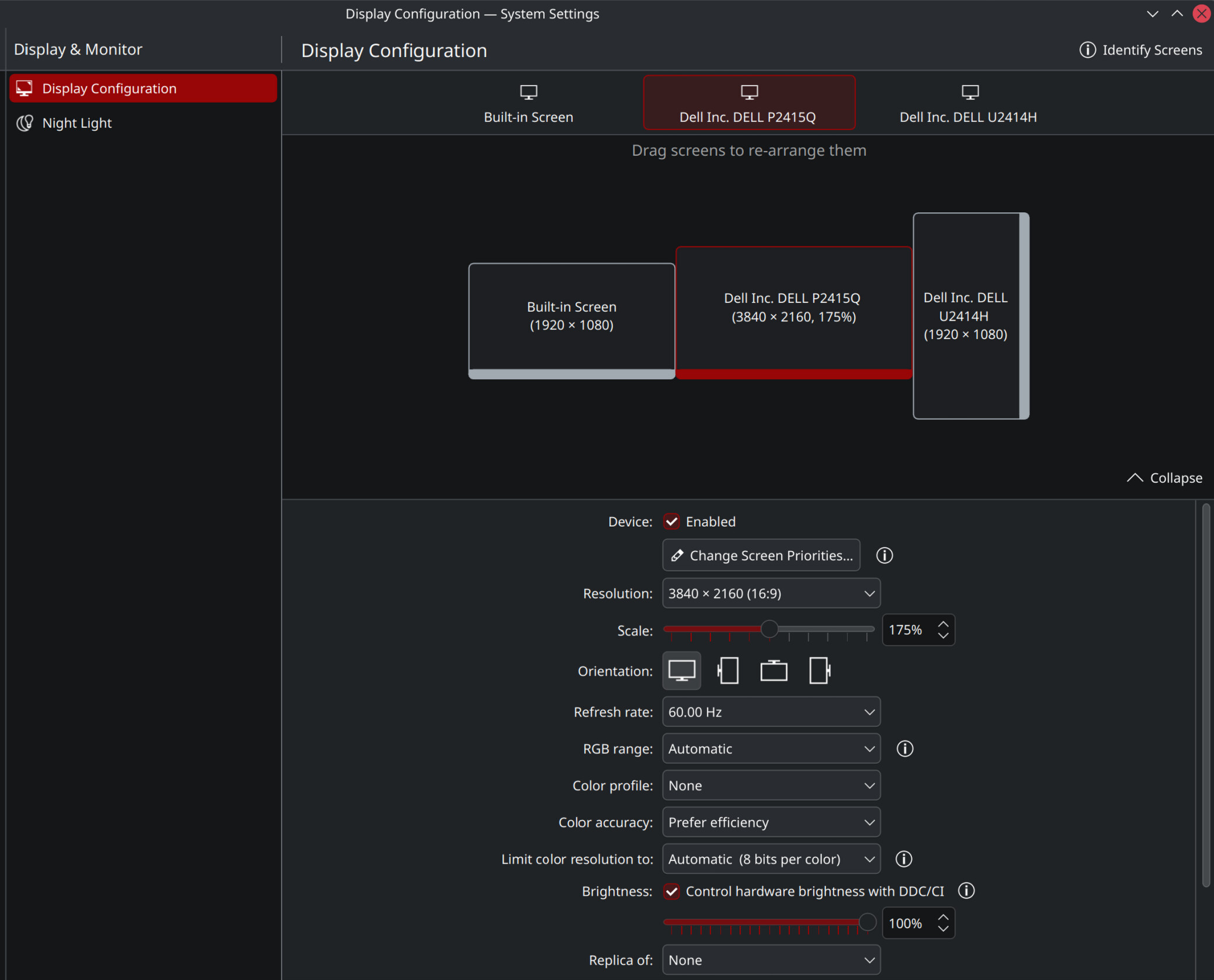
When booting with any kernel >6.7.7 (i.e., a long time ago!), the system does not let me configure my three screens as desired any longer:

  • Left: Laptop screen at 1920x1080, 60Hz, 100% scaling
  • Middle: P2415Q at 3840x2160, 60Hz, 175% scaling
  • Right: U2414H at 1080x1920 (vertical), 60Hz, 100% scaling

With the old kernel 6.7.7 (preserved thanks to putting multiversion.kernels = latest,latest-1,6.7.7-1.1,running in /etc/zypp/zypp.conf), I can use this configuration perfectly on an otherwise up-to-date Tumbleweed. Of course I don’t want to keep running like this forever, so I’d like to ask for help with figuring out how to solve this.

When booting with any newer kernel (>6.8, all the way up to the 6.17.0-rc2 from tiwai’s drm-tip home repo), the SDDM login screen operates all 3 screens, but after entering the password and hitting enter, I only get a black screen. I then have to unplug the docking station from the laptop, at which point the TW plasma loading screen (lightbulb + loading spinner) shows up, and I get to the desktop shortly after. Upon reconnecting the dock, the left and middle screen work at their configured resolutions, but the right screen remains black.

In the plasma display configuration, when trying to enable the right screen, I get this error about “Couldn’t apply display configuration: The driver rejected the output configuration”
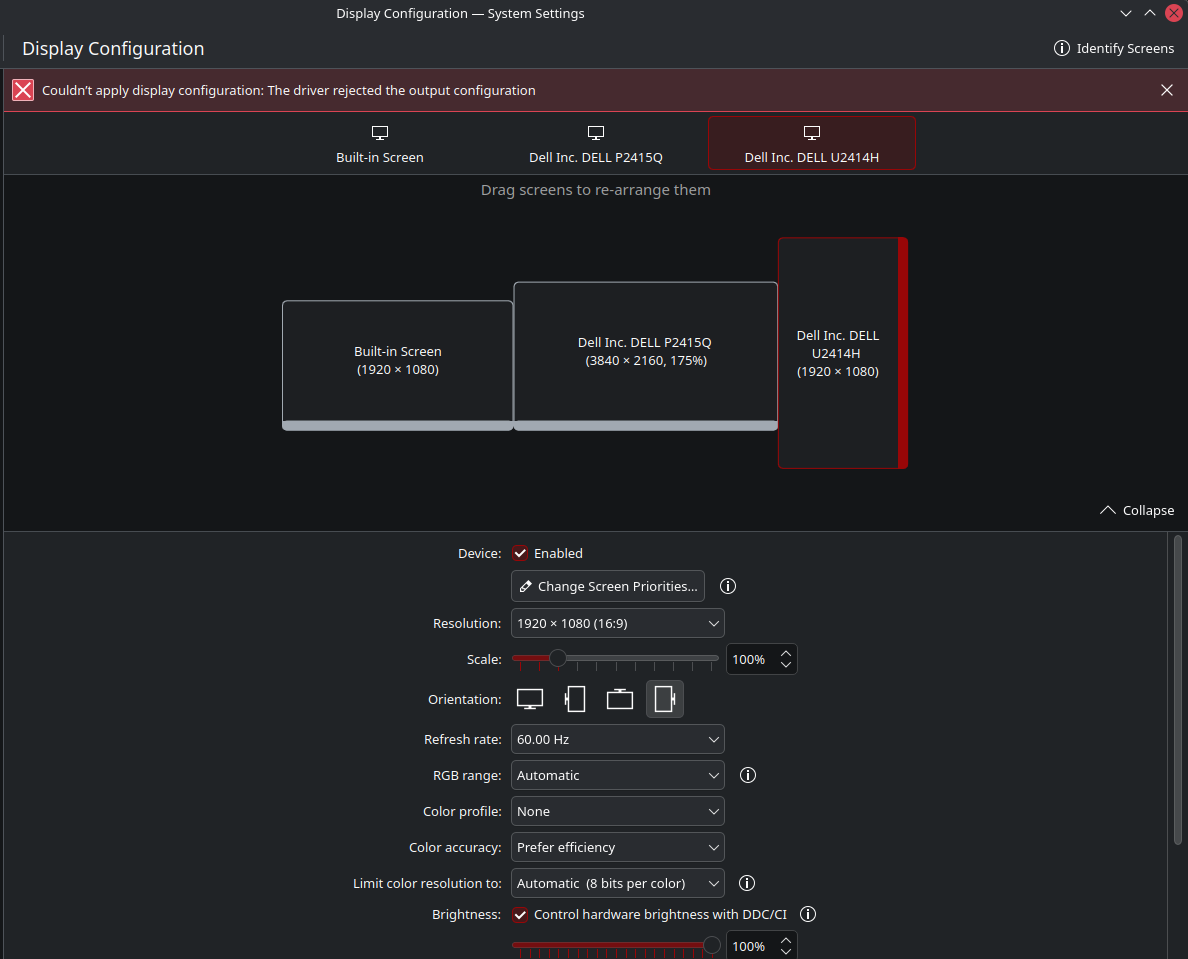
(The inxi output above shows one screen (a DELL P2415Q) operating at 2560x1440, which is the configuration I currently have to use due to my problem: I cannot configure this display to use 4k 60Hz — dropping the resolution allows all 3 displays.)

Coincidentally, this all started during the same TW update where Plasma 6 arrived (as this is when kernel 6.8 also reached my device), which I blamed at first. However, I found that Plasma 6+TW+kernel 6.7.7 actually worked perfectly (and have done ever since), so it doesn’t seem to be Plasma’s fault, at least immediately.

Things I’ve tried:

  • Waiting for kernel/TW updates to fix it (works for 95% of my TW problems…) — no luck for the past ~year now!
  • Deleting ~/.config/kwinoutputconfig.json and logging back in (like here) — no luck, still black screen at login and doesn’t allow me to configure my desired settings.
  • Updating firmware of all involved devices (BIOS, docking station); all up-to-date:
# fwupdmgr get-updates 
Devices with no available firmware updates: 
 • 0000:00:1f.5
 • 0000:00:1f.5-chip1
 • BIOS1
 • Bios DB Key
 • Bios FW Aux Authority
 • KEK CA
 • Key Exchange Key
 • Option ROM UEFI CA
 • UEFI Device Firmware
 • UEFI Device Firmware
 • USB4 Retimer
 • Windows Production PCA
Devices with the latest available firmware version:
 • Package level of Dell dock
 • RTS5413 in Dell dock
 • RTS5487 in Dell dock
 • VMM5331 in Dell dock
 • WD22TB4
 • PM9A1 NVMe Samsung 1024GB
 • System Firmware
 • UEFI CA
 • UEFI dbx
 • USB4 controller in Dell dock
 • Unifying Receiver
No updates available
  • Looking at the drm bugtracker for related i915 graphics driver bugs (involving this dock or similar ones, but also DisplayPort MST which seems to be involved — I’m speculating it’s some deep link training/bandwidth issue, which I don’t have the skills to debug :grimacing:); there have been a few such reports (example), and their fixes have landed, but not made a difference for me. (This is the reason I’ve tried use the home:tiwai repo to get recent drm-tip kernel-vanilla builds to try…)

How can I go about debugging this further? Please let me know which additional information/command output would help (I’m sure there’s more stuff that could be helpful).
Thanks in advance!
Is it intentional that you are using nouveau? What driver is used when it works?

I’ve not paid much attention to the secondary nvidia GPU in this device, and mostly tried to avoid dealing with it at all. So, not intentional; I’ve not tried to change defaults/install packages/drivers/etc for that GPU.

Rebooting back into kernel 6.7.7 (and configuring my screens as desired again), it looks like this (the same afaict?):

~> inxi -e
System:
  Host: C22URNQ Kernel: 6.7.7-1-default arch: x86_64 bits: 64
  Desktop: KDE Plasma v: 6.4.4 Distro: openSUSE Tumbleweed 20250905
Machine:
  Type: Laptop System: Dell product: Latitude 5530 v: N/A
    serial: <superuser required>
  Mobo: Dell model: 0C6CYC v: A00 serial: <superuser required> UEFI: Dell
    v: 1.31.1 date: 07/04/2025
Battery:
  ID-1: BAT0 charge: 48 Wh (100%) condition: 48/58 Wh (82.7%)
CPU:
  Info: 10-core (2-mt/8-st) model: 12th Gen Intel Core i7-1265U bits: 64
    type: MST AMCP cache: L2: 6.5 MiB
  Speed (MHz): avg: 2018 min/max: 400/4800:3600 cores: 1: 2018 2: 2018
    3: 2018 4: 2018 5: 2018 6: 2018 7: 2018 8: 2018 9: 2018 10: 2018 11: 2018
    12: 2018
Graphics:
  Device-1: Intel Alder Lake-UP3 GT2 [Iris Xe Graphics] driver: i915 v: kernel
  Device-2: NVIDIA TU117M [GeForce MX550] driver: nouveau v: kernel
  Device-3: Microdia Integrated_Webcam_HD driver: uvcvideo type: USB
  Display: wayland server: X.org v: 1.21.1.15 with: Xwayland v: 24.1.8
    compositor: kwin_wayland driver: X: loaded: intel,modesetting unloaded: vesa
    dri: iris,nouveau gpu: i915 resolution: 1: 3840x2160~60Hz
    2: 1920x1080~60Hz 3: 1920x1080~60Hz
  API: EGL v: 1.5 drivers: iris,nouveau,swrast
    platforms: gbm,wayland,x11,surfaceless,device
  API: OpenGL v: 4.6 compat-v: 4.3 vendor: intel mesa v: 25.2.2
    renderer: Mesa Intel Iris Xe Graphics (ADL GT2)
  API: Vulkan v: 1.4.321 drivers: intel,llvmpipe surfaces: N/A
  Info: Tools: api: eglinfo, glxinfo, vulkaninfo
    de: kscreen-console,kscreen-doctor gpu: gputop, intel_gpu_top, lsgpu
    wl: wayland-info x11: xdpyinfo, xprop, xrandr
Audio:
[...]
Info:
  Memory: total: 32 GiB note: est. available: 31.04 GiB used: 5.66 GiB (18.2%)
  Processes: 399 Uptime: 0h 2m Shell: Bash inxi: 3.3.39


Changes apply successfully, and no display issues — everything works/looks as it should.

Upon request, more specific and detailed inxi information:

~> inxi -GSaz --edid
System:
  Kernel: 6.7.7-1-default arch: x86_64 bits: 64 compiler: gcc v: 13.2.1
    clocksource: tsc avail: acpi_pm
    parameters: BOOT_IMAGE=/boot/vmlinuz-6.7.7-1-default
    root=UUID=10e6e85b-0312-4e57-a33a-0f2b3eb54a88 splash=silent quiet
    security=apparmor mitigations=auto
  Desktop: KDE Plasma v: 6.4.4 tk: Qt v: N/A info: frameworks v: 6.17.0
    wm: kwin_wayland tools: avail: xscreensaver vt: 3 dm: SDDM Distro: openSUSE
    Tumbleweed 20250905
Graphics:
  Device-1: Intel Alder Lake-UP3 GT2 [Iris Xe Graphics] vendor: Dell
    driver: i915 v: kernel arch: Xe process: Intel 10nm built: 2021-22+ ports:
    active: DP-3,DP-5,eDP-1 empty: DP-1, DP-2, DP-4, DP-6, DP-7, HDMI-A-1
    bus-ID: 00:02.0 chip-ID: 8086:46a8 class-ID: 0300
  Device-2: NVIDIA TU117M [GeForce MX550] vendor: Dell driver: nouveau
    v: kernel non-free: 550-580.xx+ status: current (as of 2025-08;
    EOL~2026-12-xx) arch: Turing code: TUxxx process: TSMC 12nm FF
    built: 2018-2022 pcie: gen: 4 speed: 16 GT/s lanes: 4 link-max: lanes: 16
    bus-ID: 02:00.0 chip-ID: 10de:1f9f class-ID: 0302 temp: 42.0 C
  Device-3: Microdia Integrated_Webcam_HD driver: uvcvideo type: USB
    rev: 2.0 speed: 480 Mb/s lanes: 1 mode: 2.0 bus-ID: 3-6:3 chip-ID: 0c45:6a14
    class-ID: 0e02
  Display: wayland server: X.org v: 1.21.1.15 with: Xwayland v: 24.1.8
    compositor: kwin_wayland driver: X: loaded: intel,modesetting unloaded: vesa
    alternate: fbdev,nouveau,nv,nvidia dri: iris,nouveau gpu: i915
    d-rect: 7680x4320 display-ID: 0
  Monitor-1: DP-3 pos: middle-c model: Dell P2415Q serial: <filter>
    built: 2017 res: mode: 3840x2160 hz: 60 scale: 175% (1.75) to: 2194x1234
    dpi: 185 gamma: 1.2 chroma: red: x: 0.659 y: 0.333 green: x: 0.302
    y: 0.639 blue: x: 0.149 y: 0.043 white: x: 0.314 y: 0.329
    size: 527x296mm (20.75x11.65") diag: 604mm (23.8") ratio: 16:9
    modes: 3840x2160, 2560x1440, 2048x1280, 1920x1200, 1920x1080, 1600x1200,
    1600x900, 1280x1024, 1152x864, 1280x720, 1024x768, 800x600, 720x576,
    720x480, 640x480, 720x400
  Monitor-2: DP-5 pos: top-right model: Dell U2414H serial: <filter>
    built: 2016 res: mode: 1920x1080 hz: 60 scale: 178% (1.78) to: 1080x1920
    dpi: 93 gamma: 1.2 chroma: red: x: 0.655 y: 0.333 green: x: 0.322 y: 0.612
    blue: x: 0.153 y: 0.059 white: x: 0.314 y: 0.329
    size: 527x296mm (20.75x11.65") diag: 604mm (23.8") ratio: 16:9
    modes: 1920x1080, 1600x1200, 1600x900, 1280x1024, 1152x864, 1280x720,
    1024x768, 800x600, 720x576, 720x480, 640x480, 720x400
  Monitor-3: eDP-1 pos: bottom-l model: BOE Display 0x0928 built: 2020 res:
    mode: 1920x1080 hz: 60 scale: 100% (1) dpi: 142 gamma: 1.2 chroma: red:
    x: 0.584 y: 0.365 green: x: 0.349 y: 0.569 blue: x: 0.161 y: 0.122 white:
    x: 0.314 y: 0.329 size: 344x194mm (13.54x7.64") diag: 395mm (15.5")
    ratio: 16:9 modes: 1920x1080
  EDID-Warnings: 1: parse_edid: unknown flag 0
  API: EGL v: 1.5 hw: drv: intel iris drv: nvidia nouveau platforms:
    device: 0 drv: nouveau device: 1 drv: iris device: 2 drv: swrast gbm:
    drv: nouveau surfaceless: drv: nouveau wayland: drv: iris x11: drv: iris
  API: OpenGL v: 4.6 compat-v: 4.3 vendor: intel mesa v: 25.2.2 glx-v: 1.4
    direct-render: yes renderer: Mesa Intel Iris Xe Graphics (ADL GT2)
    device-ID: 8086:46a8 memory: 30.31 GiB unified: yes display-ID: :1.0
  API: Vulkan v: 1.4.321 layers: 1 device: 0 type: integrated-gpu name: Intel
    Iris Xe Graphics (ADL GT2) driver: mesa intel v: 25.2.2
    device-ID: 8086:46a8 surfaces: N/A device: 1 type: cpu name: llvmpipe
    (LLVM 20.1.8 256 bits) driver: mesa llvmpipe v: 25.2.2 (LLVM 20.1.8)
    device-ID: 10005:0000 surfaces: N/A
  Info: Tools: api: eglinfo, glxinfo, vulkaninfo
    de: kscreen-console,kscreen-doctor gpu: gputop, intel_gpu_top, lsgpu
    wl: wayland-info x11: xdpyinfo, xprop, xrandr

I can collect the output on kernel 6.17+ later/tomorrow (also need to get some work done using this machine sometimes, no time for rebooting all day).

The MX550 is type 302, 3D Controller, so should not be affecting screen settings. Likewise last time I tried Nvidia was not working with 6.17 series kernels yet.

@pilino Not sure why running the RC of kernels series, if so it would be better to try the Xe driver rather than i915. New Mesa out, so try upgrading your system. Would also suggest dropping back to the default Tumbleweed 6.15.5 kernel and check.

I am trying drm-tip builds from home:tiwai every now and then to see if anything new has landed that fixes my issue and would reach stable soon. No luck so far.

I can look into it, seems it should support this 12th gen hardware?
On the other hand, it appears to me that i915 regressed somewhere between 6.7.7 and 6.8, and no fix since. Staying on i915 would be the nicer fix in the long run than running the experimental Xe.

Indeed, just saw the announcement. Will try later/tomorrow!

@pilino Could very well be, but also moving forward with the Xe driver and perhaps getting better support into that and i915 becoming more Legacy hardware oriented…

Updated to latest TW now, still not working. Only apparent difference in the output is that the screens now use DP-4 and DP-7 instead of DP-3 and DP-5 before, but not sure if this actually means anything.

Interestingly, I was now able to configure the middle display to use 4k @ 30Hz. Just when selecting the 60Hz option, it refuses to apply the settings. Seems like some bandwidth problem then?

~> inxi -GSaz --edid
System:
  Kernel: 6.16.5-1-default arch: x86_64 bits: 64 compiler: gcc v: 15.2.0
    clocksource: tsc avail: acpi_pm
    parameters: BOOT_IMAGE=/boot/vmlinuz-6.16.5-1-default
    root=UUID=10e6e85b-0312-4e57-a33a-0f2b3eb54a88 splash=silent quiet
    security=apparmor mitigations=auto
  Desktop: KDE Plasma v: 6.4.4 tk: Qt v: N/A info: frameworks v: 6.17.0
    wm: kwin_wayland tools: avail: xscreensaver vt: 7 dm: SDDM Distro: openSUSE
    Tumbleweed 20250908
Graphics:
  Device-1: Intel Alder Lake-UP3 GT2 [Iris Xe Graphics] vendor: Dell
    driver: i915 v: kernel alternate: xe arch: Xe process: Intel 10nm
    built: 2021-22+ ports: active: DP-4,DP-7,eDP-1 empty: DP-1, DP-2, DP-6,
    DP-8, DP-9, HDMI-A-1 bus-ID: 00:02.0 chip-ID: 8086:46a8 class-ID: 0300
  Device-2: NVIDIA TU117M [GeForce MX550] vendor: Dell driver: nouveau
    v: kernel alternate: nvidia_drm,nvidia non-free: 550-580.xx+ status: current
    (as of 2025-08; EOL~2026-12-xx) arch: Turing code: TUxxx
    process: TSMC 12nm FF built: 2018-2022 pcie: speed: Unknown lanes: 63
    link-max: gen: 4 speed: 16 GT/s bus-ID: 02:00.0 chip-ID: 10de:1f9f
    class-ID: 0302
  Device-3: Microdia Integrated_Webcam_HD driver: uvcvideo type: USB
    rev: 2.0 speed: 480 Mb/s lanes: 1 mode: 2.0 bus-ID: 3-6:3 chip-ID: 0c45:6a14
    class-ID: 0e02
  Display: wayland server: X.org v: 1.21.1.15 with: Xwayland v: 24.1.8
    compositor: kwin_wayland driver: X: loaded: intel unloaded: modesetting,vesa
    alternate: fbdev dri: iris gpu: i915 d-rect: 6400x3600 display-ID: 0
  Monitor-1: DP-4 pos: middle-c model: Dell P2415Q serial: <filter>
    built: 2017 res: mode: 2560x1440 hz: 60 scale: 100% (1) dpi: 185 gamma: 1.2
    chroma: red: x: 0.659 y: 0.333 green: x: 0.302 y: 0.639 blue: x: 0.149
    y: 0.043 white: x: 0.314 y: 0.329 size: 527x296mm (20.75x11.65")
    diag: 604mm (23.8") ratio: 16:9 modes: 3840x2160, 2560x1440, 2048x1280,
    1920x1200, 1920x1080, 1600x1200, 1600x900, 1280x1024, 1152x864, 1280x720,
    1024x768, 800x600, 720x576, 720x480, 640x480, 720x400
  Monitor-2: DP-7 pos: top-right model: Dell U2414H serial: <filter>
    built: 2016 res: mode: 1920x1080 hz: 60 scale: 178% (1.78) to: 1080x1920
    dpi: 93 gamma: 1.2 chroma: red: x: 0.655 y: 0.333 green: x: 0.322 y: 0.612
    blue: x: 0.153 y: 0.059 white: x: 0.314 y: 0.329
    size: 527x296mm (20.75x11.65") diag: 604mm (23.8") ratio: 16:9
    modes: 1920x1080, 1600x1200, 1600x900, 1280x1024, 1152x864, 1280x720,
    1024x768, 800x600, 720x576, 720x480, 640x480, 720x400
  Monitor-3: eDP-1 pos: bottom-l model: BOE Display 0x0928 built: 2020 res:
    mode: 1920x1080 hz: 60 scale: 100% (1) dpi: 142 gamma: 1.2 chroma: red:
    x: 0.584 y: 0.365 green: x: 0.349 y: 0.569 blue: x: 0.161 y: 0.122 white:
    x: 0.314 y: 0.329 size: 344x194mm (13.54x7.64") diag: 395mm (15.5")
    ratio: 16:9 modes: 1920x1080
  EDID-Warnings: 1: parse_edid: unknown flag 0
  API: EGL v: 1.5 hw: drv: intel iris platforms: device: 0 drv: iris
    device: 2 drv: swrast gbm: drv: iris surfaceless: drv: iris wayland:
    drv: iris x11: drv: iris inactive: device-1
  API: OpenGL v: 4.6 compat-v: 4.5 vendor: intel mesa v: 25.2.2 glx-v: 1.4
    direct-render: yes renderer: Mesa Intel Iris Xe Graphics (ADL GT2)
    device-ID: 8086:46a8 memory: 30.31 GiB unified: yes display-ID: :1.0
  API: Vulkan v: 1.4.321 layers: 1 device: 0 type: integrated-gpu name: Intel
    Iris Xe Graphics (ADL GT2) driver: mesa intel v: 25.2.2
    device-ID: 8086:46a8 surfaces: N/A device: 1 type: cpu name: llvmpipe
    (LLVM 20.1.8 256 bits) driver: mesa llvmpipe v: 25.2.2 (LLVM 20.1.8)
    device-ID: 10005:0000 surfaces: N/A
  Info: Tools: api: eglinfo, glxinfo, vulkaninfo
    de: kscreen-console,kscreen-doctor gpu: gputop, intel_gpu_top, lsgpu
    wl: wayland-info x11: xdpyinfo, xprop, xrandr

I also ran several of the commands listed in that Info: Tools: section; the output is long, hence pasted as links:

On 6.7.7: https://paste.opensuse.org/pastes/82339f2c79fe
On 6.16.5: https://paste.opensuse.org/pastes/06e162ed720e

Will try the Xe driver tomorrow.

This topic was automatically closed 30 days after the last reply. New replies are no longer allowed.