KDE install defaults to Wayland now(?), how to get X11 instead? (cuz Wayland doesn't work with the rest of my setup yet)

So it’s been a while since I did a proper tumbleweed install
[
by “proper” I mean, did the install and then switched to using it as my daily driver on the computer I installed it on,
as opposed to just experimentally installing it

– I’ve got 2 computers,
one currently running tumbleweed,
the other running tuxedo_OS,
and it’s the one running tuxedo_OS that I’m considering switching over to tumbleweed as well
]

However, when I just recently experimented with installing tumbleweed on that computer,
picking the KDE option as I always do,
I found that it seemed to default to wayland,
and I didn’t see any option to pick X11 instead
(
and wayland doesn’t seem to work with the rest of my system yet
– aside from the fact that I need to use Barrier,
wayland just seems to have a lot of of issues on this computer’s hardware that I can only describe as, like, lag/jank etc
)

So I installed X11 after the main install,
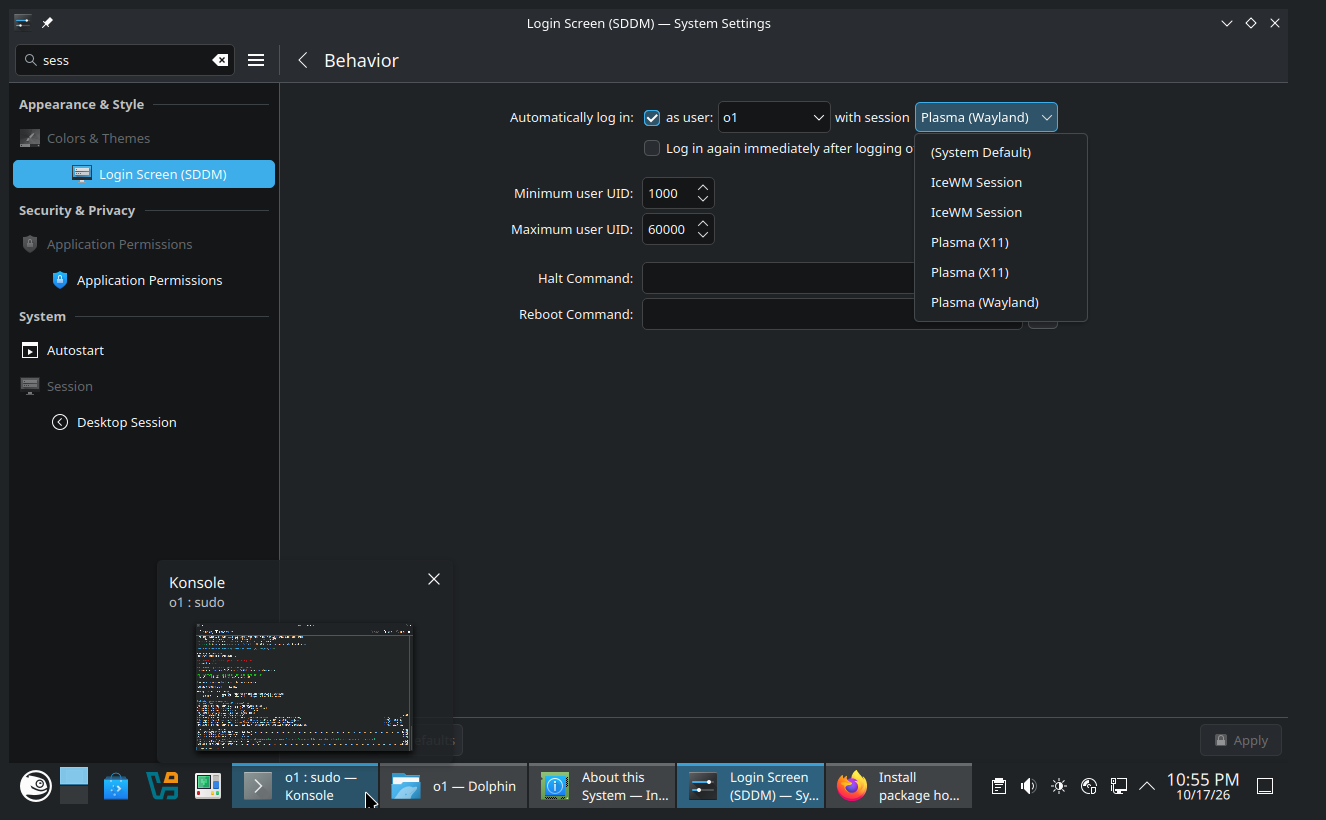
and somehow that ended up with 2 separate apparently identical entries for “X11” in the login manager(??)
(
and maybe a few other oddities?
– I forgot to note everything,
so I just remember a general sense of “things seem odd”,
although that was quite possibly due to pulling in a bunch of unintended optional dependencies while messing around…
)

And then I tried reinstalling tumbleweed again,
trying to see if there was some X11 option I missed,
and selected a bunch of X11 packages during the installation,
but ended up with apparently the same result.

Did I miss something? Like, is there some “proper” way you’re “expected” to do it if you want to use X11 instead of wayland?

Just… dig through the advanced settings to select the package plasma6-session-x11, and/or…?
The X11 session is provided by the plasma6-session-x11 package, so that would be the first thing to check if you haven’t already installed it.

I’m not sure why you’re seeing two apparently identical X11 entries in SDDM.

Please show the output of

ls -l /usr/share/xsessions/

That should help us establish what session definitions are present and investigate the duplicate entries.

To be clear, you’re saying, like:

No, there isn’t any other option you missed in the installation or anything

– just manually select the plasma6-session-x11 package under software > details during install
(or alternatively, just sudo zypper install plasma6-session-x11 after install)
and then, after install, manually switch over the default session for the login manager in the plasma settings.

That is indeed the way you’re currently expected to do it if you want to use KDE with X11.

And like, there isn’t any package other than plasma6-session-x11 that I should also manually select?
(ie, plasma6-session-x11 pulls in all the dependencies you’d expect to need?)

[And like, I’m hoping that after the next install I won’t get that weird “doubled entries” bug again…]

Not quite. I was just suggesting where to start investigating, rather than confirming that this is the intended procedure for every current Tumbleweed installation.

I know there was a recent packaging change tracked in boo#1274552, concerning the removal of plasma6-session-x11 from the KDE pattern’s recommended packages.

The duplicate entries are a separate question, and we need to establish their cause before drawing conclusions.

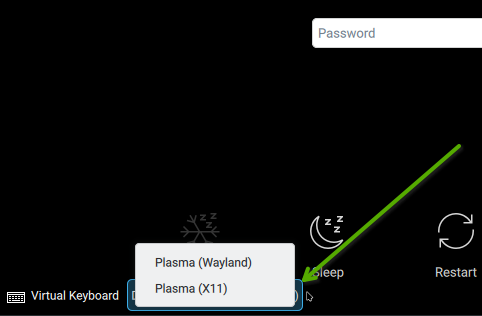
So, at the login screen … if you tap on the Desktop Session option at the lower-left, you don’t see the X11 and Wayland choices.

See screenshot - I clicked on the Session option and we see the two options.

I think the OP is well aware of this, and not one of their questions.

[
Sorry I’m slow
– I’m trying to use VirtualBox so I can experiment with things more practically,
but I’m just starting to learn how to use it,
so I keep running into problems with the clipboard not sharing between the host system and the virtual machine
(like, I found the settings for it, but they’re not doing what they seem to say they should be doing)

plus all my muscle-memory for hotkeys etc is for my own system,
which is a lot different than a fresh install…
]

I am still getting the double-entry bug, tho,
but it doesn’t seem to come with extra entries under /usr/share/xsessions/…

I will get some proper copy-pastes and screenshots of things,
just… it apparently might take me longer than you’d expect to figure out how…

KDE 6.8 does not support an X session. There is no X session to log in to.

3 Likes

Like it or not, KDE Plasma is now Wayland only:

Wayland

30 years is an impressive milestone for a community like KDE. But even older is the venerable X Window System (or “X11”), first released in 1984! After 42 years of faithful service, support for starting X11 sessions in Plasma is being retired, in conjunction with full adoption of the newer Wayland system.

Compared to X11, Wayland offers better support for modern screens and graphics cards, and is actively developed.

The small number of individual apps that still require X11 will continue to work via the “XWayland” compatibility layer.

2 Likes

@mhurron @shundhammer Huh, I guess I haven’t been keeping up with that news at all, thanks for telling me.
I guess I’m stuck on plasma… 6.6.6 apparently
(or at least, that’s as up-to-date as it currently gets on my tuxedo_OS install with X11)
until I can figure out a replacement for Barrier
(which I need, and which can’t work with Wayland I think?)
or… something…?

MAybe you can try
Deskflow
It’s available in tumbleweed

My guess is you need to install VBoxGuestAdditions

When you’re in the running Guest VM, then you install the VBoxGuestAdditions inside the Guest.


@mhurron @shundhammer
Wait, I’m confused:
when I did the install, the package plasma6-session-x11 existed,
and I selected it,
and it installed,
but after updating the system(s)
[I set up 2 virtual machines for testing, one in which I just plain installed it, and one in which I selected the package during installation]
the package just… no longer exists in the repos at all?

I guess I grabbed the ISO… 2026-08-21, so almost 2 months ago now,
so I guess this changed since then?

Currently, you can apparently only get plasma6-session-x11 from a “community” repo I guess?
ie https://software.opensuse.org/package/plasma6-session-x11?search_term=plasma6-session-x11
[ versions currently there:

- 6.7.5	home:wacke  
- 6.7.5	home:Mx775:Test  
- 6.7.5	home:cfeck:Plasma-X11  
- 6.7.5	home:cfeck:branches:KDE:Frameworks  
- 6.6.5	home:simotek:Frameworks  
- 6.5.5	home:Thaodan:KDE:Extra:KF6  
- 6.4.5	home:simotek:cmake4macro  
- 6.2.4	home:epopov:branches:openSUSE:Factory  
- 6.2.3	home:dgarcia:staging  

]

So I guess if I wanted to have X11 installed on tumbleweed,
even just as a fallback for whatever might come up,
I would need to install it from one of those?

… that… honesty seems like a weird decision to me?

Like, I understand wanting to aggressively push people to finally modernize
(I’m sympathetic, and hey, it’s quite possibly working on me – at least, it just pushed me to try to fix some of the things keeping me stuck on X11),
but that seems, like, one step more aggressive than I would have expected?


@conram
Oh thanks! Deskflow is new to me (I did look for alternatives a while ago, but didn’t find that)
(after a bit of initial testing, it looks promising, although I found a bug I reported that will need fixing before I can use it…)


@myswtest
Yeah, I was able to figure out I needed to install the guest additions somehow,
but it keeps telling me like:

Name: /usr/share/virtualbox/VBoxGuestAdditions.iso

Guest Additions Update failed: Files were installed, but kernel modules were not reloaded automatically. Please consider rebooting the guest.
Result Code: VBOX_E_GSTCTL_GUEST_ERROR (0x80bb000f)
Component: GuestSessionWrap
Interface: IGuestSession {8b2b6773-8b5a-4cd2-95f8-38faf73913e1}

but rebooting the guest doesn’t actually make it work…
(with or without the virtual “CD” ejected)

btw, I did finally get some screenshots (still haven’t got clipboard sharing working)


I had to install X11 as a downgrade from a community repo
[
$

sudo zypper addrepo https://download.opensuse.org/repositories/home:cfeck:Plasma-X11/openSUSE_Tumbleweed/home:cfeck:Plasma-X11.repo  
sudo zypper refresh  
sudo zypper install plasma6-session-x11  

]
cuz apparently (like I said above), that’s what you have to do if you want X11 at all now?

Anyway, the ls you recommended shows… what I guess are some symlinks?
So I guess the double-entries just came from that?
ie, the GUI presumably populates the drop-down list fromm something like that ls,
and it has a minor bug where it fails to resolve a thing and a symlink to the thing as a single entry.

… I guess I should report that bug to… someone(?),
because even if everyone agrees X11 plasma is now… completely(??) unsupported,
said bug clearly affects stuff like icewm as well, right?

[
I did figure how how/where to file a report:
https://bugs.kde.org/show_bug.cgi?id=527318

]

I’m not running TW, I have SR installed (which runs just behind TW and an approximately monthly upgrade cadence). Here, I have

~> zypper se -si plasma6-session
Loading repository data...
Reading installed packages...

S  | Name                | Type    | Version   | Arch   | Repository
---+---------------------+---------+-----------+--------+-----------
i  | plasma6-session     | package | 6.7.5-1.1 | noarch | repo-oss
i  | plasma6-session-x11 | package | 6.7.5-1.1 | x86_64 | repo-oss

I guess the x11 package will soon be gone. No loss for me as I have a complete Wayland environment (both with SDDM itself and KDE Plasma).

I would not recommend using home repos at all. You’re relying on a community maintainer to provide and maintain a session that is no longer part of the official Plasma release, and to keep it compatible with the rest of your system as Tumbleweed evolves.

I thought you were referring to duplicate entries on the SDDM login screen. I now understand you’re referring to the SDDM configuration module in System Settings.

I see the same duplicate entries on my system, but had never paid any attention to them.

Yeah, obviously I don’t want to use a community repo
– the repo install I tested like I said here,
it managed to break the virtual machine in a way that somehow messed with my host system
(
ie, it booted to an error message:

startkde: Could not start Plama session.

then the virtual machine grabbed the mouse and wouldn’t let go like normal
– not actually a problem, since I was able to just kill the vm, but I was very confused for a minute xD
)


But like I said:

because… I’m trying to fix some of the things keeping me stuck on X11,
and it’s… not simple quick and easy to fix even the things I know about
(and who knows what other problems there might be that I haven’t even noticed yet?)

Like, surely you’d expect there to be lots of people who at least need to be able to use X11 as a fallback for… whatever eventualities may eventuate?

Such that making it impossible to use an older x11 version plasma at all
(unless you can get some unreliable community repo working)
would be… not a decision they’d make??

… but I dunno, like I said, I have obviously not been keeping up with the news on this topic at all…

Plasma 6.8.0 was released in snapshot 20261016 @20:00 CDT…

AFAIK, it has/was explained on the Factory mailing list;
https://lists.opensuse.org/archives/list/factory@lists.opensuse.org/message/B3H6L7VTGUX6P5BUK2U4HILQHVSL6ODK/

Always pays to read the factory mailing lists if running a rolling distro like TW.

Also announced here