JAVA openSUSE 15.6

After 15 years, back to (open)SUSE, but, incredible problems. JAVA, how in the name of peace do you install Eclipse? (old version below)
!SESSION 2025-08-23 18:51:44.090 -----------------------------------------------
eclipse.buildId=4.15.0.I20200305-0155
java.version=21.0.8
java.vendor=N/A
BootLoader constants: OS=linux, ARCH=x86_64, WS=gtk, NL=en_US
Framework arguments: -product org.eclipse.epp.package.java.product
Command-line arguments: -os linux -ws gtk -arch x86_64 -product org.eclipse.epp.package.java.product

!ENTRY org.eclipse.osgi 4 0 2025-08-23 18:51:44.828
!MESSAGE Application error
!STACK 1
java.lang.UnsatisfiedLinkError: Could not load SWT library. Reasons:
no swt-pi4-gtk-4932r18 in java.library.path: /usr/java/packages/lib:/usr/lib64:/lib64:/lib:/usr/lib
no swt-pi4-gtk in java.library.path: /usr/java/packages/lib:/usr/lib64:/lib64:/lib:/usr/lib
Can’t load library: /home/and/.swt/lib/linux/x86_64/libswt-pi4-gtk-4932r18.so
Can’t load library: /home/and/.swt/lib/linux/x86_64/libswt-pi4-gtk.so

at org.eclipse.swt.internal.Library.loadLibrary(Library.java:342)
at org.eclipse.swt.internal.Library.loadLibrary(Library.java:256)
at org.eclipse.swt.internal.gtk.OS.<clinit>(OS.java:90)
at org.eclipse.swt.internal.Converter.wcsToMbcs(Converter.java:209)
at org.eclipse.swt.internal.Converter.wcsToMbcs(Converter.java:155)
at org.eclipse.swt.widgets.Display.<clinit>(Display.java:164)
at org.eclipse.ui.internal.Workbench.createDisplay(Workbench.java:760)
at org.eclipse.ui.PlatformUI.createDisplay(PlatformUI.java:166)
at org.eclipse.ui.internal.ide.application.IDEApplication.createDisplay(IDEApplication.java:180)
at org.eclipse.ui.internal.ide.application.IDEApplication.start(IDEApplication.java:123)
at org.eclipse.equinox.internal.app.EclipseAppHandle.run(EclipseAppHandle.java:203)
at org.eclipse.core.runtime.internal.adaptor.EclipseAppLauncher.runApplication(EclipseAppLauncher.java:137)
at org.eclipse.core.runtime.internal.adaptor.EclipseAppLauncher.start(EclipseAppLauncher.java:107)
at org.eclipse.core.runtime.adaptor.EclipseStarter.run(EclipseStarter.java:401)
at org.eclipse.core.runtime.adaptor.EclipseStarter.run(EclipseStarter.java:255)
at java.base/jdk.internal.reflect.DirectMethodHandleAccessor.invoke(DirectMethodHandleAccessor.java:103)
at java.base/java.lang.reflect.Method.invoke(Method.java:580)
at org.eclipse.equinox.launcher.Main.invokeFramework(Main.java:657)
at org.eclipse.equinox.launcher.Main.basicRun(Main.java:594)
at org.eclipse.equinox.launcher.Main.run(Main.java:1447)
at org.eclipse.equinox.launcher.Main.main(Main.java:1420)

regards

Your output is missing the most important information: the initial command. Please do not redact the terminal in - and output. Always show the complete input and output.What package do you try to install from where?

Installing eclipse (java version) is as easy as:
sudo zypper install eclipse-jdt

https://en.opensuse.org/Eclipse

It starts just fine in Leap 15.6 after issuing eclipse in a terminal.

I just type eclipse in my terminal!

Did you try to clean the cache as explained in the link?

terminal: eclipse
eclipse.buildId=4.15.0.I20200305-0155

So you installed the external package instead of the official one provided by openSUSE?

Yes, I tested : sudo zypper install eclipse-jdt, but what is it for use, I dont know!

There is no IDE for Java in openSUSE!

Not sure what you mean.
These eclipse packages are available in a standard Leap 15.6 installation with official repos.

test@leaptest:~> rpm -qi eclipse-jdt
Name        : eclipse-jdt
Version     : 4.15
Release     : 150200.4.16.4
Architecture: noarch
Install Date: Sat 23 Aug 2025 08:03:35 PM CEST
Group       : Development/Libraries/Java
Size        : 35773597
License     : EPL-2.0
Signature   : RSA/SHA256, Mon 01 Apr 2024 01:52:44 PM CEST, Key ID 70af9e8139db7c82
Source RPM  : eclipse-4.15-150200.4.16.4.src.rpm
Build Date  : Mon 01 Apr 2024 01:49:03 PM CEST
Build Host  : h03-ch2b
Relocations : (not relocatable)
Packager    : https://www.suse.com/
Vendor      : SUSE LLC <https://www.suse.com/>
URL         : https://www.eclipse.org/
Summary     : Eclipse Java Development Tools
Description :

Eclipse Java Development Tools.  This package is required to use Eclipse for
developing software written in the Java programming language.
Distribution: SUSE Linux Enterprise 15
test@leaptest:~> 
test@leaptest:~> zypper se -s eclipse
Loading repository data...
Reading installed packages...

S  | Name                           | Type       | Version              | Arch   | Repository
---+--------------------------------+------------+----------------------+--------+------------------
   | eclipse-contributor-tools      | package    | 4.15-150200.4.16.4   | x86_64 | repo-oss (15.6)
i  | eclipse-ecf-core               | package    | 3.14.8-150200.4.6.3  | x86_64 | repo-oss (15.6)
   | eclipse-ecf-core-bootstrap     | package    | 3.14.8-150200.4.6.3  | x86_64 | repo-oss (15.6)
   | eclipse-ecf-runtime            | package    | 3.14.8-150200.4.6.3  | noarch | repo-oss (15.6)
   | eclipse-ecf-sdk                | package    | 3.14.8-150200.4.6.3  | noarch | repo-oss (15.6)
   | eclipse-egit                   | package    | 5.11.0-150200.3.6.3  | noarch | repo-oss (15.6)
i  | eclipse-emf-core               | package    | 2.22.0-150200.4.9.3  | x86_64 | repo-oss (15.6)
   | eclipse-emf-core-bootstrap     | package    | 2.22.0-150200.4.9.3  | x86_64 | repo-oss (15.6)
   | eclipse-emf-runtime            | package    | 2.22.0-150200.4.9.3  | noarch | repo-oss (15.6)
   | eclipse-emf-sdk                | package    | 2.22.0-150200.4.9.3  | noarch | repo-oss (15.6)
   | eclipse-emf-xsd                | package    | 2.22.0-150200.4.9.3  | noarch | repo-oss (15.6)
i  | eclipse-equinox-osgi           | package    | 4.15-150200.4.16.4   | x86_64 | repo-oss (15.6)
   | eclipse-equinox-osgi-bootstrap | package    | 4.15-150200.4.16.5   | x86_64 | repo-oss (15.6)
i+ | eclipse-jdt                    | package    | 4.15-150200.4.16.4   | noarch | repo-oss (15.6)
   | eclipse-jdt-bootstrap          | package    | 4.15-150200.4.16.5   | noarch | repo-oss (15.6)
   | eclipse-jgit                   | package    | 5.11.0-150200.3.23.1 | noarch | update-sle (15.6)
   | eclipse-jgit                   | package    | 5.11.0-150200.3.20.1 | noarch | repo-oss (15.6)
   | eclipse-jgit                   | srcpackage | 5.11.0-150200.3.23.1 | noarch | update-sle (15.6)
   | eclipse-license1               | package    | 1.0.1-150200.3.5.3   | noarch | repo-oss (15.6)
   | eclipse-license2               | package    | 2.0.2-150200.3.5.3   | noarch | repo-oss (15.6)
   | eclipse-p2-discovery           | package    | 4.15-150200.4.16.4   | noarch | repo-oss (15.6)
   | eclipse-p2-discovery-bootstrap | package    | 4.15-150200.4.16.5   | noarch | repo-oss (15.6)
   | eclipse-pde                    | package    | 4.15-150200.4.16.4   | x86_64 | repo-oss (15.6)
   | eclipse-pde-bootstrap          | package    | 4.15-150200.4.16.5   | x86_64 | repo-oss (15.6)
i  | eclipse-platform               | package    | 4.15-150200.4.16.4   | x86_64 | repo-oss (15.6)
   | eclipse-platform-bootstrap     | package    | 4.15-150200.4.16.5   | x86_64 | repo-oss (15.6)
i  | eclipse-swt                    | package    | 4.15-150200.4.16.4   | x86_64 | repo-oss (15.6)
   | eclipse-swt-bootstrap          | package    | 4.15-150200.4.16.5   | x86_64 | repo-oss (15.6)
   | entangle-plugin-eclipse        | package    | 3.0-bp156.4.10       | x86_64 | repo-oss (15.6)
   | redeclipse                     | package    | 2.0.0-bp156.4.9      | x86_64 | repo-oss (15.6)
   | redeclipse-data                | package    | 2.0.0-bp156.4.9      | noarch | repo-oss (15.6)
   | redeclipse-server              | package    | 2.0.0-bp156.4.9      | x86_64 | repo-oss (15.6)
test@leaptest:~> 

Really?? …

I can show you a few options for various Java IDE’s on Linux. :+1:
(an advantage of having 30+ years Java / C(++) development)

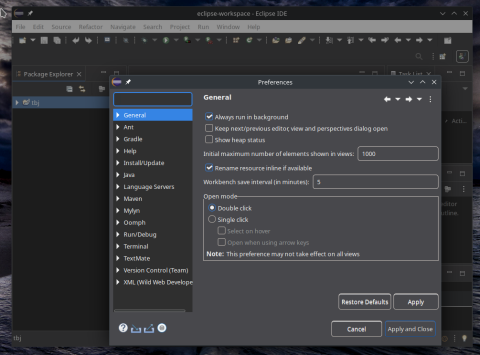
How about we start with this one (that first screenshot shows on my desktop when launched) … the second screenshot is after it has finished loading and I’ve opened the “Settings” menu option.

To launch Eclipse IDE, I go to KDE menu → Development → and click on Eclipse

The screenshots are on my Leap 15.6 laptop.
.


.

Not sure of your environment, but here on KDE Plasma, I ran Discover, and installed the Flatpak of Eclipse.

Are my computer to new?
Architecture: x86-64
Hardware Vendor: ASUSTeK COMPUTER INC.
Hardware Model: Pro WS X570-ACE
Firmware Version: 2502
Firmware Date: Wed 2020-11-11
Firmware Age: 4y 9month 1w 5d

Tried to install eclipse last time, but, couldn’t get it to work, error message during installation, see top of post, for me it’s hieroglyphics. Another thing, before, 15-25 years ago, you got a bundle with installation CD, it worked fine, but, now it’s via the internet, is anyone testing the function? One is that I can’t start the computer normally, have to go through some kind of recovery mode! So, how many errors are there in the installation?
Now to:
test@leaptest:~> rpm -qi eclipse-jdt
Name : eclipse-jdt
Version : 4.15
after a fourth try it works. (install-remove-install-remove…)
regards

I’m confused

You wrote “it works” … “what works”??

It’s NOT clear what “install-remove-install-remove” means
.
The one question I asked … what DE are you using??

Iam wrong, first try with simple program does not work!!!
I don’t understand why there should be so much hassle these days. The lack of clear and concise instructions is a definite minus.
Using another java IDE, expect a lot of hassle before you get to the end of the road. All work will probably end in a flop.

You may have missed my slightly detailed Reply (#11) - including screenshots. Fire up Discover, click “Install” for Eclipse app … 60 seconds later, you’re running Eclipse :+1:
.

.

Hi, again. downloaded Apache NetBeans, they have a good instruction how to install in openSUSE.
Tested a simple java application, something like that, and it worked.
It works well because I usually write in AWT.
Best regards


This topic was automatically closed 30 days after the last reply. New replies are no longer allowed.