I couldn’t find a live system of OS 16 to download.
Is is available somewhere?
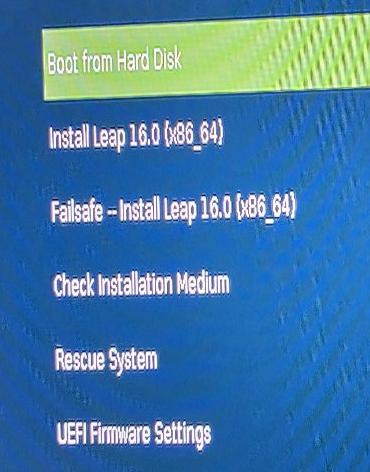
In Agama documentation there is Live boot menu option. Have you tried to boot the standard installer and look at the menu?
seems not to be available (at the moment):
## Agama Live ISO (*only for development and testing*)

The Agama project provides a [live ISO image](https://build.opensuse.org/package/show/systemsmanagement:Agama:Devel/agama-installer) for testing purposes and it is intended to be used for developers only. It has some limitations and it is not optimized for production usage.
OK, I probably confused it with Rescue.
Agama installer image is a live image preconfigured to run the gnome-kiosk session. You can boot it into run level 3 as usual (systemd.unit=multi-user.target or 3 on the kernel command line). Or probably simply select Rescue.
No, the “installer live system” is just for the installation; what we called the “inst-sys” in YaST times.
What the OP had in mind was probably a trial system with a full-fledged KDE Plasma or Gnome desktop that runs from a USB stick without the need to install. I don’t think we have that for Leap 16.0, but I might be wrong.
Hi!
There is OEM images, you can download and try some raw file: openSUSE Leap 16.0 - Consigue openSUSE
Is not like a ISO live, but it works.
You can install Leap 16 on a USB stick.
Creating partitions for / and /home on that USB stick beforehand (using e.g. GParted) helps when it comes to running the Leap 16 installer for that purpose.
Even a 16GB USB stick is sufficient if you choose ext4 for / and /home (10 GB for / , the rest for /home).
Then you’ll have a live system - however without the option to install Leap 16 from there.
But for installation on another drive, the Leap 16 installer itself can again be used.
Anyway, installing on a USB stick you can very well see how the installation works and how Leap 16.0 behaves.
the reason for me to ask for a live system is that I don’t want to perform an installation, because it would require modifying the BIOS:
I’ve seen this as well.
I don’t know which kind of PC/hardware you are using.
Do you have the Leap 16 installer on a USB stick?
If yes, if you choose it for booting, in the boot menu of your BIOS can you select it in non-UEFI mode?
(sorry, the citation of your citation displays badly)
What is the difference between an iso and a raw file?
Is the raw file written via dd to a usb stick and booted like an iso file?
You could also install it to a Virtual Machine. There are multiple options; VirtualBox works best for me. But there is also VMWare or QEMU.
Expert installation is always an option.
ISO is a standard filesystem image for CD/DVD and we often use them to create medias to install software. You even can copy it (with dd or a graphical tool) in a stick, as you know.
raw is an extension to a image file of a specific device (a partition, a disk), often created with dd
The main difference is that ISO is, as I said, for CD/DVD (you know, burning the CD and all that). Aeon installer comes in raw (at least, last time I look it), Leap (Agama) in ISO.
It’s sad that live images are no longer available for Leap 16.0, but I understand that there is some maintenance cost doing all that. I saw some posts (probably on Reddit) regarding Leap slowly dying as most of the active development moves to Tumbleweed (which of course makes sense). Absence of live images seems to be another point which proves that this is happening.
My use case: before upgrading to the next release on a live system I usually check if live KDE image boots well and if there are no major issues, then continue with the upgrade.
So it seems there are two non-ideal options as of now to test drive the new release on a piece of hardware:
- Installing on a separate USB stick (more hassle than just booting live image)
- Use Tumbleweed which has live images (also not ideal since there is evidently some version drift comparing to Leap 16.0, it should work though if you do want to go with Tumbleweed):
openSUSE Tumbleweed - Get openSUSE
I was planning to update to Leap 16.0, so I have to choose either of those options myself to test the compatibility. I have some doubts since I have pretty old piece of hardware (BIOS-only, NVIDIA) and I want to continue to use KDE (NVIDIA doesn’t play that well with it). Eventually I will need to upgrade, but I want to stay on the old system for economical and ecological reasons (the less e-waste the better).
You could also simply install into a virtual machine with VirtualBox, QEMU or VMWare.
Of course, but that doesn’t help in any way to test for hardware compatibility issues:
Please be aware that Leap 16 only supports x86_64_v2 or better CPUs and only G06 (AKA 570 or 580 series) Nvidia proprietary drivers, so maybe you will be better off with Tumbleweed anyway…
Live systems tend to have the same fallback chains as the installation medium; if the first choice of graphics driver doesn’t work, it might fall back to an ancient VGA driver or even a framebuffer driver. In particular with an NVidia card, you’ll always only get the Nouveau driver, not the proprietary NVidia driver. Overall, the information gained from such an experiment is very limited. You might get pixels on the screen, but they might be excrutiatingly slooow.
The value of a live system is more in things like the available packages, the desktop experience, the branding. It only tells you about hardware compatibility if the screen remains black, or if it doesn’t boot at all. And that’s what an attempt to boot the real installation medium (you only need to download the small “NET” ISO) also tells you.
IMHO live systems are vastly overrated.
Well, this is exactly what I want to check. I guess installation medium could also do the job, but if live KDE system boots fine with “good enough” graphics (it has been booting fine with openSUSE 15.5 and openSUSE 15.6), I have a good point of reference. Plus this image can be reused for partitioning and other things which I need to do outside of the main system.
I understand what you are saying, and I would think the same way if I would be a maintainer. It’s nice to abstract yourself away from the hardware and you can experiment without much trouble if something goes south.
However, as a end user with 1-2 pieces of very real hardware, running something in virtual machine is just an unnecessary diversion.
- Regarding
x86_64_v2: that seems to be in order (Intel i7-3770K) - Regarding NVIDIA: It’s 1050ti, so it might work out okayish (hopefully)
I already burned a live KDE Tumbleweed image and I will see how it boots. I would still prefer having live Leap 16.0 handy but it’s not a deal breaker.
I don’t plan to download installation media at all and will attempt an upgrade from 15.6 → 16.0 (as a did for last 2-3 15.* releases). In the worst case clean install will be needed, but that’s okay with up-to-date /home directory backups done beforehand.
@OrsoBruno, @shundhammer: In any case, thanks for the useful bits of information, guys!