Installing 16.0 error package installation failed, what I have to do?

on my laptop 1=ASUS vivobook pro N552VW-FY204T (2016) running 15.6 KDE and dual boot with windows
CPU is x86-64-v3 (supported)
GPU is GTX960M is currently supported by the Nvidia 580.126.09 driver.

after failed to upgrade Upgrade to leap 16.0 with opensuse-migration-tool hang after reboot - #81 by pier_andreit
trying to install leap 16.0

having this partition structure

Device         Start        End   Sectors Type-UUID                            UUID                                 Name                         Attrs
/dev/sda1       2048    1026047   1024000 EBD0A0A2-B9E5-4433-87C0-68B6B72699C7 AEE9C626-69B9-433E-B849-994A886011BB nEFI                         
/dev/sda2    1026048    1230847    204800 C12A7328-F81F-11D2-BA4B-00A0C93EC93B 214D1A7A-AB7B-4C0F-801E-5D8935C9AB46 EFI system partition         
/dev/sda3    1230848    1263615     32768 E3C9E316-0B5C-4DB8-817D-F92DF00215AE 69210CD3-6B32-458A-845C-065969CDD4E5 Microsoft reserved partition 
/dev/sda4    1263616  122345471 121081856 EBD0A0A2-B9E5-4433-87C0-68B6B72699C7 28904F0D-9574-40A6-8DEB-03A9E0692ECD Basic data partition         
/dev/sda5  122345472  123903999   1558528 DE94BBA4-06D1-4D40-A16A-BFD50179D6AC EC5D5565-75C0-4149-B77C-0CB1841F5451                              RequiredPartition
/dev/sda6  123906048  246786047 122880000 0FC63DAF-8483-4772-8E79-3D69D8477DE4 715E40B1-4154-4C49-9593-CD05149CBFA2 nSUSE1             
/dev/sda7  246786048  308226047  61440000 0FC63DAF-8483-4772-8E79-3D69D8477DE4 57B9B075-B304-4206-87D4-39C054BD0789 nHOME1             
/dev/sda8  308226048  373762047  65536000 0657FD6D-A4AB-43C4-84E5-0933C84B4F4F C06A39E6-1587-40B7-9FC7-28BEBA0BFFD2 nSWAP              
/dev/sda9  373762048 1000214527 626452480 EBD0A0A2-B9E5-4433-87C0-68B6B72699C7 0A8C3B0D-BEA0-4427-8659-728D8428AF57 nDATI      

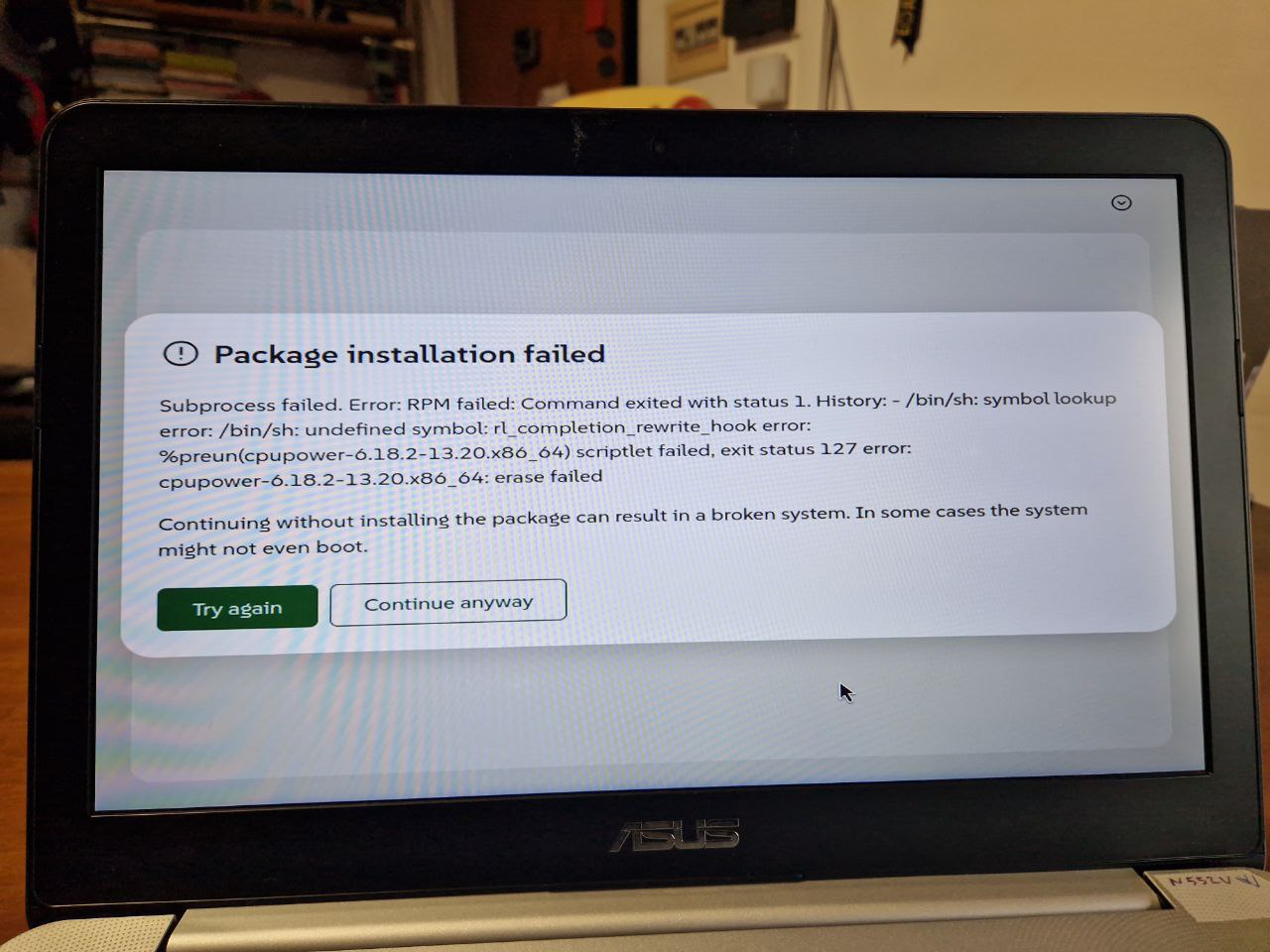
using agama (very bad installer I think) I set to install / in sda6(ext4) /home in sda7(ext4) swap in sda8 leaving untouched sda9 sda5 sda4 sda3

agama gives me this error

agama doesn’t show a way to refuse and exit, what I have to do?

trying again return to the same error

Do you use USB-Stick or DVD?
Have you checked the downloaded ISO for errors?
How do you “burn” it to DVD/USB-Stick?
Which Program is used to “burn”?

I’m using USB-stick
checked downloaded with the hash and ok
I burn USB-stick with suse studio imagewriter

Do you install Leap 16.0 over Tumbleweed/Slowroll as Upgrade?

yes, I tried to upgrade to 16.0 and it failed, then I tried to upgrade to slowroll and it failed again, so now I’m trying to install 16.0 over upgraded slowroll

Install new and format the / Partition.
Add the old /home as new /home on Install.

@pier_andreit likewise look at what the Storage items are saying, you want to add your old /home, but not format etc. The options are there…

I formatted / and /home and installation gone ok, now 16.0 boot.
but the screen resolution i bad and windows isn’t in the boot menu
how can I have windows in the boot menu again?
have I to install nvidia?

now I’m updating

I cannot login again in 16.0, I was updating lanching I suppose discover and the system went in login mode, I inserted the password but nothing happen
how can I login again?

You have to use
User and Password

Also goto grub and edit the boot line and disable selinux:
selinux=0

Also do not use discover, use myrlyn.

1 Like

I leaved the updete to work and this morning I found the laptop in sleep mode, restarted and it seems to work
to have better resolution I removed nomodeset from grub and it works
also selinux=0 seems to works

how can I make this settings pemanently?
is there a GUI like there was in yast?

as I get launching myrlin it seems that it asks me the user password instead of root password, how can I have the normal past behaviour when to operate with software the root password is asked?
heva I to install nvidia or leave as is?