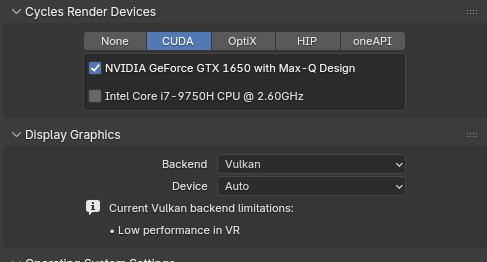
It’s my first time in this forum so bear with me. To put it simply I’m having no luck getting supposedly installed G07-signed-cuda drivers to take. The only output I ever get from the driver info is “N/A” with the alternative “nouveau” applied. (Despite my efforts to blacklist nouveau, though, in truth my intel integrated graphics is actually running.)
My aim was to use to use my GPU’s Cuda functionality to speed up Cycles rendering in Blender but…well…yeah…
I figure I’ll give a system info dump to clear up confusion…
Distro: OpenSUSE Tumbleweed 20260422
Kernel: 6.19.7-1-default (64-bit)
System: Lenovo Yoga C940-15IRH
CPU: Intel Core i7-9750H CPU @ 2.60GHz (With Intel CoffeeLake-H GT2 [UHD Graphics 630])
GPU: NVIDIA TU117M [GeForce GTX 1650 Mobile / Max-Q]
@localhost:~> inxi -aG
Graphics:
  Device-1: Intel CoffeeLake-H GT2 [UHD Graphics 630] vendor: Lenovo
    driver: i915 v: kernel arch: Gen-9.5 process: Intel 14nm built: 2016-20
    ports: active: DP-2,eDP-1 empty: DP-1,HDMI-A-1,HDMI-A-2 bus-ID: 00:02.0
    chip-ID: 8086:3e9b class-ID: 0300
  Device-2: NVIDIA TU117M [GeForce GTX 1650 Mobile / Max-Q] vendor: Lenovo
    driver: N/A alternate: nouveau non-free: 550-580.xx+ status: current (as of
    2025-11; EOL~2026-12-xx) arch: Turing code: TUxxx process: TSMC 12nm FF
    built: 2018-2022 pcie: gen: 3 speed: 8 GT/s lanes: 16 bus-ID: 01:00.0
    chip-ID: 10de:1f91 class-ID: 0302
Output of nvidia-smi:
@localhost:~> nvidia-smi
NVIDIA-SMI has failed because it couldn't communicate with the NVIDIA driver. Make sure that the latest NVIDIA driver is installed and running.
Output of prime-select nvidia:
@localhost:~> sudo prime-select nvidia
[sudo] password for root:
nvidia catched
Preparing first configuration
bbswitch not loaded

If you want energy saving bbswitch should be loaded in intel mode.
For this package 'bbswitch' needs to be installed on your system.
Or make use of DynamicPowerManagement on Turing GPUs or later by
switching to suse-prime's 'offload' or 'nvidia' mode.
Logout to switch graphics
(…Though this will ultimately do nothing)
And if I run “rpm -qa | grep -e ^nvidia -e ^libnvidia | grep -v container | sort”
@localhost:~> rpm -qa | grep -e ^nvidia -e ^libnvidia | grep -v container | sort
libnvidia-cfg-595.58.03-11.1.x86_64
libnvidia-egl-gbm1-1.1.3-11.1.x86_64
libnvidia-egl-gbm1-32bit-1.1.3-11.1.x86_64
libnvidia-egl-wayland1-1.1.22-57.3.x86_64
libnvidia-egl-wayland1-32bit-1.1.22-57.2.x86_64
libnvidia-egl-x111-1.0.5-26.1.x86_64
libnvidia-egl-x111-32bit-1.0.5-26.1.x86_64
libnvidia-gpucomp-32bit-595.58.03-11.1.x86_64
libnvidia-gpucomp-595.58.03-11.1.x86_64
libnvidia-gpucomp-G06-580.142-49.1.x86_64
libnvidia-ml-32bit-595.58.03-11.1.x86_64
libnvidia-ml-595.58.03-11.1.x86_64
nvidia-common-G07-595.58.03-11.1.x86_64
nvidia-compute-G07-32bit-595.58.03-11.1.x86_64
nvidia-compute-G07-595.58.03-11.1.x86_64
nvidia-compute-utils-G07-595.58.03-11.1.x86_64
nvidia-driver-assistant-0.43.58.03-1.noarch
nvidia-driver-G07-595.58.03-1.x86_64
nvidia-gl-G07-32bit-595.58.03-11.1.x86_64
nvidia-gl-G07-595.58.03-11.1.x86_64
nvidia-imex-595.58.03-1.x86_64
nvidia-libXNVCtrl-595.58.03-2.1.x86_64
nvidia-modprobe-595.58.03-3.1.x86_64
nvidia-open-595.58.03-1.x86_64
nvidia-open-driver-G07-signed-cuda-check-595.58.03-2.8.noarch
nvidia-open-driver-G07-signed-cuda-default-devel-595.58.03-2.8.x86_64
nvidia-open-driver-G07-signed-cuda-kmp-default-595.58.03_k6.19.12_1-2.8.x86_64
nvidia-persistenced-595.58.03-2.1.x86_64
nvidia-settings-595.58.03-2.1.x86_64
nvidia-texture-tools-2.1.2-3.2.x86_64
nvidia-userspace-meta-G07-595.58.03-11.1.x86_64
nvidia-video-G07-32bit-595.58.03-11.1.x86_64
nvidia-video-G07-595.58.03-11.1.x86_64
nvidia-xconfig-595.58.03-2.1.x86_64
I’ve followed online documentation such as: “Installation of NVIDIA drivers on openSUSE and SLE” (https sndirsch github io/nvidia/2025/07/16/nvidia-drivers.html)
and “SDB:NVIDIA drivers” (https en opensuse org/SDB:NVIDIA_drivers)
(Plus some other forum posts and reddit pages squirreled away)
(I can only post 2 links as a new user)
I believe I have the repositories set up properly.
cuda - https://developer.download.nvidia.com/compute/cuda/repos/suse16/x86_64/
nvidia - https://download.nvidia.com/opensuse/tumbleweed/
Edit: Also no, I don’t have secure boot turned on.
Does anybody have any recommendations?