I used to install opensuse by opensuse.iso (several GB) lying on the disk by network-opensuse.iso written to a USB disk, but now the version is 16.0, where is the option to specific the path of opensuse.iso?
Maybe this helps:
1 Like
I read it several times and I still cannot parse it. Try to explain it differently or give step by step description of what you did.
2 Likes
Please don’t write a novel as the bug subject. It should be a concise summary, not a story.
1 Like
Sorry for our language gap, I want to install opensuse 16 but I don’t want to write it’s installation image file to USB stick or DVD. In openSUSE 15.6, I can achieve this by giving openSUSE-Leap-15.6-NET LiveUSB the path of installation image, but where is this option in Leap-16.0-online-installer-x86_64.install?
Dose Leap-16.0-online-installer-x86_64.install.iso LiveUSB has the option to specify the path of Leap-16.0-offline-installer-x86_64.install.iso?
Seems like you are asking how to do what I did. My Grub stanza to install from NET without using USB, CD or DVD included the following:
linux /s160/linux isoscan/filename=/dev/nvme0n1p6/agama16.iso
agama16.iso is the downloaded installation .iso renamed for my convenience. @arvidjaar’s assistance lead me to it. For more detail visit here and the link hui posted above.
1 Like
Interesting, can you elaborate on the quoted part of the stanza?
I never told anyone to use this nonsense
Do not attribute to me your own contraptions.
Show the actual parameter (or, better, the full line) you used with Leap 15.
Your writings root=live:http://.../squashfs160.img, See "man dracut.cmdline"., and others in my mailing list thread led me on a path to the Grub stanza, and more, that produced my first successful Agama installation.
/s160/ is a directory in the root of the filesystem on the target nvme0n1 containing installation kernel from here, which, IIRC, is identical to that contained within agama-installer.x86_64-Leap_16.0.iso of 29 Sept from here. Having to host locally the .iso in addition to linux and initrd isn’t as space-savingly simple as needing only linux and initrd saved locally using the 15.6 and prior HTTP installer, but it enables the ultimate object: avoids need to fumble with dubious reliability removable media without need for a PXE server.
root=live:https://download.opensuse.org/distribution/leap/16.0/repo/oss/LiveOS/squashfs.img
1 Like
Mentioned here:
Here it says
For Agama-based media like Leap-16 or SLE-16 you have to provide the Live root file system via network yourself – there is currently no official download location.
This has changed.
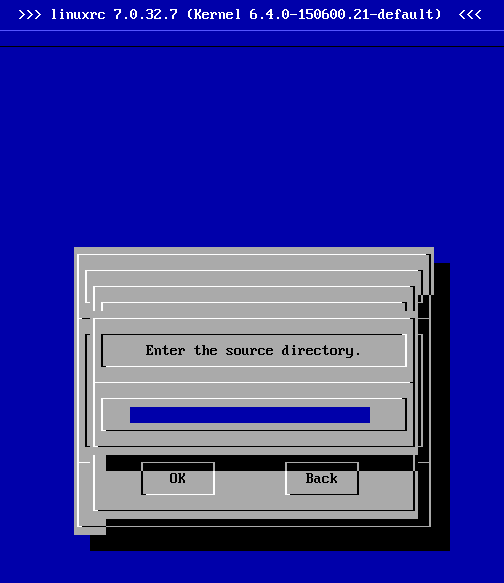
Boot the USB made by openSUSE-Leap-15.5-NET-x86_64-Media.iso. Go to Installation > Back > OK > OK > OK > OK > Start Installation > Installation > Hard Disk, then enter the folder and iso name.
Just use the kernel parameter
iso-scan/filename=/full/path/to/agama16.iso
Where /full/path/to/agama16.iso - is the full path from the root directory of the filesystem with this image. See man dracut.cmdline for additional details.
Why not simply do it the recommended way and write the ISO to an USB stick?
What’s the advantage of putting a network image, of all things, that might be outdated next week already, to the hard disk? It will fetch all packages from the network anyway.
How to do it? Step by step please.
This topic was automatically closed 30 days after the last reply. New replies are no longer allowed.