My pc refuses to suspend. When time pass(after my power settings) my pc turns off my monitor, but refuses to suspend. Same thing if i push the suspend button from gnome. Instead it freezes, from keyboard or mouse or even reset and power button (continuously). I have to close the power button from my PSU, wait a few seconds and then shuts down and then I can boot it again from the power button.
This started to happen about a few weeks ago, I don’t remember exactly when, I wait for kernel updates to fix it but nothing, cant find solution. I change my cpu, I add a second monitor, and I install a windows system in my second disk (but windows put its boot manager in my linux disk -I consider to ask about it in a different topic). And off-course updates and upgrades. I don’t know if anything of this has some connection with my problem.
I use gnome tumbleweed last version (20250813), my graphics card is amd radeon 6600, my cpu is 5950x ryzen, my MB is aourus elite b550 v2. Its very annoing, i have to never sleep my pc (always on) or poweroff every time i leave it. Please help.
Forgot to mention: My windows system can sleep and wake from keyboard
You change your cpu? Are you running openSUSE from an External Enclosure?
and are you running your Graphics with an external enclosure for your graphics card?
No, I just replace my previews ryzen cpu (5700G) with a new one (5950x)
The 5950x has an history of funky behaviour in the idle states. Try to issue systemctl suspend in a terminal and see what errors are printed out.
In KDE, to see the timing for when a monitor goes to sleep, I find this command works:
grep -A1 '\[.*DPMSControl\]' ~/.config/powermanagementprofilesrc
In Gnome, I read the following is the command, but I have not tested it :
gsettings get org.gnome.settings-daemon.plugins.power sleep-display-ac
or
gsettings get org.gnome.settings-daemon.plugins.power sleep-display-battery
Those commands are to just check the settings, not to change them.
Also, I also believe some external monitors have their own built-in sleep or power-saving features that can kick in independently of openSUSE LEAP Tumbleweed. These are often configured via the monitor’s on-screen display (OSD) menu (accessed via physical buttons). Have you checked to ensure that is not an issue?
On current Tumbleweed those commands don’t work:
bruno@LT-B:~> gsettings get org.gnome.settings-daemon.plugins.power sleep-display-ac
No such key “sleep-display-ac”
bruno@LT-B:~> gsettings get org.gnome.settings-daemon.plugins.power sleep-display-battery
No such key “sleep-display-battery”
bruno@LT-B:~>
Current available keys are:
bruno@LT-B:~> gsettings list-keys org.gnome.settings-daemon.plugins.power
ambient-enabled
idle-brightness
idle-dim
power-button-action
power-saver-profile-on-low-battery
sleep-inactive-ac-timeout
sleep-inactive-ac-type
sleep-inactive-battery-timeout
sleep-inactive-battery-type
bruno@LT-B:~>
Apologies. Unfortunately I don’t have a gnome setup to test them.
How about this command:
gsettings get org.gnome.desktop.session idle-delay
… again - I do not have gnome installed so I can not test it.
With that in mind I read, to change the setting, one can use the gsettings set command in Gnome.
For changing settings (for example) to set the display to sleep after 5 minutes (300 seconds) of inactivity, one would use:
gsettings set org.gnome.desktop.session idle-delay 300
To prevent the display from ever sleeping due to inactivity, set the value to 0:
gsettings set org.gnome.desktop.session idle-delay 0
that reads to me to be a very dangerous command, as that could result in burn-in damage to a monitor.
Again - I do not have gnome to test such
…or use the dconf Editor graphical tool that might be easier to casual users.
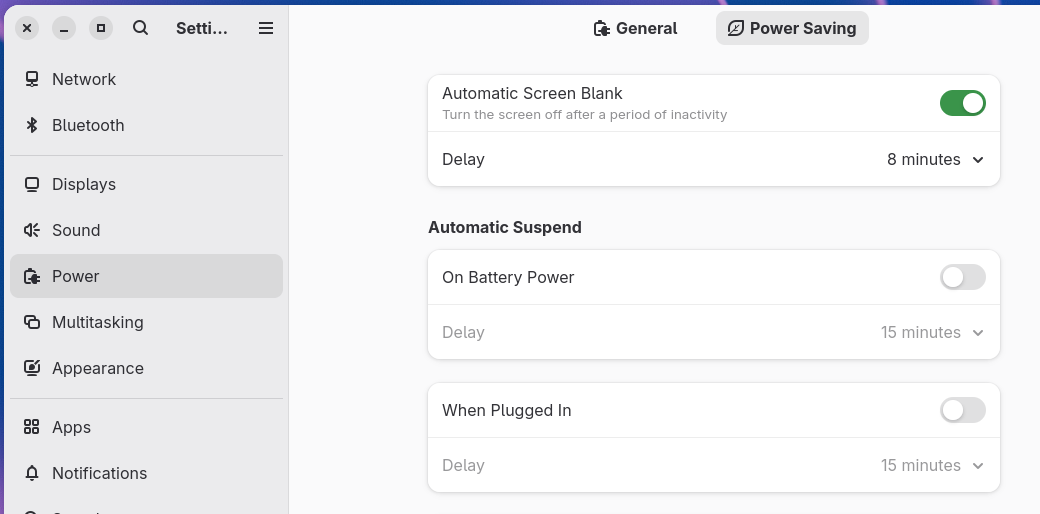
Thanks for the replies. My monitor turn off when I set it to turn off in power settings. And monitor wakes up as expected with keyboard or mouse. Also from windows i can put my pc to sleep properly and wake up with keyboard. So I don’t see a hardware problem here. I also test different cpu configurations (auto, eco mode, xpm on and off), every time in linux refuse to susped, instead freezes as described above.
Also this happens from command systemctl suspend, the same behavieur. Because of the freeze (and blank screen), I cant see any messages appear in the terminal after I run “systemctl suspend”. I try to find some log file wich describes what happening without success.
NVIDIA Involved???
@gogalthorp Read up …
OP:
I use gnome tumbleweed last version (20250813), my graphics card is amd radeon 6600
I am having a bit of a similar glitch in that my sleep works it just won’t STAY sleeping if I use the menu button option … it will wake up 5 seconds after clicking the button … if I let it sleep by timing out it works fine …
I’m thinking kernel problem … Also have a Logitech wireless keyboard and mouse that worked perfectly up until about 4ish updates ago … different problem (maybe) … different thread if it gets annoying enough or sleep quits working entirely … I’ve checked journalctl and dmesg but nothing tells me WHAT is waking up my machine when I suspend with the button … I don’t think it’s KDE because I’ve put it to sleep at the SDDM login and the same thing happened
windeath:/home/dart/Downloads # inxi -GS
System:
  Host: windeath Kernel: 6.16.0-1-default arch: x86_64 bits: 64
  Desktop: KDE Plasma v: 6.4.4 Distro: openSUSE Tumbleweed 20250812
Graphics:
  Device-1: NVIDIA GM107 [GeForce GTX 750 Ti] driver: nvidia v: 580.76.05
  Device-2: Logitech HD Webcam C615 driver: snd-usb-audio,uvcvideo type: USB
  Display: wayland server: X.org v: 1.21.1.15 with: Xwayland v: 24.1.8
    compositor: kwin_wayland driver: X: loaded: nvidia
    gpu: nvidia,nvidia-nvswitch resolution: 1920x1080~60Hz
  API: EGL v: 1.5 drivers: nvidia,swrast
    platforms: gbm,wayland,x11,surfaceless,device
  API: OpenGL v: 4.6.0 compat-v: 4.5 vendor: nvidia mesa v: 580.76.05
    renderer: NVIDIA GeForce GTX 750 Ti/PCIe/SSE2
  API: Vulkan v: 1.4.321 drivers: nvidia,llvmpipe surfaces: N/A
  Info: Tools: api: clinfo, eglinfo, glxinfo, vulkaninfo
    de: kscreen-console,kscreen-doctor gpu: nvidia-settings,nvidia-smi
    wl: kanshi, swaymsg, wayland-info x11: xdpyinfo, xprop, xrandr
windeath:/home/dart/Downloads #
I assume <CTRL><ALT><F2> to go to a full screen ‘konsole’ does not work during the freeze.
Did you try checking the journal? ie
sudo journalctl -b -1 -r
journalctl→ The systemd utility for querying and displaying logs from the journal.-b -1→ Shows logs from the previous boot (-b= boot,-1= one boot before the current one).-r→ Reverse order, displaying newest log entries first (useful for quickly seeing recent errors).
That will provide a massive output (I believe). Look for lines that show the system initiating a suspend or sleep action.
Scour the logs for any errors (error, fail, warn) that appear just before the logs abruptly stop. This point is where the system hung. Look for messages related to the kernel, suspend, drm, or the GPU’s name (e.g., amdgpu, nvidia).
Some PURE SPECULATION with some ‘diagnostic’ tests - If a specific kernel is causing a hang, you can try adding boot parameters in the GRUB boot menu to disable certain power-saving features or to better localize why the problem. Please ONLY try one at a time. Which means since the monitor needs to go to sleep mode, these different ‘tests’ could take days of operation to assess the outcome , … noting the results for each.
In my view none of them are intended as a fix. So, for example - A general power management entry to add to grub:
acpi_rev_override
Next- a workaround for computer hardware that expects MS-Windows power management (again - try this in grub).
acpi_osi="!Windows 2012
More specifically, the above is a kernel parameter that modifies how the Linux kernel interacts with ACPI (Advanced Configuration and Power Interface) by changing the OSI (Operating System Interface) string that the kernel reports to the system’s firmware.
For a very drastic test (only for one session to see if you can recover after PC goes to sleep) - try this in grub
nomodeset
That forces the use of a ‘lower level’ graphic driver, which can help determine if your nominal graphics driver is the root cause. This will likely result in a lower-resolution display - so you may or may not want to explore that possibility.
Again - if you wish to try those ideas - please only one at a time in Grub. If you do all at once we will learn almost nothing.
.
My journalctl says it …sleeped! It does for a second, then power up again and is freezed, it really tries to suspend 
user@tumbleweed:~> sudo journalctl -b -1 -r
[sudo] password for root:
Aug 16 13:42:09 tumbleweed kernel: PM: suspend entry (deep)
Aug 16 13:42:09 tumbleweed systemd-sleep[12630]: Performing sleep operation 'suspend'...
Aug 16 13:42:09 tumbleweed systemd-sleep[12632]: INFO: Skip running /usr/lib/systemd/system-sleep/gr>
Aug 16 13:42:09 tumbleweed systemd-sleep[12630]: Successfully froze unit 'user.slice'.
Aug 16 13:42:09 tumbleweed systemd[1]: user.slice: Unit now frozen.
Aug 16 13:42:09 tumbleweed systemd[1]: user-1000.slice: Unit now frozen-by-parent.
Aug 16 13:42:09 tumbleweed systemd[1]: user@1000.service: Unit now frozen-by-parent.
Aug 16 13:42:09 tumbleweed systemd[1]: session-2.scope: Unit now frozen-by-parent.
Aug 16 13:42:09 tumbleweed systemd[1]: Starting System Suspend...
Aug 16 13:42:09 tumbleweed systemd[1]: Reached target Sleep.
Aug 16 13:42:09 tumbleweed remmina[3678]: gtk_widget_get_scale_factor: assertion 'GTK_IS_WIDGET (wid>
Aug 16 13:42:09 tumbleweed com.gitlab.bits[3756]: gtk_widget_get_scale_factor: assertion 'GTK_IS_WID>
Aug 16 13:42:09 tumbleweed gnome-shell[3489]: Trying to remove non-existent keybinding "shortcut".
Aug 16 13:42:08 tumbleweed gsd-media-keys[3646]: Unable to get default sink
Aug 16 13:42:08 tumbleweed dns-dnsmasq.sh[12612]: <debug> NETWORKMANAGER_DNS_FORWARDER is not set to>
Aug 16 13:42:08 tumbleweed gjs[2484]: JS LOG: current connection: null
Aug 16 13:42:08 tumbleweed gnome-shell[3489]: Type gint32 of property AccountsService.User::password>
Aug 16 13:42:08 tumbleweed gjs[2484]: JS LOG: current connection: {"id":"Wired connection 2","type":>
Aug 16 13:42:08 tumbleweed kernel: r8169 0000:05:00.0 eno1: Link is Down
Aug 16 13:42:08 tumbleweed NetworkManager[2174]: <info>  [1755340928.6675] device (eno1): state chan>
Aug 16 13:42:08 tumbleweed dns-dnsmasq.sh[12596]: <debug> NETWORKMANAGER_DNS_FORWARDER is not set to>
Aug 16 13:42:08 tumbleweed chronyd[2267]: Source 81.2.191.34 offline
Aug 16 13:42:08 tumbleweed chronyd[2267]: Can't synchronise: no selectable sources (1 unreachable so>
Aug 16 13:42:08 tumbleweed avahi-daemon[1900]: Interface eno1.IPv4 no longer relevant for mDNS.
Aug 16 13:42:08 tumbleweed avahi-daemon[1900]: Leaving mDNS multicast group on interface eno1.IPv4 w>
Aug 16 13:42:08 tumbleweed avahi-daemon[1900]: Withdrawing address record for 192.168.1.153 on eno1.
Aug 16 13:42:08 tumbleweed NetworkManager[2174]: <info>  [1755340928.6291] dhcp6 (eno1): state chang>
Aug 16 13:42:08 tumbleweed NetworkManager[2174]: <info>  [1755340928.6291] dhcp6 (eno1): activation:>
Aug 16 13:42:08 tumbleweed NetworkManager[2174]: <info>  [1755340928.6291] dhcp6 (eno1): canceled DH>
Aug 16 13:42:08 tumbleweed NetworkManager[2174]: <info>  [1755340928.6290] dhcp4 (eno1): state chang>
Aug 16 13:42:08 tumbleweed NetworkManager[2174]: <info>  [1755340928.6290] dhcp4 (eno1): activation:>
Aug 16 13:42:08 tumbleweed avahi-daemon[1900]: Interface eno1.IPv6 no longer relevant for mDNS.
Aug 16 13:42:08 tumbleweed NetworkManager[2174]: <info>  [1755340928.6290] dhcp4 (eno1): canceled DH>
Aug 16 13:42:08 tumbleweed avahi-daemon[1900]: Leaving mDNS multicast group on interface eno1.IPv6 w>
Aug 16 13:42:08 tumbleweed avahi-daemon[1900]: Withdrawing address record for fe80::ffe0:2d6f:7ef3:a>
Aug 16 13:42:08 tumbleweed NetworkManager[2174]: <info>  [1755340928.6285] device (eno1): state chan>
Aug 16 13:42:08 tumbleweed systemd[1]: Started Network Manager Script Dispatcher Service.
Aug 16 13:42:08 tumbleweed systemd[1]: Starting Network Manager Script Dispatcher Service...
...skipping...
Aug 16 15:28:31 tumbleweed kernel: random: crng init done
Aug 16 15:28:31 tumbleweed kernel: efi: ACPI=0xbcde2000 ACPI 2.0=0xbcde2014 TPMFinalLog=0xbcdac000 S>
Aug 16 15:28:31 tumbleweed kernel: efi: EFI v2.7 by American Megatrends
Aug 16 15:28:31 tumbleweed kernel: APIC: Static calls initialized
Aug 16 15:28:31 tumbleweed kernel: NX (Execute Disable) protection: active
Aug 16 15:28:31 tumbleweed kernel: BIOS-e820: [mem 0x000000103f300000-0x000000103fffffff] reserved
Aug 16 15:28:31 tumbleweed kernel: BIOS-e820: [mem 0x0000000100000000-0x000000103f2fffff] usable
Aug 16 15:28:31 tumbleweed kernel: BIOS-e820: [mem 0x00000000ff000000-0x00000000ffffffff] reserved
Aug 16 15:28:31 tumbleweed kernel: BIOS-e820: [mem 0x00000000fedd4000-0x00000000fedd5fff] reserved
Aug 16 15:28:31 tumbleweed kernel: BIOS-e820: [mem 0x00000000fedc2000-0x00000000fedcffff] reserved
Aug 16 15:28:31 tumbleweed kernel: BIOS-e820: [mem 0x00000000fed80000-0x00000000fed8ffff] reserved
Aug 16 15:28:31 tumbleweed kernel: BIOS-e820: [mem 0x00000000fed40000-0x00000000fed44fff] reserved
Aug 16 15:28:31 tumbleweed kernel: BIOS-e820: [mem 0x00000000fed00000-0x00000000fed00fff] reserved
Aug 16 15:28:31 tumbleweed kernel: BIOS-e820: [mem 0x00000000fec30000-0x00000000fec30fff] reserved
Aug 16 15:28:31 tumbleweed kernel: BIOS-e820: [mem 0x00000000fec10000-0x00000000fec10fff] reserved
Aug 16 15:28:31 tumbleweed kernel: BIOS-e820: [mem 0x00000000feb80000-0x00000000fec01fff] reserved
Aug 16 15:28:31 tumbleweed kernel: BIOS-e820: [mem 0x00000000fea00000-0x00000000fea0ffff] reserved
Aug 16 15:28:31 tumbleweed kernel: BIOS-e820: [mem 0x00000000fd600000-0x00000000fd7fffff] reserved
Aug 16 15:28:31 tumbleweed kernel: BIOS-e820: [mem 0x00000000fd200000-0x00000000fd2fffff] reserved
Aug 16 15:28:31 tumbleweed kernel: BIOS-e820: [mem 0x00000000f0000000-0x00000000f7ffffff] reserved
Aug 16 15:28:31 tumbleweed kernel: BIOS-e820: [mem 0x00000000bf000000-0x00000000bfffffff] reserved
Aug 16 15:28:31 tumbleweed kernel: BIOS-e820: [mem 0x00000000bddff000-0x00000000beffffff] usable
Aug 16 15:28:31 tumbleweed kernel: BIOS-e820: [mem 0x00000000bcdf9000-0x00000000bddfefff] reserved
Aug 16 15:28:31 tumbleweed kernel: BIOS-e820: [mem 0x00000000bc6fe000-0x00000000bcdf8fff] ACPI NVS
Aug 16 15:28:31 tumbleweed kernel: BIOS-e820: [mem 0x00000000bc6ab000-0x00000000bc6fdfff] ACPI data
Aug 16 15:28:31 tumbleweed kernel: BIOS-e820: [mem 0x00000000b9a9b000-0x00000000bc6aafff] reserved
Aug 16 15:28:31 tumbleweed kernel: BIOS-e820: [mem 0x000000000b020000-0x00000000b9a9afff] usable
Aug 16 15:28:31 tumbleweed kernel: BIOS-e820: [mem 0x000000000b000000-0x000000000b01ffff] reserved
Aug 16 15:28:31 tumbleweed kernel: BIOS-e820: [mem 0x000000000a20e000-0x000000000affffff] usable
Aug 16 15:28:31 tumbleweed kernel: BIOS-e820: [mem 0x000000000a200000-0x000000000a20dfff] ACPI NVS
Aug 16 15:28:31 tumbleweed kernel: BIOS-e820: [mem 0x000000000a000000-0x000000000a1fffff] usable
Aug 16 15:28:31 tumbleweed kernel: BIOS-e820: [mem 0x0000000009c3f000-0x0000000009ffffff] reserved
Aug 16 15:28:31 tumbleweed kernel: BIOS-e820: [mem 0x0000000000100000-0x0000000009c3efff] usable
Aug 16 15:28:31 tumbleweed kernel: BIOS-e820: [mem 0x00000000000a0000-0x00000000000fffff] reserved
Aug 16 15:28:31 tumbleweed kernel: BIOS-e820: [mem 0x0000000000000000-0x000000000009ffff] usable
Aug 16 15:28:31 tumbleweed kernel: BIOS-provided physical RAM map:
Aug 16 15:28:31 tumbleweed kernel: Command line: BOOT_IMAGE=/boot/vmlinuz-6.16.0-1-default root=UUID>
Aug 16 15:28:31 tumbleweed kernel: Linux version 6.16.0-1-default (geeko@buildhost) (gcc (SUSE Linux>
lines 3528-3565/3565 (END)
Looking at that I note:
Aug 16 13:42:09 tumbleweed kernel: PM: suspend entry (deep)
Aug 16 13:42:09 tumbleweed systemd-sleep[12630]: Performing sleep operation 'suspend'...
I read of there being two different types of ‘sleep’, that being “deep” and that being “s2idle”.
So I think that the above means that “deep” is not working to allow recovery.
If that is accurate, I also read possible causes are:
- ACPI/firmware bug: Common on some hardware when resuming from S3.
- GPU driver issue: Display fails to reinitialize on wake
- Kernel quirk
What you can do is send the command in a bash shell:
cat /sys/power/mem_sleep
Does that only provide “deep” as an output (which is what my laptop gives), or does it give [deep] s2idle which I believe means both are supported and your computer has ‘deep’ applied (hopefully I have that right).
One can try switching to “s2idle” (if hardware supports and it may not),
And if “s2idle” not available there are also ways to test each, but this is getting too complicated for me to create a massive procedure for you to execute.
I will instead wait to see with what you come up with in terms of what you already have and go from there in terms of the many suggestions that I already provided. (there are grub boot codes and all sorts of things that can be tried - but I am not (yet) ready to go fast in further recommendations, because I am not an expert in this and for me to research this and then post a reply takes a lot of my time - when a test result from what you are trying now could invalidate such an additional test). Plus a long procedure from me would likely only confuse.
Let us know how things proceed.
.
Thanks very much for your time and effort!! that you suggested that involves grub seem difficult to me, I am not familiar with editing grub, maybe I try them when I become desperate.
The output of the coomand is
user@tumbleweed:~> cat /sys/power/mem_sleep
s2idle [deep]
mitsos@tumbleweed:~>
To switch to s2idle what do I have to do?
Try this to switch to s2idle:
echo "s2idle" | sudo tee /sys/power/mem_sleep
I read that is a recommended way to change the sleep mode temporarily. The tee command with sudo is a recommended approach because:
- It writes the value to the sysfs file with root privileges
- It displays the written value as confirmation
- It’s the method documented in the kernel documentation
After running this command, you can verify it worked by checking the file again:
cat /sys/power/mem_sleep
You should see [s2idle] deep instead of s2idle [deep], where the brackets indicate the active mode.
Here is an explanation - these are NOT additional commands. … I read that here is a breakdown of what that echo "s2idle" | sudo tee /sys/power/mem_sleep command does:
echo "s2idle": This sends the strings2idleto standard output.|: This is a pipe that redirects the output of the first command to the input of the next.sudo tee /sys/power/mem_sleep: The tee command reads from standard input and writes it to both standard output and a file.sudois used here because writing to /sys/power/mem_sleep requires root privileges. I think using tee is the preferred method for this as a directsudo echo "s2idle" > /sys/power/mem_sleepcommand may fail due to shell redirection rules.
This will NOT survive a reboot. But if it works, then a different grub menu entry can be added.
No worries. We can cross that bridge when we come to it. Its not too difficult if one is provided guidance.