HP scanner no longer working

Since a recent update of my Tumbleweed system, my printer/scanner combination hp Officejet pro 8720 does not scan any more. Xsane and Skanlite both refuse connecting to the device. Printing is still OK.
Xsane opens a window with an error message:
"Failed to open device 'hpaio:/net/HP_Officejet_Pro_8720?hostname=druckerneu': Error during device I/O."
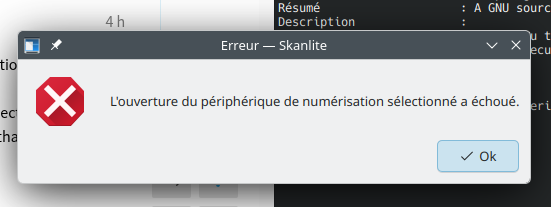
while Skanlite just says "Opening the selected scanner failed."

The version of the hplip components is 3.26.6-1.1.
On another Tumbleweed machine, with hplip version 3.26.4-2.3, scanning works. This is why I suspect the latest update of hplip to be the culprit.

The printer is connected via a local network (wired Ethernet). Switching off the Firewall doesn’t change anything.

You may give this a try:
Install sane-airscan and give the following commands
scanimage -L
airscan-discover

With respect to HPLIP, this link might be relevant to your situation:

Check that there is not an HPLIP plugin mismatch to start with.

Query existing proprietary plugin with hp-plugin -l and if necessary update it with sudo hp-plugin -i.

After updating the plug-in Xsane and Skanlite crash immediately.

This is the result of that experiment:
armin@armin-pc:~> scanimage -L
Segmentation fault (core dumped) scanimage -L
armin@armin-pc:~> airscan-discover
[devices]
HP OfficeJet Pro 8720 [6D0CF3] = http://192.168.178.21:8080/eSCL/, eSCL
HP OfficeJet Pro 8720 [6D0CF3] = https://192.168.178.21:443/eSCL/, eSCL
HP OfficeJet Pro 8720 [6D0CF3] = http://[fd43:ed2:d3ac:0:e6e7:49ff:fe6d:cf3]:8080/eSCL/, eSCL
HP OfficeJet Pro 8720 [6D0CF3] = https://[fd43:ed2:d3ac:0:e6e7:49ff:fe6d:cf3]:443/eSCL/, eSCL
HP OfficeJet Pro 8720 [6D0CF3] = http://192.168.178.21:53048, WSD
armin@armin-pc:~>

The device is somehow recognised, but XSane and Skanlite crash.

In my case after running airscan , I launched skanpage and selected the most appropriate and it worked. I cannot say more than that.

Most modern HP multifunction printers support driverless printing and scanning via AirPrint/AirScan, (or can use the vendor-supplied HPLIP drivers).

The crash you describe may be caused by an unrelated hp scanner backend. Take a read of this topic…

I described a workaround there, which should resolve this for you.

Hello, same problem here

Read the topic in my last reply.

Sorry, none of the workarounds described in the aforementioned post of 2025 helped on my machine.
However, after installing the sane-airscan package I can select the eSCL device provided for my Scanner/Printer combination, and that works.

Thank you very much for your support!

Hello so i don’t have a problem with scanimage:

vincent@localhost:~> scanimage -L
device `hpaio:/net/ENVY_Photo_6200_series?ip=192.168.1.19’ is a Hewlett-Packard ENVY_Photo_6200_series all-in-one

But the Skanlite find the scaner but don’t open it (sorry i’m french).

i checked the logs i have the following error in journalctl:

@VGib It’s Best to share output like this as preformatted text, rather then screen shots. Refer to the </> button in the forum editor.

Anyway, I note the image shows…
scan/sane/http.c:507: http_read: response exceeds buffer (read=8174 len=28 max=8192)
There are reports of scanning failing with HPLIP 3.26.6 and working again after reverting to 3.26.4.

A similar Arch Linux report here
https://bbs.archlinux.org/viewtopic.php?pid=2310489&utm_source=chatgpt.com

1 Like

@deano_ferrari , i’ve seen that. But i didn’t catch any bug report neither in sane or hplip.

Maybe i should write one, but i wonder if this is a sane or a hplip problem.

An hplip regression.

Problème rÊsolu avec airscan et utilisation avec eSCL .
Merci

Similar to others, it looks like hplip 3.26.6 is bad. I found the Arch Linux report first, and downgrading to 3.26.4 has worked for me.

With 3.26.6, I would get:

scanimage -L
device `hpaio:/usb/HP_OfficeJet_Pro_8710?serial=CN8CBDT2CW' is a Hewlett-Packard HP_OfficeJet_Pro_8710 all-in-one

So it can see that the scanner is there. But trying to actually use it, I’d get an I/O error:

scanimage --format=pnm --batch=page%d.pnm --batch-start=1 --batch-count=1  --mode Color   --source ADF  --resolution 300 -l 0 -t 0 -x 215.9 -y 279.5
scanimage: open of device hpaio:/usb/HP_OfficeJet_Pro_8710?serial=CN8CBDT2CW failed: Error during device I/O

I got similar I/O errors from the HP scan utils. After finding that Arch Linux post, I confirmed finding the same error in /var/log/messages:

2026-10-14T11:51:41.999889-05:00 farfalla scanimage: scan/sane/http.c 507: http_read: response exceeds buffer (read=8214 len=38 max=8192)

I added one of the old snapshots as a repo:

zypper ar  https://download.opensuse.org/history/20260917/tumbleweed/repo/oss/ tw20260917-oss

Installed the 3.26.4 versions:

zypper in --oldpackage hplip-base-3.26.4 hplip-common-3.26.4 hplip-cups-3.26.4 hplip-driver-hpcups-3.26.4 hplip-sane-3.26.4 hplip-utils-3.26.4 libhplip0-3.26.4

And now I’m back to having a working scanner again.

Worked for me, too. Thanks for the description.