I’ve been using Veracrypt to encrypt some of my external/portable backup drives. When plugged in, my system (OpenSUSE Tumbleweed on KDE Desktop,) does recognize that the device is plugged in, but does not recognize my drive in the file manager. Once I mount it through Veracrypt, the system recognizes it just fine, however that leads to a question on how it can be safely ejected once unmounted? I have not tried ejected it while it is mounted, and am frankly scared to try. I am ok with unplugging the drive once unmounted, since nothing has yet to happen to those drives when unplugging without safely ejecting, but it would give me peace of mind for a way to do so to be available.
I have not used “Veracrypt”. But I do use LUKS encrypted devices.
In that case, I use "cryptsetup luksClose name" to disconnect before I attempt to remove.
I’m not sure if that is helpful. I have the impression that “cryptsetup” is also used for “Veracrypt”.
To open and mount a file/partition (DEVICE) encrypted with “Veracryt”:
cryptsetup open --type=tcrypt DEVICE MAPPERDEVICE
mount /dev/mapper/MAPPERDEVICE MOUNTPOINT
To unmount and close that file/partition (DEVICE):
umount MOUNTPOINT
cryptsetup close MAPPERDEVICE
However cryptsetup has some limitations as far as “Veracrypt”-handling is concerned (see man cryptsetup(8) for more details).
1 Like
This second half interests me. For example, should I unmount the device from Veracrypt first, would I still need to run umount MOUNTPOINT or just do cryptsetup close MAPPERDEVICE? Also I am unclear what MOUNTPOINT & MAPPERDEVICE are referring to, assuming these are where I replace the terms with the corresponding information about my external drive.
Once unmounted, the device can be safely removed from the system.
I just run veracrypt -d to dismount the veracrypt encrypted volumes that I use - I only unmount them when restarting my system, and I have a script that I use to shut down services that I run when it’s up, including veracrypt.
When the filesystem is unmounted (however you unmount it), any cached writes are flushed to disk before the unmount is considered complete -so if you’ve properly unmounted all of the partitions on the device, the device is safe to remove from the system.
Now, if you’re using encrypted containers in files in a mounted filesystem, you need to unmount the filesystem those encrypted containers are in before removing the device.
cryptsetup is not used (or doesn’t need to be used) with veracrypt. It’s fully self-contained. I’ve been using it for years (since before Truecrypt was forked to Veracrypt).
1 Like
Oh interesting. Back when I was using windows it would still recognize the veracrypted device as something plugged in even when it was unmounted. So typically I would unmount the external drive in verarypt (GUI), then safely eject it using the options Windows gave me. Linux still recognizes the device is plugged in as well, but does not show it in the file manager, nor gives me an option to eject/unmount it until I mount it through Veracrypt.
Yeah, Windows and Linux behave a bit differently in this regard, at least from a UI perspective.
In Linux, if a filesystem is unmounted, the system doesn’t know about the files at all, and if you unmount after writing a lot of data to the drive, you’ll see the umount command waits until everything is written. It can actually take a while to complete the unmount.
But with veracrypt, it does make a difference how you’ve created the encrypted volume, as well, because you can do a full device (which is what I do), a partition, or create an encrypted container that’s stored as a file in the filesystem. So what becomes the safest way to unmount the drive depends on which of these methods you’ve used.
Beware that I only use cryptsetup to handle files/partitions (DEVICES) encrypted with Veracrypt/Truecrypt.
The cryptsetup man-page says
cryptsetup close
Removes the existing mapping and wipes the key from kernel memory.
so I assume that after cryptsetup close nothing can be written to the encrypted file/partition (DEVICE) any more.
To make sure that all data written is really synced to the encrypted file/partition (DEVICE) I always do an umount before I do cryptsetup close.
However I have never tested (or checked the sources) to see if cryptsetup close would take care of that sync as well.
MAPPERDEVICE is what you create with cryptsetup open and will find in /dev/mapper.
# ls -la /dev/mapper
total 0
drwxr-xr-x  2 root root      80 Sep 23 09:45 .
drwxr-xr-x 20 root root    4640 Sep 23 09:45 ..
lrwxrwxrwx  1 root root       7 Sep 23 08:32 MAPPERDEVICE -> ../dm-0
crw-------  1 root root 10, 236 Sep 23 08:32 control
#
and MOUNTPOINT is the place where /dev/mapper/MAPPERDEVICE is mounted to.
It is exactly the same if you created the volume with Veracrypt directly and use veracrypt -d. Years and years of experience with this, never a corrupted volume that wasn’t related to a hardware failure (which has happened probably 3 times over nearly 20 years - external USB drives aren’t the most reliable devices, but they’re cheap, and I use two or three of them for backupsd)
If the OP isn’t using cryptsetup, there’s no reason for them to use cryptsetup to safely/cleanly dismount their volume, as long as they use veracrypt properly (ie, the caveat that if they’re using a file in the filesystem as an encryption container, they need to dismount both the veracrypt volume and the device it’s hosted on before removing the device.
Yeah I encrypt my entire external drive. For me it just feels more simple to do than creating a partition, and I do not have any reason personally to partition anything yet.
To clarify, I am not. In fact this thread introduced me to cryptsetup.
I do not, I just encrypt the drive entirely using this option in the creation wizard:
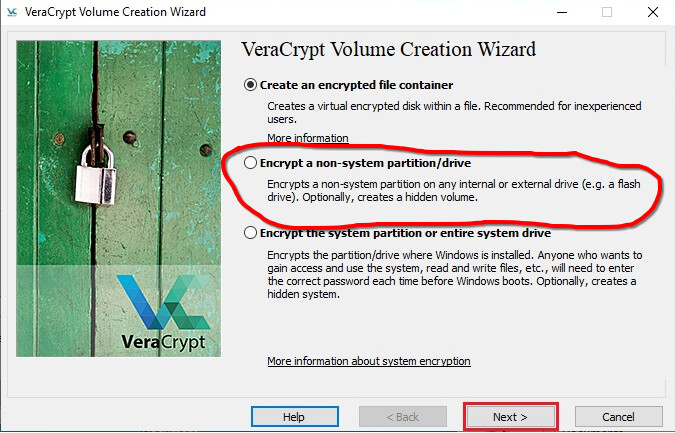
So I guess from what I am reading, as soon as I unmount my drive from veracrypt, I do not need to worry about ejecting it from the system before unplugging my drive from the computer?
That is correct. Because you’re doing a partition/drive, using veracrypt’s built-in unmount does everything you need to do to be safe to remove the drive.
1 Like
Good to know, that lays to rest my concerns. I guess like you said, Windows & Linux treat plugged in drives differently in terms of recognizing plugged in drives.
1 Like
This topic was automatically closed 7 days after the last reply. New replies are no longer allowed.