How to reset second monitor settings (Plasma 6 + Wayland)

I messed up the monitor configuration.

The refresh rate + combined resolution of the two monitors attached is above the capabilities of my AMD GPU so the screen is frozen while the system is reacts to media player commands by the keyboard shortcuts.

I can run fine on 1 monitor, the issue is when I connect the second one.

How can I undo the monitor settings without plugging in second monitor?

I’ve tried looking for the settings in:
~/.local/share/kscreen/
/.config/kscreenrc

acording to some info on the net, but without success.

To fully reset:

  • Logout, go to the console with Ctrl+Alt+F2
  • login as your user
  • do: rm -rf ~/.local/share/kscreen/ && rm ~/.config/kscreenrc
  • hit Ctrl+Alt+F7 ( not sure about the F7 )
  • login on the desktop as your user, and reconfigure the screens

EDIT: correction made, missing rm after &&

Are you sure this is the right command?

Sure it isn’t. Corrected. Thanks

Not resolved.

~/.local/share/kscreen/
folder does not exists ^

~/.config/kscreenrc
deleting only this file ^ does not resolve the issue

Also ~/.config/kscreenrc file was not recreated again after reboot.

Share your graphics hardware and environment details from inxi -Gaz and perhaps kinfo output as well.

Is kscreen active?
ps -aux | grep kscreen
If active, what does kscreen-doctor report about your displays?
kscreen-doctor -o

Please use the preformatted </> text button when posting that info.

borche@desktop:~> inxi -Gaz
Graphics:
  Device-1: Advanced Micro Devices [AMD/ATI] Ellesmere [Radeon RX 470/480/570/570X/580/580X/590]
    vendor: ASUSTeK driver: amdgpu v: kernel arch: GCN-4 code: Arctic Islands process: GF 14nm
    built: 2016-20 pcie: gen: 2 speed: 5 GT/s lanes: 16 link-max: gen: 3 speed: 8 GT/s ports:
    active: DVI-D-2 off: HDMI-A-1 empty: DP-1,DVI-D-1 bus-ID: 01:00.0 chip-ID: 1002:67df
    class-ID: 0300 temp: 42.0 C
  Display: unspecified server: X.org v: 1.21.1.15 with: Xwayland v: 24.1.8
    compositor: kwin_wayland driver: X: loaded: modesetting unloaded: vesa alternate: fbdev
    dri: radeonsi gpu: amdgpu tty: 98x58
  Monitor-1: DVI-D-2 model: BenQ GW2470 serial: <filter> built: 2017 res: 1920x1080 dpi: 93
    gamma: 1.2 size: 527x296mm (20.75x11.65") diag: 604mm (23.8") ratio: 16:9 modes:
    max: 1920x1080 min: 720x400
  Monitor-2: HDMI-A-1 model: Panasonic Panasonic-TV serial: <filter> built: 2017
    res: 3840x2160 dpi: 76 gamma: 1.2 size: 698x392mm (27.48x15.43") diag: 1469mm (57.8")
    ratio: 16:9 modes: max: 3840x2160 min: 640x480
  API: EGL v: 1.5 hw: drv: amd radeonsi platforms: device: 0 drv: radeonsi device: 1
    drv: swrast gbm: drv: kms_swrast surfaceless: drv: radeonsi wayland: drv: radeonsi
    inactive: x11
  API: OpenGL v: 4.6 compat-v: 4.5 vendor: mesa v: 25.2.4 note: console (EGL sourced)
    renderer: llvmpipe (LLVM 21.1.2 256 bits), AMD Radeon RX 570 Series (radeonsi polaris10 ACO
    DRM 3.64 6.17.2-1-default)
  API: Vulkan v: 1.4.328 layers: 5 device: 0 type: discrete-gpu name: AMD Radeon RX 570
    Series (RADV POLARIS10) driver: mesa radv v: 25.2.4 device-ID: 1002:67df surfaces: N/A
    device: 1 type: cpu name: llvmpipe (LLVM 21.1.2 256 bits) driver: mesa llvmpipe
    v: 25.2.4 (LLVM 21.1.2) device-ID: 10005:0000 surfaces: N/A
  Info: Tools: api: eglinfo, glxinfo, vulkaninfo de: kscreen-console,kscreen-doctor
    wl: wayland-info x11: xdpyinfo, xprop, xrandr
borche@desktop:~> kscreen-doctor -o
Output: 1 DVI-D-2 c4c64745-710f-406b-93e1-54c88411ab10
        enabled
        connected
        priority 1
        DVI
        replication source:0
        Modes:  1:1920x1080@60*!  2:1680x1050@60  3:1600x900@60  4:1280x1024@75  5:1280x1024@60  6:1440x900@60  7:1280x800@60  8:1152x864@75  9:1280x720@60  10:1024x768@75  11:1024x768@60  12:832x624@75  13:800x600@75  14:800x600@60  15:640x480@75  16:640x480@60  17:720x400@70  18:1368x768@60 
        Geometry: 0,0 1920x1080
        Scale: 1
        Rotation: 1
        Overscan: 0
        Vrr: incapable
        RgbRange: unknown
        HDR: incapable
        Wide Color Gamut: incapable
        ICC profile: none
        Color profile source: sRGB
        Color power preference: prefer accuracy
        Brightness control: supported, set to 60% and dimming to 100%
        DDC/CI: allowed
        Color resolution: automatic (16), range: [8; 16] bits per color
        Allow EDR: unsupported

unfortunately I can’t run kscreen-doctor from remote ssh session. but if the Panasonic TV is connected my desktop is not responsive so I can’t execute it.

The issue is present only when the Panasonic TV is connected via HDMI cable as second monitor.

When there is only one monitor, BenQ over DVI cable, everything is fine.

Ok, so what happens if the Panasonic TV is connected while the KDE session is active?

I did note that your desktop session is using software rendering, rather than hardware acceleration as expected? Not sure if that might be impacting here? You could also check with

glxinfo | grep "renderer string"

BTW, does a Plasma X11 session behave the same way for you?

The BenQ screen is frozen.

I can ssh from my phone, I can execute music player etc… but the screen is frozen until I disconnect the HDMI cable (Panasonic TV)

borche@desktop:~> glxinfo | grep "renderer string"
OpenGL renderer string: AMD Radeon RX 570 Series (radeonsi, polaris10, ACO, DRM 3.64, 6.17.2-1-default)
borche@desktop:~> 

Ok, that checks out as expected.

Did you try a Plasma (X11) session (choose via login screen) yet?

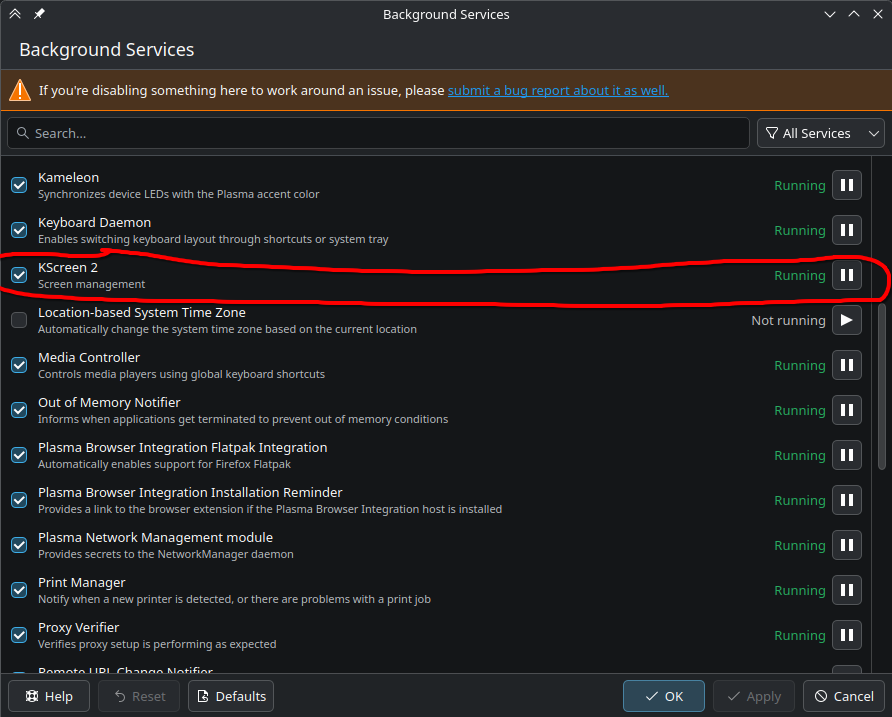
Navigate to “Background Services” via the KDE menu. There you can disable KScreen2 (Screen management) if desired, and see if that makes a difference.

Other than that I have no further ideas here.

On X11 it is working as expected.

BenQ monitor is not frozen when Pansonic TV is connected via HDMI.

But I have managed to figure out the issue for Wayland session too.
The root cause is the state of the Kscreen2 service.

Although the Kscreen2 service is checked, it was NOT running under wayland session.

But when I manually started it by pressing the “play” icon, its state changed from “not running” to running.

So when Kscreen2 service is running, then I can plug in and plug-out the Monitor and TV un any order and combination, everything works as expected, I can change the resolution and refresh rate per monitor so everything is fine.

My question now is:
Should I make this Kscreen2 service persistently active?

I’m asking because of the orange warning message that appears on the top of the window. To me it looks like I shouldn’t mess around with this settings.

Edit:

After reboot, the Kscreen 2 service is not active again, although it is market as checked.

However, the issue is not present anymore.

Just to simplify

  1. I logged in to X11 session

  2. I plugged the Panasonic TV, there was no issue.

  3. I logged in to Wayland session

  4. Under waylens session I plugged the Panasonic TV, BenQ screen froze again.

  5. I unplugged the Panasonic TV

  6. I manually started the Kscreen2 service by pressing the play button.

  7. I plugged the Panasonic tv again. There was no issue, Benq monitor was not frozen, i was able to adjust the resolution and refresh rate.

  8. I reboot the system

  9. I logged in to wayland session. The Kscreen2 service is checked, but again, not active (as described above). However, both BenQ monitor and PansonicTV are working as expected.

I’m able to plug in, plug out, set the resolution, refresh rate and everything without issues.

So in my opinion it has to be something related to that Kscreen2 service has overriden some configuration while being active. Now even though it is not active, everything works as expected.
The act of writing the configuration might have been sufficient here.

With Plasma 6 Wayland, KScreen has been integrated within KWin for screen management, so not a separate entity as such.

2 Likes

This topic was automatically closed 7 days after the last reply. New replies are no longer allowed.