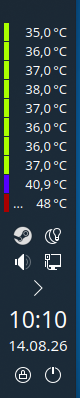
I have an AMD Ryzen 7 2700x cpu. I am running KDE. The CPU overheated and shut down once. Fortunately. blowing out the heat sink helped. But it brings up the question, “How do I monitor the CPU temperature”
Lm-sensors is no longer available, and google suggested systemd-sensors, which isn’t available either.
Do you have any suggestions?
The sensors is still there along with the command. But Plasma has a sensors applet?
rrahl0
August 14, 2026, 1:17am
3
lm-sensors still exists, it’s just called sensors
ahh somebody was faster
Thank you. I ran sensors and got the following:
jc@localhost:~$ sensors
k10temp-pci-00c3
Adapter: PCI adapter
Tctl:         +50.5°C
Tdie:         +40.5°C
I don’t see any CPU stuff.
rrahl0
August 14, 2026, 1:40am
5
k10 is your CPU
it’s not as verbose as intel CPUs, but afair that was always the case with AMD cpus
conram
August 14, 2026, 1:51am
6
If configures properly the bottom application is good for monitoring AMD machine.
You will need pointers from
@malcolmlewis for nice pointers
rrahl0
August 14, 2026, 1:54am
7
which doesn’t help at all. looking at your screenshot you also only have k10temp Tctl and Tccd1, while looking at my intel as an example:
coretemp-isa-0000
Adapter: ISA adapter
Package id 0:  +43.0°C  (high = +100.0°C, crit = +100.0°C)
Core 0:        +41.0°C  (high = +100.0°C, crit = +100.0°C)
Core 1:        +39.0°C  (high = +100.0°C, crit = +100.0°C)
Core 2:        +40.0°C  (high = +100.0°C, crit = +100.0°C)
Core 3:        +41.0°C  (high = +100.0°C, crit = +100.0°C)
and that’s just the cpu
@featherfoot as root user run the command sensors-detect --auto and it should setup your system sensors. Review this output for anything like nct and an unknown id as there may be other tweaks needed.
conram
August 14, 2026, 2:03am
9
Really? Those nct’s are invalid. Please educate me, I might be missing something in this amd machine. Those nct are my cpu if I understand it.
Your setup is fine, some get missed as the id’s are not in the database, so have to use force_id.
1 Like
conram
August 14, 2026, 2:09am
11
For Sensors command
~> sensors
spd5118-i2c-6-53
Adapter: SMBus PIIX4 adapter port 0 at 0b00
temp1:        +30.0°C  (low  =  +0.0°C, high = +55.0°C)
                       (crit low =  +0.0°C, crit = +85.0°C)

drivetemp-scsi-3-0
Adapter: SCSI adapter
temp1:        +24.0°C

drivetemp-scsi-1-0
Adapter: SCSI adapter
temp1:        +31.0°C  (low  =  +0.0°C, high = +70.0°C)
                       (crit low =  -5.0°C, crit = +75.0°C)
                       (lowest = +26.0°C, highest = +31.0°C)

nct6799-isa-0290
Adapter: ISA adapter
in0:                          920.00 mV (min =  +0.00 V, max =  +1.74 V)
in1:                            1.02 V  (min =  +0.00 V, max =  +0.00 V)  ALARM
in2:                            3.38 V  (min =  +0.00 V, max =  +0.00 V)  ALARM
in3:                            3.38 V  (min =  +0.00 V, max =  +0.00 V)  ALARM
in4:                            1.02 V  (min =  +0.00 V, max =  +0.00 V)  ALARM
in5:                            1.03 V  (min =  +0.00 V, max =  +0.00 V)
in6:                          848.00 mV (min =  +0.00 V, max =  +0.00 V)  ALARM
in7:                            3.39 V  (min =  +0.00 V, max =  +0.00 V)  ALARM
in8:                            3.28 V  (min =  +0.00 V, max =  +0.00 V)  ALARM
in9:                            3.39 V  (min =  +0.00 V, max =  +0.00 V)  ALARM
in10:                           1.14 V  (min =  +0.00 V, max =  +0.00 V)  ALARM
in11:                           1.10 V  (min =  +0.00 V, max =  +0.00 V)  ALARM
in12:                           1.03 V  (min =  +0.00 V, max =  +0.00 V)  ALARM
in13:                         368.00 mV (min =  +0.00 V, max =  +0.00 V)  ALARM
in14:                           2.03 V  (min =  +0.00 V, max =  +0.00 V)  ALARM
in15:                         984.00 mV (min =  +0.00 V, max =  +0.00 V)  ALARM
in16:                           1.82 V  (min =  +0.00 V, max =  +0.00 V)  ALARM
in17:                           1.26 V  (min =  +0.00 V, max =  +0.00 V)
fan1:                            0 RPM  (min =    0 RPM)
fan2:                          633 RPM  (min =    0 RPM)
fan3:                          757 RPM  (min =    0 RPM)
fan4:                            0 RPM  (min =    0 RPM)
fan5:                            0 RPM  (min =    0 RPM)
fan6:                            0 RPM  (min =    0 RPM)
fan7:                            0 RPM  (min =    0 RPM)
SYSTIN:                        +27.0°C  (high = +80.0°C, hyst = +75.0°C)
                                        (crit = +125.0°C)  sensor = thermistor
CPUTIN:                        +34.0°C  (high = +80.0°C, hyst = +75.0°C)
                                        (crit = +125.0°C)  sensor = thermistor
AUXTIN0:                       +34.0°C  (high = +80.0°C, hyst = +75.0°C)
                                        (crit = +125.0°C)  sensor = thermistor
AUXTIN1:                       +19.0°C  (high = +80.0°C, hyst = +75.0°C)
                                        (crit = +125.0°C)  sensor = thermistor
AUXTIN2:                       +20.0°C  (high = +80.0°C, hyst = +75.0°C)
                                        (crit = +100.0°C)  sensor = thermistor
AUXTIN3:                       -60.0°C  (high = +80.0°C, hyst = +75.0°C)
                                        (crit = +125.0°C)  sensor = thermistor
AUXTIN4:                       +24.0°C  (high = +80.0°C, hyst = +75.0°C)
                                        (crit = +100.0°C)
PECI/TSI Agent 0 Calibration:  +34.0°C  (high = +80.0°C, hyst = +75.0°C)
AUXTIN5:                       +12.0°C
PCH_CHIP_CPU_MAX_TEMP:          +0.0°C
PCH_CHIP_TEMP:                  +0.0°C
PCH_CPU_TEMP:                   +0.0°C
TSI0_TEMP:                     +44.6°C
pwm1:                              65%  (mode = pwm)
pwm2:                              29%  (mode = pwm)
pwm3:                              30%  (mode = pwm)
pwm4:                              65%  (mode = pwm)
pwm6:                              65%  (mode = pwm)
pwm7:                             100%  (mode = pwm)
intrusion0:                   ALARM
intrusion1:                   OK
beep_enable:                  disabled

mt7921_phy0-pci-0800
Adapter: PCI adapter
temp1:        +36.0°C

spd5118-i2c-6-51
Adapter: SMBus PIIX4 adapter port 0 at 0b00
temp1:        +31.2°C  (low  =  +0.0°C, high = +55.0°C)
                       (crit low =  +0.0°C, crit = +85.0°C)

k10temp-pci-00c3
Adapter: PCI adapter
Tctl:         +44.6°C
Tccd1:        +37.2°C

drivetemp-scsi-2-0
Adapter: SCSI adapter
temp1:        +25.0°C  (lowest = +23.0°C, highest = +25.0°C)

drivetemp-scsi-0-0
Adapter: SCSI adapter
temp1:        +30.0°C  (low  =  +0.0°C, high = +70.0°C)
                       (crit low =  +0.0°C, crit = +70.0°C)
                       (lowest = +30.0°C, highest = +40.0°C)
@conram that looks normal for an nct sensor that’s detected…
1 Like
jjis
August 14, 2026, 8:03am
13
I use Gnome & have an extension that can monitor that type of thing in the top panel. Not sure if there is something similar for KDE. However, by way of assistance to you this recommended I installed amdgpu module so when I run sensors in the terminal I get the following: `sensors
k10temp-pci-00c3
system
September 13, 2026, 8:12am
15
This topic was automatically closed 30 days after the last reply. New replies are no longer allowed.

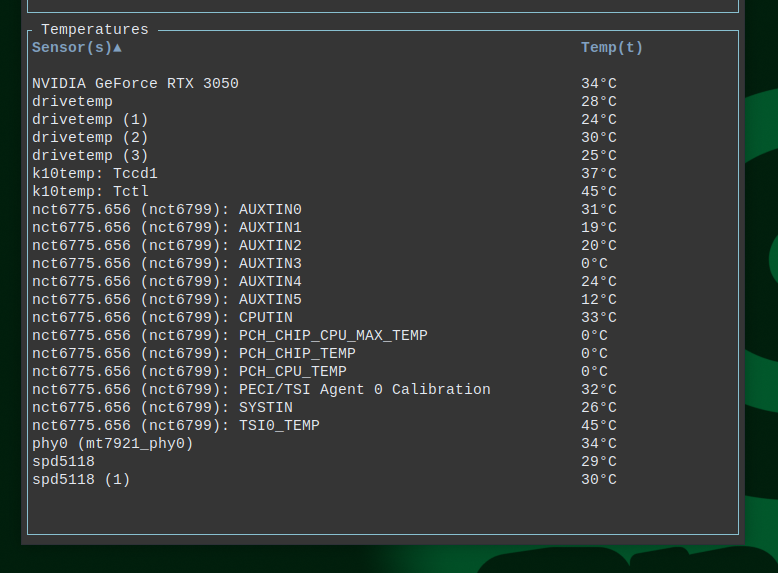
 got more stuff like nvme