on my laptop tuxedo infinity book graphic Intel UHD Graphics 620, running leap 16.0 argon (upgraded from 15.6 via opensuse-migration-tool), plasma 6.4.2, X11 (but happen also in wayland), smplayer 24.5.0
when I run smplayer on the screen instead of my big yellow system cursor appear a very small black cursor.
how can I have my big yellow cursor also on the screen?
I tried with kdesu systemsettings choosing a bigger cursor but it doesn’t works
I’m not sure what causes the issue you describe, but the KDE System Settings utility should be launched as user.
I used kdesu systemsettings becouse I thought that smplayer take the cursor size from root but I was wrong
I found googling this:
but
XCURSOR_SIZE=48 smplayerdidn’t work
and this
but I cannot find qt6ct nor qt5-style-plugins
You shouldn’t need qt5-style-plugins or qt6ct if you are using System Settings in KDE Plasma. Is smplayer installed from openSUSE repository? Have you tried reinstalling it?
What do you see when you run zypper se -v qt6ct? How about zypper lr -u?
Hi manythanks, I’m using system settings in KDE plasma
smplayer version 24.5.0-bp160.1.12 from opensuse oss
yes tried to reinstall smplayer but same result
camera@pla4-TW:~> LANG=C zypper se -v qt6ct
Loading repository data...
Reading installed packages...

S  | Name              | Type       | Version         | Arch   | Repository
---+-------------------+------------+-----------------+--------+----------------
   | qt6ct             | srcpackage | 0.11-lp160.14.5 | noarch | KDE-Qt6(argon)
    name: qt6ct
   | qt6ct             | package    | 0.11-lp160.14.5 | x86_64 | KDE-Qt6(argon)
    name: qt6ct
   | qt6ct             | package    | 0.9-bp160.1.13  | x86_64 | repo-oss (16.0)
    name: qt6ct
   | qt6ct-debuginfo   | package    | 0.11-lp160.14.5 | x86_64 | KDE-Qt6(argon)
    name: qt6ct-debuginfo
   | qt6ct-debugsource | package    | 0.11-lp160.14.5 | x86_64 | KDE-Qt6(argon)
    name: qt6ct-debugsource

    Note: For an extended search including not yet activated remote resources please use
    'zypper search-packages'.
camera@pla4-TW:~>
camera@pla4-TW:~> LANG=C zypper lr -u
Repository priorities in effect: (See 'zypper lr -P' for details)
74 (raised priority) : 2 repositories
75 (raised priority) : 2 repositories
80 (raised priority) : 1 repository
99 (default priority) : 9 repositories
# | Alias | Name | Enabled | GPG Check | Refresh | URI
---+--------------------------------+--------------------------------------------+---------+-----------+---------+------------------------------------------------------------------------------------------------
1 | KDE-Applications | KDE-Applications(argon) | Yes | (r ) Yes | Yes | https://download.opensuse.org/repositories/KDE:/Applications/KDE_Frameworks5_openSUSE_Leap_16.0
2 | KDE-Extra | KDE-Extra(argon) | Yes | (r ) Yes | Yes | https://download.opensuse.org/repositories/KDE:/Extra/KDE_Applications_openSUSE_Leap_16.0
3 | KDE-Frameworks | KDE-Frameworks(argon) | Yes | (r ) Yes | Yes | https://download.opensuse.org/repositories/KDE:/Frameworks/openSUSE_Leap_16.0
4 | KDE-Qt6 | KDE-Qt6(argon) | Yes | (r ) Yes | Yes | https://download.opensuse.org/repositories/KDE:/Qt6/openSUSE_Leap_16.0
5 | gnome:apps_16.0 | GNOME:Apps_16.0 | Yes | (r ) Yes | Yes | https://download.opensuse.org/repositories/GNOME:Apps/16.0/
6 | openSUSE:repo-non-oss | repo-non-oss (16.0) | Yes | (r ) Yes | Yes | http://cdn.opensuse.org/distribution/leap/16.0/repo/non-oss/x86_64
7 | openSUSE:repo-non-oss-debug | repo-non-oss-debug (16.0) | No | ---- | ---- | http://cdn.opensuse.org/debug/distribution/leap/16.0/repo/non-oss/x86_64
8 | openSUSE:repo-openh264 | repo-openh264 (16.0) | Yes | (r ) Yes | Yes | http://codecs.opensuse.org/openh264/openSUSE_Leap_16
9 | openSUSE:repo-oss | repo-oss (16.0) | Yes | (r ) Yes | Yes | http://cdn.opensuse.org/distribution/leap/16.0/repo/oss/x86_64
10 | openSUSE:repo-oss-debug | repo-oss-debug (16.0) | No | ---- | ---- | http://cdn.opensuse.org/debug/distribution/leap/16.0/repo/oss/x86_64
11 | openSUSE:repo-oss-source | repo-oss-source (16.0) | No | ---- | ---- | http://cdn.opensuse.org/source/distribution/leap/16.0/repo/oss
12 | packman-repo | Packman | Yes | (r ) Yes | Yes | https://ftp.gwdg.de/pub/linux/misc/packman/suse/openSUSE_Leap_16.0/
13 | suse_emulators_16.0(q4wine) | suse_Emulators_16.0(q4wine) | Yes | (r ) Yes | Yes | https://download.opensuse.org/repositories/Emulators/16.0/
14 | suse_kde:extra_16.0 | suse_KDE:Extra_16.0 | Yes | (r ) Yes | Yes | https://download.opensuse.org/repositories/KDE:/Extra/openSUSE_Leap_16.0/
15 | susehome:obs_mhogomchungu_16.0 | susehome:obs_mhogomchungu_16.0(sirikali) | Yes | (r ) Yes | Yes | https://download.opensuse.org/repositories/home:obs_mhogomchungu/16.0/
16 | susehome_bdmdesign:kde_sr | susehome_BdMdesigN:KDE_SR(kim servicemenu) | Yes | (r ) Yes | Yes | https://download.opensuse.org/repositories/home:/BdMdesigN:/KDE/openSUSE_Slowroll/
17 | x86_64 | z-ext google(chrome) | Yes | (r ) Yes | Yes | http://dl.google.com/linux/chrome/rpm/stable/x86_64/
camera@pla4-TW:~> partially solved
adding to /home/user/.profile
export XCURSOR_THEME=Oxygen_Yellow
cursor theme name from /usr/share/icons/
in X11 works
in wayland the cursor theme is ok but the cursor dimension is small
so I tried to add also
export XCURSOR_SIZE=72
to /home/user/.profile
but doesn’t works
also tried to add
XCURSOR_SIZE=72
to /home/camera/.config/environment.d/cursorsize.conf
but doesn’t works
how can I have a bigger cursor also in wayland??
and may be the same big cursor also in SDDM login screen?
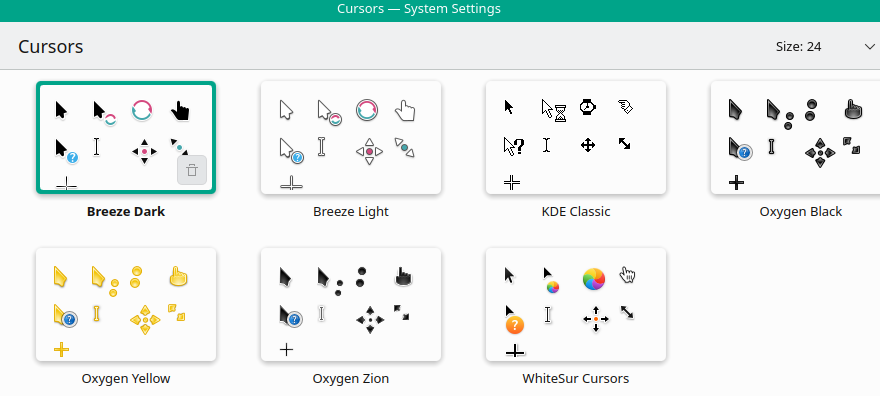
SDDM does not read your user config, so you must configure it separately.
Admin configuration files located in /etc/sddmd.conf.d/, or create as required eg cursor.conf with
[Theme]
CursorTheme=Oxygen_Yellow
CursorSize=72
The man page may be useful to you:
man sddm.conf
Also note, If you’re using scaling (125%, 150%, etc.), cursor size may appear smaller than expected.
already done, oxygen yellow and dimension 72, in the desktop is ok, in smplayer is oxygen yellow but small
in smaplayer the scale factor is auto or 1 and in systemsettings>screen configuration>scale=100%
manythanks this works but in /etc/sddm.conf.d/
as I would like to increase also fonts reading the man sddm.conf I tried to add this in my/etc/sddm.conf.d/font.conf
FontFamily="Noto Sans"
FontSize=18
but doesn’tworks
I also modified /usr/share/sddm/themes/THEME_NAME/theme.conf.user
where THEME_NAME is from /etc/sddm.conf.d/kde_settings.conf Current=breeze-openSUSE
adding fontSize=16
but didn’t works
can you give me better ideas?
Those are not valid options, hence they will be ignored.
The font sizes appear to be set within the theme config files themselves.
Also, do not edit files under /usr/share, as they will be overwritten on subsequent updates. Instead, copy the theme to /etc and modify it there…
sudo mkdir -p /etc/sddm/themes
sudo cp -r /usr/share/sddm/themes/breeze-openSUSE /etc/sddm/themes/breeze-openSUSE-custom
I note that theme.conf is located there and contains fontSize=10. You could try chaging that to fontSize=18.
Make sure to specify the theme eg /etc/sddm/conf.d/theme.conf with…
[Theme]
Current=breeze-openSUSE-custom
…and when done reboot.
I get really dizzy from that repo mess you again have.
To answer you topic after having seen that can only result in a bold “no idea”, because you turned Leap 16.0 in some Frankenstein install. With this repo list any bug report should not be made, since it is a waste of developer time. My $ 0,02.
Hi and manythanks but it doesn’t works
pla@pla4-TW:~> sudo cat /etc/sddm.conf.d/cusorthemefont.conf
#added by me 2026-03-28mar
[Theme]
CursorTheme=Oxygen_Yellow
CursorSize=48

pla@pla4-TW:~>
pla@pla4-TW:~> sudo cat /etc/sddm/themes/breeze-openSUSE-custom/theme.conf
[General]
showlogo=hidden
showClock=true
logo=/usr/share/sddm/themes/breeze/default-logo.svg
type=image
color=#1d99f3
fontSize=18
background=/usr/share/wallpapers/openSUSEdefault/contents/images/1920x1200.png
needsFullUserModel=false
pla@pla4-TW:~> pla@pla4-TW:~> sudo cat /etc/sddm.conf.d/kde_settings.conf
[Autologin]
Relogin=false
Session=default.desktop
User=
[General]
HaltCommand=
RebootCommand=
[Theme]
Current=breeze-openSUSE-custom
[Users]
MaximumUid=60000
MinimumUid=1000
pla@pla4-TW:~> and of course rebooted but the fonts in sddm login screen are always the same small size
I can’t help any further than what I already showed with my initial replies. The cursor in my system does not behave strangely with smplayer as you describe. The odd mixture of repos as Gertjan already mentioned may be impacting here.
1 Like
only to say that I followed the suggested opensuse site
https://en.opensuse.org/SDB:KDE_repositories#KDE_Frameworks_5.2C_Plasma_5_and_Applications
to have the argon version of leap 16
That site does not provide instructions for adding home: repos, adding a GNOME Apps repo and so on.
I have only this:
knurpht@Lenovo-P16:~> zypper lr -d
# | Alias                      | Name              | Enabled | GPG Check | Refresh | Keep | Priority | Type   | URI                                                          | Service
--+----------------------------+-------------------+---------+-----------+---------+------+----------+--------+--------------------------------------------------------------+---------
1 | google-chrome              | google-chrome     | Ja      | (r ) Ja   | Nee     | -    |   99     | rpm-md | https://dl.google.com/linux/chrome/rpm/stable/x86_64         |
2 | openSUSE:repo-non-oss      | repo-non-oss      | Ja      | (r ) Ja   | Ja      | -    |   99     | rpm-md | http://cdn.opensuse.org/tumbleweed/repo/non-oss              | openSUSE
3 | openSUSE:repo-openh264     | repo-openh264     | Ja      | (r ) Ja   | Ja      | -    |   99     | rpm-md | https://codecs.opensuse.org/openh264/openSUSE_Tumbleweed     | openSUSE
4 | openSUSE:repo-oss          | repo-oss          | Ja      | (r ) Ja   | Ja      | -    |   99     | rpm-md | http://cdn.opensuse.org/tumbleweed/repo/oss                  | openSUSE
5 | openSUSE:repo-oss-debug    | repo-oss-debug    | Nee     | ----      | ----    | -    |   99     | N/A    | http://cdn.opensuse.org/debug/tumbleweed/repo/oss            | openSUSE
6 | openSUSE:repo-oss-source   | repo-oss-source   | Nee     | ----      | ----    | -    |   99     | N/A    | http://cdn.opensuse.org/source/tumbleweed/repo/oss           | openSUSE
7 | openSUSE:update-tumbleweed | update-tumbleweed | Ja      | (r ) Ja   | Ja      | -    |   99     | rpm-md | http://cdn.opensuse.org/update/tumbleweed                    | openSUSE
8 | tailscale-stable           | Tailscale stable  | Ja      | (r ) Ja   | Ja      | -    |   99     | rpm-md | https://pkgs.tailscale.com/stable/opensuse/tumbleweed/x86_64 |
knurpht@Lenovo-P16:~>
and none of the issues you have. Never. If I want a newer KDE, I install TW/Slowroll instead of Leap. My Leap VMs are plain stock, no added (3rd party) repos etc. And … btrfs + snapshots everywhere.
I tried time ago tumbleweed and slowroll and btrfs (as you can see in repo list the machine name is pla4-TW) but I had too much crashes so passed to leap argon that resulted better stable and basically no crashes,
for the other repos:
GNOME:Apps needs only for onboard (that is very appreciated from my users)
suse_Emulators needs only for q4wine (that with discover didn’t worked)
susehome:obs_mhogomchungu needs only for sirikali (very better than vault that works very badly)
susehome_BdMdesigN:KDE_SR needs only for kim servicemenu that is very useful and seems to works also in the slowroll version
remain suse_KDE:Extra_16.0 that I have two becouse I foget too disable one
so as I need these software and I tried also to install some of them via discover but didn’t worked very well, what I have to do?
Actually, using the KDE repos is fine (many including myself do that), but I was questioning the third party home repos in the mix.
Investigate using the following settings for HiDPI…
https://www.reddit.com/r/kde/comments/1bahvog/fix_sddm_on_hidpi_screens_on_plasma_6/