I am doing a command line installation of openSUSE Tumbleweed.
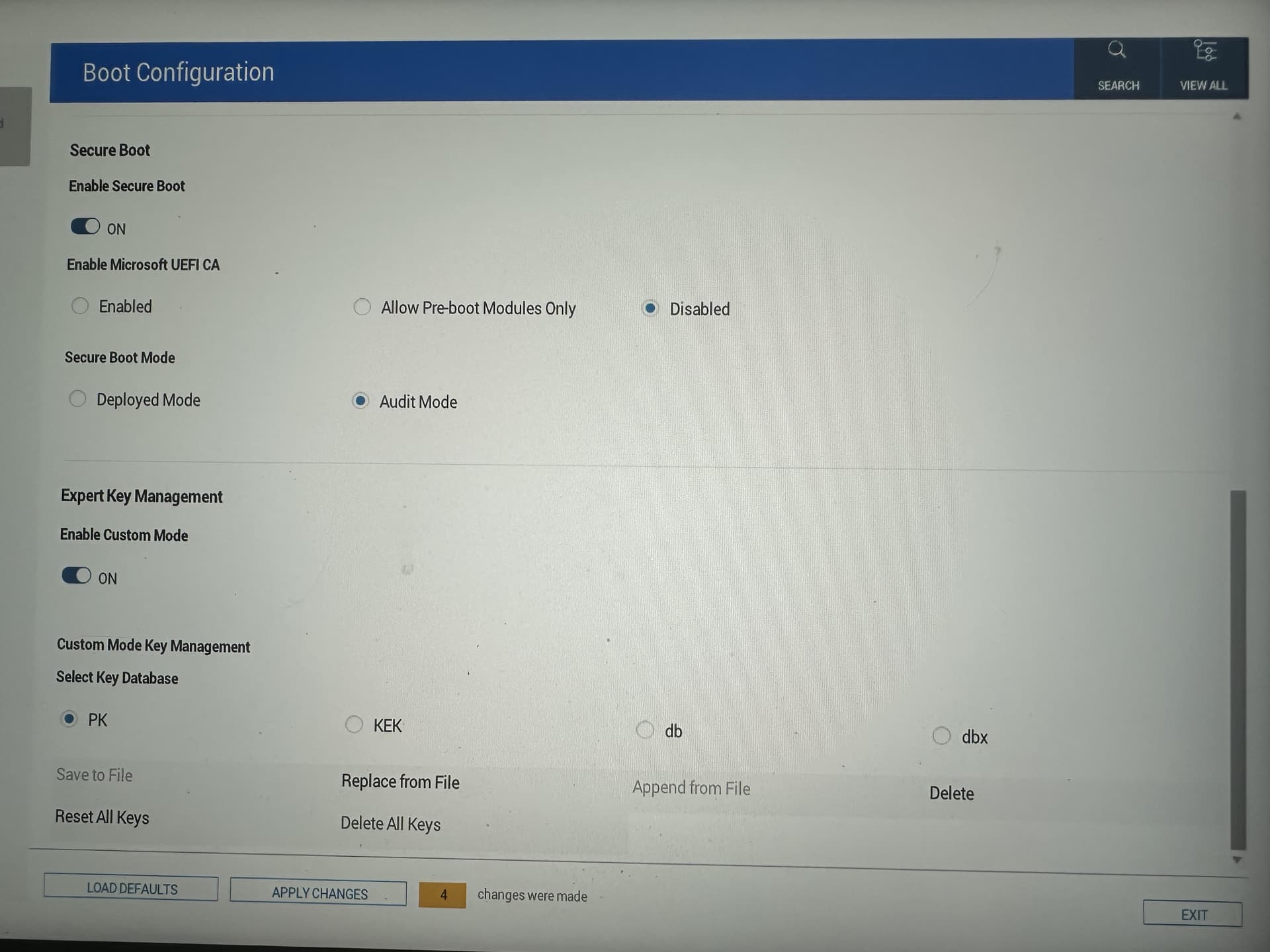
I am trying to enable Secure Boot using systemd-boot, sdbootutil and sbctl.
Unfortunately I cannot find or lack some information and I need some help please.
Currently, after preparing the disks and installing everything I need, I proceed with:
# Installing bootloader
zypper in -y systemd-boot
bootctl install

# Installing boot helpers
zypper in -y sdbootutil fde-tools tpm2-0-tss

# Deleting all .efi entries from NVRAM
efibootmgr --delete-bootnum --bootnum "<num here>"

# UEFI Secure Boot is in "Setup Mode" (and keys have been deleted)

# TPM auto-unlock for LUKS devices
sdbootutil enroll --method=tpm2

# Generating and enrolling keys for Secure Boot
zypper in -y sbctl
sbctl create-keys
sbctl enroll-keys -m

# Updating bootloader & boot entries (I am also using the Snapper integration)
sdbootutil install
sdbootutil set-timeout -- 8
sdbootutil add-all-kernels
At this point I was hoping for things (bootloader, initrd, kernel) to be signed but that is not the case.
… and running “sbctl verify” confirms this.
I see that sbctl comes with “/usr/lib/kernel/install.d/91-sbctl.install” which should automatically sign the kernel when there’s an update. So my guess is I just need to force the update of the kernel.
What hooks do I need to install/configure such that the bootloader and initrd are signed automatically on updates?
I’ve also looked into UKI but I am confused on the state.
I understand there’s uki-tool but it’s still experimental so maybe I could use systemd-ukify?
I am not sure on how to integrate the UKI in the entire pipeline such that it’s not broken on system updates.
Created "/boot/efi/EFI".
Created "/boot/efi/EFI/systemd".
Created "/boot/efi/EFI/BOOT".
Created "/boot/efi/loader".
Created "/boot/efi/loader/keys".
Created "/boot/efi/loader/entries".
Created "/boot/efi/EFI/Linux".
Copied "/usr/lib/systemd/boot/efi/systemd-bootx64.efi" to "/boot/efi/EFI/systemd/systemd-bootx64.efi".
Copied "/usr/lib/systemd/boot/efi/systemd-bootx64.efi" to "/boot/efi/EFI/BOOT/BOOTX64.EFI".
Random seed file /boot/efi/loader/random-seed successfully written (32 bytes).
Created EFI boot entry "Linux Boot Manager".
sdbootutil enroll --method=tpm2
Recovery PIN: hbfercub-rdgrrghc-fdlluirv-ibftkgei-ktjdktjn-ldjghbct-ekdgbuhn-vijktlnt
You can also scan it with your mobile phone:
*{some QR code}*
NVIndex policy created

🔐 Please enter current passphrase for disk /dev/nvme0n1p2: ••••
New TPM2 token enrolled as key slot 1.
sbctl create-keys
Created Owner UUID ea302f7e-0b1c-47e4-b0e0-b17398616825
Creating secure boot keys...✓
Secure boot keys created!

sbctl enroll-keys -m
Enrolling keys to EFI variables...
With vendor keys from microsoft...✓
Enrolled keys to the EFI variables!
sdbootutil install
NVIndex policy created

sdbootutil set-timeout -- 8
NVIndex policy created
sdbootutil -v add-all-kernels
Installing all kernels
Found kernel 6.17.0-1-default = 35ef7aeaef5806afdbf9174915fb9a039bfc2828
Installing kernel 6.17.0-1-default
Found existing initrd /opensuse-tumbleweed/6.17.0-1-default/initrd-7e824ec74e0f9da29b62fb37c681d54352291fe6
Required free space in ESP: 15836 KB
Reusing /boot/efi/opensuse-tumbleweed/6.17.0-1-default/linux-35ef7aeaef5806afdbf9174915fb9a039bfc2828
 /boot/efi/loader/entries/opensuse-tumbleweed-6.17.0-1-default-1.conf unchanged
Loading config file /etc/sysconfig/fde-tools
Generating TPM2 predictions with systemd-pcrlock
Generating TPM2 predictions with systemd-pcrlock (systemd-boot)
NVIndex policy created
Verifying file database and EFI images in /boot/efi...
✗ /boot/efi/EFI/BOOT/BOOTX64.EFI is not signed
failed to verify file /boot/efi/EFI/systemd/boot.csv: /boot/efi/EFI/systemd/boot.csv: invalid pe header
failed to verify file /boot/efi/EFI/systemd/installed_by_sdbootutil: /boot/efi/EFI/systemd/installed_by_sdbootutil: invalid pe header
failed to verify file /boot/efi/EFI/systemd/measure-pcr-prediction: /boot/efi/EFI/systemd/measure-pcr-prediction: invalid pe header
failed to verify file /boot/efi/EFI/systemd/measure-pcr-prediction.sha256: /boot/efi/EFI/systemd/measure-pcr-prediction.sha256: invalid pe header
failed to verify file /boot/efi/EFI/systemd/pcrlock.json: /boot/efi/EFI/systemd/pcrlock.json: invalid pe header
✗ /boot/efi/EFI/systemd/systemd-bootx64.efi is not signed
failed to verify file /boot/efi/loader/entries/opensuse-tumbleweed-6.17.0-1-default-1.conf: /boot/efi/loader/entries/opensuse-tumbleweed-6.17.0-1-default-1.conf: invalid pe header
failed to verify file /boot/efi/loader/entries.srel: /boot/efi/loader/entries.srel: invalid pe header
failed to verify file /boot/efi/loader/loader.conf: /boot/efi/loader/loader.conf: invalid pe header
failed to verify file /boot/efi/loader/random-seed: /boot/efi/loader/random-seed: invalid pe header
failed to verify file /boot/efi/opensuse-tumbleweed/6.17.0-1-default/initrd-7e824ec74e0f9da29b62fb37c681d54352291fe6: /boot/efi/opensuse-tumbleweed/6.17.0-1-default/initrd-7e824ec74e0f9da29b62fb37c681d54352291fe6: invalid pe header
✗ /boot/efi/opensuse-tumbleweed/6.17.0-1-default/linux-35ef7aeaef5806afdbf9174915fb9a039bfc2828 is not signed
That’s why I was saying maybe I should force the kernel update to trigger that kernel sign. I was mentioning this in the context of seamless sign on system updates.
Yes, that’s the thing, I don’t want to lose snapshot support (with all the bells and whistles).
I configured dracut to build a UKI (that part works). I assumed (very badly I guess) that would go through kernel-install so the sbctl hook (91-sbctl.install) would auto-sign it.
Regardless, I found out that the UKI is not discovered by sdbootutil, it still generates entries for separate kernel+initrd files.
I am a bit confused on how to achieve my goal and not sure if it’s supported without some custom hooks.