I have found a library for OpenRGB for hardware synchronization, but it only has builds for debian, not universal builds. I was wondering how to compile the library from this file (OpenRGBHardwareSyncPlugin-release_0.8.zip)
the library should be a .so file.
Download the latest stable version. It is only the so file.
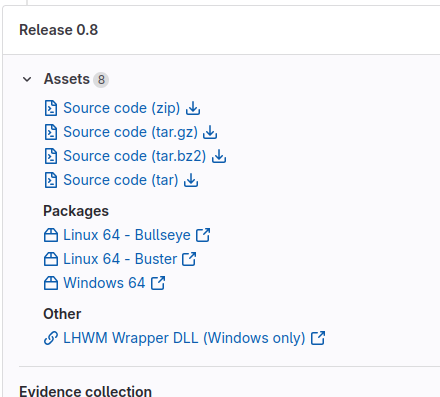
I am on version 0.8 because I had an issue which i cannot remember with 0.9
If you can’t remember the issue…why not try it again? The actual stable version 0.9 contains only the .so file?
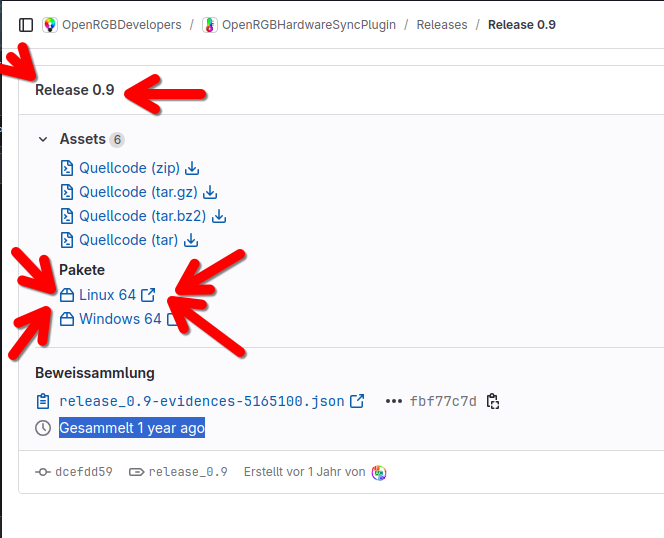
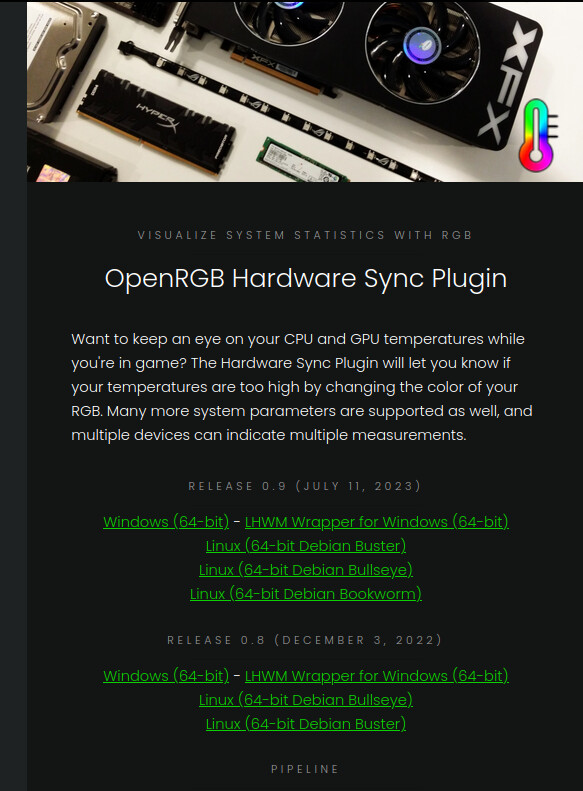
Whatever you want to show (without any valid URL)…as already said, when you extract the zip from the latest stable version 0.9 (shown in my screenshot from gitlab), it only contains the wanted .so file.
the library is compiled for debian and does not load, it does not actually have to say debian in the filename in order to be only for debian.
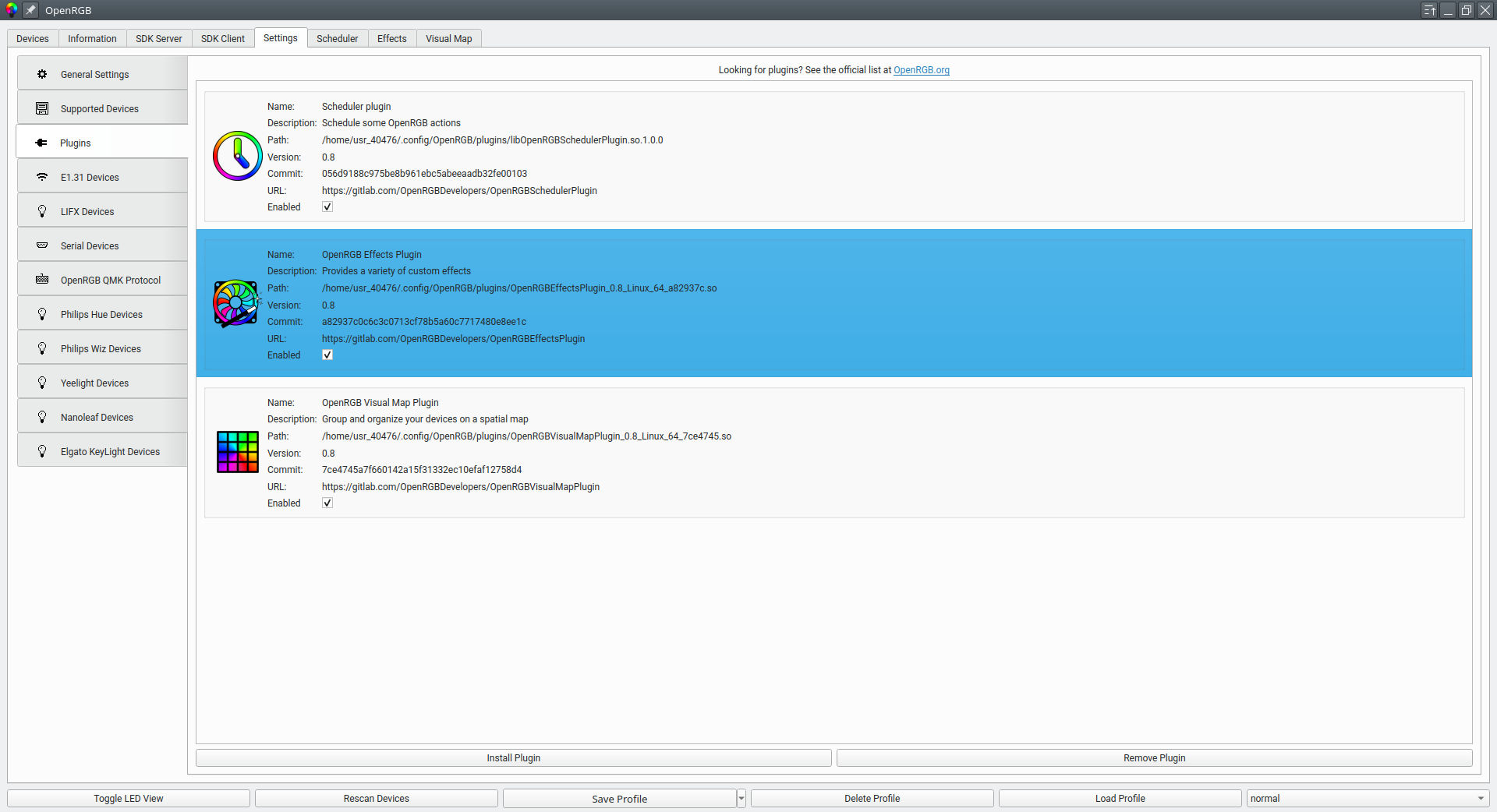
see here for the plugin list
in this snippet even though it does not explicitly say so, the plugin does not load. ( i also tried twice)
[PluginManager] Attempting to remove plugin /home/usr_40476/.config/OpenRGB/plugins/libOpenRGBHardwareSyncPlugin.so.1.0.0
[PluginManager] Plugin /home/usr_40476/.config/OpenRGB/plugins/libOpenRGBHardwareSyncPlugin.so.1.0.0 not active
[OpenRGBPluginsPage] Copying from /home/usr_40476/Downloads/libOpenRGBHardwareSyncPlugin.so.1.0.0 to /home/usr_40476/.config/OpenRGB/plugins/
[OpenRGBPluginsPage] Installing plugin /home/usr_40476/Downloads/libOpenRGBHardwareSyncPlugin.so.1.0.0
[PluginManager] Attempting to remove plugin /home/usr_40476/.config/OpenRGB/plugins/libOpenRGBHardwareSyncPlugin.so.1.0.0
[PluginManager] Plugin /home/usr_40476/.config/OpenRGB/plugins/libOpenRGBHardwareSyncPlugin.so.1.0.0 not active
[OpenRGBPluginsPage] Copying from /home/usr_40476/Downloads/libOpenRGBHardwareSyncPlugin.so.1.0.0 to /home/usr_40476/.config/OpenRGB/plugins/
perhaps @malcolmlewis knows how? He (correct me if I’m wrong with the pronouns) has helped me in the past. (And if i remember i have only ever done my own OBS package once without trouble)
As root user install;
zypper in qt6-core-devel qt6-gui-devel qt6-widgets-devel libgtop-devel libsensors4-devel qt6-base-common-devel
As your user;
cd

git clone https://gitlab.com/OpenRGBDevelopers/OpenRGBHardwareSyncPlugin.git --recursive

mkdir -p OpenRGBHardwareSyncPlugin/build

cd  OpenRGBHardwareSyncPlugin/build

vi ../OpenRGBPluginsFont.cpp

Add #include <QStringList> after #include <QFontDatabase> and save/exit

qmake6 ../

make
compiling ../OpenRGBPluginsFont.cpp
compiling ../PluginInfo.cpp
....
....
compiling moc_EditableLabel.cpp
rm -f libOpenRGBHardwareSyncPlugin.so
linking libOpenRGBHardwareSyncPlugin.so

install -m0644 libOpenRGBHardwareSyncPlugin.so /home/usr_40476/.config/OpenRGB/plugins/

ln -s /home/usr_40476/.config/OpenRGB/plugins/libOpenRGBHardwareSyncPlugin.so \
      /home/usr_40476/.config/OpenRGB/plugins/libOpenRGBHardwareSyncPlugin.so.1.0.0
i cant see the plugin font file
usr_40476@localhost:~/Downloads/OpenRGBHardwareSyncPlugin-release_0.8/build> nano ../OpenRGB
OpenRGB/                       OpenRGBHardwareSyncPlugin.cpp  OpenRGBHardwareSyncPlugin.h    OpenRGBHardwareSyncPlugin.png  OpenRGBHardwareSyncPlugin.pro
usr_40476@localhost:~/Downloads/OpenRGBHardwareSyncPlugin-release_0.8/build>
@40476 you did not clone the repository… that is a download.
if I clone the repo it gives me a version other than 0.8, right? My OpenRGB installation is on version 0.8 for a reason which I cannot remember.
@40476 Tumbleweed is using OpenRGB 0.9? Build it and see how it goes, or switch to 0.8 with git checkout release_0.8 and work through the errors…
@malcolmlewis I did that but now I have this error,
usr_40476@localhost:~/Downloads/OpenRGBHardwareSyncPlugin> make
/usr/bin/qmake6 -o Makefile OpenRGBHardwareSyncPlugin.pro
g++ -c -pipe -std=c++17 -O2 -Wall -Wextra -D_REENTRANT -fPIC -DORGBHARDWARESYNCPLUGIN_LIBRARY -DVERSION_STRING=\""0.8\"" -DBUILDDATE_STRING=\""Thu, 31 Oct 2024 20:23:31 -0400\"" -DGIT_COMMIT_ID=\""185a1844aa5af17a9317ed86f2654d2b6c437c83\"" -DGIT_COMMIT_DATE=\""2022-12-03 08:43:42 +0100\"" -DGIT_BRANCH=\""HEAD\"" -DLATEST_BUILD_URL=\""https://gitlab.com/OpenRGBDevelopers/OpenRGBHardwareSyncPlugin/-/jobs/artifacts/master/download?job=Linux 64 - Bullseye\"" -DQT_NO_DEBUG -DQT_WIDGETS_LIB -DQT_GUI_LIB -DQT_CORE_LIB -I. -IOpenRGB -IOpenRGB/i2c_smbus -IOpenRGB/RGBController -IOpenRGB/net_port -IOpenRGB/dependencies/json -Idependencies/libsensors-cpp -I/usr/include/glib-2.0 -I/usr/include/libgtop-2.0 -I/usr/lib/x86_64-linux-gnu/glib-2.0/include/ -I/usr/include/qt6 -I/usr/include/qt6/QtWidgets -I/usr/include/qt6/QtGui -I/usr/include/qt6/QtCore -I. -I. -I/usr/lib64/qt6/mkspecs/linux-g++ -o ControllerZoneManager.o ControllerZoneManager.cpp
In file included from /usr/include/glib-2.0/glib/galloca.h:34,
                 from /usr/include/glib-2.0/glib.h:32,
                 from /usr/include/libgtop-2.0/glibtop.h:29,
                 from HardwareMeasure.h:23,
                 from OpenRGBHardwareSyncPlugin.h:6,
                 from ControllerZoneManager.cpp:1:
/usr/include/glib-2.0/glib/gtypes.h:34:10: fatal error: glibconfig.h: No such file or directory
   34 | #include <glibconfig.h>
      |          ^~~~~~~~~~~~~~
compilation terminated.
make: *** [Makefile:569: ControllerZoneManager.o] Error 1
usr_40476@localhost:~/Downloads/OpenRGBHardwareSyncPlugin>
Install glib2-devel.
@malcolmlewis umm… Yes?
usr_40476@localhost:~/Downloads/OpenRGBHardwareSyncPlugin> sudo zypper install glib2-devel
[sudo] password for root:
Loading repository data...
Reading installed packages...
'glib2-devel' is already installed.
No update candidate for 'glib2-devel-2.82.2-1.1.x86_64'. The highest available version is already installed.
Resolving package dependencies...
Nothing to do.
usr_40476@localhost:~/Downloads/OpenRGBHardwareSyncPlugin> sudo zypper install --force glib2-devel
Loading repository data...
Reading installed packages...
Forcing installation of 'glib2-devel-2.82.2-1.1.x86_64' from repository 'openSUSE-Tumbleweed-Oss'.
Resolving package dependencies...

The following package is going to be reinstalled:
  glib2-devel

1 package to reinstall.

Package download size:     1.4 MiB

Package install size change:
            |      15.1 MiB  required by packages that will be installed
       0 B  |  -   15.1 MiB  released by packages that will be removed

Backend:  classic_rpmtrans
Continue? [y/n/v/...? shows all options] (y):
Retrieving: glib2-devel-2.82.2-1.1.x86_64 (openSUSE-Tumbleweed-Oss)                                                                                                                                                     (1/1),   1.4 MiB
Retrieving: glib2-devel-2.82.2-1.1.x86_64.rpm ............................................................................................................................................................................[done (1.1 MiB/s)]

Checking for file conflicts: .........................................................................................................................................................................................................[done]
No such key “picture-uri-dark” in schema “org.gnome.desktop.screensaver” as specified in override file “/usr/share/glib-2.0/schemas/20_openSUSE-branding.gschema.override”; ignoring override for this key.
(1/1) Installing: glib2-devel-2.82.2-1.1.x86_64 ......................................................................................................................................................................................[done]
Running post-transaction scripts .....................................................................................................................................................................................................[done]
usr_40476@localhost:~/Downloads/OpenRGBHardwareSyncPlugin> make
g++ -c -pipe -std=c++17 -O2 -Wall -Wextra -D_REENTRANT -fPIC -DORGBHARDWARESYNCPLUGIN_LIBRARY -DVERSION_STRING=\""0.8\"" -DBUILDDATE_STRING=\""Thu, 31 Oct 2024 20:23:31 -0400\"" -DGIT_COMMIT_ID=\""185a1844aa5af17a9317ed86f2654d2b6c437c83\"" -DGIT_COMMIT_DATE=\""2022-12-03 08:43:42 +0100\"" -DGIT_BRANCH=\""HEAD\"" -DLATEST_BUILD_URL=\""https://gitlab.com/OpenRGBDevelopers/OpenRGBHardwareSyncPlugin/-/jobs/artifacts/master/download?job=Linux 64 - Bullseye\"" -DQT_NO_DEBUG -DQT_WIDGETS_LIB -DQT_GUI_LIB -DQT_CORE_LIB -I. -IOpenRGB -IOpenRGB/i2c_smbus -IOpenRGB/RGBController -IOpenRGB/net_port -IOpenRGB/dependencies/json -Idependencies/libsensors-cpp -I/usr/include/glib-2.0 -I/usr/include/libgtop-2.0 -I/usr/lib/x86_64-linux-gnu/glib-2.0/include/ -I/usr/include/qt6 -I/usr/include/qt6/QtWidgets -I/usr/include/qt6/QtGui -I/usr/include/qt6/QtCore -I. -I. -I/usr/lib64/qt6/mkspecs/linux-g++ -o ControllerZoneManager.o ControllerZoneManager.cpp
In file included from /usr/include/glib-2.0/glib/galloca.h:34,
                 from /usr/include/glib-2.0/glib.h:32,
                 from /usr/include/libgtop-2.0/glibtop.h:29,
                 from HardwareMeasure.h:23,
                 from OpenRGBHardwareSyncPlugin.h:6,
                 from ControllerZoneManager.cpp:1:
/usr/include/glib-2.0/glib/gtypes.h:34:10: fatal error: glibconfig.h: No such file or directory
   34 | #include <glibconfig.h>
      |          ^~~~~~~~~~~~~~
compilation terminated.
make: *** [Makefile:569: ControllerZoneManager.o] Error 1
usr_40476@localhost:~/Downloads/OpenRGBHardwareSyncPlugin>
Did you run qmake6?
usr_40476@localhost:~/Downloads/OpenRGBHardwareSyncPlugin> sudo zypper install glib2-devel
[sudo] password for root:
Loading repository data...
Reading installed packages...
'glib2-devel' is already installed.
No update candidate for 'glib2-devel-2.82.2-1.1.x86_64'. The highest available version is already installed.
Resolving package dependencies...
Nothing to do.
usr_40476@localhost:~/Downloads/OpenRGBHardwareSyncPlugin> sudo zypper install --force glib2-devel
Loading repository data...
Reading installed packages...
Forcing installation of 'glib2-devel-2.82.2-1.1.x86_64' from repository 'openSUSE-Tumbleweed-Oss'.
Resolving package dependencies...

The following package is going to be reinstalled:
  glib2-devel

1 package to reinstall.

Package download size:     1.4 MiB

Package install size change:
            |      15.1 MiB  required by packages that will be installed
       0 B  |  -   15.1 MiB  released by packages that will be removed

Backend:  classic_rpmtrans
Continue? [y/n/v/...? shows all options] (y):
Retrieving: glib2-devel-2.82.2-1.1.x86_64 (openSUSE-Tumbleweed-Oss)                                                                                                                                                     (1/1),   1.4 MiB
Retrieving: glib2-devel-2.82.2-1.1.x86_64.rpm ............................................................................................................................................................................[done (1.1 MiB/s)]

Checking for file conflicts: .........................................................................................................................................................................................................[done]
No such key “picture-uri-dark” in schema “org.gnome.desktop.screensaver” as specified in override file “/usr/share/glib-2.0/schemas/20_openSUSE-branding.gschema.override”; ignoring override for this key.
(1/1) Installing: glib2-devel-2.82.2-1.1.x86_64 ......................................................................................................................................................................................[done]
Running post-transaction scripts .....................................................................................................................................................................................................[done]
usr_40476@localhost:~/Downloads/OpenRGBHardwareSyncPlugin> make
g++ -c -pipe -std=c++17 -O2 -Wall -Wextra -D_REENTRANT -fPIC -DORGBHARDWARESYNCPLUGIN_LIBRARY -DVERSION_STRING=\""0.8\"" -DBUILDDATE_STRING=\""Thu, 31 Oct 2024 20:23:31 -0400\"" -DGIT_COMMIT_ID=\""185a1844aa5af17a9317ed86f2654d2b6c437c83\"" -DGIT_COMMIT_DATE=\""2022-12-03 08:43:42 +0100\"" -DGIT_BRANCH=\""HEAD\"" -DLATEST_BUILD_URL=\""https://gitlab.com/OpenRGBDevelopers/OpenRGBHardwareSyncPlugin/-/jobs/artifacts/master/download?job=Linux 64 - Bullseye\"" -DQT_NO_DEBUG -DQT_WIDGETS_LIB -DQT_GUI_LIB -DQT_CORE_LIB -I. -IOpenRGB -IOpenRGB/i2c_smbus -IOpenRGB/RGBController -IOpenRGB/net_port -IOpenRGB/dependencies/json -Idependencies/libsensors-cpp -I/usr/include/glib-2.0 -I/usr/include/libgtop-2.0 -I/usr/lib/x86_64-linux-gnu/glib-2.0/include/ -I/usr/include/qt6 -I/usr/include/qt6/QtWidgets -I/usr/include/qt6/QtGui -I/usr/include/qt6/QtCore -I. -I. -I/usr/lib64/qt6/mkspecs/linux-g++ -o ControllerZoneManager.o ControllerZoneManager.cpp
In file included from /usr/include/glib-2.0/glib/galloca.h:34,
                 from /usr/include/glib-2.0/glib.h:32,
                 from /usr/include/libgtop-2.0/glibtop.h:29,
                 from HardwareMeasure.h:23,
                 from OpenRGBHardwareSyncPlugin.h:6,
                 from ControllerZoneManager.cpp:1:
/usr/include/glib-2.0/glib/gtypes.h:34:10: fatal error: glibconfig.h: No such file or directory
   34 | #include <glibconfig.h>
      |          ^~~~~~~~~~~~~~
compilation terminated.
make: *** [Makefile:569: ControllerZoneManager.o] Error 1
usr_40476@localhost:~/Downloads/OpenRGBHardwareSyncPlugin>
Your error message said that it couldn’t find #include <glibconfig.h> That header is provided by glib2-devel After you installed glib2-devel you need to try your build again, your computer isn’t just going to magically go:
“Oh, glibconfig.h is here now!” and resume the build.
well how do i try again then, re-clone the repo? I honestly have no clue.