These are installs to a VBox VM. I’ve never had to set nomodeset for the Leap 16.x installer (offline .ISO), or the Leap 15.6 (non-Agama) to a VM.
It’s odd, because up until the last two 16.1 releases of the Offline ISO installer, I’ve never used nomodeset. It’s as if something rwong has been added recently.
I realize that many folks who have a boot issue, and using NVIDIA hardware, are asked to use nomodeset.
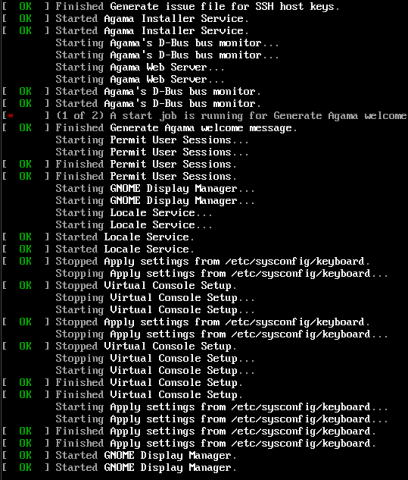
Screenshot below shows, if I don’t use nomodeset, the output stops | freezes at the “GNOME Display Manager” line.
And of course, the negative side-effect is that the install screen is horribly small - you have to use the up / down arrow keys to maneuver to the various sections of the Agama configuration output. And some output gets cut-off at its right-edge.
Well, if nothing else, maybe other folks wanting to install Leap 16.1 (and freezes) will see this and try the nomodeset workaround. And yea, after installation, at first boot, be sure to removenomodeset
.
This is interesting, because I have a Leap 16 VM guest (Windows VirtualBox host) that was installed months ago and originally ran SDDM Wayland + Plasma Wayland without any problems. Recently, some Mesa/desktop updates, Wayland became unusable, although X11 remains fine. I’m using LightDM for the login manager currently. Given that you’re now seeing the Leap 16.1 installer itself hang at GDM in VirtualBox unless nomodeset is used, I wonder whether we’re seeing the same (or related) regression in the graphics stack rather than an installer-specific issue?
But you indicate that post-install it works without nomodeset?
So, I check every few days for the newest 16.1 ISO.
A new version is usually available once a week.
Prior to two weeks ago, I NEVER had to use nomodeset (all previous installer versions did not require it).
I spent an hour or so trying to figure what was rwong. Then I tried nomodeset. There are actually a couple of threads out here, that folks responded with, “with the newer installers, use nomodeset” (not verbatim). That’s why I tried it.
So, starting two weeks ago, I now have to use that kernel option. Prior to two weeks ago, never used it.
(not sure about the regression you mention).
Yes … after installation, at first boot screen, I remove nomodeset (E option at Grub) … and after I’m in the freshly booted system, I obviously have to make the change permanent (done at command line).