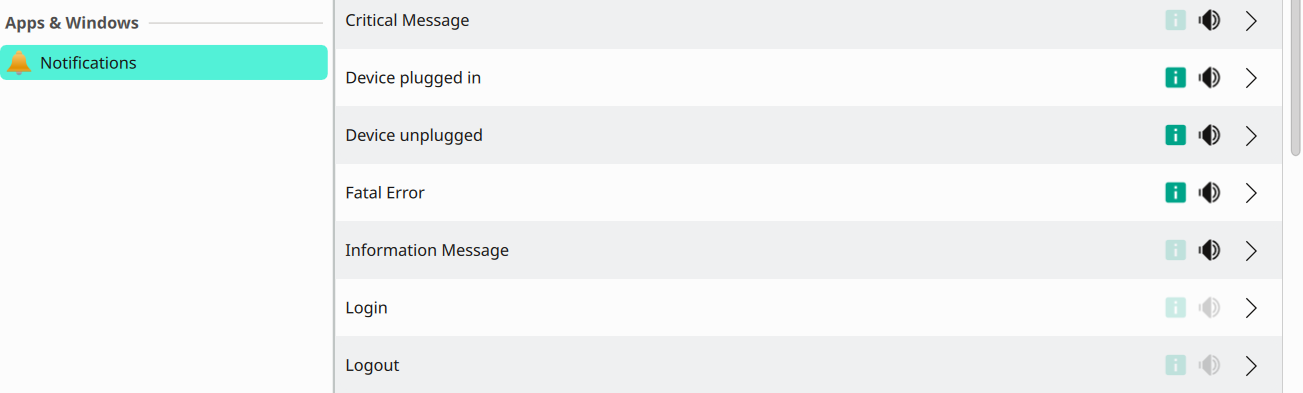
That is what I have been using and I have tried switching the start-up sound off and back on. I have also tried with Wayland - all without any success. The ‘preview sound’ plays fine and I have no other sound issues.
I was going to make a bugzilla report, but as it is only a minor issue and no one else seems to be affected - I will just leave it.
I signed up because I’m having the exact same problem. Fresh install of Tumbleweed about two weeks ago and it defaulted to that. Switching the audio driver from pipewire to pulseaudio booted me into the IceWM session, but once I reinstalled the KDE packages, I somehow have a log out sound, but still no log in sound.
It’s more of a disappointment than a deal-breaker (I like the Ocean theme), but since everything else works, I’m not inclined to fight with it too much in case I break something else.
I did try to see if there were any sound issues and got this (the common fix I saw was simply to restart, which did not work):
pipewire debug=3 pipewire
[E][19:25:30.877905] mod.protocol-native | [module-protocol-:  793 lock_socket()] server 0x5605c7883ec0: unable to lock lockfile '/run/user/1000/pipewire-0.lock': Resource temporarily unavailable (maybe another daemon is running)
[E][19:25:30.878015] pw.conf      | [          conf.c:  602 load_module()] 0x5605c7863ca0: could not load mandatory module "libpipewire-module-protocol-native": Resource temporarily unavailable
[E][19:25:30.878108] default      | [      pipewire.c:  124 main()] failed to create context: Resource temporarily unavailable
So then I examined my drivers and I seem to have two? JACK and Pipewire. Unclear if this is typical:
This is normal for KDE, has been an issue since Plasma 5, and is likely due to some sort of race condition caused by systemd that’s beyond my limited ability to comprehend.
Anyway, I used to work around it by setting the login notification to play a sound, which it invariably wouldn’t do after a cold boot but would (though at an almost inaudible volume) after a logout/login, and then using an autostart script to play the sound I wanted, which would play at full volume. Unfortunately, since Plasma 6.5.2 that workaround stopped working and I’m now using a variation of the solution in Comment 49 from the old KDE bug report at 422948 – [systemd boot] Startup sound does not play; system muted until after login, with the desktop file in /etc/xdg/autostart running my login sound script which used pw-play to play two sound files consecutively, the first being 2s of silence and the second being my preferred login sound. Of course, a race condition does mean that YMMV!
For information, my situation may be made more complicated by using an external USB sound card rather than the builtin audio:
$ inxi -A
Audio:
Device-1: Intel Raptor Lake High Definition Audio driver: N/A
Device-2: C-Media Digital Hifi Audio
driver: hid-generic,snd-usb-audio,usbhid type: USB
Device-3: Generic USB Audio driver: N/A type: USB
API: ALSA v: k6.17.7-1-default status: kernel-api
Server-1: PipeWire v: 1.5.83 status: active
PS. I have disabled usb and pipewire/wireplumber autosuspend.
This issue can be got round by installing the main ‘pulseaudio’ rpm (currently 17.0-5.1 version). This will install 6 or so other pulseaudio rpm’s and remove 2 pipewire rpm’s.
That’s a bit drastic IMHO. By default pipewire and pipewire-pulse are socket activated. I don’t normally bother with “Login” and “Logout” sounds, but I just tested this on Plasma 6 (openSUSE Slowroll) and was able to reproduce the same “no login sound on first boot” issue when PipeWire was running purely in socket-activated mode. However, simply enabling the PipeWire user service was enough to fix it. In fact, either of the following appeared sufficient to ensure the audio stack was active early enough for the login sound to play reliably:
This is useful and gets me back to the state before Plasma 6.5.2, but the login notification still plays too quietly (and this is through a 50W/channel amp) and I only get to hear the tail end of the audio, so I must be a special case and I’m going to sticking to my personal workaround for the time being.
Thanks! Works great and I was getting ready to dig into pipewire and pulseaudio services.
Old Tumbleweed Install
This fixed my old TW install but I have a little breakup of the login sound. I’ve fixed it before but, it’s back. I ran both on mine, I don’t know if that helps or hurts anything. I’ll look into it.
New Tumbleweed Install
It also worked on my wife’s two day old TW install. Rebooted and no login sound. I did the second command, still no login sound.
It turned out that login and logout sounds were turned off in Systemsettings> Notifications, then at the top of that window click System Notificaions. Turn on the login and logout sounds, and any others that you want to enable.