Is this issue present in other distributions, such as Fedora?
@hui Sorry, I meant to point out this issue, but I couldn’t post there because it was locked.
Is this issue present in other distributions, such as Fedora?
@hui Sorry, I meant to point out this issue, but I couldn’t post there because it was locked.
These packages do not even exist for Fedora under this name. It is like comparing aplles with peaches.
Yes, it could. The issue is not technical, rather lack of proper workflow and coordination on the openSUSE side. I do not know how Fedora manages it.
So what? Fedora has openh264 and noopenh264 and if a new version of noopenh264 is released and the relevant packages are rebuilt against it without matching true openh264 being available they will face the same problem.
It is not technical issue and it most certainly does not depend on the exact package names.
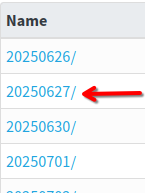
For those interested in trying Gstreamer-plugins-bad wants to obsolete gstreamer-plugin-openh264 - #41 by fragraider, time might be running out: The number of history repositories seems limited to 20. The repository where I found an old enough[1] version of libavcodec61 is now second to last to disappear:
[1] There are old enough versions in newer repositories, however, together with a newer version. Using those repositories, I was only able to see and select the newer version. My guess is that the older version can be installed if it is a dependency of something, for direct installing, only the newer version was visible.
Most likely only packages are present, but they are not listed in the metadata. In any case, you should be able to download the packages and install them manually as local files.
So, I found a post on the Fedora forum about a similar issue, and the solution seems very simple: replace noopenh264 with openh264. The solution will be the same for traditional Fedora editions. I guess it’s time to move to a distribution that offers less hassle solutions.
This is about rpm-ostree which I am not familiar with. Using traditional RPM packages should have worked, because in Fedora openh264 Obsoletes noopenh264. But rpm-ostree is image based and may add some additional requirements on top of pure RPM dependencies.
But you are right in that it shows how fragile the whole idea is in reality. As long as manual steps are needed to switch between noopenh264 and openh264 users can just use packages from Fusion (or Packman on openSUSE).
Other than waiting for Cisco to release their package, is there anything else that openSUSE could do in the meantime to rectify this? As a project I mean, rather than individual users having to do particular technical workarounds such as installing old packages or using packman.
Revert changes in all affected packages I presume.
But then we should consider the balance of the benefit of updated packages for the many users of the free codecs vs. the benefit of those users willing to use that single h264 format and not willing to use the available Packman packages…
I see there’s some recent discussion about this in https://lists.opensuse.org/archives/list/factory@lists.opensuse.org/thread/KKVOKIDKJGK6XOMHMNRWPK63JG3EBX4E/
As one of many users, my impression was that packman is obsolete for the purpose of installing the h264 codec.
My impression is based on stumbling though conversations that I do not completely understand and try to interpret in the context of the topic. Specifically, this reply to one of your clarifications.
This questions lingered for 5 days before I tried to offer my understanding (which is not great, but maybe better than nothing. Also, i felt the same).
While i came accross packman during my searches, this news article from 2023 does not mention packman: openSUSE Simplifies Codec Installation - openSUSE News
This strengthend my assumption that SDB:Installing codecs from Packman repositories - openSUSE Wiki is not just a bad idea (the big glaring warning), but may not work anymore.
Would you be able to confirm that running:
sudo zypper addrepo -cfp 90 'https://ftp.gwdg.de/pub/linux/misc/packman/suse/openSUSE_Tumbleweed/' packman
sudo zypper refresh
sudo zypper dist-upgrade --from packman --allow-vendor-change
sudo zypper install --from packman ffmpeg gstreamer-plugins-{good,bad,ugly,libav} libavcodec vlc-codecs
still should work and thereby remedy the situation, allowing us at latter point in time to move back to official repositories (if one would not have long forgotten about this after a week)?
Other user might appreciate that knowledge. Alternatively, someone able and willing to try?
And, if some knows, would going back simply involve replacing packman in the last 2 comments with oss?? I am confused that the OpenSuse repository is called. Then again, this may be simpler to achieve in Yast Software , under the repositories tap.
Please open your own thread if you need specific advice, this one is already cluttered.
Generally speaking, switching everything to Packman just to play h264 videos is overkill.
libopenh264-8 from the Cisco repo will come sooner or later. Meanwhile what you really need depends on your HW (you may already have HW decoding for h264 with most recent GPUs) and the app you use to play videos: you may need vlc-codecs or ffmpeg-7 from Packman, plus possibly a handful of dependencies.
openSUSE build of ffmpeg disables all H.264 decoders except libopenh264. I expect gstreamer does the same. Firefox theoretically can download libopenh264 from Cisco, I do not know if it is just disabled by default or completely turned off in the openSUSE build.
If you have e.g. a recent Nvidia GPU with the proprietary driver installed you don’t need Packman to play h264 on apps using gstreamer (Totem, Showtime…).
Firefox needs ffmpeg from Packman by default, didn’t test other options.
(The original question has been answered and this thread is already cluttered, I’m not going to elaborate further).
New package gstreamer-plugins-bad 1.26.4-1.1 from the Main Repository fixed this issue for me. Note that I didn’t and don’t have Packman repos installed.
Hmm, I’m still getting “the to be installed gstreamer-plugins-bad-1.26.4-1.1.x86_64 obsoletes ‘gstreamer-plugin-openh264 < 1.26.0’ provided by the installed gstreamer-plugin-openh264-1.24.12-1.suse1699.2.x86_64”
On my laptop, which is stock, up to date Tumbleweed (Agreed to obsoleting packages), I am not able to play online h264 content. I have no local videos to test.
Meanwhile, I’m still locking the gstreamer packages since I still have them (thank god).
As expected, the history repository I used does not exist anymore and zypper dup yields the following error:
# zypper dup
Refreshing service 'openSUSE'.
Retrieving repository 'history20250627' metadata ........................[error]
Repository 'history20250627' is invalid.
[history20250627|https://download.opensuse.org/history/20250627/tumbleweed/repo/oss] Failed to retrieve new repository metadata.
History:
 - [history20250627|https://download.opensuse.org/history/20250627/tumbleweed/repo/oss] Repository type can't be determined.
Please check if the URIs defined for this repository are pointing to a valid repository.
Warning: Skipping repository 'history20250627' because of the above error.
Some of the repositories have not been refreshed because of an error.

    dist-upgrade: Due to the treatment of orphaned packages dist-upgrade depends
    on a proper repository setup more than any other command. It must not
    continue if enabled repositories fail to refresh. This may severely damage
    the system. If a failing repository is actually not needed, it must be
    disabled. See 'man zypper' for more information about this command.
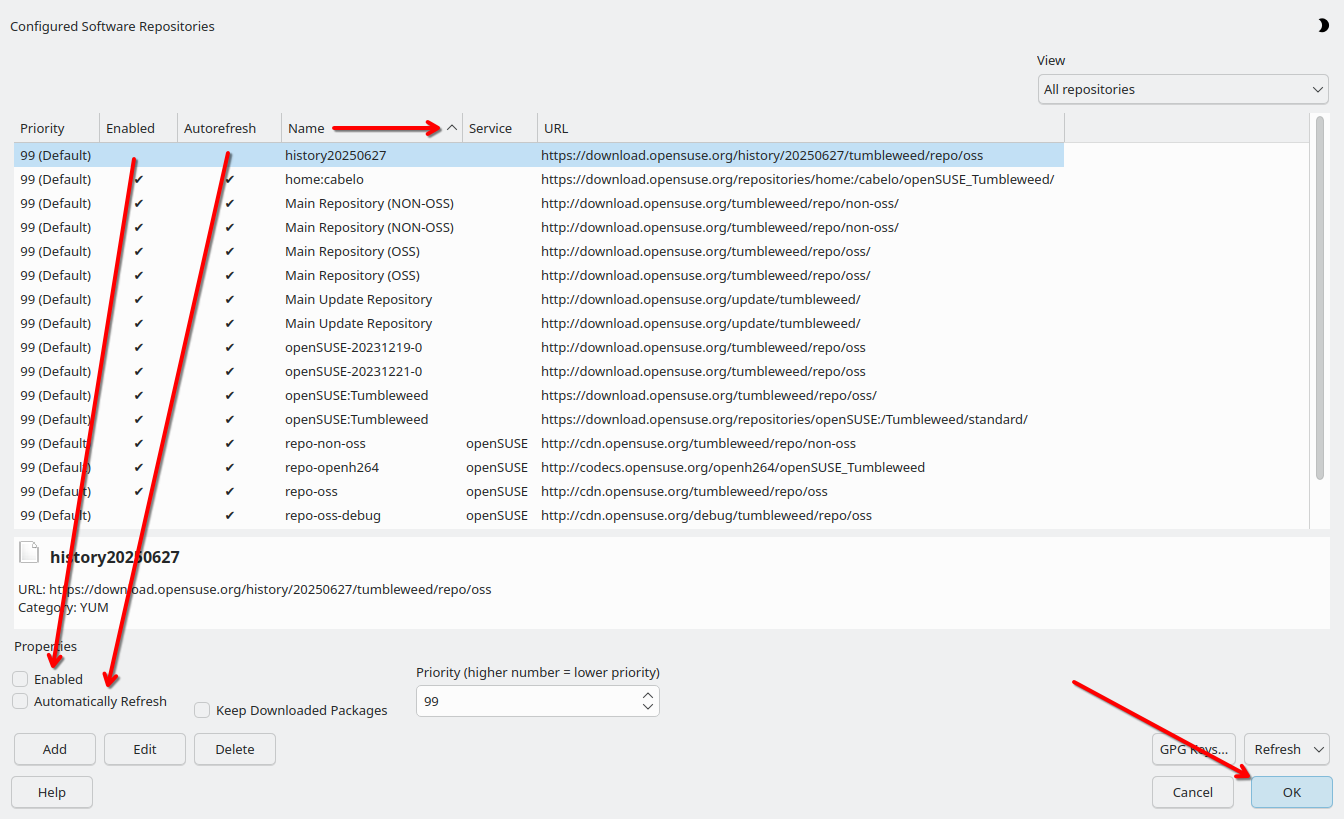
I both disabled and removed auto refresh using

Running zypper dup again, i choose the option to keep the obsolete packages (In my case, Solution 1).
# zypper dup
Refreshing service 'openSUSE'.
Loading repository data...
Reading installed packages...
Warning: You are about to do a distribution upgrade with all enabled repositories. Make sure these repositories are compatible before you continue. See 'man zypper' for more information about this command.
Computing distribution upgrade...
3 Problems:
Problem: 1: the installed ffmpeg-7-7.1.1-6.1.x86_64 requires '(libavcodec61 = 7.1.1-6.1 or ffmpeg-7-mini-libs = 7.1.1-6.1)', but this requirement cannot be provided
deleted providers: libavcodec61-7.1.1-6.1.x86_64

Problem: 2: the to be installed gstreamer-plugins-bad-lang-1.26.4-1.1.noarch requires 'gstreamer-plugins-bad = 1.26.4', but this requirement cannot be provided
not installable providers: gstreamer-plugins-bad-1.26.4-1.1.x86_64[download.opensuse.org-oss_1]
                   gstreamer-plugins-bad-1.26.4-1.1.x86_64[download.opensuse.org-oss_2]
                   gstreamer-plugins-bad-1.26.4-1.1.x86_64[https-download.opensuse.org-03c8734d]
                   gstreamer-plugins-bad-1.26.4-1.1.x86_64[https-download.opensuse.org-607b0641]
                   gstreamer-plugins-bad-1.26.4-1.1.x86_64[openSUSE-20231219-0]
                   gstreamer-plugins-bad-1.26.4-1.1.x86_64[openSUSE-20231221-0]
                   gstreamer-plugins-bad-1.26.4-1.1.x86_64[openSUSE:repo-oss]

Problem: 3: the installed ffmpeg-7-7.1.1-6.1.x86_64 requires '(libavdevice61 = 7.1.1-6.1 or ffmpeg-7-mini-libs = 7.1.1-6.1)', but this requirement cannot be provided
deleted providers: libavdevice61-7.1.1-6.1.x86_64


Problem: 1: the installed ffmpeg-7-7.1.1-6.1.x86_64 requires '(libavcodec61 = 7.1.1-6.1 or ffmpeg-7-mini-libs = 7.1.1-6.1)', but this requirement cannot be provided
deleted providers: libavcodec61-7.1.1-6.1.x86_64

 Solution 1: Following actions will be done:
  keep obsolete libavcodec61-7.1.1-6.1.x86_64
  keep obsolete libavfilter10-7.1.1-6.1.x86_64
  keep obsolete libavformat61-7.1.1-6.1.x86_64
  keep obsolete libavutil59-7.1.1-6.1.x86_64
  keep obsolete libpostproc58-7.1.1-6.1.x86_64
  keep obsolete libswresample5-7.1.1-6.1.x86_64
  keep obsolete libswscale8-7.1.1-6.1.x86_64
 Solution 2: remove lock to allow removal of ffmpeg-7-7.1.1-6.1.x86_64
 Solution 3: break ffmpeg-7-7.1.1-6.1.x86_64 by ignoring some of its dependencies

Choose from above solutions by number or skip, retry or cancel [1/2/3/s/r/c/d/?] (c): 1
After this, zypper presented a second problem, for with i choose to keep the obsolete gstreamer plugin. (In my case, Solution 9 )
Problem: 2: the to be installed gstreamer-plugins-bad-lang-1.26.4-1.1.noarch requires 'gstreamer-plugins-bad = 1.26.4', but this requirement cannot be provided
not installable providers: gstreamer-plugins-bad-1.26.4-1.1.x86_64[download.opensuse.org-oss_1]
                   gstreamer-plugins-bad-1.26.4-1.1.x86_64[download.opensuse.org-oss_2]
                   gstreamer-plugins-bad-1.26.4-1.1.x86_64[https-download.opensuse.org-03c8734d]
                   gstreamer-plugins-bad-1.26.4-1.1.x86_64[https-download.opensuse.org-607b0641]
                   gstreamer-plugins-bad-1.26.4-1.1.x86_64[openSUSE-20231219-0]
                   gstreamer-plugins-bad-1.26.4-1.1.x86_64[openSUSE-20231221-0]
                   gstreamer-plugins-bad-1.26.4-1.1.x86_64[openSUSE:repo-oss]

 Solution 1: Following actions will be done:
  remove lock to allow installation of gstreamer-plugins-bad-1.26.4-1.1.x86_64[download.opensuse.org-oss_1]
  remove lock to allow removal of gstreamer-plugins-bad-1.26.2-1.1.x86_64
 Solution 2: Following actions will be done:
  remove lock to allow installation of gstreamer-plugins-bad-1.26.4-1.1.x86_64[download.opensuse.org-oss_2]
  remove lock to allow removal of gstreamer-plugins-bad-1.26.2-1.1.x86_64
 Solution 3: Following actions will be done:
  remove lock to allow installation of gstreamer-plugins-bad-1.26.4-1.1.x86_64[https-download.opensuse.org-03c8734d]
  remove lock to allow removal of gstreamer-plugins-bad-1.26.2-1.1.x86_64
 Solution 4: Following actions will be done:
  remove lock to allow installation of gstreamer-plugins-bad-1.26.4-1.1.x86_64[https-download.opensuse.org-607b0641]
  remove lock to allow removal of gstreamer-plugins-bad-1.26.2-1.1.x86_64
 Solution 5: Following actions will be done:
  remove lock to allow installation of gstreamer-plugins-bad-1.26.4-1.1.x86_64[openSUSE-20231219-0]
  remove lock to allow removal of gstreamer-plugins-bad-1.26.2-1.1.x86_64
 Solution 6: Following actions will be done:
  remove lock to allow installation of gstreamer-plugins-bad-1.26.4-1.1.x86_64[openSUSE-20231221-0]
  remove lock to allow removal of gstreamer-plugins-bad-1.26.2-1.1.x86_64
 Solution 7: Following actions will be done:
  remove lock to allow installation of gstreamer-plugins-bad-1.26.4-1.1.x86_64[openSUSE:repo-oss]
  remove lock to allow removal of gstreamer-plugins-bad-1.26.2-1.1.x86_64
 Solution 8: deinstallation of gstreamer-plugins-bad-lang-1.26.2-1.1.noarch
 Solution 9: keep obsolete gstreamer-plugins-bad-lang-1.26.2-1.1.noarch
 Solution 10: break gstreamer-plugins-bad-lang-1.26.4-1.1.noarch by ignoring some of its dependencies

Choose from above solutions by number or skip, retry or cancel [1/2/3/4/5/6/7/8/9/10/s/r/c/d/?] (c): 9
Problem 3: keep obsolete packages (Sollution 1):
Problem: 3: the installed ffmpeg-7-7.1.1-6.1.x86_64 requires '(libavdevice61 = 7.1.1-6.1 or ffmpeg-7-mini-libs = 7.1.1-6.1)', but this requirement cannot be provided
deleted providers: libavdevice61-7.1.1-6.1.x86_64

 Solution 1: Following actions will be done:
  keep obsolete libavdevice61-7.1.1-6.1.x86_64
  keep obsolete libavfilter10-7.1.1-6.1.x86_64
  keep obsolete libavformat61-7.1.1-6.1.x86_64
  keep obsolete libavutil59-7.1.1-6.1.x86_64
  keep obsolete libpostproc58-7.1.1-6.1.x86_64
  keep obsolete libswresample5-7.1.1-6.1.x86_64
  keep obsolete libswscale8-7.1.1-6.1.x86_64
 Solution 2: deinstallation of ffmpeg-7-7.1.1-6.1.x86_64
 Solution 3: remove lock to allow installation of ffmpeg-7-7.1.1-8.1.x86_64[openSUSE:repo-oss]
 Solution 4: remove lock to allow installation of ffmpeg-7-7.1.1-8.1.x86_64[openSUSE-20231221-0]
 Solution 5: remove lock to allow installation of ffmpeg-7-7.1.1-8.1.x86_64[openSUSE-20231219-0]
 Solution 6: remove lock to allow installation of ffmpeg-7-7.1.1-8.1.x86_64[https-download.opensuse.org-607b0641]
 Solution 7: remove lock to allow installation of ffmpeg-7-7.1.1-8.1.x86_64[https-download.opensuse.org-03c8734d]
 Solution 8: remove lock to allow installation of ffmpeg-7-7.1.1-8.1.x86_64[download.opensuse.org-oss_2]
 Solution 9: remove lock to allow installation of ffmpeg-7-7.1.1-8.1.x86_64[download.opensuse.org-oss_1]
 Solution 10: break ffmpeg-7-7.1.1-6.1.x86_64 by ignoring some of its dependencies

Choose from above solutions by number or skip, retry or cancel [1/2/3/4/5/6/7/8/9/10/s/r/c/d/?] (c): 1
After Problem 3, I was able update as expected. The list of packages that will not be changed was displayed at the begining of the promt, in my case:
The following 11 items are locked and will not be changed by any action:
 Installed:
  ffmpeg-7 gstreamer-plugins-bad gstreamer-plugins-bad-lang libavcodec61
  libavdevice61 libavfilter10 libavformat61 libavutil59 libpostproc58
  libswresample5 libswscale8