I have 34GB of RAM. I’ve decided to leave swapiness at default because of a recommendation here for average desktop user.
@Wtrfull and your system is using swap? I’d suggest you try zram instead of disk based swap or swap file.
At the time of Tumbleweed installation I thought that I would use the hibernate function. After installation I’ve found out that enabling Secure Boot disables hibernation so I just left the swap partition as it was. I’ll try zram.
I “protected” my gstreamer-plugins-bad in YaSt and that allowed the zyppering to go forth in security of operations.
When will we know that it is OK to unlock or unprotect the gstreamer package???
1 Like
Guys? Any thoughts on the when it would be OK to unlock the gstreamer package? Seems like this question is on topic to the OPs question???
@non_space when a update tells you it’s there but won’t update because it’s locked, just look at the output from zypper -vvv dup
2 Likes
A new gstreamer-plugins-bad package is in the repo, but it doesn’t correct the openh264 issue.
Problem: 1: the to be installed gstreamer-plugins-bad-1.26.3-2.1.x86_64 obsoletes 'gstreamer-plugin-openh264 < 1.26.0' provided by the installed gstreamer-plugin-openh264-1.24.12-1.suse1699.2.x86_64
 Solution 1: install gstreamer-plugins-bad-1.26.3-2.1.x86_64 from vendor openSUSE
  replacing gstreamer-plugin-openh264-1.24.12-1.suse1699.2.x86_64 from vendor obs://build.opensuse.org/openSUSE:Factory
 Solution 2: keep obsolete gstreamer-plugins-bad-1.26.2-2.1.x86_64

Choose from above solutions by number or cancel [1/2/c/d/?] (c): c
1 Like
The problem should be fixed when you will see a libopenh264-8 from repo http://codecs.opensuse.org/openh264/openSUSE_Tumbleweed which will replace the version from the OSS repo, currently marked with “noopenh264” in its Version.
2 Likes
It will not change the fact that one will need to manually acknowledge vendor switch and remove the obsolete plugin.
@malcolmlewis Thank you for linking the two threads.
Last night, I installed openSUSE Tumbleweed on a (fairly) new to me laptop. Although the codec repository was enabled after the installation, there were no openh264 packages installed and I was able to play the same media (audio, mp3) with no issues.
It appears that, in my case, I don’t actually need the openh264 packages, so I removed the lock on gstreamer-plugins-bad and chose Solution 1 to install the new version and remove openh264.
h264 is a video format and has nothing to do with .mp3 audio.
openh264 is a way of enabling video decoding for many videos over the net without needing “foreign” repositories like Packman, where you can find substitute decoders like vlc-codecs or ffmpeg.
After reading this thread, the response on the exact action required is all over the place. Regarding the below, is it eventually going to resolve itself or is there intervention needed? I don’t mind waiting for packman to get caught up, I’m must wondering if there is anything that needs to be done on my end that won’t resolve with time.
abystus@linux: ~ $ sudo zypper dup
Loading repository data...
Reading installed packages...
Warning: You are about to do a distribution upgrade with all enabled repositories. Make sure these repositories are compatible before you continue. See 'man zypper' for more information about this command.
Computing distribution upgrade...
2 Problems:
Problem: 1: problem with the installed libfaad2-2.11.2-1699.2.pm.9.x86_64
Problem: 2: the to be installed gstreamer-plugins-bad-1.26.3-2.1.x86_64 obsoletes 'gstreamer-plugin-openh264 < 1.26.0' provided by the installed gstreamer-plugin-openh264-1.24.12-1.suse1699.2.x86_64

Problem: 1: problem with the installed libfaad2-2.11.2-1699.2.pm.9.x86_64
 Solution 1: install libfaad2-2.11.2-2.1.x86_64 from vendor openSUSE
  replacing libfaad2-2.11.2-1699.2.pm.9.x86_64 from vendor http://packman.links2linux.de
 Solution 2: keep obsolete libfaad2-2.11.2-1699.2.pm.9.x86_64

Choose from above solutions by number or skip, retry or cancel [1/2/s/r/c/d/?] (c):
libfaad2 is not in Packman anymore and will never be again, so “Packman catch-up” is not going to happen.
For gstreamer-plugins-bad see above here.
2 Likes
Ok, I’ve changed libfaad2 to be from opensuse instead and put a lock on gstreamer for now. Hopefully all goes well. Thanks for clarifying.
I’m so lost with this whole thing. All I know is that half my video library won’t play now. I went with solution 1 in the update prompts. Can you tell me in a simple way how I go back to the working version of Gstreamer?
My understanding is, once updated, not much can be done other than wait until the new libopenh264-8 becomes available. I have no understanding when that is.
One way of going back could be to boot into an older snapshot (if old enough snapshot is available, see further down). This guide for leap should work just fine: System recovery and snapshot management with Snapper | Reference | openSUSE Leap 15.6. Once running a working snapshot, one could lock gstreamer-plugins-bad with:
zypper addlock gstreamer-plugins-bad
then the system should be updatable without breacking mp4 and a lot of web content playback:
zypper dup
At some point, libopenh264-8 should be available. I am not sure how one sees that other than checking manually (or maybe looking at the new packages list, which can be long, when doing an update?). Currently, it says dummy implementation, I assume this will change when the actual package is ready:
# zypper search libopenh264-8
Refreshing service 'openSUSE'.
Loading repository data...
Reading installed packages...

S  | Name                | Summary                                    | Type
---+---------------------+--------------------------------------------+--------
i  | libopenh264-8       | H.264 codec library (dummy implementation) | package
   | libopenh264-8-32bit | H.264 codec library (dummy implementation) | package
When the proper package is available, my understanding is that the lock can be removed again:
zypper removelock gstreamer-plugins-bad
Simply downgrading gstreamer-plugins-bad seems not possible as no older versions of the package are available. Apparently, not every package maintainer keeps old versions. This information is also available in the YAST software manager gui, under the Versions tap for the package:
# zypper search -s --match-exact gstreamer-plugins-bad
Refreshing service 'openSUSE'.
Loading repository data...
Reading installed packages...

S  | Name                  | Type    | Version    | Arch   | Repository
---+-----------------------+---------+------------+--------+----------------------
i+ | gstreamer-plugins-bad | package | 1.26.3-2.1 | x86_64 | Main Repository (OSS)
i+ | gstreamer-plugins-bad | package | 1.26.3-2.1 | x86_64 | Main Repository (OSS)
i+ | gstreamer-plugins-bad | package | 1.26.3-2.1 | x86_64 | openSUSE:Tumbleweed
i+ | gstreamer-plugins-bad | package | 1.26.3-2.1 | x86_64 | openSUSE:Tumbleweed
i+ | gstreamer-plugins-bad | package | 1.26.3-2.1 | x86_64 | openSUSE-20231219-0
i+ | gstreamer-plugins-bad | package | 1.26.3-2.1 | x86_64 | openSUSE-20231221-0
i+ | gstreamer-plugins-bad | package | 1.26.3-2.1 | x86_64 | repo-oss
I did not try the above, lack of time and hope that the issue is resolved before long. Also, by now, snapper list (run as root and took a moment) tells me that the oldest snapshot I have is from the 12th of July, which I believe is to new to perform the above (I have been updating regularly). In my case, waiting seems to be the only option.
What could the timing for the new libopenh264-8 be? I don’t know, but @OrsoBruno posted further up: Gstreamer-plugins-bad wants to obsolete gstreamer-plugin-openh264 - #9 by OrsoBruno
A completely different approach: A virtual machine with, for example, Leap. Virt-manager makes it easy to set up data sharing with a virtual machine. This might be a bit too much work for most and certainly not a quick fix either…
Yet another approach: Boot from a live distribution that has working h264 encoding (I would not know what to recommend). Local hard drives can be mounted and media accessed that way.
The prior versions are available in the Tumbleweed history repository…
https://download.opensuse.org/history/20250704/tumbleweed/repo/oss/x86_64/
Simply install it from there and lock it if this is the approach you want to go.
Hello @hui
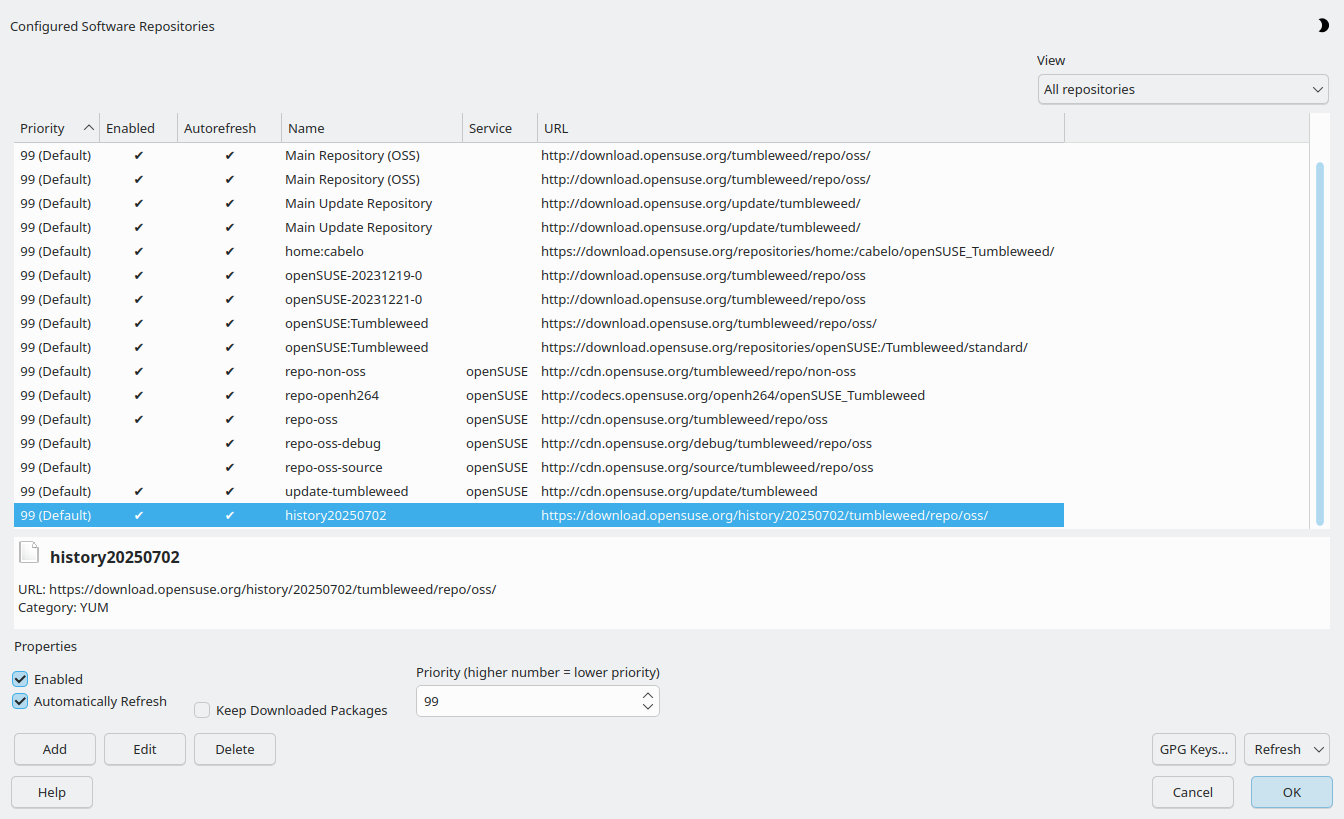
Partial success, the previous version of gstreamer-plugins-bad is now installed, mp4 still does not play, neither local nor online (e.g. Carmina Burana. Subtitled. By Carl Orff. Subtitles: LAT – ESP – ENG. - PeerTube by Causa Arcana). Here are my steps so far, for those wanting to follow along:
- Adding history repository wich only had the previous version, not (https://download.opensuse.org/history/20250702/tumbleweed/repo/oss/, i called it
history20250702):
- Installing the previous version:
- Locking:
sudo zypper addlock gstreamer-plugins-bad
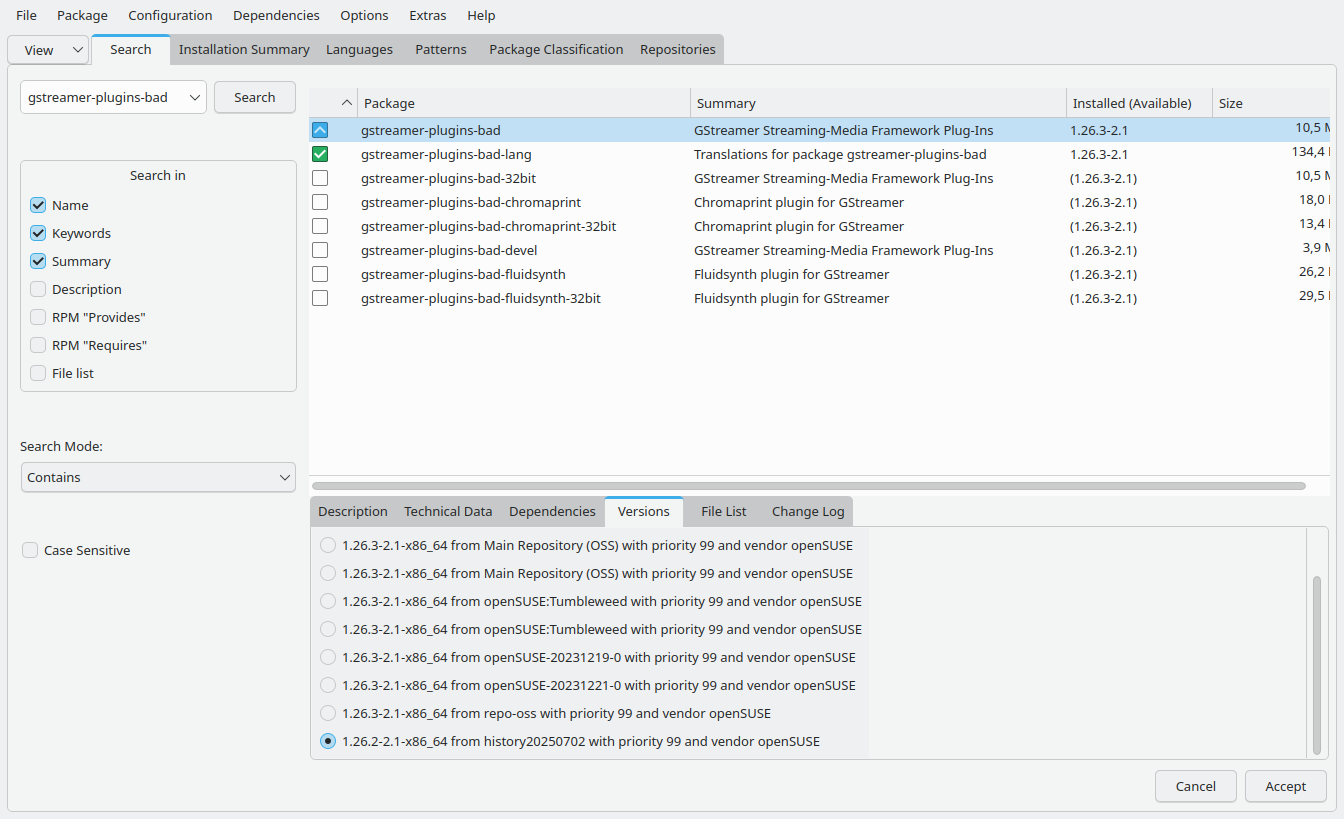

Looks right to me:

Even
gstreamer-plugin-openh264 is now installed again:
One concern i have was that the dummy libopenh264-8 is still installed. Removing it seems like bad idea:
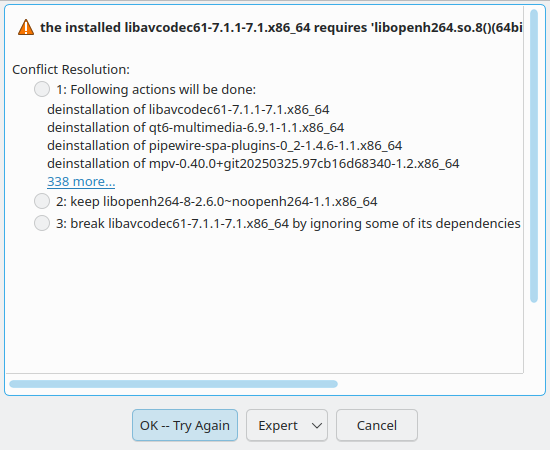
Yes, you also need to downgrade ffmpeg packages that were rebuilt against noopenh library.
Success!
Disclaimer: The below worked for me. I might not be able to help if it does not for your. I suggest you try out if you can boot and restore an older snappshot before attempting. Here is the link to the Leap guide again, which (to my understanding should work for Tumbleweed as well): System recovery and snapshot management with Snapper | Reference | openSUSE Leap 15.6
Quick guide :
- Start
Yast Software.

- Select menu
Configuration→Repositories(Or just pressCTRL-R).
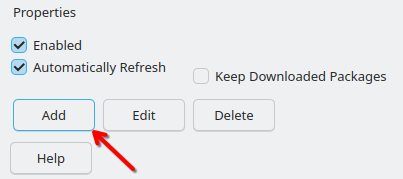
- Click
Add.
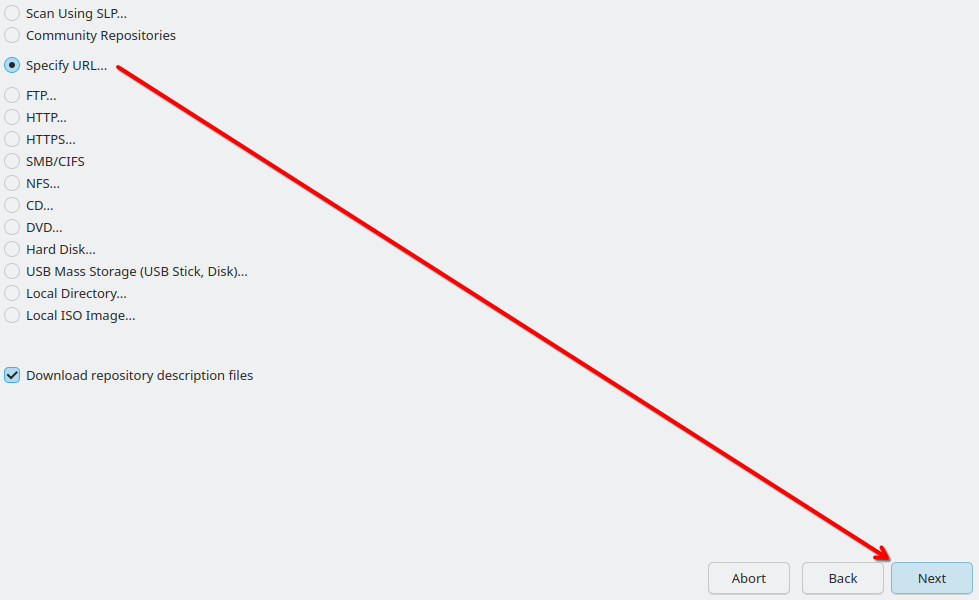
- If not selected, choose “Specify URL…”, then click
Next…
Repository Name:history20250627(Or something that make sense to you).URL:https://download.opensuse.org/history/20250627/tumbleweed/repo/oss/. ClickNext.
`- Wait until the repository has been added. It should be easy to verify that the repository is added and enabled by sorting for name. Click
OK.
- Find
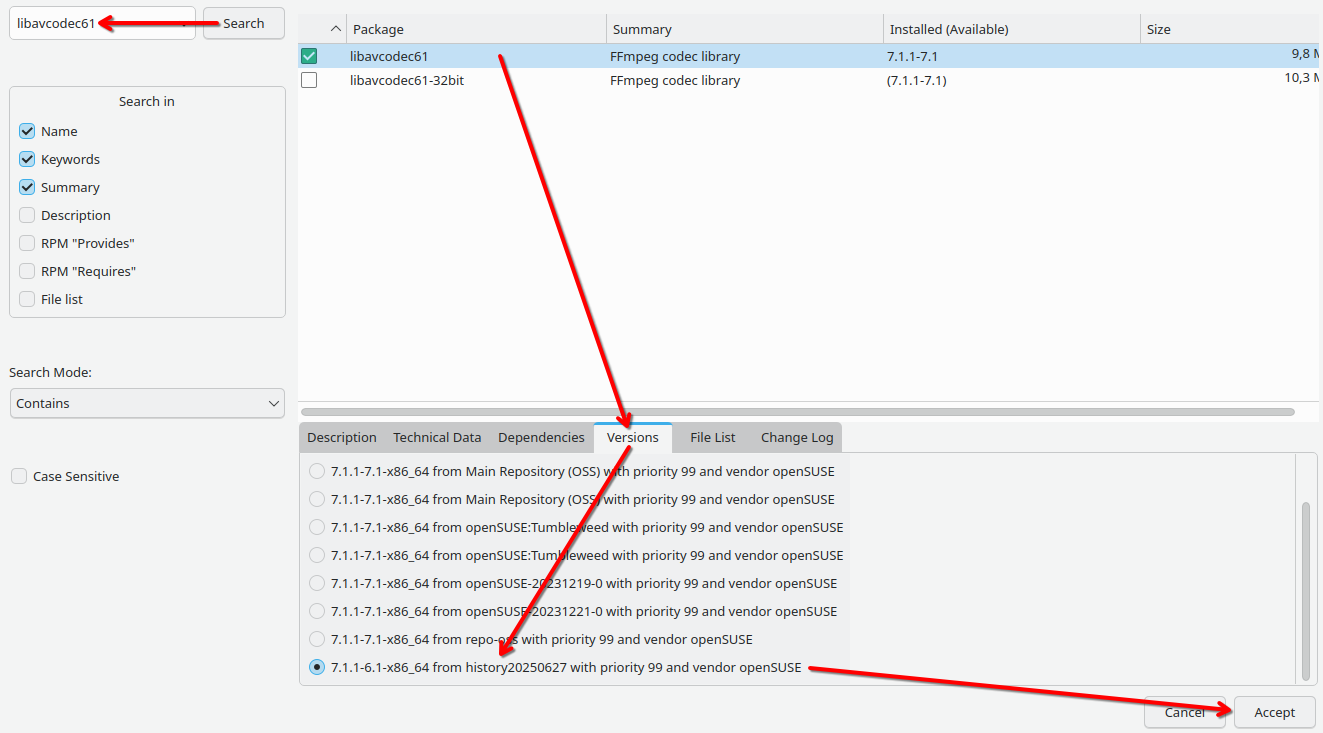
gstreamer-plugins-badand select it. In theVersiontap, select the version from the newly added history repository (in my case thehistory20250627). ClickAccept.
- Select the
downgradeconflict resolution. ClickOK -- Try Again.
- Once installation is done, click
Continue(Clickingfinishwill closeYast Softwareand it has to be started again).
- Repeat steps 7 and 8 for
libavcodec61. There will be more packages to downgrade in the conflict resolution.
- When the downgrading is done, click
Finishthe next steps requireYast Softwareto be closed as it will otherwise block zypper.
Now playing of mp4 (and possibly other video formats?) should work again. I had to restart Firefox. - If the system is updated, for example by running
zypper dup, the new packages will be installed again. That can be prevented locking theffmpegandgstreamer-plugins-badpackages by running:sudo zypper addlock ffmpeg-7 gstreamer-plugins-bad
If successful, there should be the messageSpecified locks have been successfully added.. I found that theInstallation Summarytap inYast Softwarealways shows locked packages. (Protectedneeds to be selected, if not already.)





(13.) At some point, libopenh264-8 should no longer be a dummy implementation. I guessed in this post how to figure that out: Gstreamer-plugins-bad wants to obsolete gstreamer-plugin-openh264 - #35 by ihavenoideawhatimdoing. It might be better if someone who actually has a clue could confirm this or post a better solution. In any case, the locks can be removed by running: sudo zypper removelock ffmpeg-7 gstreamer-plugins-bad. Analogous as in step 12, the packages should have disappeard from the Installation Summary tab in Yast Software.