This I recognize from certain (older?) textmode boot ‘iso’. You should select ‘Boot Installed System’ and hope it finds the correct partition and subvol. It might show many options. But select the ‘correct’ one, not all might work perfectly, but you should get to a CLI prompt (if multiuser.target) or I guess default graphical.target for you. Then use efibootmgr bootctl update-bootloader etc to make sure SuSE is the master OS, so it owns/sets EFI/boot and EFI/opensuse-tumbleweed (or something like that).
This whole method with rEFind is not supported or documented. Perform (or attempt to) install according to mean that are.
Hi look I’m no expert - just a regular user. So with that caveat - looking at those discs I would think gpt 1 will be where the Grub2 should be not sure about gpt 2 & 5 as gpt 5 says SUSE_INSTALL but it is ntfs which is more normal for storage & quite small. Whereas gpt2 is btrfs file type which is more typical / default for Tumbleweed installs I would have thought.
However if YOU know which of the drives you have the system on you MAY be able to mount that from the rescue terminal using something like CHROOT command & then rebuild / update the GRUB configuration & regenerate initramfs maybe. You also probably need to know if your system is using UEFI or some legacy set up as that can make a difference to the above.
Please note my caveat at the start of this post, so if this is possible you might want to see if there are any more experienced users / admins who can advise if this course of action is appropriate. Or maybe you could use a rescue USB stick & YAST it perhaps?
Or if you are feeling brave & your data is backed up, you could always search this up or even ask AI perhaps & have a go yourself. Best of luck, hope this helps in some way sorry I can’t help beyond that.
Not sure if stuff in this link is still appropriate as this seems to be an old document https://doc.opensuse.org/documentation/leap/archive/15.1/startup/html/book.opensuse.startup/cha-trouble.html#sec-trouble-data-recover-rescue-grub but again maybe admins can can advise the best way to proceed?
Hi everyone, thanks again to everyone who chimed in earlier! I wanted to let you know that I successfully resolved the boot issue and am now back on my desktop with everything working perfectly.
I remember those menu’s were a bit confusing to me as well, but if still a correct rootfs is there and correct kernel+initrd, at least in non-secure mode, it should be possible to get kernel and initrd loaded, especially if also boot/grub2/grub.cfg is found/parsed.
You should get rid of all those external foreign bootmanagers, it is already a big enough problem that both Windows and Tumbleweed have their own and potentially overwrite each others stuff (what is in EFI/boot/). I hardly boot Windows although I have multi-boot, but certainly only use efibootmgr to write entries in the UEFI data store. And I simply backup EFI/boot/ elsewhere, so in cases like this, can use that files/info to get the computer booted again.
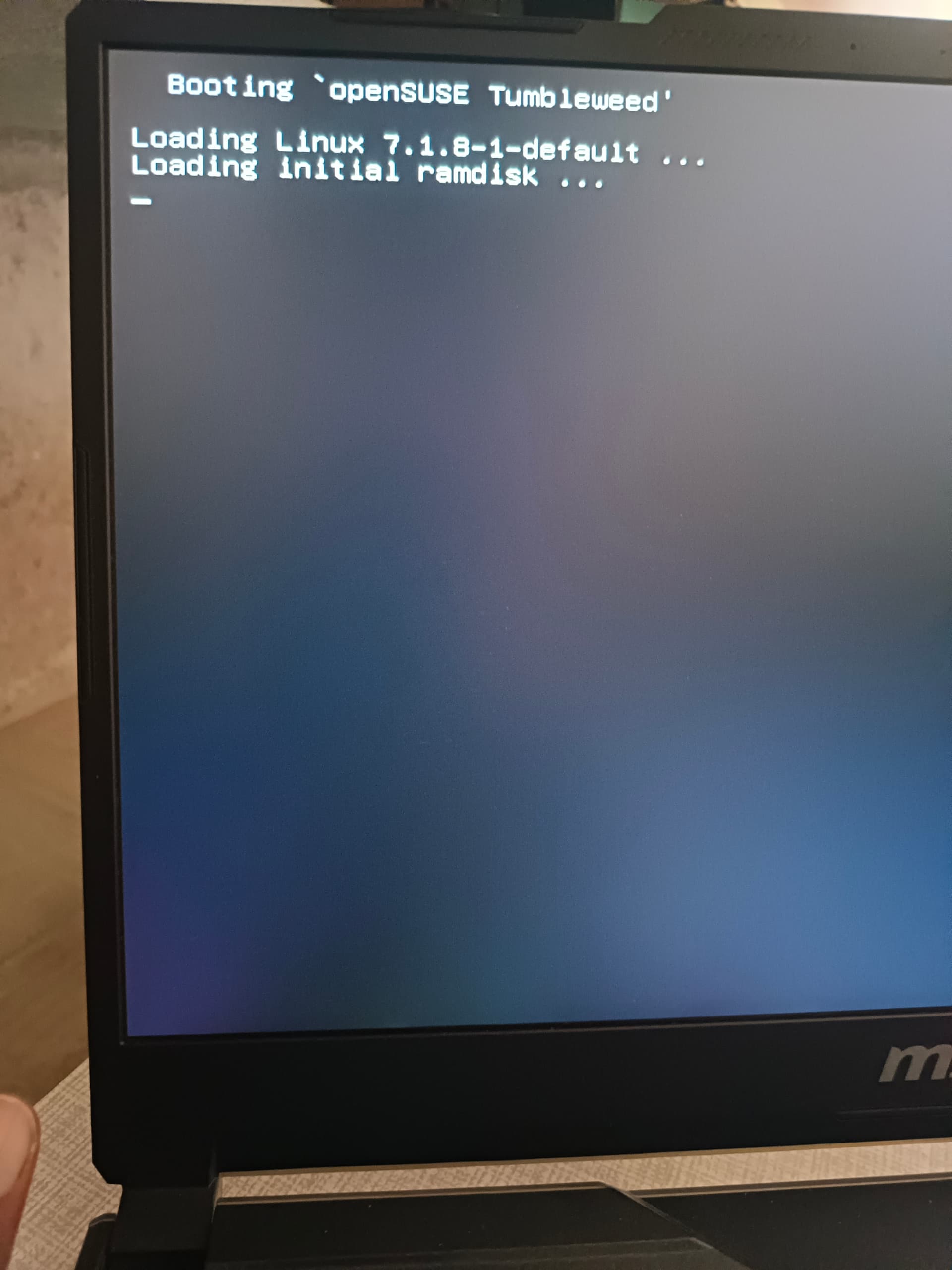
When reboot show this screen,for 2-3 sec, is this normal? I want to turnoff, i want clean restart or login, thanks to all @luse4x4 @jjis @hui @susejunky @knurpht
You can run systemd-analyze (and see man systemd-analyze for all sorts of options) to see where time is spent. On x86_64 systems, also time spent in Firmware/UEFI is included. On various aarch64 it is not (work to be done) so I mostly remove all sorts of quiet and/or plymouth settings and also set kernel loglevel=7 so see always what is happening. I like that much more than some black screen and circulating dots used in Windows.
Those 3 lines are basic, also you might see some UEFI firmware message overwriting a background boot picture, at least happens on older UEFI and/or Tianocore EDK2 UEFI used in VM’s or Aarch64 boards.
Tumbleweed can have a boot screen with graphic animation same as windows, I had that when I did a new install on a 2-in-1 laptop/tablet 4 years ago, but as indicated, I removed it as development/debugging is more important to me than clean screen. Logo/graphic was/is also HP-SuSE merged/mixed branding AFAIR. Not for every brand I guess. I have no clue how to get that (back), it is likely in the EFI/*/*.efi embedded as image.
It’s normal on my TW installations whether using traditional BIOS or EFI booting, the result of Grub stanza echo command lines preceding linux and initrd lines.
BTW, the MSI EFI boot menu hotkey is F11.
Which starts AFTER this echo, which comes directly from grub / systemd-boot.
@Kailash, you can, but this is not something I would suggest to new users. I would almost say: If you cannot find out how, don’t touch it, it’s something you see only for a second …
But, off we go:
- Fork the openSUSE grub theme to your own version
- Make your own version the active grub theming
- Comment the lines that contain the echoed lines
Do not try this on the installed theme, because that will be overwritten by a grub package update
1 Like
A huge thank-you to @susejunky, @knurpht, @luse4x4, @jjis, @mrmazda, and everyone else who jumped in to help!
I really appreciate your guidance, and expertise while helping me figure out the boot issues and clearing up how openSUSE handles the startup text. My laptop is booting up smoothly, my NVIDIA RTX 3050 drivers are fully active, and everything is running great. Thanks for being such an awesome community!"
1 Like
Can you remember how you got it working & what commands or methods you used if you are able to share those - maybe it could help someone in the future who faces a similar problem? Seems there is another one in list today for example.
Thanks for asking! Here is the complete step-by-step process I used to recover my system, restore my bootloader, and fix the freezing/long boot times. Hopefully, this helps anyone else running into the same issue.
Part 1: Recovering the Bootloader (rEFInd)
Initially, I couldn’t boot into the OS properly. To get the openSUSE boot options back in rEFInd:
I booted from the openSUSE Install Disk (USB).

From the installation menu, I selected the Rescue System option.

Because I needed a network connection, I plugged in my phone and used USB Mobile Tethering to get internet access in the rescue environment.

Running the recovery tools from there fixed the boot entries. After a reboot, the proper openSUSE icon started showing up in rEFInd (alongside the default penguin icon), allowing me to boot back into Tumbleweed.
Part 2: Fixing the Long Boot Delay (Hanging at the Logo)
Once I could boot, the system was taking an unusually long time, getting stuck on the manufacturer logo screen. Hitting Esc revealed it was hanging on: A start job is running for /dev/disk/by-designator/esp.
To fix this, I had to stop the system from indefinitely waiting on the EFI partition during boot:
Open the terminal and edit the file system table:
Bash

sudo nano /etc/fstab

Find the line for the EFI partition (/boot/efi) and add ,nofail to the mount options. For example, changing utf8,dmask=0077 to utf8,dmask=0077,nofail.

Save and exit.
Part 3: Rebuilding the Boot Images & GRUB
To make sure the hardware and partitions were mapped perfectly without stalling the RAM disk, I forced a rebuild:
Rebuild the initramfs:
Bash

sudo dracut --force --regenerate-all

Update the GRUB configuration to apply all changes:
Bash

sudo grub2-mkconfig -o /boot/grub2/grub.cfg
Part 4: Getting a Clean, Fast Login
Finally, to hide all the scrolling terminal text and skip the GRUB countdown for a clean, fast boot straight to the login screen:
Edit the GRUB defaults:
Bash

sudo nano /etc/default/grub

Set the timeout to zero: GRUB_TIMEOUT=0

Ensure the boot is quiet: GRUB_CMDLINE_LINUX_DEFAULT="quiet splash=silent"

Run sudo grub2-mkconfig -o /boot/grub2/grub.cfg one last time.
After restarting, the system flies straight through rEFInd to the login screen with zero hangs!
1 Like
I see I downloaded some .iso files, for x84_64 at least, but also some aarch64, 2 years ago. A decade ago with slow internet, I focused on as small as possible, so the NET variant is smallest.
Now did a refresh and it is:
openSUSE-Tumbleweed-NET-x86_64-Snapshot20260815-Media.iso
The confusion mentioned earlier comes from the fact that I did not manage to use the Rescue .iso as what its name suggests. Instead I made a ‘Live’ system with it that uses an extra storage (8GB or so) for storage changes, it uses overlayFS. Just for seeing what new/fresh/minimal Tumbleweed looks like.
For ‘rescue’ in this topic, the trick is to use the normal installer .iso and start installation process until you need a first decision, e.g. accept terms or somewhere which DE to use. Then abort and the screen then goes into text mode (linuxrc 9.6, kernel 7.1.8 ATM).
Then in [Main Menu] select [Start Installation], then in that sub-menu [Start Installation], select [Boot Installed System]. The tool then searches all storage for a rootfs, might be multiple OSses and Btrfs subvolumes. For my current test on a VM with just a virtio vda2 rootfs and the .iso from USB, it is 1 line. Further search result options are then done to help you get the correct kernel cmdline. Then it starts that rootfs.
I use Tumbleweed with all initial Btrfs subvols removed and a manually set default subvol to keep it as simple as possible and in line with other distros/filesystems and architectures (other non-UEFI bootloaders especially), but if the fstab on the rootfs is not messed up, it should also be straight-forward I think.
If things on the rootfs are messed up, you indeed might select Rescue in the sub-menu or just use the Rescue .iso to get an parallel Linux system for doing all sorts of surgery on the broken/corrupted/non-booting system on the computer’s main storage. Another option might be to select Upgrade, but is many years ( a decade or so) ago I used that, it will overwrite/reset quite some preferences I think.
If initrd is the problem, or you want to clone/port to another computer with UUID of rootfs different (must be for Btrfs if same name-space (same computer), I once took the vmlinuz and initrd from the Rescue .iso as that has no fixed embedded UUID. I am sure there are dracut options to make it more flexible, but haven’t found those. It is much easier in Debian as the root= statement on the cmdline overrides things, but also that is just defaults, might be different if more customization has been done, e.g. LVMroot and/or cryptroot.
1 Like
Thank you so much for taking the time to write such a detailed and helpful response!
I actually come from a commerce background (B.Com) and not computer science, so I have to admit that a lot of the technical terminology went a bit over my head! 
But I really appreciate you sharing this method. Even if I don’t fully grasp the inner workings of it just yet, I know how valuable these “sysadmin tricks” are. Having this alternative workaround documented here is going to be incredibly helpful for others who run into the same issue and understand the system better than I do.
Thanks again for being so willing to help and share your knowledge with the community! @luse4x4
For less technical users, if you can get into YAST on a rescue system that has a section for the boot loader in the System section. This has options for probing foreign OS’s if one has gone missing & also changing how long it show for. Just select what you want from there & accept or hit OK & it goes of & sorts it out for you assuming you’re using GRUB2 & not the newer Systemd thing which it the default in the installer these dass . At least it has on my working system a few times, but can’t guarantee it will work on a “broken boot” but might be worth a try.
1 Like
OK, thanks @jjis, I think that is what I needed but had not found or thought of. I used YaST extensively in the past (since early 2000 when I went from Slackware to SuSE), but recent years quite some ARM64 computers that don’t have UEFI so then all sorts of workarounds and tricks/hacks are needed to get Tumbleweed booted.
Some months ago someone on another forum advised me to use the new Agama installer as they also had successfully used it to get Tumbleweed on a Radxa ROCK5B+ (after compiling their own updated version of Tianocore EDK2 UEFI). So maybe that Agama can also repair/rescue things, never used it so far as Tumbleweed runs OK on non ‘+’ (bit older) ROCK5B with the default downloadable UEFI v1.1 version.
1 Like
This topic was automatically closed 30 days after the last reply. New replies are no longer allowed.