How do I change Days of the week to French?
Language: US
Formats: France
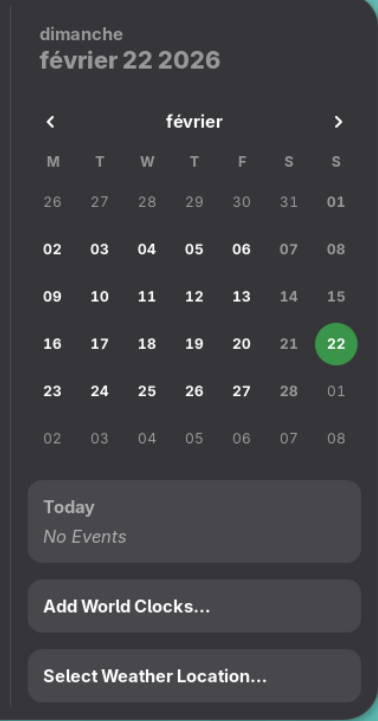
If you want the UI in English but days/month names in French, you need to explicitly set LC_TIME.
I’m not a Gnome user, but it might be sufficient to add export LC_TIME=fr_FR.UTF-8 to ~/.profile, save and then logout and back in.
Otherwise via Gnome Settings → System → Region & Language → Formats → France
(If that does not change LC_TIME, something is overriding it (often a previously set system locale via localectl.)
Nothing has changed. In Fedora 43, I only changed the settings in Gnome and everything was fine, but here it’s not (
Here is Fedora.
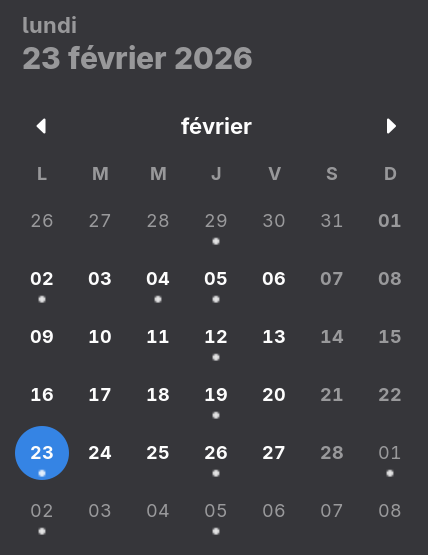
Try creating a new user, see if the issue exists for that user.
Nothing changes (
A couple of suggestions:
Make a system-wide change with…
sudo localectl set-locale LC_TIME=fr_FR.UTF-8
or a user-specific approach…
echo "LC_TIME=fr_FR.UTF-8" > ~/.config/locale.conf
Log out and back in again. Any different?
1 Like
No changes (
Ok, let’s see what fellow Gnome users can advise here.
1 Like
YaST → Software Management.
View → Languages.
Add French
Accept
The specific package needed to solve the problem in the OP is gnome-shell-lang
The “French Language” in YaST2-Software installs many more packages (205 in my system) to cover all other applications installed.
To cover the whole Gnome Desktop, but not necessarily all other applications, you may install the 30 or so gnome-***-lang packages.
1 Like
Thanks for the tip
I missed the fat that you were missing the French language support packages.  (Should have checked that first.)
1 Like
This topic was automatically closed 7 days after the last reply. New replies are no longer allowed.