Getting a dconf-warning when starting virt-manager

To avoid errors in my W11 VM guest when a USB device was inserted, I learned that I needed to start virt-manager this way:

su -l -c virt-manager

This indeed removed that USB error.

However, now when I start virt-manager (not the VM) I get 4 times this warning:

(virt-manager:11512): dconf-WARNING **: 12:01:07.781: failed to commit changes to dconf: Error spawning command line “dbus-launch --autolaunch=ef0ae0b0f1a04369a969d71f17bf1b3e --binary-syntax --close-stderr”: Child process exited with code 1

Already having done quite a lot of searching, I could not find why this is, and what to do about it.

Any ideas? Thx in advance!

@XAvW Hi, so is your user a member of the libvirt group?

In Yast users and groups I only see 2 groups: user and root.
How to check if I’m in group libvirt?

Use the correct filter. It is a dropdown menu. Use system users/groups as filter.

Or use following command in a terminal (replace USERNAME with your actual username).

groups USERNAME

My user is indeed a member og group libvirt.
Any other suggestions (and thx so far).

@XAvW and if you start virt-manager as your user, connect and start the machine? Also what happens is you use (as root user) virsh to start the virtual machine and connect to it as your user via virt-viewer?
In that case the earlier errors are gone.
However, now I get this warning:

(virt-manager:34349): GSpice-WARNING **: 14:30:59.481: Warning no automount-inhibiting implementation available in the terminal

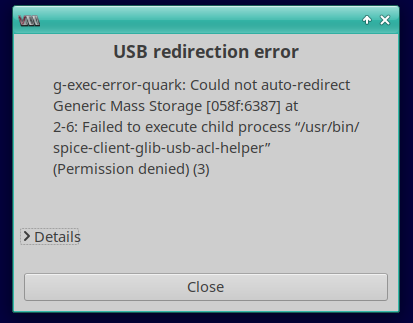
and also I get this error when inserting a USB stick:

which I hadn’t before this change.

Any ideas on this?
I guess the latter error is worse that the dbus issues?

Thx!

@XAvW are you running SELinux?

Sorry, how do I check that??

> sestatus
SELinux status:                 enabled
SELinuxfs mount:                /sys/fs/selinux
SELinux root directory:         /etc/selinux
Loaded policy name:             targeted
Current mode:                   enforcing
Mode from config file:          enforcing
Policy MLS status:              enabled
Policy deny_unknown status:     allowed
Memory protection checking:     actual (secure)
Max kernel policy version:      34

@XAvW So if you have a read here https://en.opensuse.org/Portal:SELinux and look at https://en.opensuse.org/Portal:SELinux/Troubleshooting to see if there is any information on possible SELinux errors/warnings etc.

Could be 1249581 – Ownership changed on /etc/polkit-1/rules.d after upgrade

That is easily testable as the fix for that is in snapshot 20250917.

This topic was automatically closed 30 days after the last reply. New replies are no longer allowed.