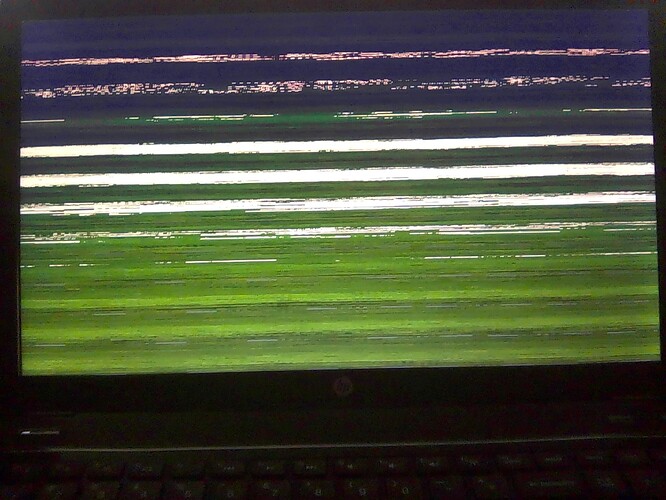
Hi, I have a HP g6 laptop. When resuming from suspend it’s exhibiting problematic results as the display is garbled and switching between TTY2,TTY3,TTY4 (not necessarily in that order). This is required to achieve a usable SDDM login Display Manager. Sometimes these steps are unable to grab (from any TTY), a usable SDDM login screen. Must then close laptop lid… let machine suspend and open lid, and then reattempt the process described above.
Once able to grab a usable SDDM window, SDDM will then have a different background, (the desktop background). Not the set background initially displayed when machine is initially booted to SDDM.
Passing # systemctl restart sddm.service seems to help greatly, correct SDDM background is then also displayed. After then switching around TTY’s.
This occurs with X11 and Wayland.
# kinfo
Operating System: openSUSE Tumbleweed 20251127
KDE Plasma Version: 6.5.3
KDE Frameworks Version: 6.20.0
Qt Version: 6.10.1
Kernel Version: 6.17.9-10.g09c7f51-default (64-bit)
Graphics Platform: X11
Processors: 2 × AMD A6-4400M APU with Radeon(tm) HD Graphics
Memory: 8 GiB of RAM (7.2 GiB usable)
Graphics Processor: llvmpipe
HP-Pavilion-g6:~ #
# journalctl -b | grep "error\|warn\|fail"
Full log result from above > openSUSE Paste
# inxi -GSaz --za
System:
  Kernel: 6.17.9-10.g09c7f51-default arch: x86_64 bits: 64 compiler: gcc
    v: 15.2.1 clocksource: tsc avail: hpet,acpi_pm
    parameters: BOOT_IMAGE=/boot/vmlinuz-6.17.9-10.g09c7f51-default
    root=/dev/mapper/system-root resume=/dev/system/swap
    root=/dev/mapper/system-root splash=0 plymouth.enable=0 libata.noacpi=1
    security=selinux selinux=1 amdgpu.dc=0 amd_iommu=on mitigations=auto
  Desktop: KDE Plasma v: 6.5.3 tk: Qt v: N/A wm: kwin_wayland tools:
    avail: xscreensaver dm: SDDM Distro: openSUSE Tumbleweed 20251127
Graphics:
  Device-1: Advanced Micro Devices [AMD/ATI] Trinity 2 [Radeon HD 7520G]
    vendor: Hewlett-Packard driver: radeon v: kernel alternate: amdgpu
    arch: TeraScale-3 code: Northern Islands process: TSMC 32nm built: 2010-13
    ports: active: LVDS-1 empty: HDMI-A-1,VGA-1 bus-ID: 00:01.0
    chip-ID: 1002:9990 class-ID: 0300
  Device-2: Realtek HP Truevision HD driver: uvcvideo type: USB rev: 2.0
    speed: 480 Mb/s lanes: 1 mode: 2.0 bus-ID: 1-3:3 chip-ID: 0bda:58de
    class-ID: 0e02 serial: <filter>
  Display: unspecified server: X.org v: 1.21.1.21 with: Xwayland v: 24.1.8
    compositor: kwin_wayland driver: X: loaded: modesetting unloaded: vesa
    alternate: fbdev dri: r600 gpu: radeon display-ID: :1 screens: 1
  Screen-1: 0 s-res: 1366x768 s-dpi: 96 s-size: 361x203mm (14.21x7.99")
    s-diag: 414mm (16.31")
  Monitor-1: LVDS-1 model: LG Display 0x0384 built: 2012 res: mode: 1366x768
    hz: 60 scale: 100% (1) dpi: 101 gamma: 1.2 size: 344x194mm (13.54x7.64")
    diag: 395mm (15.5") ratio: 16:9 modes: 1366x768
  API: EGL v: 1.5 hw: drv: amd r600 platforms: device: 0 drv: r600 device: 1
    drv: swrast gbm: drv: r600 surfaceless: drv: r600 x11: drv: r600
    inactive: wayland
  API: OpenGL v: 4.6 compat-v: 4.5 vendor: mesa v: 25.3.0 glx-v: 1.4
    direct-render: yes renderer: AMD ARUBA (DRM 2.51.0 /
    6.17.9-10.g09c7f51-default LLVM 21.1.5) device-ID: 1002:9990
    memory: 500 MiB unified: no
  API: Vulkan v: 1.4.328 layers: 1 device: 0 type: cpu name: llvmpipe (LLVM
    21.1.5 256 bits) driver: mesa llvmpipe v: 25.3.0 (LLVM 21.1.5)
    device-ID: 10005:0000 surfaces: N/A
  Info: Tools: api: eglinfo, glxinfo, vulkaninfo
    de: kscreen-console,kscreen-doctor gpu: amdgpu_top wl: wayland-info
    x11: xdriinfo, xdpyinfo, xprop, xrandr
HP-Pavilion-g6:~ #
What is causing this issue?
