Firefox resolves some domains as local ips

Using ff 145.0 from mozilla repo.
Some domains resolve to a local ip.
My computer is 192.168.2.3
I have bind on 192.168.2.5 (my local server) running. It resolves OK, both local domain names

> dig mydomain.com.es

; <<>> DiG 9.18.33 <<>> samara.com.es
;; global options: +cmd
;; Got answer:
;; ->>HEADER<<- opcode: QUERY, status: NOERROR, id: 14369
;; flags: qr aa rd ra; QUERY: 1, ANSWER: 1, AUTHORITY: 0, ADDITIONAL: 1

;; OPT PSEUDOSECTION:
; EDNS: version: 0, flags:; udp: 1232
; COOKIE: 728013dd07adcb7801000000691d996736715611b8fc49c5 (good)
;; QUESTION SECTION:
;mydomain.com.es.                 IN      A

;; ANSWER SECTION:
mydomain.com.es.          86400   IN      A       192.168.2.5

;; Query time: 4 msec
;; SERVER: 192.168.2.5#53(192.168.2.5) (UDP)
;; WHEN: Wed Nov 19 11:18:15 CET 2025
;; MSG SIZE  rcvd: 86

and external domain names

> dig google.com

; <<>> DiG 9.18.33 <<>> google.com
;; global options: +cmd
;; Got answer:
;; ->>HEADER<<- opcode: QUERY, status: NOERROR, id: 40397
;; flags: qr rd ra; QUERY: 1, ANSWER: 1, AUTHORITY: 0, ADDITIONAL: 1

;; OPT PSEUDOSECTION:
; EDNS: version: 0, flags:; udp: 1232
; COOKIE: 700f08076b39052601000000691d99b3c950382e9e22f3d2 (good)
;; QUESTION SECTION:
;google.com.                    IN      A

;; ANSWER SECTION:
google.com.             172     IN      A       142.250.200.142

;; Query time: 4 msec
;; SERVER: 192.168.2.5#53(192.168.2.5) (UDP)
;; WHEN: Wed Nov 19 11:19:31 CET 2025
;; MSG SIZE  rcvd: 83

resolv.conf in my 192.168.2.3 is

search mydomain.com.es
nameserver 192.168.2.5
nameserver 192.168.2.1

mydomain.com.es is really registered and accesible from outside, but resolved locally by bind to access to my server from inside

up to this point all seems OK.
I go in firefox to about:networking#dnslookuptool
and

ok, i can connect to google

form most domain names it return the ip but says HTTPS RRs
NS_ERROR_UNKNOWN_HOST … i don’t know if it is an error or bot, but indeed the browser works and the page is displayed
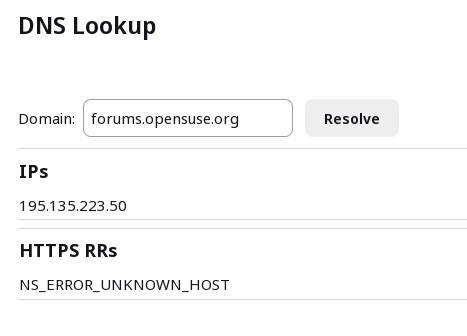
But for some it returns a local ip… the locla ip of my server and i can’t know why, because the resolver resolves ok and i can’t fian any difference in firefox, here two external domain, one resolves ok, the second resolves to 192.168.2.5

> dig flow.polar.com

; <<>> DiG 9.18.33 <<>> flow.polar.com
;; global options: +cmd
;; Got answer:
;; ->>HEADER<<- opcode: QUERY, status: NOERROR, id: 44979
;; flags: qr rd ra; QUERY: 1, ANSWER: 4, AUTHORITY: 0, ADDITIONAL: 1

;; OPT PSEUDOSECTION:
; EDNS: version: 0, flags:; udp: 1232
; COOKIE: ddda4846b4fb1a2201000000691d9c414906002c91bb8fb7 (good)
;; QUESTION SECTION:
;flow.polar.com.                        IN      A

;; ANSWER SECTION:
flow.polar.com.         23      IN      A       3.160.237.56
flow.polar.com.         23      IN      A       3.160.237.118
flow.polar.com.         23      IN      A       3.160.237.42
flow.polar.com.         23      IN      A       3.160.237.75

;; Query time: 0 msec
;; SERVER: 192.168.2.5#53(192.168.2.5) (UDP)
;; WHEN: Wed Nov 19 11:30:25 CET 2025
;; MSG SIZE  rcvd: 135

in firefox

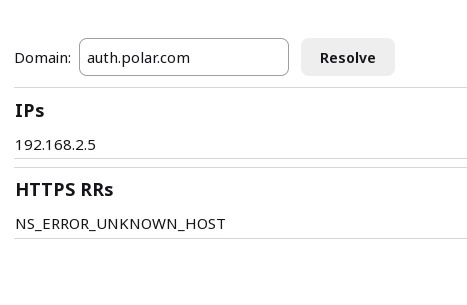
and this resolv ok, from nslookup but to 192.168.2.5 in firefox

> dig auth.polar.com

; <<>> DiG 9.18.33 <<>> auth.polar.com
;; global options: +cmd
;; Got answer:
;; ->>HEADER<<- opcode: QUERY, status: NOERROR, id: 18393
;; flags: qr rd ra; QUERY: 1, ANSWER: 4, AUTHORITY: 0, ADDITIONAL: 1

;; OPT PSEUDOSECTION:
; EDNS: version: 0, flags:; udp: 1232
; COOKIE: 12986ac0dd3033e401000000691d9ca63933e7598ce86552 (good)
;; QUESTION SECTION:
;auth.polar.com.                        IN      A

;; ANSWER SECTION:
auth.polar.com.         60      IN      A       18.154.29.13
auth.polar.com.         60      IN      A       18.154.29.36
auth.polar.com.         60      IN      A       18.154.29.128
auth.polar.com.         60      IN      A       18.154.29.70

;; Query time: 60 msec
;; SERVER: 192.168.2.5#53(192.168.2.5) (UDP)
;; WHEN: Wed Nov 19 11:32:06 CET 2025
;; MSG SIZE  rcvd: 135
running
tcpdump -i any -n port 53
from y 192.168.2.3 PC and running dns lookup from firefox

dns lookup for flow.polar.com (which resolves ok)

11:39:05.803216 eth0  Out IP 192.168.2.3.49449 > 192.168.2.5.53: 23470+ Type65? flow.polar.com. (32)
11:39:05.803986 eth0  In  IP 192.168.2.5.53 > 192.168.2.3.49449: 23470 0/1/0 (116)

dns lookup for auth.polar.com (which resolves to 192.168.2.5)

11:39:17.811936 eth0  Out IP 192.168.2.3.58167 > 192.168.2.5.53: 39775+ Type65? auth.polar.com. (32)
11:39:17.812699 eth0  In  IP 192.168.2.5.53 > 192.168.2.3.58167: 39775 0/1/0 (117)

i can’t see the difference, but in the firefox cache

Hostname 	Family 	TRR 	Addresses 	Expires (Seconds) 	Isolation Key 	Extra flags

auth.polar.com	ipv4	false	192.168.2.5  	648		                  0|0x2|2|0|
flow.polar.com	ipv4	false	3.160.237.118
3.160.237.56
3.160.237.42
3.160.237.75 	                                636		                  0|0x2|2|0|

why?

Maybe the issue is a bug? I think it has happened before and stop happening.

You need to look at the actual packet content.

you mean this?

tcpdump -vvv -s0 -n -i eth0 port 53

I deleted dns cache in firefox and then make a dns lookup to

flow.polar.com

   16:31:12.709452 IP (tos 0x0, ttl 64, id 30931, offset 0, flags [DF], proto UDP (17), length 60)
   192.168.2.3.32896 > 192.168.2.5.53: [bad udp cksum 0x8592 -> 0x08fa!] 59443+ Type65? flow.polar.com. (32)
16:31:12.710248 IP (tos 0x0, ttl 64, id 12629, offset 0, flags [none], proto UDP (17), length 144)
   192.168.2.5.53 > 192.168.2.3.32896: [udp sum ok] 59443 q: Type65? flow.polar.com. 0/1/0 ns: flow.polar.com. [4m47s] SOA ns-900.awsdns-48.net. awsdns-hostmaster.amazon.com. 1 7200 900 1209600 86400 (116)

and then to auth.polar.com

16:31:37.997935 IP (tos 0x0, ttl 64, id 61175, offset 0, flags [DF], proto UDP (17), length 60)
  192.168.2.3.35145 > 192.168.2.5.53: [bad udp cksum 0x8592 -> 0x3b81!] 45795+ Type65? auth.polar.com. (32)
16:31:37.998815 IP (tos 0x0, ttl 64, id 17233, offset 0, flags [none], proto UDP (17), length 145)
  192.168.2.5.53 > 192.168.2.3.35145: [udp sum ok] 45795 q: Type65? auth.polar.com. 0/1/0 ns: auth.polar.com. [7m1s] SOA ns-1085.awsdns-07.org. awsdns-hostmaster.amazon.com. 1 7200 900 1209600 86400 (117)
  

Still can’t see why firefox resolves ok the fist one and bad the second one

No, I do not. I meant the full content.

This is a capture of

tcpdump -s0 -w dns-full.pcap -i eth0 port 53

decoded by whireshark

Screenshot_20251119_233121

but, but, but… now it resolves ok what before it didn’t … and i have changed nothing.
And I think it has happened before: firefox resolving bad some domains and some time after it resolves them ok.

I have had some more errors outside firefox, exactly in nextcloud client, and with a different domain name than the previous, it seem aleatory, it appears just somethimes, but the only common thing I can find in the differenta cases is taht a tcpdum of the request show A? in the query for the valid responses and Type65? in the query for the bad responses

So it seems some problem of my named. It seems not to process well Type 65 requests … sometimes.

The named is in a opensuse 15.6 server and is BIND 9.18.33 (Extended Support Version)

… I keep researching …

Well, I have some more things to add but indeed I don’t ave the answers to why this is happening. This is a briefing

  • The problem involves a type 65 dns query from my client to my bind 9.18.33-150600.3.18.1 server, both in opensuse 15.6, in different computers
  • It happens for some domains (for instance but not only auth.polar.com) but not always.
  • When te problem arise the only thing I have found that solves it is rebooting the computer (the client, not the dns server). It happens again some days after (y use not to power off the computer but suspend it when not using)
  • So far I have found the problem in nextcloud-desktop (client: 3.13.4-lp156.150.1) and in MozillaFirefox (145.0-lp156.2.1).
  • Normal dns querys always work, this is an example when querying the server from nslookup asking for auth.polar.com
# tcpdump -vvv -s0 -n -i any port 53
tcpdump: data link type LINUX_SLL2
tcpdump: listening on any, link-type LINUX_SLL2 (Linux cooked v2), snapshot length 262144 bytes
17:44:30.873657 eth0  Out IP (tos 0x0, ttl 64, id 33128, offset 0, flags [DF], proto UDP (17), length 60)
    192.168.2.3.35151 > 192.168.2.5.53: [bad udp cksum 0x8592 -> 0x76d8!] 30662+ A? auth.polar.com. (32)
17:44:30.873678 eth0  Out IP (tos 0x0, ttl 64, id 33129, offset 0, flags [DF], proto UDP (17), length 60)
    192.168.2.3.35151 > 192.168.2.5.53: [bad udp cksum 0x8592 -> 0x56c1!] 38850+ AAAA? auth.polar.com. (32)
17:44:30.874864 eth0  In  IP (tos 0x0, ttl 64, id 1237, offset 0, flags [none], proto UDP (17), length 145)
    192.168.2.5.53 > 192.168.2.3.35151: [udp sum ok] 38850 q: AAAA? auth.polar.com. 0/1/0 ns: auth.polar.com. [13m45s] SOA ns-1085.awsdns-07.org. awsdns-hostmaster.amazon.com. 1 7200 900 1209600 86400 (117)
17:44:30.921254 eth0  In  IP (tos 0x0, ttl 64, id 1240, offset 0, flags [none], proto UDP (17), length 124)
    192.168.2.5.53 > 192.168.2.3.35151: [udp sum ok] 30662 q: A? auth.polar.com. 4/0/0 auth.polar.com. [1m] A 18.154.29.128, auth.polar.com. [1m] A 18.154.29.70, auth.polar.com. [1m] A 18.154.29.13, auth.polar.com. [1m] A 18.154.29.36 (96)
17:44:31.921285 eth0  Out IP (tos 0x0, ttl 64, id 50201, offset 0, flags [none], proto UDP (17), length 83)
    192.168.2.3.58803 > 192.168.2.5.53: [bad udp cksum 0x85a9 -> 0x1da3!] 26689+ [1au] A? auth.polar.com. ar: . OPT UDPsize=1232 [COOKIE 20b61b1d8c4e39d3] (55)
17:44:31.922217 eth0  In  IP (tos 0x0, ttl 64, id 1278, offset 0, flags [none], proto UDP (17), length 163)
    192.168.2.5.53 > 192.168.2.3.58803: [udp sum ok] 26689 q: A? auth.polar.com. 4/0/1 auth.polar.com. [59s] A 18.154.29.36, auth.polar.com. [59s] A 18.154.29.70, auth.polar.com. [59s] A 18.154.29.13, auth.polar.com. [59s] A 18.154.29.128 ar: . OPT UDPsize=1232 [COOKIE 20b61b1d8c4e39d3 0100000069248b6f46725f0be3be01d7] (135)
  • Querys from dns lookup in firefox sometimes work, here are two querys, the first one after clearing the DNS cache of firefox, the second with the dns record already cached
17:51:25.732171 eth0  Out IP (tos 0x0, ttl 64, id 23542, offset 0, flags [DF], proto UDP (17), length 60)
    192.168.2.3.60847 > 192.168.2.5.53: [bad udp cksum 0x8592 -> 0xa673!] 58250+ Type65? auth.polar.com. (32)
17:51:25.732233 eth0  Out IP (tos 0x0, ttl 64, id 59619, offset 0, flags [DF], proto UDP (17), length 60)
    192.168.2.3.34126 > 192.168.2.5.53: [bad udp cksum 0x8592 -> 0x7c6b!] 30260+ A? auth.polar.com. (32)
17:51:25.732239 eth0  Out IP (tos 0x0, ttl 64, id 59620, offset 0, flags [DF], proto UDP (17), length 60)
    192.168.2.3.34126 > 192.168.2.5.53: [bad udp cksum 0x8592 -> 0x164f!] 56373+ AAAA? auth.polar.com. (32)
17:51:25.733016 eth0  In  IP (tos 0x0, ttl 64, id 57466, offset 0, flags [none], proto UDP (17), length 145)
    192.168.2.5.53 > 192.168.2.3.60847: [udp sum ok] 58250 q: Type65? auth.polar.com. 0/1/0 ns: auth.polar.com. [13m28s] SOA ns-1085.awsdns-07.org. awsdns-hostmaster.amazon.com. 1 7200 900 1209600 86400 (117)
17:51:25.733299 eth0  In  IP (tos 0x0, ttl 64, id 57467, offset 0, flags [none], proto UDP (17), length 145)
    192.168.2.5.53 > 192.168.2.3.34126: [udp sum ok] 56373 q: AAAA? auth.polar.com. 0/1/0 ns: auth.polar.com. [6m50s] SOA ns-1085.awsdns-07.org. awsdns-hostmaster.amazon.com. 1 7200 900 1209600 86400 (117)
17:51:25.774340 eth0  In  IP (tos 0x0, ttl 64, id 57477, offset 0, flags [none], proto UDP (17), length 124)
    192.168.2.5.53 > 192.168.2.3.34126: [udp sum ok] 30260 q: A? auth.polar.com. 4/0/0 auth.polar.com. [1m] A 18.154.29.13, auth.polar.com. [1m] A 18.154.29.128, auth.polar.com. [1m] A 18.154.29.36, auth.polar.com. [1m] A


17:49:53.515396 eth0  Out IP (tos 0x0, ttl 64, id 13262, offset 0, flags [DF], proto UDP (17), length 60)
    192.168.2.3.54412 > 192.168.2.5.53: [bad udp cksum 0x8592 -> 0x3c6b!] 26294+ Type65? auth.polar.com. (32)
17:49:53.565278 eth0  In  IP (tos 0x0, ttl 64, id 45441, offset 0, flags [none], proto UDP (17), length 145)
    192.168.2.5.53 > 192.168.2.3.54412: [udp sum ok] 26294 q: Type65? auth.polar.com. 0/1/0 ns: auth.polar.com. [15m] SOA ns-1085.awsdns-07.org. awsdns-hostmaster.amazon.com. 1 7200 900 1209600 86400 (117)

In both cases the firefox dns lookup returns

18.154.29.36
18.154.29.128
18.154.29.13
18.154.29.70
HTTPS RRs NS_ERROR_UNKNOWN_HOST

but when it is failing it also logs

17:49:53.515396 eth0  Out IP (tos 0x0, ttl 64, id 13262, offset 0, flags [DF], proto UDP (17), length 60)
    192.168.2.3.54412 > 192.168.2.5.53: [bad udp cksum 0x8592 -> 0x3c6b!] 26294+ Type65? auth.polar.com. (32)
17:49:53.565278 eth0  In  IP (tos 0x0, ttl 64, id 45441, offset 0, flags [none], proto UDP (17), length 145)
    192.168.2.5.53 > 192.168.2.3.54412: [udp sum ok] 26294 q: Type65? auth.polar.com. 0/1/0 ns: auth.polar.com. [15m] SOA ns-1085.awsdns-07.org. awsdns-hostmaster.amazon.com. 1 7200 900 1209600 86400 (117)

but then it returns

192.168.2.5
HTTPS RRs NS_ERROR_UNKNOWN_HOST

I have found that there is a way when the problem appear to solve it other than rebooting the computer.

#systemctl restart nscd

in the pc acting as client (no need to reset the dns server in the server) solves the problem for both firefox and nextcloud-desktop client.

so the conclusion is that it a problem of the Name Service Cache Daemon in the client that, for some reason, breaks with some (but not all) type 65 querys, obtain a bad IP for this domains … and keep it forever … i don’t know why because

# nscd -g
nscd configuration:

              0  server debug level
  1d 12h 13m 40s  server runtime
             19  current number of threads
             32  maximum number of threads
             14  number of times clients had to wait
             no  paranoia mode enabled
           3600  restart internal
              5  reload count

passwd cache:

            yes  cache is enabled
            yes  cache is persistent
            yes  cache is shared
            211  suggested size
         216064  total data pool size
           1144  used data pool size
            600  seconds time to live for positive entries
             20  seconds time to live for negative entries
         201002  cache hits on positive entries
              0  cache hits on negative entries
          45578  cache misses on positive entries
           5359  cache misses on negative entries
             79% cache hit rate
             12  current number of cached values
            153  maximum number of cached values
              5  maximum chain length searched
              0  number of delays on rdlock
              0  number of delays on wrlock
              0  memory allocations failed
            yes  check /etc/passwd for changes

group cache:

            yes  cache is enabled
            yes  cache is persistent
            yes  cache is shared
            211  suggested size
         216064  total data pool size
           1224  used data pool size
           3600  seconds time to live for positive entries
             60  seconds time to live for negative entries
         361877  cache hits on positive entries
           9074  cache hits on negative entries
          24053  cache misses on positive entries
          40892  cache misses on negative entries
             85% cache hit rate
             15  current number of cached values
            107  maximum number of cached values
              5  maximum chain length searched
              0  number of delays on rdlock
              0  number of delays on wrlock
              0  memory allocations failed
            yes  check /etc/group for changes

hosts cache:

            yes  cache is enabled
             no  cache is persistent
            yes  cache is shared
            211  suggested size
         216064  total data pool size
          14504  used data pool size
            600  seconds time to live for positive entries
              0  seconds time to live for negative entries
              0  cache hits on positive entries
              0  cache hits on negative entries
           3622  cache misses on positive entries
              0  cache misses on negative entries
              0% cache hit rate
             98  current number of cached values
            236  maximum number of cached values
              4  maximum chain length searched
              0  number of delays on rdlock
              0  number of delays on wrlock
              0  memory allocations failed
            yes  check /etc/hosts for changes

nscd reports a TTL for hosts entries os 10 minutes … I understand that if it caches a bad ip it should last 10 minutes, not forever.

Anyway, I see two options to solve it

  1. Let it as it is now nd when there is a problem clear nscd cache manually
  2. Disable nscd and use always the dns resolver in my server.

It’s generally disabled by default these days. The latency saved by a local cache is less significant on fast, reliable networks, and using it has the potential for introducing stale local cache entries.

Before you search a ghost, disable DoH (DNS over HTTPS) in Firefox:

DNS over HTTPS:=Off

You should see A (IPv4) and AAAA (IPv6) DNS record types in Wireshark. Not HTTPS DNS record type (65)!

Check SNI and Encrypted Client Hello (ECH):

I had already done this but didn’t work, it is definitely a nscd problem.