I have already gone through all the troubleshooting suggested in there (already had before even finding that post) and, although a downgrade of Mesa to the latest found in Packman and a zypper update for everything else + reboot initially helped (no crash for ~24 hours) it’s now playing up again. The Mesa build that I had installed has been removed from Packman, latest available was same version but different build number – I’m currently on 23.3.4-150600.83.8.pm.2.
The telltale sign are these:
Exiting due to channel error.
Exiting due to channel error.
Exiting due to channel error.
Exiting due to channel error.
Exiting due to channel error.
Terminated
Sorry can’t give more details atm as I’m typing this on the faulty Firefox and it lasts for about five minutes before it just dies.
Almost nobody needs Mesa from Packman today. Unless you are one of the few people with ancient AMD graphics and needing hardware decoding for videos switch to the OSS version of Mesa and dependent packages and try again.
BTW, no problems with Firefox here, but Intel+Nvidia if that matters.
I came to that conclusion yesterday but I can’t remember the details right now. I believe the Exiting due to channel error. is being produced by Plasma not Firefox (again, not sure how I came to that conclusion).
I remember now. Because of the ATTENTION: default value of option mesa_glthread overridden by environment. Though that might be a red herring
I have also now tried downgrading all the way to 115.10.0esr, to no avail.
Any suggestions as to how I could still run Plasma (which I need to be productive because of heavy shortcuts customisation, etc.) but with as much fancy video stuff disabled as practical?
However, and I may have missed what you’re running … have you installed / and are using the RPM downloaded from Mozilla?
I occasionally read (out here) about folks who can’t watch videos, or FF crashes, etc. So, I do a quick test … never have an issue with FF … playing videos, no crashes, etc. But I will admit, I never use FF, except to test when other folks have issues. (I only use Brave primarily, and Chrome for personal stuff).
Here, I have the default FF install via openSUSE:
Installed Version: 140.1.0-150200.152.193.1, or as reported via “About” box in FF: 140.1.0esr. My GUI environment is Plasma / X11.
If you are using FF via downloaded-native Mozilla RPM, might be a good idea to post at Mozilla forums.
# zypper search -si mesa
Reading installed packages...

S  | Name                      | Type    | Version              | Arch   | Repository
---+---------------------------+---------+----------------------+--------+-------------------------------------------------------------
i  | Mesa                      | package | 23.3.4-150600.83.3.1 | x86_64 | Update repository with updates from SUSE Linux Enterprise 15
i  | Mesa-demo-x               | package | 8.3.0-150000.3.6.1   | x86_64 | Update repository with updates from SUSE Linux Enterprise 15
i  | Mesa-dri                  | package | 23.3.4-150600.83.3.1 | x86_64 | Update repository with updates from SUSE Linux Enterprise 15
i  | Mesa-gallium              | package | 23.3.4-150600.83.3.1 | x86_64 | Update repository with updates from SUSE Linux Enterprise 15
i  | Mesa-libEGL1              | package | 23.3.4-150600.83.3.1 | x86_64 | Update repository with updates from SUSE Linux Enterprise 15
i  | Mesa-libGL1               | package | 23.3.4-150600.83.3.1 | x86_64 | Update repository with updates from SUSE Linux Enterprise 15
i  | Mesa-libglapi0            | package | 23.3.4-150600.83.3.1 | x86_64 | Update repository with updates from SUSE Linux Enterprise 15
i  | Mesa-libva                | package | 23.3.4-150600.83.3.1 | x86_64 | Update repository with updates from SUSE Linux Enterprise 15
i+ | Mesa-vulkan-device-select | package | 23.3.4-150600.83.3.1 | x86_64 | Update repository with updates from SUSE Linux Enterprise 15
#
# zypper search -si mesa
S  | Name                      | Type    | Version              | Arch   | Repository
---+---------------------------+---------+----------------------+--------+-------------------------------------------------------------
i+ | Mesa                      | package | 23.3.4-150600.83.3.1 | x86_64 | Update repository with updates from SUSE Linux Enterprise 15
i+ | Mesa-demo-x               | package | 8.3.0-150000.3.6.1   | x86_64 | Update repository with updates from SUSE Linux Enterprise 15
i+ | Mesa-dri                  | package | 23.3.4-150600.83.3.1 | x86_64 | Update repository with updates from SUSE Linux Enterprise 15
i+ | Mesa-gallium              | package | 23.3.4-150600.83.3.1 | x86_64 | Update repository with updates from SUSE Linux Enterprise 15
i+ | Mesa-KHR-devel            | package | 23.3.4-150600.83.3.1 | x86_64 | Update repository with updates from SUSE Linux Enterprise 15
i+ | Mesa-libEGL-devel         | package | 23.3.4-150600.83.3.1 | x86_64 | Update repository with updates from SUSE Linux Enterprise 15
i+ | Mesa-libEGL1              | package | 23.3.4-150600.83.3.1 | x86_64 | Update repository with updates from SUSE Linux Enterprise 15
i+ | Mesa-libGL-devel          | package | 23.3.4-150600.83.3.1 | x86_64 | Update repository with updates from SUSE Linux Enterprise 15
i+ | Mesa-libGL1               | package | 23.3.4-150600.83.3.1 | x86_64 | Update repository with updates from SUSE Linux Enterprise 15
i+ | Mesa-libglapi0            | package | 23.3.4-150600.83.3.1 | x86_64 | Update repository with updates from SUSE Linux Enterprise 15
i+ | Mesa-libva                | package | 23.3.4-150600.83.3.1 | x86_64 | Update repository with updates from SUSE Linux Enterprise 15
i+ | Mesa-vulkan-device-select | package | 23.3.4-150600.83.3.1 | x86_64 | Update repository with updates from SUSE Linux Enterprise 15
Starting to suspect duff video hardware. I didn’t think to mention earlier, but for the last two weeks kwin does lock up badly every couple days or so, to the point that it only responds to kill 9.
Still, doesn’t explain why, if I run a Firefox from a different computer on the bad one (ssh -Y otherhost firefox) it works fine. The next obvious try is to do it the other way around, except that for some reason /tmp/.X11-unix/X0 does not exist on the “working” host so I can’t open remote applications over ssh on it (that’s a different issue altogether though).
Ok, good news. It’s not the graphics card / drivers. I’ve managed to open the faulty Firefox remotely (i.e., on an X server on a different computer) and it crashed fairly promptly.
My current test is I’ve asked a different user to log into his account on the computer having the problem and open Firefox, see if that crashes. If it doesn’t it would suggest something with my user directory (it’s not the Firefox profile, I’ve tried a bunch of them).
So, I’m now at my desktop machine, just did a “zypper up” and rebooted… to test here (haven’t logged in here for a couple of weeks).
I’ve run the “inxi” and “zypper … mesa” commands, which are shown at bottom.
Anyway, running FF (standard openSUSE release) here no issue. Same version as on my laptop (I ran test earlier), plus I’m also running Plasma / X11 here on Leap 15.6. But the hardware is different (AMD Ryzen processor and AMD Radeon graphics).
I have a good understanding of Chrome-based browsers (but not FF ) and there is an occasional issue where the Chrome-based browser can crash or simply won’t work (mostly happens on TW, rarely seen it on Leap). And it’s not targeted at openSUSE … folks running other distros have the issue.
There is a sub-component of Chrome that utilitzes what’s called a “GPUCache”. If it become corrupted, you simply delete the GPUCache sub-dir content. However, FF does not have it … it may use a similar facility, but I’m no FF techie. Heck, look at the output below (GPUCache search outoput) … even Marble uses GPUCache.
.
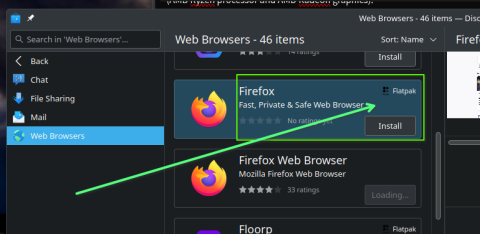
Okay, I have one other suggestion, before I hit Reply. If you fire up Discover … you will find there is a Flatpak packaged version of FF. You might install that and test. It can run completely independent of the low-level install of FF (screenshot of FF Flatpak in Discover) … it creates it’s own “user profile” located elsewhere):
# zypper search -si mesa
Loading repository data...
Reading installed packages...

S  | Name                      | Type    | Version              | Arch   | Repository
---+---------------------------+---------+----------------------+--------+-------------------------------------------------------------
i  | Mesa                      | package | 23.3.4-150600.83.3.1 | x86_64 | Update repository with updates from SUSE Linux Enterprise 15
i  | Mesa-demo-x               | package | 8.3.0-150000.3.6.1   | x86_64 | Update repository with updates from SUSE Linux Enterprise 15
i  | Mesa-dri                  | package | 23.3.4-150600.83.3.1 | x86_64 | Update repository with updates from SUSE Linux Enterprise 15
i  | Mesa-gallium              | package | 23.3.4-150600.83.3.1 | x86_64 | Update repository with updates from SUSE Linux Enterprise 15
i  | Mesa-libEGL1              | package | 23.3.4-150600.83.3.1 | x86_64 | Update repository with updates from SUSE Linux Enterprise 15
i  | Mesa-libGL1               | package | 23.3.4-150600.83.3.1 | x86_64 | Update repository with updates from SUSE Linux Enterprise 15
i  | Mesa-libglapi0            | package | 23.3.4-150600.83.3.1 | x86_64 | Update repository with updates from SUSE Linux Enterprise 15
i  | Mesa-libva                | package | 23.3.4-150600.83.3.1 | x86_64 | Update repository with updates from SUSE Linux Enterprise 15
i+ | Mesa-vulkan-device-select | package | 23.3.4-150600.83.3.1 | x86_64 | Update repository with updates from SUSE Linux Enterprise 15
#
As @myswtest suggested, you should try installing the Firefox Flatpak first with a clean profile, and depending on results, ad your current user profile to the Flatpak directory and see what happens.
In addition to the other ideas presented on this thread …
I believe that the channel error message usually indicates a GPU process crash in Firefox’s multi-process (e10s) model, could relate to:
WebRender or GPU acceleration issues
Sandboxing failures (ie firefox failing to properly implement some security aspects)
Driver or Mesa bugs
Firefox bugs, such as with Mesa + AMDGPU
However - the fact that the crash happens even on remote X suggests it’s not purely rendering-related, but I speculate it could still be sandbox or GPU-process related.
Also, Plasma 6.1 is a relatively recent update, and perhaps you have a newer Mesa, Qt, or system libraries — any of which could potentially break Firefox GPU interaction.
My understanding is ‘safe-mode’ (which you tried) does not disable GPU acceleration in Firefox.
Have you tried to disable GPU Acceleration in Firefox? (since this could be GPU related)? To do this, try launching Firefox with acceleration disabled:
If given a choice of profiles, select ‘default’ (I am guessing here - you may not be given such a choice). That is only a temporary setting for boot of firefox and it should change nothing.
Does the issue still occur with that?
If that fails to help then likely the issue is not acceleration.
Another test (to see if a sandboxing issue) is to launch Firefox this way MOZ_SANDBOX_DISABLE=1 firefox
Don’t get me wrong. This is just me speculating trying to narrow down the issue if not an issue with other apps causing the problem. This may do nothing to help.
All good suggestions. I did install the Flatpak version and it crashed almost immediately (before I could even finish going through the settings on the new profile). This was while offline btw (no wifi, no LAN, no BT).
I don’t get core dumps on this system but I have now started strace firefox (inspired by one of the answers in the Arch Linux link above), hoping that there might be some useful clues when it finally crashes. Annoyingly, it sometimes works for hours before deciding to faceplant.
For the record, disabling hardware acceleration was one of the very first things I tried, and it did not make any difference.
There are Firefox instances running on two other user profiles and those have not been crashing. One is a new user profile I just created but the other is a real profile from a different user.
Whatever it is, it is not tied to my Firefox user profile (I tried with different ones) but there are strong indications that it is tied to my $HOME.
So to recap:
While logged in as myself, Firefox crashes:
with my regular user profile in regular use;
with my regular user profile with hardware acceleration disabled;
with my regular user profile in --safe-mode;
with my regular user profile via ssh -CY myhost firefox
with a new user profile
with a Flatpak install and new, pristine user profile.
Firefox does not crash on this machine:
for any other local users;
for remote users using the local X11 server (ssh -CY anotherhost firefox)
No other user applications are crashing, but…
KWin was locking up (only for myself) until I upgraded / rebooted / etc. yesterday (not saying it’s related)
I have recreated ~/.cache/fontconfig (fc-cache --really-force) and now I’m waiting for a crash
If / when it eventually crashes, I’ll zap the other common factor between profiles for the same user that I can think of: ~/.cache/mozilla and ~/.cache/Mozilla (both exist)
Aha! I just found ~/.cache/mesa_shader_cache (I’d been looking for it earlier). That’s another good candidate for a zap.
Editing to say: Ok, it did crash and I did delete all three directories above. It crashes again almost immediately after starting.
I still think it must be something in my $HOME but I’m running out of ideas.
I looked in this thread but could not see where you claimed you deleted: /home/licehunter/.mozilla
you simply posted about a cache deletion.
There is a clear message in what you posted about that directory ( albeit that is a clean up command) but it is a .mozilla directory possibly with relevant data causing the issue …
You may wish to backup bookmarks before deleting .mozilla.