After 30+ years of both supporting and using SuSE Leap and SuSe Enterprise, I must say ado. The bottom line is no ext4 no SuSE
1 Like
What? ext4 is fully supported on openSUSE and SUSE distributions…
If you want to use snapper, sure you need to use btrfs. But nobody forces you to use snapper. Many useres here do not use btrfs but ext4 or xfs or other filesystems on openSUSE without any issues.
3 Likes
That’s interesting. Where did you read that?
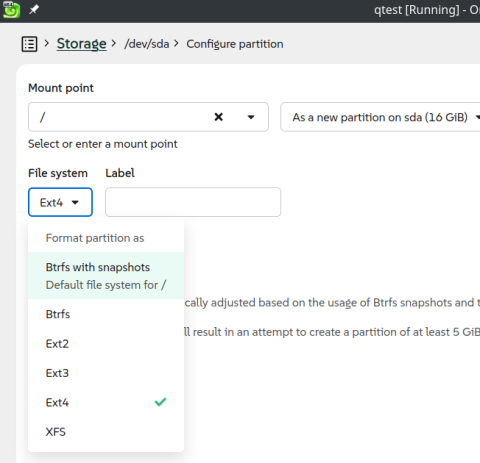
Here I am, just now did a test install of Leap 16.1
(yes, 16.1): Look closely - I selected ext4 for the root filesystem.
Heck, even ext2 and ext3 are available 
4 Likes
Also here –
- /boot/efi → vfat
- /, /var, /var/tmp, /tmp, /srv → ext4
- /home, /home01 → XFS
BTW, it’s either “Adieu.” or “Au revoir!” … 
I’m using “ext4”. I’m not seeing the problem.
Well, I’ll admit that it’s a bit harder to select “ext4” with the Agama installer.
1 Like
I am using ext4 exclusively on all my machines - no problem at all. What makes you think this is no longer possible?
3 Likes
Took me less than 20 seconds (?) to change to ext4.
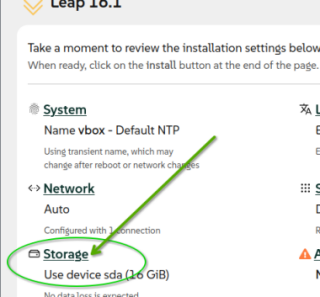
- At main install screen, select Storage (screenshot 1)
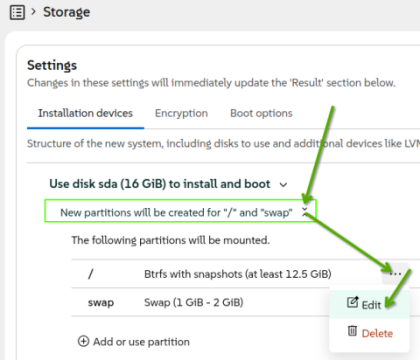
- At Storage screen (screenshot 2) , select “New partitions will …” up|down arrow icon.
- Then click on “…” (icon) for the “/” root partition. Then click on “Edit” choice (pop-up).
- The next screen shown is the one I posted in my previous Reply.
Quick and easy.
.
2 Likes
Not at all, although I haven’t used the newer version yet, profiles are awesome for configuring the system. Remote access over ssh, set an installer password etc.
It’s all I use now for Tumbleweed installs as well.
Oh and fyi;
"storage": {
....
          {
            "filesystem": {
              "label": "TWMMDDYY",
              "mkfsOptions": [],
              "mountOptions": [],
              "path": "/",
              "reuseIfPossible": false,
              "type": "ext4"
            },
....
},Well that does make a difference. (16 vs 16.1)
Thanks for your insight
Well, to reveal my reason for installing 16.1, is because I am currently on 15.6. I do NOT plan to install | upgrade to 16.0 first.
Personally, I’d rather wait for 16.1 GA … rather than installing 16.0 then upgrading to 16.1 shortly thereafter.
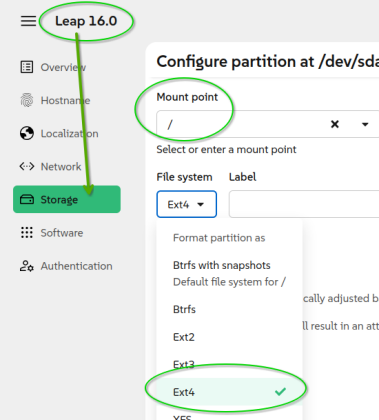
Anyway, just to be clear on 16.0 and ext4 filesystem … I just now downloaded a 16.0 ISO offline installer (Build178.27, dated 06/20/2026, 4.2gb).
Screenshot below shows that ext4 is available for 16.0
.
there must be more than 1 16.0 floating around. I tried multiple times with the 16.0 iso I downloaded. I know you have no reason to believe me but While I had no issues with 16.1 16.0 gave me no partitioning format options.
At any rate, Once again, thanks for the insight!
1 Like
There’s always more than a few versions of any Release “floating around” – beginning with the “Alpha Test” and then, the “Beta Test” and then, the “Release Candidate” versions …
- Not only openSUSE, also (at least) KDE uses this release strategy …
And then, once any given Release has been officially announced and released, the image available for a new installation may well be updated to repair anything major or, almost major, which the Release Testing (Alpha, Beta and, Candidate) didn’t find …
- Nothing is perfect – it never was perfect and, will never be perfect – especially Software Testing and System Testing …

No there are not. Alpha’s gone once Beta is reached, Beta once RC is released. As you can see here https://download.opensuse.org/distribution/leap/16.0/offline/ there was a respin of 16.0 which was announced and replaced the originial 16.0 .
4 Likes
BTW, can you confirm that there is no risk with the current version 15.6 in waiting until version 16.1 to upgrade? (home use)
There is no “current 15.6”. 15.6 was EOL since ~April. And, going from 15.6 to 16.1 still means a major version upgrade.
3 Likes
I can confirm there is always a risk running any operating system, even one that has been updated as of today and seems to have all the advanced security features running (be it a business or home machine).
And yea, 15.6 is EOL, and will not get regular software updates (I occasionally get 4,5,6 package updates, nothing major).
The other factor is that I have zero idea about your machine’s setup and Leap’s enabled features, plus I have no idea about your habits when using your computer while connected to the Internet.
But, I will admit, I-myself am not concerned about running 15.6 until 16.1 GA. (Tue, Nov 3, 2026 … last RC: Wed, Sep 16, 2026).
I use Brave and Chrome browsers - both get updated directly from their dedicated repos (updates once a week±), so I feel confident with my web-surfing.
Am retired, so I don’t run any mission-critical applications 
1 Like
Upgrade at least web browsers. Firefox and Vivaldi are available as binary or rpm from developers.
@MrNice @myswtest I would suggest they are patched for some vulnerabilities eg Copy Fail, Dirtyfrag?
I’ll take a guess that “they” refers to my Leap 15.6 install / operating system (?).
Leap 15.6 received the official security update for the “Dirty Frag” vulnerability class (CVE-2026-43284 and CVE-2026-43500) on May 13, 2026. The kernel update patched both critical page-cache vulnerabilities
Leap 15.6 received its security update for the “Copy Fail” vulnerability (CVE-2026-31431) in early May 2026. The official security patches for the Linux Kernel were released on May 2, 2026 (Advisory SUSE-SU-2026:1671-1) and May 4, 2026 (Advisory SUSE-SU-2026:1671-2)
Whenever I run a “zypper up”, if there are update(s), I copy the output of “zypper up” and paste it into a perpetual text file with the date of the update. That way, I have the historical updates, if I have to investigate.
So, yea, I checked my perpetual “update.txt” file and found an update which included kernel updates (for Dirty Frag?). Here is one entry:
==== 0514
# zypper up
...
Reading installed packages...
Force resolution: No

The following 7 items are locked and will not be changed by any action:
 Available:
  geoclue2 gtk3-immodule-amharic gtk3-immodule-inuktitut gtk3-immodule-thai gtk3-immodule-tigrigna gtk3-immodule-vietnamese
  kcm_tablet

The following 3 packages are going to be upgraded:
  brave-browser         1.90.121-1 -> 1.90.122-1             x86_64  Brave Browser         Brave Software, Inc.
  brave-browser-beta    1.91.142-1 -> 1.91.153-1             x86_64  Brave Browser - Beta  Brave Software, Inc.
  google-chrome-stable  148.0.7778.96-1 -> 148.0.7778.167-1  x86_64  google-chrome         Google LLC

The following 3 NEW packages are going to be installed:
  kernel-default
    6.4.0-150600.23.103.1  x86_64  Update repository with updates from SUSE Linux Enterprise 15
    SUSE LLC <https://www.suse.com/>
  kernel-default-extra
    6.4.0-150600.23.103.1  x86_64  Update repository with updates from SUSE Linux Enterprise 15
    SUSE LLC <https://www.suse.com/>
  kernel-default-optional
    6.4.0-150600.23.103.1  x86_64  Update repository with updates from SUSE Linux Enterprise 15
    SUSE LLC <https://www.suse.com/>

The following package requires a system reboot:
  kernel-default
    6.4.0-150600.23.103.1  x86_64  Update repository with updates from SUSE Linux Enterprise 15
    SUSE LLC <https://www.suse.com/>

3 packages to upgrade, 3 new.

Package download size:   562.8 MiB

Package install size change:
              |      1.47 GiB  required by packages that will be installed
   237.4 MiB  |  -   1.23 GiB  released by packages that will be removed

    Note: System reboot required.
Backend:  classic_rpmtrans
Continue?

==== 0517
...
EDIT … I found the update I did on 0504:
==== 0504
# zypper up
...
Reading installed packages...
Force resolution: No

The following 7 items are locked and will not be changed by any action:
 Available:
  geoclue2 gtk3-immodule-amharic gtk3-immodule-inuktitut gtk3-immodule-thai gtk3-immodule-tigrigna gtk3-immodule-vietnamese
  kcm_tablet

The following 3 NEW packages are going to be installed:
  kernel-default
    6.4.0-150600.23.100.1  x86_64  Update repository with updates from SUSE Linux Enterprise 15
    SUSE LLC <https://www.suse.com/>
  kernel-default-extra
    6.4.0-150600.23.100.1  x86_64  Update repository with updates from SUSE Linux Enterprise 15
    SUSE LLC <https://www.suse.com/>
  kernel-default-optional
    6.4.0-150600.23.100.1  x86_64  Update repository with updates from SUSE Linux Enterprise 15
    SUSE LLC <https://www.suse.com/>

The following package requires a system reboot:
  kernel-default
    6.4.0-150600.23.100.1  x86_64  Update repository with updates from SUSE Linux Enterprise 15
    SUSE LLC <https://www.suse.com/>

3 new packages to install.

Package download size:   175.5 MiB

Package install size change:
              |     239.9 MiB  required by packages that will be installed
   239.9 MiB  |  -      0 B    released by packages that will be removed

    Note: System reboot required.

Backend:  classic_rpmtrans
Continue?

==== 0505
1 Like
This topic was automatically closed 30 days after the last reply. New replies are no longer allowed.