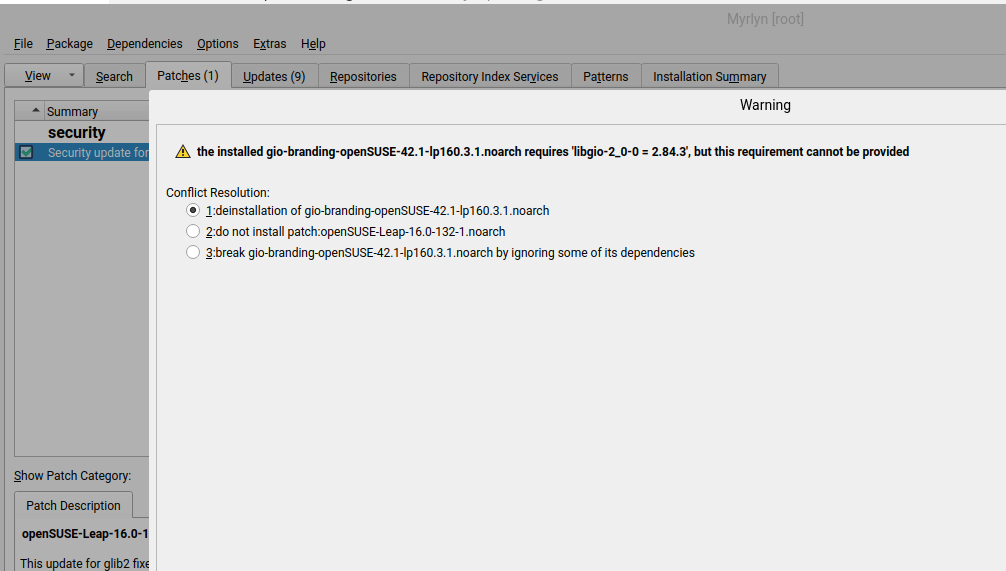
I am running leap 16, keeping it updates every week. Today when checking updates I get an error on updating glib2 with a security update. The error I get:
the installed gio-branding-openSUSE-42.1-lp160.3.1.noarch requires ‘libgio-2_0-0 = 2.84.3’, but this requirement cannot be provided
@robinmuilwijk Hi and welcome to the Forum
It could very well be a sync issue with the cdn network, I see the issue here. I would suggest wait a few hours and try again. If you run zypper -vvv ref -f it’s hitting mirrors and then picking up on the cdn network and package is not there.
For me it installs automatically gio-upstream-branding.
And:
LANG=C zypper in gio-branding-openSUSE
Loading repository data...
Reading installed packages...
Resolving package dependencies...

Problem: 1: the installed gio-branding-upstream-2.84.4-160000.1.1.noarch conflicts with 'gio-branding' provided by the to be installed gio-branding-openSUSE-42.1-lp160.3.1.noarch
 Solution 1: Following actions will be done:
  deinstallation of gio-branding-upstream-2.84.4-160000.1.1.noarch
  downgrade of libgio-2_0-0-2.84.4-160000.1.1.x86_64 to libgio-2_0-0-2.84.3-160000.2.2.x86_64
  downgrade of glib2-devel-2.84.4-160000.1.1.x86_64 to glib2-devel-2.84.3-160000.2.2.x86_64
  downgrade of glib2-tools-2.84.4-160000.1.1.x86_64 to glib2-tools-2.84.3-160000.2.2.x86_64
  downgrade of libgirepository-2_0-0-2.84.4-160000.1.1.x86_64 to libgirepository-2_0-0-2.84.3-160000.2.2.x86_64
  downgrade of libglib-2_0-0-2.84.4-160000.1.1.x86_64 to libglib-2_0-0-2.84.3-160000.2.2.x86_64
  downgrade of libgmodule-2_0-0-2.84.4-160000.1.1.x86_64 to libgmodule-2_0-0-2.84.3-160000.2.2.x86_64
  downgrade of libgobject-2_0-0-2.84.4-160000.1.1.x86_64 to libgobject-2_0-0-2.84.3-160000.2.2.x86_64
  downgrade of libgthread-2_0-0-2.84.4-160000.1.1.x86_64 to libgthread-2_0-0-2.84.3-160000.2.2.x86_64
  downgrade of typelib-1_0-GIRepository-3_0-2.84.4-160000.1.1.x86_64 to typelib-1_0-GIRepository-3_0-2.84.3-160000.2.2.x86_64
  downgrade of typelib-1_0-GLib-2_0-2.84.4-160000.1.1.x86_64 to typelib-1_0-GLib-2_0-2.84.3-160000.2.2.x86_64
  downgrade of typelib-1_0-GLibUnix-2_0-2.84.4-160000.1.1.x86_64 to typelib-1_0-GLibUnix-2_0-2.84.3-160000.2.2.x86_64
  downgrade of typelib-1_0-GModule-2_0-2.84.4-160000.1.1.x86_64 to typelib-1_0-GModule-2_0-2.84.3-160000.2.2.x86_64
  downgrade of typelib-1_0-GObject-2_0-2.84.4-160000.1.1.x86_64 to typelib-1_0-GObject-2_0-2.84.3-160000.2.2.x86_64
  downgrade of typelib-1_0-Gio-2_0-2.84.4-160000.1.1.x86_64 to typelib-1_0-Gio-2_0-2.84.3-160000.2.2.x86_64
  downgrade of glib2-lang-2.84.4-160000.1.1.noarch to glib2-lang-2.84.3-160000.2.2.noarch
 Solution 2: do not install gio-branding-openSUSE-42.1-lp160.3.1.noarch

Choose from above solutions by number or cancel [1/2/c/d/?] (c): c
what do you mean with ‘click on Icon…’? Do you mean the checkboxes?
edit; you probably refer to the checkbox, I can put that on update or delete. Both choices provide me with a conflict/solution screen where I need to pick 1/2/3.
Is this the option 1 you referred to in an earlier reply?
Yes, the checkbox. Choose to update. At the conflict solution choose 1 (uninstall gio-branding-openSUSE). Then check the tab “Installation summary” You will see that gio-branding-upstream gets installed and gio-branding-openSUSE uninstalled.
It depends on the conflict solution. Choose a solution. Check at the “Installation summary” tab, which consequences it has. As long as you don’t click apply, nothing will get installed or uninstalled. The summary tab is there, to see which package actions (removal, update, additional installation, …) will be done when you choose an action. It is always possible to abort there or apply the proposed changes.